MS Office is trying to screw me – HELP!!!

GRoston

New member
Power User
VIP
Local time
7:12 AM
Messages
374
MS Office is trying to screw me – HELP!!!

I have been running Office Professional Plus 2010 without issue for more than a decade. This morning when I used my computer, Excel and Outlook ran without issue. However, this afternoon, when I tried running both, I was greeted with:
This copy of Microsoft Office is not activated. … Error Code: 0x8007007B

After some quick looking around, I ran ‘sfc /scannow’, but it found absolutely nothing. So, I rebooted my machine, but the same error appeared. At this point, I clicked the ‘Change Product Key’ button and entered the proper product key, but was told ‘Sorry, this isn’t Office 2010 product key’.

What the eff is going on???? I need this software to function because I use it daily.
 

My Computer

Computer type
PC/Desktop
OS
Windows 7 x64 Pro
CPU
Core i7 860 @ 3.8 GHz
Motherboard
MSI P55-GD80
Memory
16 GB F3-12800CL7D (DDR3 1600 7-7-7-24)
Graphics Card(s)
Sapphire Vapor-X 100283VXL Radeon HD 5770
Monitor(s) Displays
NEC LCD3090WQXi-BK
It's a common problem of Office2010.
I'm a user of Office2010. In its forums, I have read many complaints on issue of Office2010 Not activated when in use.

my fix was
1. re-install then re-activate.
2. backup. If the problem occurs again, restore its backup image.

I didn't read any better solutions. MSFT Representative wouldn't help (would suggest you a newer version).
 

My Computers

System One System Two

  • Computer type
    PC/Desktop
    Computer Manufacturer/Model Number
    HP Elite 800 G5
    OS
    Windows 7 Pro 64-bit
    CPU
    I7-9700
    Memory
    32 GB
  • Computer type
    Laptop
    System Manufacturer/Model Number
    ASUS UX305C
    OS
    Windows 7 Pro 64-bit
Despite the fact that MS has claimed that they will no longer support Office 10, this issue is clearly caused by some action taken by MS. Has anyone thought about filing a class action suit against those scum for intentionally making the software we paid for impossible to use?

- - - Updated - - -

siliconbeaver - I found this This copy of microsoft is not activated error solved - YouTube - it worked for me and is a WHOLE lot easier than un/re-installing.
 

My Computer

Computer type
PC/Desktop
OS
Windows 7 x64 Pro
CPU
Core i7 860 @ 3.8 GHz
Motherboard
MSI P55-GD80
Memory
16 GB F3-12800CL7D (DDR3 1600 7-7-7-24)
Graphics Card(s)
Sapphire Vapor-X 100283VXL Radeon HD 5770
Monitor(s) Displays
NEC LCD3090WQXi-BK
I didn't read any better solutions. MSFT Representative wouldn't help (would suggest you a newer version).
Yeah, that's why I never look for solutions for Windows 7 on Redirecting because MSFT representatives never even helped when Windows 7, Office 2010, or any now unsupported software WERE supported! For example: Asking them how to change the design of any Microsoft software is not helpful, they just say use built in Settings/Control Panel.
 

My Computers

System One System Two

  • Computer type
    PC/Desktop
    Computer Manufacturer/Model Number
    DELL
    OS
    Windows 7 Professional SP1 64 bit
    Memory
    8 GB RAM
    Graphics Card(s)
    Integrated Intel® HD Graphics 4600
    Sound Card
    High Definition Audio Device
    Monitor(s) Displays
    Dell™ E1910
    Screen Resolution
    1440 x 900
    Hard Drives
    1
    Keyboard
    HP KU-3016
    Mouse
    ione LYNX-M9 Optical Mouse
    Antivirus
    Microsoft Security Essentials
    Browser
    Mypal, Internet Explorer 8
    Other Info
    DELL™ Optiplex 9020
  • Computer type
    Laptop
    System Manufacturer/Model Number
    HP
    OS
    Windows 7 Ultimate SP1 64 bit
    Graphics Card(s)
    Intel HD Graphics
    Sound Card
    High Definition Audio Device
    Screen Resolution
    1440 x 900
    Keyboard
    Built in G72 Laptop Keyboard
    Mouse
    HP G72 Laptop Built in Touchpad
    Browser
    Mypal, Internet Explorer 8
    Other Info
    HP G72 C55DX Notebook PC
Despite the fact that MS has claimed that they will no longer support Office 10, this issue is clearly caused by some action taken by MS. Has anyone thought about filing a class action suit against those scum for intentionally making the software we paid for impossible to use?
- - Updated - - -

siliconbeaver - I found this This copy of microsoft is not activated error solved - YouTube - it worked for me and is a WHOLE lot easier than un/re-installing.

I might be in some kind of violation here for signing up not running Win 7, but I have the activation issue with Office 2010, which I still own the physical disc of AND I'm within license terms (moving the product to a new machine). I just finally retired old machine and indeed, Office 2010 will not activate. I FINALLY got thru to a human on chat (no easy feat) who tried various things but could not get the key re-activated. I think the class-action idea is a good one, other than the class would be too small (a few rando losers like us that insist on not upgrading etc), but it is total BS and in fact fraudulent that they do not allow this legacy product that still works fine to be used.

Regarding the tool in the video, AFAIK that just extends the trial period, and only works a few (five?) times... I would be curious here if almost a year later you found any different?
 

My Computers

System One System Two

  • OS
    11 Pro 64-bit
  • Computer type
    PC/Desktop
my recent Office 2010 activation, three times, all passed. (my two licenses, should be ok for 6 PCs).

Just try the 1-800 number. MSFT AI will take it. I didn't talk to any real human.
 

My Computers

System One System Two

  • Computer type
    PC/Desktop
    Computer Manufacturer/Model Number
    HP Elite 800 G5
    OS
    Windows 7 Pro 64-bit
    CPU
    I7-9700
    Memory
    32 GB
  • Computer type
    Laptop
    System Manufacturer/Model Number
    ASUS UX305C
    OS
    Windows 7 Pro 64-bit
Well, I've tried every 1-800 number I could. Which 1-800 number did you use?

This worked for me once:

866-421-7141.

But that was a few years ago. It may also depend on your location, but try it and see.
 

My Computer

Computer type
PC/Desktop
Computer Manufacturer/Model Number
Gateway GT5656
OS
Windows 7 x64 SP1
CPU
AMD Athlon 64 X2 6000+ / 3.0 GHz
Motherboard
NVIDIA GeForce 6150 SE
Memory
6 GB
Monitor(s) Displays
Lenovo LED
Screen Resolution
1920 X 1080
Hard Drives
Windows on 500 GB spinner; Ubuntu 16 on Sandisk 250GB SSD; Bodhi5 on Samsung 250GB SSD; another old spinner for fooling around.
PSU
Original that came with computer
Keyboard
Logitech wireless
Mouse
Logitech wireless
Antivirus
Microsoft Sec Essentials
Browser
Vivaldi
This worked for me once:
866-421-7141.
But that was a few years ago. It may also depend on your location, but try it and see.

Yup, that was one of several tried. The "few years ago" part seems to be the thing. TONS of "just call MS they will sort it out" hits for years and years, but now - all the numbers go to the same place btw - you get an AI that makes it impossible to even get to a human. I tried a phone activation number buried in the MS site somewhere (there's a by-country lookup)(maybe even the one you cited) and got the same error ("invalid" key" as activating online from the dialog). When I finally got a human on chat, it basically came down to "it won't let me re-activate this key" etc. Since I'm the type of person to not accept this, I ordered a copy off Ebay to see if a different unused key will work. If not, it's looking like Thunderbird and Libre Office are in my near future....
 

My Computers

System One System Two

  • OS
    11 Pro 64-bit
  • Computer type
    PC/Desktop
Seeing that you couldn't activate Office Pro Plus 2010 reminded me that I needed to reactivate Office 2007 and Office 2010 on one of my computers.

Over the the last week I changed the motherboards on two computers Note the 1st was dual-boot. Because of the hardware changes I had to
reactivate a lot of software.

I had no problem reactivating Windows and Office on the 1st computer. It may have helped that the software was retail. Note I activated Windows and Office over the Internet.

Computer #1 (dual-boot)
Computer #1a:
  • Windows 10 Pro
  • Office Pro 2010
Computer #1b:
  • Windows 7 Home Premium
  • Office Standard 2007

Office 2007 Activation.jpg

Office 2010 Activation.jpg

I wasn't so lucky with computer #2. Windows activated OK but Office did not. The error message was something like the product key entered was not a valid. Is Microsoft finally cracking down on shady keys now?

Computer #2:
  • Windows 11 Pro
  • Office Pro Plus 2019

I really needed Office on this computer. I could have tried to call Microsoft tech support but felt that might be a waste of time. I ended up buying a copy Office Pro Plus 2021. I used Office Pro Plus 2019 for over 4 years before I couldn't activate it again. If I at least go that long with Office Pro Plus 2021 it will be worth it.

BTW, I had uninstalled Adobe Photoshop Elements 11.0 on Computer # 2 before I replaced the motherboard. After I replaced the motherboard I tried to reinstall and activate it. The activation failed because it said something like the activation limit of 2 had been reached. I contacted Adobe. They said that I should have deactivated Photoshop Elements 11.0 before I uninstalled it. If I had done that I might have been able to reinstall and reactivate it again. The essentially told me too bad because they didn't support Photoshop Elements 11.0 any more. They said that my only option was to buy a new copy of Photoshop Elements.

At least you can reinstall Windows Retail (and sometimes OEM) and reactivate on a new computer. Note a couple years ago I activated Windows XP Pro on two computers. I also activated Office 2003 Pro. I had to call Microsoft tech support to do all this. They seemed reluctant at first but got the activation done. I wish Adobe was as cooperative as Microsoft.
 

My Computers

System One System Two

  • Computer type
    PC/Desktop
    Computer Manufacturer/Model Number
    Custom build
    OS
    Windows 7 Home Premium 64-bits
    CPU
    AMD FX-8350
    Motherboard
    Gigabyte GA-990FXA-UD3 (AM3+)
    Memory
    GSKILL Ripjaw-X PC3 12800 8GB (2x4GB)
    Graphics Card(s)
    ASUS ROG STRIX GTX 1060 6GB
    Sound Card
    Integrated
    Monitor(s) Displays
    Asus VE228H (21.5-in)
    Screen Resolution
    1920x1080 60Hz
    Hard Drives
    SAMSUNG 870 EVO 2.5 Inch SATA SSD (1TB)
    SAMSUNG 870 EVO 2.5 Inch SATA SSD (1TB)
    SAMSUNG 870 EVO 2.5 Inch SATA SSD (1TB)
    PSU
    Corsair RM750x (750 watts)
    Case
    Corsair Carbide Series 200R
    Cooling
    Corsair Hydro Series H60 (CWCH60)
    Keyboard
    Logitech Elite
    Mouse
    Logitech M510 Wireless Mouse
    Internet Speed
    Comcast Gigabit Extra (1200Mbps down / 35Mbps up)
    Antivirus
    Malwarebytes
    Browser
    Firefox, Edge, Chrome
    Other Info
    ASUS DRW-24B1ST DVD-RW (24X) optical drive
    Seagate Expansion Desk (5TB) external SATA/USB HDD
    Comcast XB8 Internet Gateway
  • Computer type
    PC/Desktop
    System Manufacturer/Model Number
    Custom
    OS
    Windows 7 Pro (64-bit)
    CPU
    AMD Phenom II 960T X4
    Motherboard
    ASUS M4N82 Deluxe
    Memory
    Corsair XMS2 DDR2-800 8GB (4x2GB)
    Graphics Card(s)
    ASUS ENGTX560 DCII OC/2DI/1GD5 1GB
    Monitor(s) Displays
    Samsung 930B 19-inch LCD
    Screen Resolution
    1280x1024
    Hard Drives
    Samsung SSD 870 EVO 1000 GB (Windows 10)
    Seagate ST1000DM003 1000 GB (Windows 7)
    PSU
    Antec TruePower (new) TP-650
    Case
    Antec Three Hundred
    Cooling
    AMD stock cooler from FX8350
    Mouse
    Logitech M100
    Internet Speed
    Xfinity Gigabit Extra 1200/35 Mbps
Is Microsoft finally cracking down on shady keys now?
They told me that message typically means the key has been used too many times. In my case, that is possible (I can't remember though I didn't think I'd exceeded 3) but moving it from 1 PC to another is a valid extension - which their system no longer allows - apparently. In ye olden days (search hits previously mentioned going back years) this used to be a 5-minute or less call/no problem.

Now, I JUST got this to activate... EBay copy arrived today. I tried to change key thru control panel; it said "this is not an Office 2010 product key" so I contacted seller and he said try uninstalling it and installing from the disc (how this is different from my old disc that appears the same, I have no idea) but on this install it didn't ask for LK on the way in, and going to File -> Help and entering key there did activate it. "Shrug."

I could have tried to call Microsoft tech support but felt that might be a waste of time...I wish Adobe was as cooperative as Microsoft

Huge and the guy on chat was cooperative as heck, tried all kinds of stuff...didn't work, respectively.

And yeah, the Adobe stuff - many horror stories....
 

My Computers

System One System Two

  • OS
    11 Pro 64-bit
  • Computer type
    PC/Desktop
Don't know if this would be helpful, but did you know you can install Microsoft Works 9 on Window7, 10 and 11? I know it's not Office, but v.9, which is the last one, is pretty impressive. You download it as an iso, open it up and run the installer. And no activation necessary. It may not be sufficient for your needs, but certainly for casual use it more than suffices.
 

My Computer

Computer type
PC/Desktop
Computer Manufacturer/Model Number
Gateway GT5656
OS
Windows 7 x64 SP1
CPU
AMD Athlon 64 X2 6000+ / 3.0 GHz
Motherboard
NVIDIA GeForce 6150 SE
Memory
6 GB
Monitor(s) Displays
Lenovo LED
Screen Resolution
1920 X 1080
Hard Drives
Windows on 500 GB spinner; Ubuntu 16 on Sandisk 250GB SSD; Bodhi5 on Samsung 250GB SSD; another old spinner for fooling around.
PSU
Original that came with computer
Keyboard
Logitech wireless
Mouse
Logitech wireless
Antivirus
Microsoft Sec Essentials
Browser
Vivaldi
They told me that message typically means the key has been used too many times. In my case, that is possible (I can't remember though I didn't think I'd exceeded 3) but moving it from 1 PC to another is a valid extension - which their system no longer allows - apparently. In ye olden days (search hits previously mentioned going back years) this used to be a 5-minute or less call/no problem.
Huge and the guy on chat was cooperative as heck, tried all kinds of stuff...didn't work, respectively.
Office Professional Plus unlike Office Professional is not a consumer product so we should expect eventual activation problems.

Office Professional Plus is a special volume license version of Office. It is normally only available for computer professionals and commercial use. It differs from other volume licenses in that it uses a retail license. Years ago when I worked as a computer professional I could have signed of for a MSDN subscription from Microsoft. With that I would have been given special retail licenses for a number of Microsoft products. Unlike normal retails keys these keys could be used for more than one installation. The purpose of these installations was to test Microsoft products. One of these products is Office Professional Plus. I think the limit may have been something like 100. For example, if I had this subscription I could have installed Office Professional Plus 2010 legally on 50 computers. According to Microsoft if I exceeded the limit (100?) all I had to do was contact them and they would increase the limit. BTW, the keys a person is given with a MSDN subscription is only to be used by the subscriber. They are not supposed to be given away or sold.

I have no definitive information but I think people around the world are getting these special retail keys and selling them online. Smart sellers limit the number of times they sell the same key to prevent exceeding the limit before activation no longer works. I have heard of people buying one of these keys and it doesn't work the first time they try to use it. Usually the seller will then just send them a new key. That is why some sellers will tell you that you must install and activate Office within 30 days. After that if the key doesn't work you are out of luck.

- - - Updated - - -

Don't know if this would be helpful, but did you know you can install Microsoft Works 9 on Window7, 10 and 11? I know it's not Office, but v.9, which is the last one, is pretty impressive. You download it as an iso, open it up and run the installer. And no activation necessary. It may not be sufficient for your needs, but certainly for casual use it more than suffices.
Back in 1995 I was going to school and needed to buy Word 95. The cheapest way to first buy Works 3.0. After that I was given a discount for Word 95. I was really annoyed because Word 95 couldn't even open the Work 3.0 document files that it had created.

Maybe a year ago out of curiosity I downloaded and installed Works 9.0. I was surprised it actually worked. Unfortunately, it is a little dated. I prefer something a little more modern so is worth it for me to buy Office for my main computers.

Currently the only way I can afford Office is to buy one of these "gray" versions which cost a fraction of the normal retail price. They cost less than $100. The downside is that I have to accept that some day they may no longer activate.

For a couple computers I have FreeOffice installed. A lot of people recommend LibreOffice but I prefer FreeOffice to it. FreeOffice like LibreOffice is totally free to use.

FreeOffice
Download

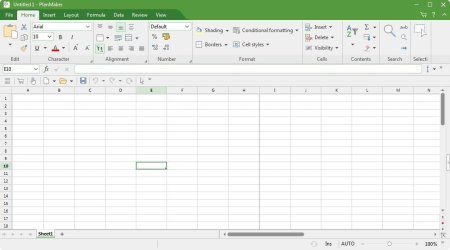
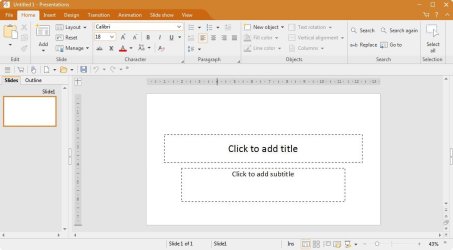
FreeOffice consists of three programs: TextMaker, PlanMaker, and Presentations. They are comparable to MS Office Word, Excel, and PowerPoint.

FreeOffice 2024 - TextMaker
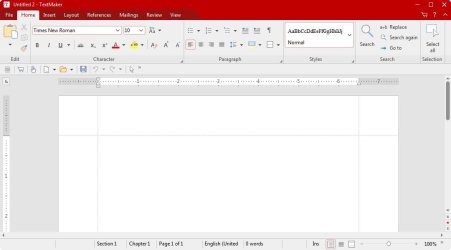
FreeOffice2024 - TextMaker.jpg

FreeOffice 2024 - PlanMaker

FreeOffice2024 - PlanMaker.jpg

FreeOffice 2024 - Presentations

FreeOffice2024 - Presentations.jpg
 

My Computers

System One System Two

  • Computer type
    PC/Desktop
    Computer Manufacturer/Model Number
    Custom build
    OS
    Windows 7 Home Premium 64-bits
    CPU
    AMD FX-8350
    Motherboard
    Gigabyte GA-990FXA-UD3 (AM3+)
    Memory
    GSKILL Ripjaw-X PC3 12800 8GB (2x4GB)
    Graphics Card(s)
    ASUS ROG STRIX GTX 1060 6GB
    Sound Card
    Integrated
    Monitor(s) Displays
    Asus VE228H (21.5-in)
    Screen Resolution
    1920x1080 60Hz
    Hard Drives
    SAMSUNG 870 EVO 2.5 Inch SATA SSD (1TB)
    SAMSUNG 870 EVO 2.5 Inch SATA SSD (1TB)
    SAMSUNG 870 EVO 2.5 Inch SATA SSD (1TB)
    PSU
    Corsair RM750x (750 watts)
    Case
    Corsair Carbide Series 200R
    Cooling
    Corsair Hydro Series H60 (CWCH60)
    Keyboard
    Logitech Elite
    Mouse
    Logitech M510 Wireless Mouse
    Internet Speed
    Comcast Gigabit Extra (1200Mbps down / 35Mbps up)
    Antivirus
    Malwarebytes
    Browser
    Firefox, Edge, Chrome
    Other Info
    ASUS DRW-24B1ST DVD-RW (24X) optical drive
    Seagate Expansion Desk (5TB) external SATA/USB HDD
    Comcast XB8 Internet Gateway
  • Computer type
    PC/Desktop
    System Manufacturer/Model Number
    Custom
    OS
    Windows 7 Pro (64-bit)
    CPU
    AMD Phenom II 960T X4
    Motherboard
    ASUS M4N82 Deluxe
    Memory
    Corsair XMS2 DDR2-800 8GB (4x2GB)
    Graphics Card(s)
    ASUS ENGTX560 DCII OC/2DI/1GD5 1GB
    Monitor(s) Displays
    Samsung 930B 19-inch LCD
    Screen Resolution
    1280x1024
    Hard Drives
    Samsung SSD 870 EVO 1000 GB (Windows 10)
    Seagate ST1000DM003 1000 GB (Windows 7)
    PSU
    Antec TruePower (new) TP-650
    Case
    Antec Three Hundred
    Cooling
    AMD stock cooler from FX8350
    Mouse
    Logitech M100
    Internet Speed
    Xfinity Gigabit Extra 1200/35 Mbps
Office Professional Plus is a special volume license version of Office. It is normally only available for computer professionals and commercial use.

The nutso part is even though this (both my old original copy) and the new Ebay copy (that I eventually got to register*, with the LK on the card) are retail-packaged 3-license DVDs yet identified as "Plus" in both Help/About and Programs/Features.

*I had to uninstall/reinstall and do the LK thru Help/About - changing key from P&F didn't work - had bogus error that it was not an Office 2010 key when I did that.

(Edit: One cool thing is the uninstall/reinstall kept all settings, so clearly those are in registry and not removed on uninstall. Which I suppose could be something people should be aware of, even though presumably - ?! - stuff like Outlook passwords are encrypted....)
 

My Computers

System One System Two

  • OS
    11 Pro 64-bit
  • Computer type
    PC/Desktop
I recently discovered this tool, which allows you to backup your Windows or Office activation. I used it to activate Vista and Office on the same machine, but a different drive. So nothing illegal.

Advanced Tokens Manager: Backup Windows & Office Activation Tokens

There is a a link for the download. Obviously, you need to have a running and activated Windows and/or Office. Otherwise there is no activation file to save and restore.

Re: Vista, don't worry, I'm keeping it offline.
 

My Computer

Computer type
PC/Desktop
Computer Manufacturer/Model Number
Gateway GT5656
OS
Windows 7 x64 SP1
CPU
AMD Athlon 64 X2 6000+ / 3.0 GHz
Motherboard
NVIDIA GeForce 6150 SE
Memory
6 GB
Monitor(s) Displays
Lenovo LED
Screen Resolution
1920 X 1080
Hard Drives
Windows on 500 GB spinner; Ubuntu 16 on Sandisk 250GB SSD; Bodhi5 on Samsung 250GB SSD; another old spinner for fooling around.
PSU
Original that came with computer
Keyboard
Logitech wireless
Mouse
Logitech wireless
Antivirus
Microsoft Sec Essentials
Browser
Vivaldi
The Office activation license is saved in Microsoft server too (right like Windows 10/11 activation, digital license).
hence if same computer, re-install same Office copy (i.e same install key), when computer goes online, it will be automatically activated.
even Office 2010 activates this way. I didn't test lower Office version (2003 ? ).
Office97 no need of online activation (install key is enough).

however, if staying offline, your method can be a solution.


I recently discovered this tool, which allows you to backup your Windows or Office activation. I used it to activate Vista and Office on the same machine, but a different drive. So nothing illegal.

Advanced Tokens Manager: Backup Windows & Office Activation Tokens

There is a a link for the download. Obviously, you need to have a running and activated Windows and/or Office. Otherwise there is no activation file to save and restore.

Re: Vista, don't worry, I'm keeping it offline.
 

My Computers

System One System Two

  • Computer type
    PC/Desktop
    Computer Manufacturer/Model Number
    HP Elite 800 G5
    OS
    Windows 7 Pro 64-bit
    CPU
    I7-9700
    Memory
    32 GB
  • Computer type
    Laptop
    System Manufacturer/Model Number
    ASUS UX305C
    OS
    Windows 7 Pro 64-bit
This has been an interesting read. I never would have thought that MS would deliberately sabotage Office. I thought my problem of not being able to do anything with that program--even uninstalling it--was due to a bug in the most recent "optional" Win10 update. Specifically, I am denied permission for any manipulation whatsoever. I tried to figure out this permission procedure, but it is too tricky for me. There's a couple of Tutor articles here that I'll look through, anyway.

I have "Microsoft Office Professional Plus 2010 Full License - English" and its backup DVD. These were offered to all persons in or working in the U.S. military (maybe the entire Federal government?) in 2012 (active duty or civilian employee). It was a great deal -- both items together cost me only US$25.00. I installed it once in Win7, then again when I went to Win10.

I thought for sure my Win10 update had some bugs in it, now I'm not so sure. I installed the free "WPS Office" and it's OK, but noticing the screen shots of "Free Office" makes me think this is a better option. If my denial to use MS Office was intentional, it's unlikely I'll ever be able to use it again. I don't need much, and it's not worth my effort to find a workaround to install MS Office again, and I don't want to be caught off guard in the future with another "failure." I think I'll try Free Office.
 

My Computers

System One System Two

  • Computer type
    PC/Desktop
    Computer Manufacturer/Model Number
    HP Pavilion HPE h8-1287c
    OS
    Windows 7 Professional, SP1, 64-bit
    CPU
    Intel Core i7 3770
    Motherboard
    Pegatron IPMMB-FM (Formosa)
    Memory
    16 GB DDR3-1600 (expanded from 12 GB)
    Graphics Card(s)
    Radeon HD 7450
    Sound Card
    Integrated IDT 92HD73E Audio
    Hard Drives
    Samsung V-NAND SSD, 860 EVO, 500 GB (Primary/Boot drive)
    Western Digital WD2003FZEX, 2 TB (Secondary, user data drive)
    PSU
    HP DPS-300AB-73A, Int. 300W (100V-240V)
    Case
    Mid-size ATX
    Cooling
    Three fans: rear case, CPU and graphics card
    Keyboard
    HP, Standard, typical corded
    Mouse
    HP, Standard, typical corded
    Internet Speed
    approx. 400 Mbs/s, via cable
    Antivirus
    none yet (probable: Bitdefender Free)
    Browser
    ? -- part of Win7
    Other Info
    Networking: 802.11 wireless b/g/n & Bluetooth 3.0 half-length
    PCI-Express Mini card;
    Elect. interface: WLAN: PCIe 2.0, CEM 1.1 compliant with no Vaux support
    Operating band: 2.4 GHz single band
    LAN: 1000BASE-T (Atheros AR8161L)
  • Computer type
    PC/Desktop
This has been an interesting read. I never would have thought that MS would deliberately sabotage Office. I thought my problem of not being able to do anything with that program--even uninstalling it--was due to a bug in the most recent "optional" Win10 update. Specifically, I am denied permission for any manipulation whatsoever. I tried to figure out this permission procedure, but it is too tricky for me. There's a couple of Tutor articles here that I'll look through, anyway.

I have "Microsoft Office Professional Plus 2010 Full License - English" and its backup DVD. These were offered to all persons in or working in the U.S. military (maybe the entire Federal government?) in 2012 (active duty or civilian employee). It was a great deal -- both items together cost me only US$25.00. I installed it once in Win7, then again when I went to Win10.

I thought for sure my Win10 update had some bugs in it, now I'm not so sure. I installed the free "WPS Office" and it's OK, but noticing the screen shots of "Free Office" makes me think this is a better option. If my denial to use MS Office was intentional, it's unlikely I'll ever be able to use it again. I don't need much, and it's not worth my effort to find a workaround to install MS Office again, and I don't want to be caught off guard in the future with another "failure." I think I'll try Free Office.

After trying several Office alternatives, I think Free Office is indeed the best. I even bought the paid version, Soft Office, and installed it on Linux for my wife, but she still wanted Office... So I gave up and installed Office 2010 on Linux, via Wine program. Not easy to do, but it is working fine, no difference from Windows.
 

My Computer

Computer type
PC/Desktop
Computer Manufacturer/Model Number
Gateway GT5656
OS
Windows 7 x64 SP1
CPU
AMD Athlon 64 X2 6000+ / 3.0 GHz
Motherboard
NVIDIA GeForce 6150 SE
Memory
6 GB
Monitor(s) Displays
Lenovo LED
Screen Resolution
1920 X 1080
Hard Drives
Windows on 500 GB spinner; Ubuntu 16 on Sandisk 250GB SSD; Bodhi5 on Samsung 250GB SSD; another old spinner for fooling around.
PSU
Original that came with computer
Keyboard
Logitech wireless
Mouse
Logitech wireless
Antivirus
Microsoft Sec Essentials
Browser
Vivaldi
Back
Top