Open With Irfanview Context Menu is no longer working - Windows 7

JennB213

New member
Member
Local time
10:11 AM
Messages
82
Location
Tennessee
Hello,

I had some work done on my Windows 7 laptop now I can no longer use the right click context menu for Irfanview.
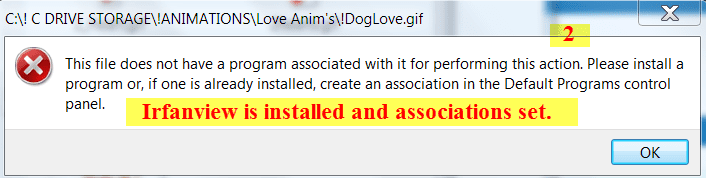
When I right click on "Open With Irfanview" I get the following message.

Open with Irfanview from context menu.png Open With Flyout No Longer Working.png

However when I go to the Context Menu using just "Open With" the files will open.
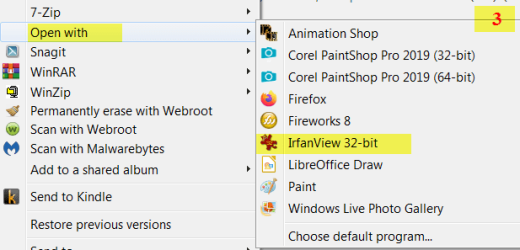
Open With2.png

I know I can use the second option but my "Open with Irfanview" used to work.

I have tried downloading newer Irfanview updates but no change.

Another weird thing is when I open the actual program and go to Options > Properties & settings/
There is a place to check for adding Open With Irfanview to the shell menu but when I check it then tell it okay ..
When I come back and look it is no longer checked.

Anybody know what could be wrong and also is there a way to just remove "Open with Irfanview" from the context menu.
I don't want it removed from the "Open With" menu because that's what I'm having to use now, so I don't know what to do.

Files also attached for clarity.

Thanks to anybody that can help me.

Kindest Regards, Jenn
 

My Computer My Computer

At a glance

Microsoft Windows 7 Home Premium, Service Pac...Intel(R) Core(TM) CPU i7-3610QM CPU 2.30 GHz8 GB RamIntel(R) HD Graphics 4000
Computer type
Laptop
Computer Manufacturer/Model Number
HP Pavilion m7 Notebook PC
OS
Microsoft Windows 7 Home Premium, Service Pack 1 64-bit
CPU
Intel(R) Core(TM) CPU i7-3610QM CPU 2.30 GHz
Memory
8 GB Ram
Graphics Card(s)
Intel(R) HD Graphics 4000
Sound Card
IDT High Definition Audio CODEC
Hard Drives
Local Disk (C:) 697 GB Free of 909 GB
Recovery Disk (D:)
Antivirus
Webroot Secure/Anywhere 9.0.24.49
Browser
Firefox Quantum 65.0.2

My Computers My Computers

  • At a glance

    Windows 7 pro/Windows 10 ProIntel i7 860 Quad core 2.8 ghz8 gbATI Radeon HD 5770 1 gb ram
    Computer type
    PC/Desktop
    Computer Manufacturer/Model Number
    HP Pavillion Elite HPE-250f
    OS
    Windows 7 pro/Windows 10 Pro
    CPU
    Intel i7 860 Quad core 2.8 ghz
    Memory
    8 gb
    Graphics Card(s)
    ATI Radeon HD 5770 1 gb ram
    Monitor(s) Displays
    Alienware 25 AW2521HF & Viewsonic
    Screen Resolution
    1920 x1080 & 1680x1050
    Hard Drives
    WD blue 1 tb & 500 gb.
    Browser
    FF of course.
    Other Info
    https://www.bestbuy.com/site/hp-pavilion-elite-desktop-intel-core-i7-processor-8gb-memory-1tb-hard-drive/9921493.p?skuId=9921493
  • At a glance

    Windows 2012 R2 Data center/Linux Minti3 9100 3.6GHz, 8M cache, 4C/4T8GB 2666MT/s DDR4 ECC UDIMM
    Computer type
    PC/Desktop
    System Manufacturer/Model Number
    Dell Poweredge T140
    OS
    Windows 2012 R2 Data center/Linux Mint
    CPU
    i3 9100 3.6GHz, 8M cache, 4C/4T
    Memory
    8GB 2666MT/s DDR4 ECC UDIMM
    Monitor(s) Displays
    Viewsonic
    Screen Resolution
    1680x1050
    Hard Drives
    1 TB & 750 GB
    Other Info
    https://www.dell.com/en-us/work/shop/productdetailstxn/poweredge-t140?~ck=bt
I had some work done on my Windows 7 laptop now I can no longer use the right click context menu for Irfanview.
This is probably at the root of your issue.
Can you be more specific as to what was done to your laptop?
 

My Computer My Computer

At a glance

Windows 7 Professional SP1 64-bitIntel Core i7-4790 3.60 GHz32 GB DDR3-1600 MHzIntegrated Intel HD Graphics 4600
Computer type
PC/Desktop
Computer Manufacturer/Model Number
Dell OptiPlex 9020
OS
Windows 7 Professional SP1 64-bit
CPU
Intel Core i7-4790 3.60 GHz
Memory
32 GB DDR3-1600 MHz
Graphics Card(s)
Integrated Intel HD Graphics 4600
Monitor(s) Displays
Viewsonic 32" LCD
Hard Drives
Kingston SATA 3 240 GB SSD
Internet Speed
Spectrum Internet 1000 Mbps
Thank you I tried this and it didn't help.
I do appreciate your time in trying to help me.

Kindest Regards, Jenn
See this: Why no right-click context menu on main image window? -

IrfanView Support Forum
If nothing else I would suggest asking on their forum which that link goes to.

- - - Updated - - -

I had a Virus that was removed from my computer.
They ran several different programs and it did mess up my file associations on some of my default programs.
I had to go in and reassign a lot of IrfanView's file associations.

I wonder if I uninstall the old IrfanView & just start anew if that would correct the situation.

Thanks for your time in helping me.

Kindest Regards, Jenn

This is probably at the root of your issue.
Can you be more specific as to what was done to your laptop?

- - - Updated - - -

I have downloaded the program and will see if this helps.

I appreciate your time in helping me.

Kindest Regards, Jenn
 

My Computer My Computer

At a glance

Microsoft Windows 7 Home Premium, Service Pac...Intel(R) Core(TM) CPU i7-3610QM CPU 2.30 GHz8 GB RamIntel(R) HD Graphics 4000
Computer type
Laptop
Computer Manufacturer/Model Number
HP Pavilion m7 Notebook PC
OS
Microsoft Windows 7 Home Premium, Service Pack 1 64-bit
CPU
Intel(R) Core(TM) CPU i7-3610QM CPU 2.30 GHz
Memory
8 GB Ram
Graphics Card(s)
Intel(R) HD Graphics 4000
Sound Card
IDT High Definition Audio CODEC
Hard Drives
Local Disk (C:) 697 GB Free of 909 GB
Recovery Disk (D:)
Antivirus
Webroot Secure/Anywhere 9.0.24.49
Browser
Firefox Quantum 65.0.2
I had a Virus that was removed from my computer.
They ran several different programs and it did mess up my file associations on some of my default programs.

It seems your problem is MUCH bigger than the context menu then. How did you "removed" it exactly? Who is "they" that ran several programs? What programs and what they did do specifically?

My question would be, have you reformated and completely reinstalled Windows from scratch?
When you're infected, that's the only known way out of it to a clean system.
 

My Computer My Computer

At a glance

Windows 7 Ultimate x64Intel Core i7-740QM8 GB DDR3NVIDIA GeForce 330GT
Computer type
Laptop
Computer Manufacturer/Model Number
Toshiba Sattelite A665-S6092
OS
Windows 7 Ultimate x64
CPU
Intel Core i7-740QM
Memory
8 GB DDR3
Graphics Card(s)
NVIDIA GeForce 330GT
Screen Resolution
1366x768
Hard Drives
Samsung 840 SSD 500GB
1TB USB3 external HD
Cooling
Coolermaster Notepal U3 notebook cooling pad
Internet Speed
3mbps ASDL
Antivirus
ClamWin 0.98.7
Browser
Opera 12.17 x86 (main), Firefox 38 (sec), IE11 (last resort)
Back
Top