Solved new canon printer 3620 will not initialize Win7 64 bit

canonman2012

New member
Local time
7:40 PM
Messages
8
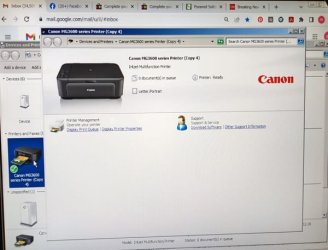
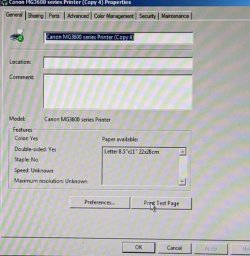
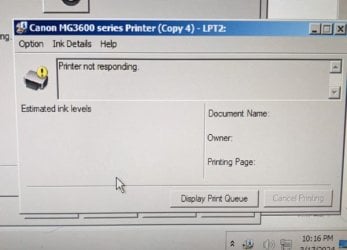
replaced old 3620 after it said replace ink pad., but was printing fine, purchase a new identical 3620 printer loaded DVD fine, but would not initialize. Brought new printer over to another win 7 computer, DVD loaded and printer printed. Tried uninstalling drivers, tried different ports,replacing usb cable, loaded driver from Canon instead of the one that came with the cd.. Called Canon Tech support, and after 1 hour, tech said "call Microsoft".
I am stumped, please I need your wonderful solutions.
Regards,
Millard
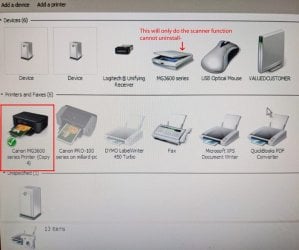
1-devices & printersW.jpg2-devices-&-printersW.jpg3- PSE-send-test-page.W.jpg4- PSE-printer-not-responding.W.jpg
 
Last edited:

My Computer My Computer

Computer type
PC/Desktop
Computer Manufacturer/Model Number
custom
OS
windows 7 64 bit
CPU
Intel i5 4670 cpu @3.40 GHz
Motherboard
gigabyte gtx 650 Ti
Memory
16 gb
Graphics Card(s)
Nvidia GeForce GTX 650 Ti, Intel Hd Graphic 4600
Hard Drives
2 internal hard drives, 1- 1tb, 1-3 tb, 2 external hd, 1-4 tb, 1-1tb
Antivirus
bitdefender antivirus plus 2016
Browser
Google Chrome
You can attach a screenshot of the error it shows you.
Maybe some of us can appreciate it in more detail.
 

My Computer My Computer

Computer type
Laptop
Computer Manufacturer/Model Number
HP
OS
Windows 7 Ultimate x64
CPU
AMD E-450 APU with Raedon(tm) HD Graphics (2 CPUs), ~1.6GHz
Motherboard
Hewlett-Packard
Memory
6 GB
Graphics Card(s)
AMD Raedon HD 6320 Graphics
Sound Card
High Definition Audio
Monitor(s) Displays
Monitor PnP Generic
Screen Resolution
1024 x 728 (32 bit) (60Hz)
Keyboard
HP Key
Mouse
Perfect Choice
Internet Speed
1 MB/S
Antivirus
Windows Defender
Browser
Google Chrome
You can attach a screenshot of the error it shows you.
Maybe some of us can appreciate it in more detail.

OK, see my original edited post
 

My Computer My Computer

Computer type
PC/Desktop
Computer Manufacturer/Model Number
custom
OS
windows 7 64 bit
CPU
Intel i5 4670 cpu @3.40 GHz
Motherboard
gigabyte gtx 650 Ti
Memory
16 gb
Graphics Card(s)
Nvidia GeForce GTX 650 Ti, Intel Hd Graphic 4600
Hard Drives
2 internal hard drives, 1- 1tb, 1-3 tb, 2 external hd, 1-4 tb, 1-1tb
Antivirus
bitdefender antivirus plus 2016
Browser
Google Chrome
M$ seems to have problems with printers & scanners. I don't know id it is a 'USB' thing (which is probably part of the problem), but even after supposedly removing the drivers, the O/S 'remembers' the existence of that model and re-installs the driver package with a "Copy x"

The fact that FOUR 'copies' are listed, I would say that may be the problem or at least part of it. I've run into similar problems with other USB devices.

I use a program called "Revo Uninstaller Pro" to remove programs and drivers that were in a .exe package. Not added thru Device Manager (which I prefer). I'm sure there are others, but if you never used one, you would surprised just how much crap is left over just using the programs 'uninstall' .exe !! Then there is the Registry which is another vast wasteland of more crap that doesn't get removed. :mad:

There is a 'Portable' free, basic version that I would try. I prefer 'Portable' versions since they leave less garage behind when you remove the program since it's not installed. But, some Portable programs (Browsers for example) do place fines in that stupid 'Uses' folder buried layers deep.

Download Revo Uninstaller Freeware - Free and Full Download
 

My Computers My Computers

System One System Two

  • Computer type
    Laptop
    Computer Manufacturer/Model Number
    Toshiba
    OS
    Win7 x64
    CPU
    AMD
  • Computer type
    PC/Desktop
    System Manufacturer/Model Number
    AMD based MB
    OS
    Win 7 Pro x64
    CPU
    AMD FX-8350
    Motherboard
    Gigabyte GA-970A-D3P
    Memory
    16GB
    Graphics Card(s)
    nVidia GeForce 1060
    Monitor(s) Displays
    25"
    Screen Resolution
    1920x1200
    Hard Drives
    two SSD;
    two 4TB HDD
    PSU
    700watt Seasonic
    Internet Speed
    300MB up & down
    Browser
    Firefox
    Other Info
    BD Recorder
Back
Top