Solved Win7 (on hyper-v) will not connect to win10 file share

Pothos

New member
Local time
2:05 PM
Messages
2
This is driving me nuts!

All of my win10 boxes connect to the file share just fine, even with some higher security settings. Win7 does not. Also, the Hyperv box has the same problem.

Assume:
SERVER = win10 home with the shared folder
CLIENT1 = win7 home running on hyper-v on win server 2019
HYPER = server 2019

All systems have the following services started:
DNS Client
Function Discovery Resource Publication
SSDP Discovery
UPnP Device Host

All systems are on the same network/subnet/workgroup (default WORKGROUP)
All systems can ping each other via IP or hostname (connectivity and DNS are working)
All systems adapters are set to private network/home or work profiles
Turn on network discovery are selected “on” and so is everything else to minimum security on all systems
Windows firewall is completly OFF on all systems

This might be a clue but I dunno:
I CAN RDP from the win10 to the win7 but not vice versa. Shrug.
When I setup a share on the win7 it shows up internally as "\\VM1\share" vs CLIENT1 (but I doubt a DNS issuse because same case with \\IP_address)

What could I be missing???

Thanks for any help.
 

My Computers My Computers

  • At a glance

    Windows everything
    Computer type
    PC/Desktop
    OS
    Windows everything
  • Computer type
    PC/Desktop
was it working? a new problem?

It's well-known, XP cannot connect to Win10/11 since Microsoft has blocked it.
My Win7 is sharing networking with Win10/11. no problem.
 

My Computers My Computers

  • At a glance

    Windows 7 Pro 64-bitI7-970032 GB
    Computer type
    PC/Desktop
    Computer Manufacturer/Model Number
    HP Elite 800 G5
    OS
    Windows 7 Pro 64-bit
    CPU
    I7-9700
    Memory
    32 GB
  • At a glance

    Windows 7 Pro 64-bit
    Computer type
    Laptop
    System Manufacturer/Model Number
    ASUS UX305C
    OS
    Windows 7 Pro 64-bit
This is driving me nuts!

All of my win10 boxes connect to the file share just fine, even with some higher security settings. Win7 does not. Also, the Hyperv box has the same problem.
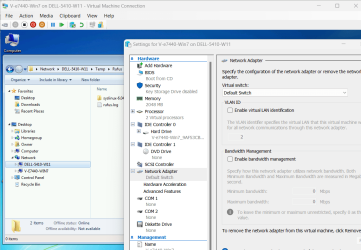
When the guest OS's network adapter is connected to the Default Switch it can only see shares on the Host machine. This is a W7 Pro guest on a W11 Pro host machine.

image.png

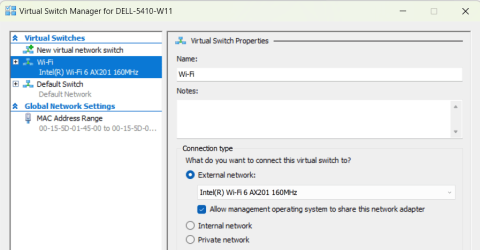
To see and connect to shares on any other PCs on the network you need to create an External Switch and use that.

image.png

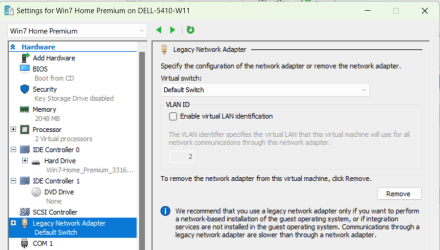
Also, I couldn't get a Hyper-V Windows 7 Home guest to connect to anything until I gave it a Legacy Network Adapter.

image.png
 

My Computers My Computers

  • At a glance

    Windows 7 Home Premium x64AMD V1204GB
    Computer type
    Laptop
    Computer Manufacturer/Model Number
    Toshiba satellite C650D
    OS
    Windows 7 Home Premium x64
    CPU
    AMD V120
    Memory
    4GB
    Internet Speed
    150 Mbps
    Antivirus
    MSE
    Browser
    IE11, Edge, Firefox
    Other Info
    I also have W7 Pro on my System Two, and several W7 Hyper-V VMs. My other machines run Windows 10/11. Their specs are in my Ten Forums & Eleven Forum profiles.
  • At a glance

    Windows 7 Pro x64Intel i5-3320M8 GB
    Computer type
    Laptop
    System Manufacturer/Model Number
    Lenovo Thinkpad T430
    OS
    Windows 7 Pro x64
    CPU
    Intel i5-3320M
    Memory
    8 GB
    Hard Drives
    250GB Samsung SSD 860 EVO
    Antivirus
    MSE
was it working? a new problem?

It's well-known, XP cannot connect to Win10/11 since Microsoft has blocked it.
My Win7 is sharing networking with Win10/11. no problem.
I have a number of computers with Windows XP, 7, 10 & 11. With my Windows XP computers I can directly access the shares on my two computers with Windows 11 Pro. However, I don't do it the usual way. I use a network shortcut to each computer to access them. For some reason I can't access my Windows 10 computers that way from Windows XP.
 

My Computers My Computers

  • At a glance

    Windows 7 Home Premium 64-bitsAMD FX-8350GSKILL Ripjaw-X PC3 12800 8GB (2x4GB)ASUS ROG STRIX GTX 1060 6GB
    Computer type
    PC/Desktop
    Computer Manufacturer/Model Number
    Custom build
    OS
    Windows 7 Home Premium 64-bits
    CPU
    AMD FX-8350
    Motherboard
    Gigabyte GA-990FXA-UD3 (AM3+)
    Memory
    GSKILL Ripjaw-X PC3 12800 8GB (2x4GB)
    Graphics Card(s)
    ASUS ROG STRIX GTX 1060 6GB
    Sound Card
    Integrated
    Monitor(s) Displays
    Asus VE228H (21.5-in)
    Screen Resolution
    1920x1080 60Hz
    Hard Drives
    SAMSUNG 870 EVO 2.5 Inch SATA SSD (1TB)
    SAMSUNG 870 EVO 2.5 Inch SATA SSD (1TB)
    SAMSUNG 870 EVO 2.5 Inch SATA SSD (1TB)
    PSU
    Corsair RM750x (750 watts)
    Case
    Corsair Carbide Series 200R
    Cooling
    Corsair Hydro Series H60 (CWCH60)
    Keyboard
    Logitech Elite
    Mouse
    Logitech M510 Wireless Mouse
    Internet Speed
    Comcast Gigabit Extra (1200Mbps down / 35Mbps up)
    Antivirus
    Malwarebytes
    Browser
    Firefox, Edge, Chrome
    Other Info
    ASUS DRW-24B1ST DVD-RW (24X) optical drive
    Seagate Expansion Desk (5TB) external SATA/USB HDD
    Comcast XB8 Internet Gateway
  • At a glance

    Windows 7 Pro (64-bit)AMD Phenom II 960T X4Corsair XMS2 DDR2-800 8GB (4x2GB)ASUS ENGTX560 DCII OC/2DI/1GD5 1GB
    Computer type
    PC/Desktop
    System Manufacturer/Model Number
    Custom
    OS
    Windows 7 Pro (64-bit)
    CPU
    AMD Phenom II 960T X4
    Motherboard
    ASUS M4N82 Deluxe
    Memory
    Corsair XMS2 DDR2-800 8GB (4x2GB)
    Graphics Card(s)
    ASUS ENGTX560 DCII OC/2DI/1GD5 1GB
    Monitor(s) Displays
    Samsung 930B 19-inch LCD
    Screen Resolution
    1280x1024
    Hard Drives
    Samsung SSD 870 EVO 1000 GB (Windows 10)
    Seagate ST1000DM003 1000 GB (Windows 7)
    PSU
    Antec TruePower (new) TP-650
    Case
    Antec Three Hundred
    Cooling
    AMD stock cooler from FX8350
    Mouse
    Logitech M100
    Internet Speed
    Xfinity Gigabit Extra 1200/35 Mbps
When the guest OS's network adapter is connected to the Default Switch it can only see shares on the Host machine. This is a W7 Pro guest on a W11 Pro host machine.

View attachment 424191

To see and connect to shares on any other PCs on the network you need to create an External Switch and use that.

View attachment 424189

Also, I couldn't get a Hyper-V Windows 7 Home guest to connect to anything until I gave it a Legacy Network Adapter.

View attachment 424190

Thanks I fiddled with the virtual switches a bit and got it working. Was a PITA tho because this hyperv box is standalone (just has power and nic connected) and I lost connectivity and had to plug in a monitor, keybord and mouse to mess with it.
 

My Computers My Computers

  • At a glance

    Windows everything
    Computer type
    PC/Desktop
    OS
    Windows everything
  • Computer type
    PC/Desktop
Thanks I fiddled with the virtual switches a bit and got it working.
Glad to hear that....

Was a PITA tho because this hyperv box is standalone (just has power and nic connected) and I lost connectivity and had to plug in a monitor, keybord and mouse to mess with it.
Mine's on a W11 Pro laptop, much easier to work on ;)
 

My Computers My Computers

  • At a glance

    Windows 7 Home Premium x64AMD V1204GB
    Computer type
    Laptop
    Computer Manufacturer/Model Number
    Toshiba satellite C650D
    OS
    Windows 7 Home Premium x64
    CPU
    AMD V120
    Memory
    4GB
    Internet Speed
    150 Mbps
    Antivirus
    MSE
    Browser
    IE11, Edge, Firefox
    Other Info
    I also have W7 Pro on my System Two, and several W7 Hyper-V VMs. My other machines run Windows 10/11. Their specs are in my Ten Forums & Eleven Forum profiles.
  • At a glance

    Windows 7 Pro x64Intel i5-3320M8 GB
    Computer type
    Laptop
    System Manufacturer/Model Number
    Lenovo Thinkpad T430
    OS
    Windows 7 Pro x64
    CPU
    Intel i5-3320M
    Memory
    8 GB
    Hard Drives
    250GB Samsung SSD 860 EVO
    Antivirus
    MSE
you are running XP?

was thinking my XP was last one alive in this world. :D

to improve my XP sharing, it's x86 device that cannot run any x64 (crashing forever). I added Windows 10 x86 (slimdown), dual-boot. the device is still strong. XP runs fast (I think even Windows 7 cannot beat XP speed). when transferring files, it will boot onto Windows 10 which is good sharing networking to Windows 7/10/11.

my XP can run python (v2.8) and excel macros (Office97/2007). new PC, with modern hardware, for somehow, run slower than XP. It's a shame. but XP is dead old. no GPT, no SSD, no USB3. also no browsers. A sorry for XP. XP time seems gone.

I have a number of computers with Windows XP, 7, 10 & 11. With my Windows XP computers I can directly access the shares on my two computers with Windows 11 Pro. However, I don't do it the usual way. I use a network shortcut to each computer to access them. For some reason I can't access my Windows 10 computers that way from Windows XP.
 

My Computers My Computers

  • At a glance

    Windows 7 Pro 64-bitI7-970032 GB
    Computer type
    PC/Desktop
    Computer Manufacturer/Model Number
    HP Elite 800 G5
    OS
    Windows 7 Pro 64-bit
    CPU
    I7-9700
    Memory
    32 GB
  • At a glance

    Windows 7 Pro 64-bit
    Computer type
    Laptop
    System Manufacturer/Model Number
    ASUS UX305C
    OS
    Windows 7 Pro 64-bit
I have 5 desktops still working. The two with Windows XP are about 20 years old and have AMD Athlon XP CPUs which don't support SSE2. That means that they aren't suitable for much beyond Windows XP. I think one has Office 97 on it and the other has Office 2003.Also, I just upgraded their HDDs from IDE to SATA ones last year. The SATA controllers only support SATA 1.0 but that is still faster then IDE.

I also built computers back in the 1990's which had DOS, Windows 95, and Windows 98. I discarded them long ago. They're is something about these old Windows XP computers that make me reluctant to discard them at least for now.
you are running XP?

was thinking my XP was last one alive in this world. :D

to improve my XP sharing, it's x86 device that cannot run any x64 (crashing forever). I added Windows 10 x86 (slimdown), dual-boot. the device is still strong. XP runs fast (I think even Windows 7 cannot beat XP speed). when transferring files, it will boot onto Windows 10 which is good sharing networking to Windows 7/10/11.

my XP can run python (v2.8) and excel macros (Office97/2007). new PC, with modern hardware, for somehow, run slower than XP. It's a shame. but XP is dead old. no GPT, no SSD, no USB3. also no browsers. A sorry for XP. XP time seems gone.
 

My Computers My Computers

  • At a glance

    Windows 7 Home Premium 64-bitsAMD FX-8350GSKILL Ripjaw-X PC3 12800 8GB (2x4GB)ASUS ROG STRIX GTX 1060 6GB
    Computer type
    PC/Desktop
    Computer Manufacturer/Model Number
    Custom build
    OS
    Windows 7 Home Premium 64-bits
    CPU
    AMD FX-8350
    Motherboard
    Gigabyte GA-990FXA-UD3 (AM3+)
    Memory
    GSKILL Ripjaw-X PC3 12800 8GB (2x4GB)
    Graphics Card(s)
    ASUS ROG STRIX GTX 1060 6GB
    Sound Card
    Integrated
    Monitor(s) Displays
    Asus VE228H (21.5-in)
    Screen Resolution
    1920x1080 60Hz
    Hard Drives
    SAMSUNG 870 EVO 2.5 Inch SATA SSD (1TB)
    SAMSUNG 870 EVO 2.5 Inch SATA SSD (1TB)
    SAMSUNG 870 EVO 2.5 Inch SATA SSD (1TB)
    PSU
    Corsair RM750x (750 watts)
    Case
    Corsair Carbide Series 200R
    Cooling
    Corsair Hydro Series H60 (CWCH60)
    Keyboard
    Logitech Elite
    Mouse
    Logitech M510 Wireless Mouse
    Internet Speed
    Comcast Gigabit Extra (1200Mbps down / 35Mbps up)
    Antivirus
    Malwarebytes
    Browser
    Firefox, Edge, Chrome
    Other Info
    ASUS DRW-24B1ST DVD-RW (24X) optical drive
    Seagate Expansion Desk (5TB) external SATA/USB HDD
    Comcast XB8 Internet Gateway
  • At a glance

    Windows 7 Pro (64-bit)AMD Phenom II 960T X4Corsair XMS2 DDR2-800 8GB (4x2GB)ASUS ENGTX560 DCII OC/2DI/1GD5 1GB
    Computer type
    PC/Desktop
    System Manufacturer/Model Number
    Custom
    OS
    Windows 7 Pro (64-bit)
    CPU
    AMD Phenom II 960T X4
    Motherboard
    ASUS M4N82 Deluxe
    Memory
    Corsair XMS2 DDR2-800 8GB (4x2GB)
    Graphics Card(s)
    ASUS ENGTX560 DCII OC/2DI/1GD5 1GB
    Monitor(s) Displays
    Samsung 930B 19-inch LCD
    Screen Resolution
    1280x1024
    Hard Drives
    Samsung SSD 870 EVO 1000 GB (Windows 10)
    Seagate ST1000DM003 1000 GB (Windows 7)
    PSU
    Antec TruePower (new) TP-650
    Case
    Antec Three Hundred
    Cooling
    AMD stock cooler from FX8350
    Mouse
    Logitech M100
    Internet Speed
    Xfinity Gigabit Extra 1200/35 Mbps
my XP came with a package, 4GB DDR2, 2TB SATA storage. 2 DELL XP PRO CD (SP2/SP3 each one, many DELL XP cd-key which never being used) and a suit of Ghost (discontinued).
I never got a chance to install XP on new PC, no XP drivers and no CD/DVD-ROM. no idea to make XP USB stick.
while, for this old XP, ghost is my only tool to image/backup it. It's surprised this XP runs so well. its Win10 x86 was my last achievement on this XP. Its python scripts, macros are too old. they still run well, not broken. If move to new PC, even Windows 7, they will request much re-work. better keep them intact. Anyway, it wouldn't run x64 of Windows 7 or Windows 10/11.

I have 5 desktops still working. The two with Windows XP are about 20 years old and have AMD Athlon XP CPUs which don't support SSE2. That means that they aren't suitable for much beyond Windows XP.
 

My Computers My Computers

  • At a glance

    Windows 7 Pro 64-bitI7-970032 GB
    Computer type
    PC/Desktop
    Computer Manufacturer/Model Number
    HP Elite 800 G5
    OS
    Windows 7 Pro 64-bit
    CPU
    I7-9700
    Memory
    32 GB
  • At a glance

    Windows 7 Pro 64-bit
    Computer type
    Laptop
    System Manufacturer/Model Number
    ASUS UX305C
    OS
    Windows 7 Pro 64-bit
Back
Top