Default file action on smartphone is WRONG!

thornik

New member
Local time
11:49 PM
Messages
3
Guys, please read carefully my problem, because it was not solved, not even mentioned in topics, despite looks familiar.
I plug my Samsung S22 into USB, open its folders in Windows 7 (usually it's DCIM w pics).When I double click a WEBP image, Windows open its clumsy "Photo Viewer", which shows nothing.When I right click WEBP and see popup, default action (by some stupid, unknown reason) is set as 'preview'! (which calls that MS Photo Viewer)But if I select 'open' from the same popup, system runs my associated program (IrfanView) and I see pic.At the same time if I double click any pic on local drive, its default action is 'open'! (and everything works as expected)You already guess what I want - change default action for S22 to 'open'! (ideally if I can force Windows to use 'open' on ANY plugged drive!)Note again: it's not about drive or folder or autoplay, it's about default action FOR FILE, which MS hiddenly changed to 'preview' for smartphones. Hell knows why.
 

My Computers

System One System Two

  • OS
    Windows 7 x64 Ultimate
  • Computer type
    PC/Desktop
I don't understand where you are getting ".webp" files. The only place I have seen them is in web pages. The default file format for Samsung S22 photos is ".jpg". However, in the settings you can change that to "heic".

If you are saving the photos in the "heic" format then there is no viewer that I know of for Windows 7. I have read there are ways to convert these files to other formats such as ".jpg".

BTW, in Windows 11 both Paint and the Windows Photos Viewer by default can open "heic" files. Also, I have opened "webp" files in Windows 11 with Paint and the Windows Photos Viewer. You can also view "webp" files with Chrome, Edge, and Firefox.
 

My Computers

System One System Two

  • Computer type
    PC/Desktop
    Computer Manufacturer/Model Number
    Custom build
    OS
    Windows 7 Home Premium 64-bits
    CPU
    AMD FX-8350
    Motherboard
    Gigabyte GA-990FXA-UD3 (AM3+)
    Memory
    GSKILL Ripjaw-X PC3 12800 8GB (2x4GB)
    Graphics Card(s)
    ASUS ROG STRIX GTX 1060 6GB
    Sound Card
    Integrated
    Monitor(s) Displays
    Asus VE228H (21.5-in)
    Screen Resolution
    1920x1080 60Hz
    Hard Drives
    SAMSUNG 870 EVO 2.5 Inch SATA SSD (1TB)
    SAMSUNG 870 EVO 2.5 Inch SATA SSD (1TB)
    SAMSUNG 870 EVO 2.5 Inch SATA SSD (1TB)
    PSU
    Corsair RM750x (750 watts)
    Case
    Corsair Carbide Series 200R
    Cooling
    Corsair Hydro Series H60 (CWCH60)
    Keyboard
    Logitech Elite
    Mouse
    Logitech M510 Wireless Mouse
    Internet Speed
    Comcast Gigabit Extra (1200Mbps down / 35Mbps up)
    Antivirus
    Malwarebytes
    Browser
    Firefox, Edge, Chrome
    Other Info
    ASUS DRW-24B1ST DVD-RW (24X) optical drive
    Seagate Expansion Desk (5TB) external SATA/USB HDD
    Comcast XB8 Internet Gateway
  • Computer type
    PC/Desktop
    System Manufacturer/Model Number
    Custom
    OS
    Windows 7 Pro (64-bit)
    CPU
    AMD Phenom II 960T X4
    Motherboard
    ASUS M4N82 Deluxe
    Memory
    Corsair XMS2 DDR2-800 8GB (4x2GB)
    Graphics Card(s)
    ASUS ENGTX560 DCII OC/2DI/1GD5 1GB
    Monitor(s) Displays
    Samsung 930B 19-inch LCD
    Screen Resolution
    1280x1024
    Hard Drives
    Samsung SSD 870 EVO 1000 GB (Windows 10)
    Seagate ST1000DM003 1000 GB (Windows 7)
    PSU
    Antec TruePower (new) TP-650
    Case
    Antec Three Hundred
    Cooling
    AMD stock cooler from FX8350
    Mouse
    Logitech M100
    Internet Speed
    Xfinity Gigabit Extra 1200/35 Mbps
I don't understand....
MrEd, I appreciate for your try to help, but point is "you don't understand", so all that help become irrelevant, sorry.

No matter is it jpeg or webp, is it shot or I just uploaded my own file on smartphone, key of the question was change default action. This and only this is my main concern.
By some reason MS "coders" decide to break UX and on local drive you have one behaviour, but on joined disk - another (inconsistency).
And of course I don't care what is going on on Win10+ - these systems I don't consider as safe and completely avoid.
 

My Computers

System One System Two

  • OS
    Windows 7 x64 Ultimate
  • Computer type
    PC/Desktop
What you don't understand is that "webp" is a format mostly used in webpages. "webp" files are smaller than other formats so saves on storage space and load times. It was not meant to be used elsewhere so you won't find a way to view these files with Windows 7. However, you are free to convert them to other formats like ".jpg". That is what I have to do when I use Windows 7.

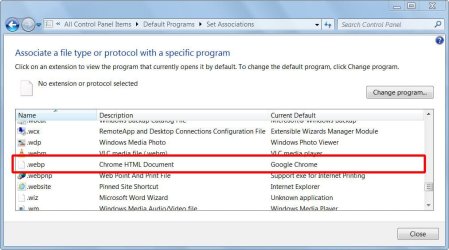
If you don't like the default action for "webp" file you are free to change it. However, you would first have to find a program to open them.

On one of my computers with Windows 7 the default way to open a "webp" file is with Google Chrome. If I use Open With I find that Edge and Firefox can also open "webp" files.

How To Open WEBP File | Tools To Open WEBP File

Set Associations for webp.jpg

Open with.jpg
 
Last edited:

My Computers

System One System Two

  • Computer type
    PC/Desktop
    Computer Manufacturer/Model Number
    Custom build
    OS
    Windows 7 Home Premium 64-bits
    CPU
    AMD FX-8350
    Motherboard
    Gigabyte GA-990FXA-UD3 (AM3+)
    Memory
    GSKILL Ripjaw-X PC3 12800 8GB (2x4GB)
    Graphics Card(s)
    ASUS ROG STRIX GTX 1060 6GB
    Sound Card
    Integrated
    Monitor(s) Displays
    Asus VE228H (21.5-in)
    Screen Resolution
    1920x1080 60Hz
    Hard Drives
    SAMSUNG 870 EVO 2.5 Inch SATA SSD (1TB)
    SAMSUNG 870 EVO 2.5 Inch SATA SSD (1TB)
    SAMSUNG 870 EVO 2.5 Inch SATA SSD (1TB)
    PSU
    Corsair RM750x (750 watts)
    Case
    Corsair Carbide Series 200R
    Cooling
    Corsair Hydro Series H60 (CWCH60)
    Keyboard
    Logitech Elite
    Mouse
    Logitech M510 Wireless Mouse
    Internet Speed
    Comcast Gigabit Extra (1200Mbps down / 35Mbps up)
    Antivirus
    Malwarebytes
    Browser
    Firefox, Edge, Chrome
    Other Info
    ASUS DRW-24B1ST DVD-RW (24X) optical drive
    Seagate Expansion Desk (5TB) external SATA/USB HDD
    Comcast XB8 Internet Gateway
  • Computer type
    PC/Desktop
    System Manufacturer/Model Number
    Custom
    OS
    Windows 7 Pro (64-bit)
    CPU
    AMD Phenom II 960T X4
    Motherboard
    ASUS M4N82 Deluxe
    Memory
    Corsair XMS2 DDR2-800 8GB (4x2GB)
    Graphics Card(s)
    ASUS ENGTX560 DCII OC/2DI/1GD5 1GB
    Monitor(s) Displays
    Samsung 930B 19-inch LCD
    Screen Resolution
    1280x1024
    Hard Drives
    Samsung SSD 870 EVO 1000 GB (Windows 10)
    Seagate ST1000DM003 1000 GB (Windows 7)
    PSU
    Antec TruePower (new) TP-650
    Case
    Antec Three Hundred
    Cooling
    AMD stock cooler from FX8350
    Mouse
    Logitech M100
    Internet Speed
    Xfinity Gigabit Extra 1200/35 Mbps
What you don't understand is that "webp" is a format mostly used in webpages

MrEd, you talking absolutely irrelevant things. I don't ask anybody "where webp is used", why you continue to spread unnecessary knowledge??
If you can feel better, let's say it's "XYZ" file. Happier now?
OK, question: I wanna change default action for XYZ from "preview" to "open". Know how?

Additional question: I have feeling that it's not only about picture file, I fear Windows uses "preview" for ANY file on smartphone. I mean maybe it's some global setting, which affects all files.
 

My Computers

System One System Two

  • OS
    Windows 7 x64 Ultimate
  • Computer type
    PC/Desktop
Back
Top