CMR drive in an external enclosure

piikea

New member
Member
Local time
10:31 AM
Messages
53
Location
San Diego
Recently had a hard drive in an external enclosure go bad so need to replace it. Began looking into options & supposedly CMR is preferable to SMR drives. Haven't found any single external hard drives where being CMR can be determined so was wondering if I could just buy an enclosure & put say a WD Red CMR drive into it? Not using it for image backups of my system only a large amount of video & audio files long term so want the media to be as reliable & stable as possible. It wouldn't be written to or read from often - only to add new files over time manually - not using RAID or other software. Does this make sense or would a WD Red drive need to be in a NAS?
 

My Computers My Computers

  • At a glance

    Windows 7 Home Premium 64bit with SP1, OEMIntel Core i7-3770G Skill 8GB (2x4GB) Ripkaws PC3-12800 DDR3 16...EVGA, GeForce GTX 560 Ti FPB (AR) 1GB GDDR5 4...
    Computer type
    PC/Desktop
    OS
    Windows 7 Home Premium 64bit with SP1, OEM
    CPU
    Intel Core i7-3770
    Motherboard
    Gigabyte GA-Z77X-UD3H LGA1155
    Memory
    G Skill 8GB (2x4GB) Ripkaws PC3-12800 DDR3 1600MHz
    Graphics Card(s)
    EVGA, GeForce GTX 560 Ti FPB (AR) 1GB GDDR5 4104MHz
    Sound Card
    Creative Sound Blaster Audigy SE, 7.1 channels, 24 bit
    Monitor(s) Displays
    HP ZR24w
    Screen Resolution
    1920x1200 - 60Hz
    Hard Drives
    Intel 60GB 520 Series SSD, MLC SandForce SF-2281, 550/475 MB/s

    WD 1TB Caviar Blue, SATA 6 Gb/s, 7200 RPM
    PSU
    Seasonic X-560, 80 PLUS Gold
    Case
    Cooler Master Elite 430
    Cooling
    2 stock fans
  • Antivirus
    MS Security Essentials
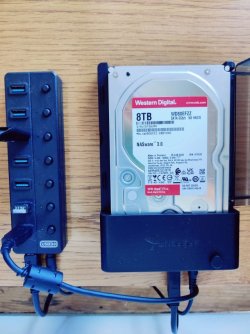
I bought a couple WD Reds awhile ago when Newegg had them on sale for a good price, and have been using them flawlessly this way for several years now. This photo shows one in an external USB dock, which is the same thing as a USB enclosure. These are for long-term storage, so like you, I prefer CMR.

Reds are probably overkill for this kind of use, but they work perfectly well, they're CMR, and the price was right.

IMG_20241201_144828.jpg

These days I only buy internal drives separately and put them in enclosures myself. I no longer trust the pre-made "external" hard drives because many of them, including more and more of WD's external models, are shipped with the drives encrypted. Even if you don't use a password or encryption, they're tied to a key on the enclosure's circuit board so can't be separated from the enclosure.

When the drive eventually starts to go bad, that makes them a whole order of magnitude more difficult to work with to try and repair or recover your data. I prefer it when the drive can be removed from the case and worked on with traditional data recovery tools.
 

My Computer My Computer

At a glance

Windows 7/8.1/10 multibootIntel Core i7-770048GB (2x16GB Crucial DDR4-3200 + 2x8GB Hynix ...Intel HD630 + AMD Radeon R7 450 PCIe
Computer type
PC/Desktop
Computer Manufacturer/Model Number
Dell Optiplex 7050
OS
Windows 7/8.1/10 multiboot
CPU
Intel Core i7-7700
Motherboard
Dell, Intel Q270 chipset
Memory
48GB (2x16GB Crucial DDR4-3200 + 2x8GB Hynix DDR4-2400)
Graphics Card(s)
Intel HD630 + AMD Radeon R7 450 PCIe
Monitor(s) Displays
Asus VC279 (27")
Screen Resolution
1920x1080
Hard Drives
Toshiba M.2 NVMe (256GB),
Samsung 960 Evo (500GB),
WD Red Plus 80EFBX (8TB)
This photo shows one in an external USB dock, which is the same thing as a USB enclosure. These are for long-term storage, so like you, I prefer CMR.
Reds are probably overkill for this kind of use, .......

This is what I had in mind. Idk if they are but perhaps CMR WD Reds will be more stable & reliable. I can't quite make out which brand that is but I was leaning toward Sabrent which seems to be well reviewed, etc.. I've only had enclosures so far but will look into external USB dock as well. Occasionally had some "freezes" when transferring data (toward the end of my previous drive's life) so if a USB dock is any better in that regard I'd def use one. Thanks for the info!
 

My Computers My Computers

  • At a glance

    Windows 7 Home Premium 64bit with SP1, OEMIntel Core i7-3770G Skill 8GB (2x4GB) Ripkaws PC3-12800 DDR3 16...EVGA, GeForce GTX 560 Ti FPB (AR) 1GB GDDR5 4...
    Computer type
    PC/Desktop
    OS
    Windows 7 Home Premium 64bit with SP1, OEM
    CPU
    Intel Core i7-3770
    Motherboard
    Gigabyte GA-Z77X-UD3H LGA1155
    Memory
    G Skill 8GB (2x4GB) Ripkaws PC3-12800 DDR3 1600MHz
    Graphics Card(s)
    EVGA, GeForce GTX 560 Ti FPB (AR) 1GB GDDR5 4104MHz
    Sound Card
    Creative Sound Blaster Audigy SE, 7.1 channels, 24 bit
    Monitor(s) Displays
    HP ZR24w
    Screen Resolution
    1920x1200 - 60Hz
    Hard Drives
    Intel 60GB 520 Series SSD, MLC SandForce SF-2281, 550/475 MB/s

    WD 1TB Caviar Blue, SATA 6 Gb/s, 7200 RPM
    PSU
    Seasonic X-560, 80 PLUS Gold
    Case
    Cooler Master Elite 430
    Cooling
    2 stock fans
  • Antivirus
    MS Security Essentials
The dock is a Sabrent EC-DFLT that I purchased in 2016, and it's worked perfectly with a number of different drives from 250GB to 8TB.

I'm not sure why the difference, but Newegg says it supports hard drives up to 8TB, while Amazon says the max is 20TB. I've never tried anything larger than 8TB, so caveat emptor.

I use a pair of 8TB drives, one for an archive and the other as a duplicate for backup, with one drive stored in my (small) bank safe deposit box. A bare 3.5" drive just fits in my safe deposit box, whereas a 3.5" drive with external enclosure would not. That makes my dock strategy ideal, since putting each drive in its own semi-permanent enclosure would not fit in the safe deposit box.
 

My Computer My Computer

At a glance

Windows 7/8.1/10 multibootIntel Core i7-770048GB (2x16GB Crucial DDR4-3200 + 2x8GB Hynix ...Intel HD630 + AMD Radeon R7 450 PCIe
Computer type
PC/Desktop
Computer Manufacturer/Model Number
Dell Optiplex 7050
OS
Windows 7/8.1/10 multiboot
CPU
Intel Core i7-7700
Motherboard
Dell, Intel Q270 chipset
Memory
48GB (2x16GB Crucial DDR4-3200 + 2x8GB Hynix DDR4-2400)
Graphics Card(s)
Intel HD630 + AMD Radeon R7 450 PCIe
Monitor(s) Displays
Asus VC279 (27")
Screen Resolution
1920x1080
Hard Drives
Toshiba M.2 NVMe (256GB),
Samsung 960 Evo (500GB),
WD Red Plus 80EFBX (8TB)
The dock is a Sabrent EC-DFLT that I purchased in 2016, and it's worked perfectly with a number of different drives from 250GB to 8TB.

I'm not sure why the difference, but Newegg says it supports hard drives up to 8TB, while Amazon says the max is 20TB. I've never tried anything larger than 8TB, so caveat emptor.

Yeah I saw 20TB on that Amazon link - which was the one I figured I would get. Saw some negative reviews on there about drive recognition problems yet overall it has 4.4 out of 5 stars & you haven't had any issues with it. Doubt I will ever need even 8TB let alone 20TB.
 

My Computers My Computers

  • At a glance

    Windows 7 Home Premium 64bit with SP1, OEMIntel Core i7-3770G Skill 8GB (2x4GB) Ripkaws PC3-12800 DDR3 16...EVGA, GeForce GTX 560 Ti FPB (AR) 1GB GDDR5 4...
    Computer type
    PC/Desktop
    OS
    Windows 7 Home Premium 64bit with SP1, OEM
    CPU
    Intel Core i7-3770
    Motherboard
    Gigabyte GA-Z77X-UD3H LGA1155
    Memory
    G Skill 8GB (2x4GB) Ripkaws PC3-12800 DDR3 1600MHz
    Graphics Card(s)
    EVGA, GeForce GTX 560 Ti FPB (AR) 1GB GDDR5 4104MHz
    Sound Card
    Creative Sound Blaster Audigy SE, 7.1 channels, 24 bit
    Monitor(s) Displays
    HP ZR24w
    Screen Resolution
    1920x1200 - 60Hz
    Hard Drives
    Intel 60GB 520 Series SSD, MLC SandForce SF-2281, 550/475 MB/s

    WD 1TB Caviar Blue, SATA 6 Gb/s, 7200 RPM
    PSU
    Seasonic X-560, 80 PLUS Gold
    Case
    Cooler Master Elite 430
    Cooling
    2 stock fans
  • Antivirus
    MS Security Essentials
Hmm ... I don't know what to make of those Amazon reviews. Most seem to be more recent than my 2016 purchase, and I would assume mine can't be a more recent version of the same product that later buyers got years later.

The alleged problems seem to be all over the place, with no consistency. A few reviews can be discounted, having been posted by buyers apparently unaware that you need to format a blank disk before it can be used, or in at least one case (and perhaps more) from somebody trying to read a WD Essentials drive, which have a reputation for being encrypted. Understandably, a drive encrypted by another enclosure isn't going to be readable by this (or any other) dock.

Still, the bulk of negative reviews are all over the place. Does that suggest Sabrent has a quality control problem? On one hand, the majority of buyers have no trouble. OTOH, I note various listings on Newegg and Amazon will inconsistently say it supports up to 4TB vs 8TB vs 20TB. Even the Sabrent website (which says 20TB) has a currently downloadable user manual that still says it only supports up to 4TB. That's not encouraging evidence of quality control, at least as far as documentation goes -- and if they can't get documentation right, does that say anything about manufacturing?

OTOH, perhaps it's more of a supply chain problem, with a lot of old product inexplicably lingering in the pipeline for very long periods of time -- sometimes years. There's a 2016 firmware update online that purportedly expands the support limit to over 4TB, but even recent buyers reported having to apply that update to use 6TB or 8TB drives. I'm using 8TB drives, and my 2016 purchase needed no firmware update. Apparently mine already had the update when I got it in 2016, but then why are other people purchasing units years later that were not already updated?

I don't know. But I've had no trouble with it, and neither have the majority of buyers, it seems. I guess the lesson is: if you get one, make sure you give it a good workout while it's still within the return period.

The EC-DFLT apparently comes in both fan and fan-less variations. Mine is fan-less. I see some reviews mention that on long disk transfers the hard drive will get too hot and slow down transfers. Again, I haven't had problems, but on this topic I'll tangentially note that WD Reds are supposedly designed for higher temp use (because of their intended use scenario), so Reds may be a good choice for you, anyway.
 

My Computer My Computer

At a glance

Windows 7/8.1/10 multibootIntel Core i7-770048GB (2x16GB Crucial DDR4-3200 + 2x8GB Hynix ...Intel HD630 + AMD Radeon R7 450 PCIe
Computer type
PC/Desktop
Computer Manufacturer/Model Number
Dell Optiplex 7050
OS
Windows 7/8.1/10 multiboot
CPU
Intel Core i7-7700
Motherboard
Dell, Intel Q270 chipset
Memory
48GB (2x16GB Crucial DDR4-3200 + 2x8GB Hynix DDR4-2400)
Graphics Card(s)
Intel HD630 + AMD Radeon R7 450 PCIe
Monitor(s) Displays
Asus VC279 (27")
Screen Resolution
1920x1080
Hard Drives
Toshiba M.2 NVMe (256GB),
Samsung 960 Evo (500GB),
WD Red Plus 80EFBX (8TB)
Hard drive type doesn't matter. What matters is the internal interface and physical size. If you have a sata interface on your enclosure you have to get a sata drive. One thing about an external drive of a large size I would make sure that it is a single drive and not 2 put together. The only way to get 2 drives to look like one is to use a raid and with that kind of raid if you lose one of the drives you lose everything on both drives. It takes 3 drives to keep that from happening. So really fat ones probably have 2 3.5" drives. I would suspect a 20 TB drive to really be 2. Here are raids explained. RAID - Wikipedia
 

My Computers My Computers

  • At a glance

    Windows 7 pro/Windows 10 ProIntel i7 860 Quad core 2.8 ghz8 gbATI Radeon HD 5770 1 gb ram
    Computer type
    PC/Desktop
    Computer Manufacturer/Model Number
    HP Pavillion Elite HPE-250f
    OS
    Windows 7 pro/Windows 10 Pro
    CPU
    Intel i7 860 Quad core 2.8 ghz
    Memory
    8 gb
    Graphics Card(s)
    ATI Radeon HD 5770 1 gb ram
    Monitor(s) Displays
    Alienware 25 AW2521HF & Viewsonic
    Screen Resolution
    1920 x1080 & 1680x1050
    Hard Drives
    WD blue 1 tb & 500 gb.
    Browser
    FF of course.
    Other Info
    https://www.bestbuy.com/site/hp-pavilion-elite-desktop-intel-core-i7-processor-8gb-memory-1tb-hard-drive/9921493.p?skuId=9921493
  • At a glance

    Windows 2012 R2 Data center/Linux Minti3 9100 3.6GHz, 8M cache, 4C/4T8GB 2666MT/s DDR4 ECC UDIMM
    Computer type
    PC/Desktop
    System Manufacturer/Model Number
    Dell Poweredge T140
    OS
    Windows 2012 R2 Data center/Linux Mint
    CPU
    i3 9100 3.6GHz, 8M cache, 4C/4T
    Memory
    8GB 2666MT/s DDR4 ECC UDIMM
    Monitor(s) Displays
    Viewsonic
    Screen Resolution
    1680x1050
    Hard Drives
    1 TB & 750 GB
    Other Info
    https://www.dell.com/en-us/work/shop/productdetailstxn/poweredge-t140?~ck=bt
Hard drive type doesn't matter. What matters is the internal interface and physical size. If you have a sata interface on your enclosure you have to get a sata drive. One thing about an external drive of a large size I would make sure that it is a single drive and not 2 put together. The only way to get 2 drives to look like one is to use a raid and with that kind of raid if you lose one of the drives you lose everything on both drives. It takes 3 drives to keep that from happening. So really fat ones probably have 2 3.5" drives. I would suspect a 20 TB drive to really be 2. Here are raids explained. RAID - Wikipedia
RAID 1 aka disk mirroring consists of two drives. The 2nd is a mirror of the 1st. If one of the drives fails then you lose nothing. You just replace it and rebuild the RAID. The biggest downside is that you have to power down the computer and drives to do that. Naturally you have to figure out which drive has failed so you replace it not the good one.

For example a RAID 5 setup consists of three or more drives. If one drive fails then it can be hot-swapped without losing any data. After that the RAID array is rebuilt. The biggest problem is figuring out which drive has failed .

If you build a RAID with more than two drives then you provide better safety. For example a RAID 5 setup consists of three or more drives. If one drive fails then it can be hot-swapped without losing any data. After that the RAID array is rebuilt.

What makes you think a 20TB drive is not a single drive? A couple weeks ago I bought a WD easystore 20TB External USB 3.0 Hard Drive for $250 at Best Buy for Black Friday. According to CrystalDiskInfo the internal hard drive is a WD WD200EDGZ-11B9PA0.

According to the following post it is a single CMR drive. WD easystore 20TB Shucked. Here's what's inside.
 

My Computers My Computers

  • At a glance

    Windows 7 Home Premium 64-bitsAMD FX-8350GSKILL Ripjaw-X PC3 12800 8GB (2x4GB)ASUS ROG STRIX GTX 1060 6GB
    Computer type
    PC/Desktop
    Computer Manufacturer/Model Number
    Custom build
    OS
    Windows 7 Home Premium 64-bits
    CPU
    AMD FX-8350
    Motherboard
    Gigabyte GA-990FXA-UD3 (AM3+)
    Memory
    GSKILL Ripjaw-X PC3 12800 8GB (2x4GB)
    Graphics Card(s)
    ASUS ROG STRIX GTX 1060 6GB
    Sound Card
    Integrated
    Monitor(s) Displays
    Asus VE228H (21.5-in)
    Screen Resolution
    1920x1080 60Hz
    Hard Drives
    SAMSUNG 870 EVO 2.5 Inch SATA SSD (1TB)
    SAMSUNG 870 EVO 2.5 Inch SATA SSD (1TB)
    SAMSUNG 870 EVO 2.5 Inch SATA SSD (1TB)
    PSU
    Corsair RM750x (750 watts)
    Case
    Corsair Carbide Series 200R
    Cooling
    Corsair Hydro Series H60 (CWCH60)
    Keyboard
    Logitech Elite
    Mouse
    Logitech M510 Wireless Mouse
    Internet Speed
    Comcast Gigabit Extra (1200Mbps down / 35Mbps up)
    Antivirus
    Malwarebytes
    Browser
    Firefox, Edge, Chrome
    Other Info
    ASUS DRW-24B1ST DVD-RW (24X) optical drive
    Seagate Expansion Desk (5TB) external SATA/USB HDD
    Comcast XB8 Internet Gateway
  • At a glance

    Windows 7 Pro (64-bit)AMD Phenom II 960T X4Corsair XMS2 DDR2-800 8GB (4x2GB)ASUS ENGTX560 DCII OC/2DI/1GD5 1GB
    Computer type
    PC/Desktop
    System Manufacturer/Model Number
    Custom
    OS
    Windows 7 Pro (64-bit)
    CPU
    AMD Phenom II 960T X4
    Motherboard
    ASUS M4N82 Deluxe
    Memory
    Corsair XMS2 DDR2-800 8GB (4x2GB)
    Graphics Card(s)
    ASUS ENGTX560 DCII OC/2DI/1GD5 1GB
    Monitor(s) Displays
    Samsung 930B 19-inch LCD
    Screen Resolution
    1280x1024
    Hard Drives
    Samsung SSD 870 EVO 1000 GB (Windows 10)
    Seagate ST1000DM003 1000 GB (Windows 7)
    PSU
    Antec TruePower (new) TP-650
    Case
    Antec Three Hundred
    Cooling
    AMD stock cooler from FX8350
    Mouse
    Logitech M100
    Internet Speed
    Xfinity Gigabit Extra 1200/35 Mbps
Hmm ... I don't know what to make of those Amazon reviews......

I'm going to give the Sabrent w/ a WD REd Plus a go & see how it goes. W/ my only backup of my internal drive not even being recognized now so it's def NOT reliable ext HD for backup purposes any more. Now my 1TB internal HD is acting up & CrystalDisk shows it as "bad" AND it was having I/O errors when I was trying to copy some stuff from it I don't trust it either! How 2 different drives could (seemingly) go bad or fail within days of each other seems near impossible. I'd like to replace it w/ a 4TB drive (to be same size as external drive) but I've discovered the above 2TB issue. From my brief research on that for a non-boot disk apparently it can be done. Will have to study it some more.

As to RAID that's above my pay grade.
 

My Computers My Computers

  • At a glance

    Windows 7 Home Premium 64bit with SP1, OEMIntel Core i7-3770G Skill 8GB (2x4GB) Ripkaws PC3-12800 DDR3 16...EVGA, GeForce GTX 560 Ti FPB (AR) 1GB GDDR5 4...
    Computer type
    PC/Desktop
    OS
    Windows 7 Home Premium 64bit with SP1, OEM
    CPU
    Intel Core i7-3770
    Motherboard
    Gigabyte GA-Z77X-UD3H LGA1155
    Memory
    G Skill 8GB (2x4GB) Ripkaws PC3-12800 DDR3 1600MHz
    Graphics Card(s)
    EVGA, GeForce GTX 560 Ti FPB (AR) 1GB GDDR5 4104MHz
    Sound Card
    Creative Sound Blaster Audigy SE, 7.1 channels, 24 bit
    Monitor(s) Displays
    HP ZR24w
    Screen Resolution
    1920x1200 - 60Hz
    Hard Drives
    Intel 60GB 520 Series SSD, MLC SandForce SF-2281, 550/475 MB/s

    WD 1TB Caviar Blue, SATA 6 Gb/s, 7200 RPM
    PSU
    Seasonic X-560, 80 PLUS Gold
    Case
    Cooler Master Elite 430
    Cooling
    2 stock fans
  • Antivirus
    MS Security Essentials
Something to think about...before you decide a drive is bad make sure it's not a bad or marginal enclosure. If you think a drive is bad then test another drive in the enclosure.

One time I thought I had several bad drives. After I replaced the enclosure the drives turned out to be good after all.
 

My Computers My Computers

  • At a glance

    Windows 7 Home Premium 64-bitsAMD FX-8350GSKILL Ripjaw-X PC3 12800 8GB (2x4GB)ASUS ROG STRIX GTX 1060 6GB
    Computer type
    PC/Desktop
    Computer Manufacturer/Model Number
    Custom build
    OS
    Windows 7 Home Premium 64-bits
    CPU
    AMD FX-8350
    Motherboard
    Gigabyte GA-990FXA-UD3 (AM3+)
    Memory
    GSKILL Ripjaw-X PC3 12800 8GB (2x4GB)
    Graphics Card(s)
    ASUS ROG STRIX GTX 1060 6GB
    Sound Card
    Integrated
    Monitor(s) Displays
    Asus VE228H (21.5-in)
    Screen Resolution
    1920x1080 60Hz
    Hard Drives
    SAMSUNG 870 EVO 2.5 Inch SATA SSD (1TB)
    SAMSUNG 870 EVO 2.5 Inch SATA SSD (1TB)
    SAMSUNG 870 EVO 2.5 Inch SATA SSD (1TB)
    PSU
    Corsair RM750x (750 watts)
    Case
    Corsair Carbide Series 200R
    Cooling
    Corsair Hydro Series H60 (CWCH60)
    Keyboard
    Logitech Elite
    Mouse
    Logitech M510 Wireless Mouse
    Internet Speed
    Comcast Gigabit Extra (1200Mbps down / 35Mbps up)
    Antivirus
    Malwarebytes
    Browser
    Firefox, Edge, Chrome
    Other Info
    ASUS DRW-24B1ST DVD-RW (24X) optical drive
    Seagate Expansion Desk (5TB) external SATA/USB HDD
    Comcast XB8 Internet Gateway
  • At a glance

    Windows 7 Pro (64-bit)AMD Phenom II 960T X4Corsair XMS2 DDR2-800 8GB (4x2GB)ASUS ENGTX560 DCII OC/2DI/1GD5 1GB
    Computer type
    PC/Desktop
    System Manufacturer/Model Number
    Custom
    OS
    Windows 7 Pro (64-bit)
    CPU
    AMD Phenom II 960T X4
    Motherboard
    ASUS M4N82 Deluxe
    Memory
    Corsair XMS2 DDR2-800 8GB (4x2GB)
    Graphics Card(s)
    ASUS ENGTX560 DCII OC/2DI/1GD5 1GB
    Monitor(s) Displays
    Samsung 930B 19-inch LCD
    Screen Resolution
    1280x1024
    Hard Drives
    Samsung SSD 870 EVO 1000 GB (Windows 10)
    Seagate ST1000DM003 1000 GB (Windows 7)
    PSU
    Antec TruePower (new) TP-650
    Case
    Antec Three Hundred
    Cooling
    AMD stock cooler from FX8350
    Mouse
    Logitech M100
    Internet Speed
    Xfinity Gigabit Extra 1200/35 Mbps
Something to think about...before you decide a drive is bad make sure it's not a bad or marginal enclosure. If you think a drive is bad then test another drive in the enclosure.
One time I thought I had several bad drives. After I replaced the enclosure the drives turned out to be good after all.

I plan to try the finicky (at best) external one in the Sabrent to see what happens. It's been off & on sometimes being recognized normally & other times being recognized but saying needed to be formatted. Other times freezing during data transfers. Chkdsk would find bad sectors, etc but "fixing" them may not be helping. I did open the enclosure to make sure cables weren't loose but since then it's not even recognized at all. Both these drives are plenty old so prob'ly lucky they've lasted this long!
 

My Computers My Computers

  • At a glance

    Windows 7 Home Premium 64bit with SP1, OEMIntel Core i7-3770G Skill 8GB (2x4GB) Ripkaws PC3-12800 DDR3 16...EVGA, GeForce GTX 560 Ti FPB (AR) 1GB GDDR5 4...
    Computer type
    PC/Desktop
    OS
    Windows 7 Home Premium 64bit with SP1, OEM
    CPU
    Intel Core i7-3770
    Motherboard
    Gigabyte GA-Z77X-UD3H LGA1155
    Memory
    G Skill 8GB (2x4GB) Ripkaws PC3-12800 DDR3 1600MHz
    Graphics Card(s)
    EVGA, GeForce GTX 560 Ti FPB (AR) 1GB GDDR5 4104MHz
    Sound Card
    Creative Sound Blaster Audigy SE, 7.1 channels, 24 bit
    Monitor(s) Displays
    HP ZR24w
    Screen Resolution
    1920x1200 - 60Hz
    Hard Drives
    Intel 60GB 520 Series SSD, MLC SandForce SF-2281, 550/475 MB/s

    WD 1TB Caviar Blue, SATA 6 Gb/s, 7200 RPM
    PSU
    Seasonic X-560, 80 PLUS Gold
    Case
    Cooler Master Elite 430
    Cooling
    2 stock fans
  • Antivirus
    MS Security Essentials
Something to think about...before you decide a drive is bad make sure it's not a bad or marginal enclosure. If you think a drive is bad then test another drive in the enclosure.
One time I thought I had several bad drives. After I replaced the enclosure the drives turned out to be good after all.
Turns out it WAS the enclosure. Put the drive into the Sabrent & it's recognized & usable. Also turned out the internal 1TB (data-only) HDD that I was backing up to the one in the enclosure was bad! It was almost full so I put in a 4TG (internal) HDD to replace it. Unfortunately AFTER I'd cloned the data to it there was a Reserved Partition & an EFI System Partition also created. I want to delete those & just have the entire drive w/ no partitions but more I read on that the more confused I get. I could re-clone all the data onto that drive again w/ a software that won't create those. Unsure yet if I want to go to that trouble.
 

My Computers My Computers

  • At a glance

    Windows 7 Home Premium 64bit with SP1, OEMIntel Core i7-3770G Skill 8GB (2x4GB) Ripkaws PC3-12800 DDR3 16...EVGA, GeForce GTX 560 Ti FPB (AR) 1GB GDDR5 4...
    Computer type
    PC/Desktop
    OS
    Windows 7 Home Premium 64bit with SP1, OEM
    CPU
    Intel Core i7-3770
    Motherboard
    Gigabyte GA-Z77X-UD3H LGA1155
    Memory
    G Skill 8GB (2x4GB) Ripkaws PC3-12800 DDR3 1600MHz
    Graphics Card(s)
    EVGA, GeForce GTX 560 Ti FPB (AR) 1GB GDDR5 4104MHz
    Sound Card
    Creative Sound Blaster Audigy SE, 7.1 channels, 24 bit
    Monitor(s) Displays
    HP ZR24w
    Screen Resolution
    1920x1200 - 60Hz
    Hard Drives
    Intel 60GB 520 Series SSD, MLC SandForce SF-2281, 550/475 MB/s

    WD 1TB Caviar Blue, SATA 6 Gb/s, 7200 RPM
    PSU
    Seasonic X-560, 80 PLUS Gold
    Case
    Cooler Master Elite 430
    Cooling
    2 stock fans
  • Antivirus
    MS Security Essentials
[...]AFTER I'd cloned the data to it there was a Reserved Partition & an EFI System Partition also created. I want to delete those & just have the entire drive w/ no partitions

No, leave it as is.

A 4TB disk has to be partitioned with a GPT partition table. The alternative to GPT is MBR (aka, "Legacy"), but if you tried to use Legacy/MBR you'd only be able to use 2TB of your 4TB disk. GPT is what you want, and GPT requires an EFI System Partition, so you can't get rid of that.

The MSR ("Microsoft System Reserved") partition is put there by Microsoft to facilitate certain Microsoft features like Bitlocker and Dynamic Disks. If you don’t use those features, the partition is superfluous and can be deleted, but it's only 16MB and far too small to bother reclaiming, so I recommend leaving it as is.

FWIW, note that if you use Microsoft tools to initialize a new disk, Microsoft will always add a hidden MSR partition, even on a data-only disk. Disks initialized by third-party tools do not create a MSR partition. (FTR, note Windows' Disk Management won’t disclose the presence of the MSR partition, but third-party tools like Minitool Partition Wizard and others will reveal it.)
 

My Computer My Computer

At a glance

Windows 7/8.1/10 multibootIntel Core i7-770048GB (2x16GB Crucial DDR4-3200 + 2x8GB Hynix ...Intel HD630 + AMD Radeon R7 450 PCIe
Computer type
PC/Desktop
Computer Manufacturer/Model Number
Dell Optiplex 7050
OS
Windows 7/8.1/10 multiboot
CPU
Intel Core i7-7700
Motherboard
Dell, Intel Q270 chipset
Memory
48GB (2x16GB Crucial DDR4-3200 + 2x8GB Hynix DDR4-2400)
Graphics Card(s)
Intel HD630 + AMD Radeon R7 450 PCIe
Monitor(s) Displays
Asus VC279 (27")
Screen Resolution
1920x1080
Hard Drives
Toshiba M.2 NVMe (256GB),
Samsung 960 Evo (500GB),
WD Red Plus 80EFBX (8TB)
FWIW, note that if you use Microsoft tools to initialize a new disk, Microsoft will always add a hidden MSR partition, even on a data-only disk. Disks initialized by third-party tools do not create a MSR partition. (FTR, note Windows' Disk Management won’t disclose the presence of the MSR partition, but third-party tools like Minitool Partition Wizard and others will reveal it.)

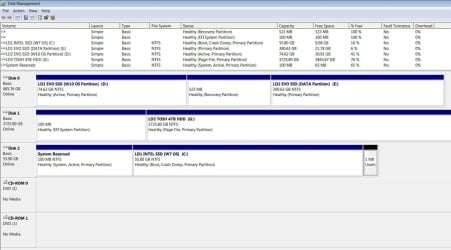
I'd found out about the 4TB & GPT issue beforehand but the MS adding the other small partitions AFTERWARDS. Disk Management shows the EFT System Partition but not the Reserved Partition that shows up in MiniTool PW. Also DM shows a 1MB unallocated partition at the end of C: but MiniTool also shows a 1MB unallocated space partition at the beginning of the drive. I "think' because I had recently restored that drive from an image backup & selected "align sectors for SSD" or something like that. I guess if I do so again w/o selecting that option they wouldn't be put there. It's just annoying having these extra "spaces" there even though negligible in size! The disk numbers (0,1,2) also got rearranged even though I only disconnected/replaced the 1TB that had been Disk 2 but the new drive is now Disk 1! Strangely in MPW the Disks are shown as 1,2 & 3 - not starting w/ Disk 0. Confusing & screwy!

Untitled-1.jpg
 

My Computers My Computers

  • At a glance

    Windows 7 Home Premium 64bit with SP1, OEMIntel Core i7-3770G Skill 8GB (2x4GB) Ripkaws PC3-12800 DDR3 16...EVGA, GeForce GTX 560 Ti FPB (AR) 1GB GDDR5 4...
    Computer type
    PC/Desktop
    OS
    Windows 7 Home Premium 64bit with SP1, OEM
    CPU
    Intel Core i7-3770
    Motherboard
    Gigabyte GA-Z77X-UD3H LGA1155
    Memory
    G Skill 8GB (2x4GB) Ripkaws PC3-12800 DDR3 1600MHz
    Graphics Card(s)
    EVGA, GeForce GTX 560 Ti FPB (AR) 1GB GDDR5 4104MHz
    Sound Card
    Creative Sound Blaster Audigy SE, 7.1 channels, 24 bit
    Monitor(s) Displays
    HP ZR24w
    Screen Resolution
    1920x1200 - 60Hz
    Hard Drives
    Intel 60GB 520 Series SSD, MLC SandForce SF-2281, 550/475 MB/s

    WD 1TB Caviar Blue, SATA 6 Gb/s, 7200 RPM
    PSU
    Seasonic X-560, 80 PLUS Gold
    Case
    Cooler Master Elite 430
    Cooling
    2 stock fans
  • Antivirus
    MS Security Essentials
Back
Top