r3dfox, modern Firefox for Windows 7!

I missed the notification email for this, so my response is a bit late.

I haven't been here in a while.I've installed r3dfox, but it has no resemblance to my Waterfox, which is very outdated, but still runs XUL. Can I copy over my Waterfox profile?

I assume you mean Waterfox Classic. It might work, but that is such a big gap that I'd rather manually transfer everything over so there's not any weird bugs.

Where do I put my bookmark bar?

I'm not entirely sure what you mean? It just goes below the address bar. It can only be there unless you install a theme of some sort.
How do I get those apps off my homepage? I don't use any of those sites except Youtube, which I access from a bookmark.. My home page should be aldaily.com.
I disable that page on my browsers, but iirc you should be able to right click the site and delete. If not, hovering should show three dots or some sort of indicator in the corner, which from there you can delete it from the page.

- - - Updated - - -

I am sticking with FF ESR.
tried supermium, r3dfox. The pink version looked weird to me. ;)

You can disable the colors and revert to the stock UI by disabling a few settings. Use r3dfox theme styles, Backgrounds for tabs and other toolbar items, and Use r3dfox colors.
 

My Computers My Computers

System One System Two

  • Computer type
    PC/Desktop
    Computer Manufacturer/Model Number
    Custom build
    OS
    Windows 8.1 x64
    CPU
    AMD Ryzen 9 5950X
    Motherboard
    MSI Prestige X570 Creation
    Memory
    Patriot Viper Steel 64GB 2x32GB@3800MHz
    Graphics Card(s)
    EVGA Geforce RTX 2080 Ti Black
    Sound Card
    The most generic/cheap USB to Toslink adapter you can find
    Monitor(s) Displays
    Acer CB271HU, Viotek GNV27DB, and Acer G247HL
    Screen Resolution
    2x1440p, 1x1080p
    Hard Drives
    Kingsman KP800 2TB M.2 SSD
    WD Black SN750 2TB M.2 SSD
    WD Blue 2TB SATA SSD
    PSU
    EVGA SuperNOVA 850 G6
    Case
    Fractal Design Pop Air
    Cooling
    Scythe FUMA 2 and a bunch of Noctua Redux fans
    Keyboard
    EVGA Z20
    Mouse
    Logitech G700
    Internet Speed
    Symmetrical gigabit fiber
    Browser
    r3dfox
    Other Info
    I am not baller. I just got lucky and somehow ended up with two 5950X's for free. This would be extremely goofy like 5950X and GTX 970 had that not happened.
  • Computer type
    PC/Desktop
I can't use 115ESR because there are no boxes or lines dividing things and no color. It's all just one page of text. No, I don't have a color theme.

RE: r3d:
OK, I removed the links on the homepage.
I want my homepage to be aldaily.com.
And I don't use Google, but Duckduckgo.
I have 1400 bookmarks in Waterfox, and I copied them into the profile, but they're not showing up
Ditto the passwords aren't coming up.

Maybe I copied them into the wrong place. Exactly where is the profile? I already have one for Firefox + the default profile, one for Waterfox.
 

My Computer My Computer

Computer type
PC/Desktop
Computer Manufacturer/Model Number
HP p6-2020t
OS
Win 7 Ult 64-bit
CPU
G620 2.6GHZ Pentium R
Memory
6 GB
Monitor(s) Displays
25" HPLV2311
Screen Resolution
1920 x 1200
Hard Drives
1 SATA, 1 exterior SATA
Case
HP
Cooling
PSU
Antivirus
Glasswire
Browser
Waterfox; Firefox; Chrome for work
Other Info
Firewall--Glasswire
Similar specs in Gateway DX4200
Verizon FIOS Wired network

1 other Win7 computer-- has SSD
RE: r3d:
I want my homepage to be aldaily.com.
And I don't use Google, but Duckduckgo.
I have 1400 bookmarks in Waterfox, and I copied them into the profile, but they're not showing up
Ditto the passwords aren't coming up.

r3dfox is managing settings exactly the same way that Firefox/Mozilla does, so yours isn't strictly a r3dfox issue. It sounds like you're unfamiliar with how Firefox does things.

re: homepage . . .
Open aldaily.com in a tab, and close all other tabs. Got to Settings->Home, and under "New Windows and Tabs" click "Use Current Page".

re: default search engine . . .
Go to Settings->Search, and under "Default Search Engine" click "Google" and from the drop-down menu select "DuckDuckGo".

re: bookmarks . . .
How did you transfer bookmarks?

1. Easy way is to launch Waterfox, open "Manage Bookmarks", "Import and Backup", and "Backup". That will create a .json file, which you can put on your desktop for easy access. Close Waterfox, launch r3dfox, open "Manage Bookmarks", "Import and Backup", and "Restore". Navigate to the .json file on your desktop, and it will replace all r3dfox bookmarks with those from the Waterfox backup, in exactly the same places and folder structure as you're used to. (Warning: this will replace everything in r3dfox, so if you have anything you want saved that's only in r3dfox, temporarily save those some other way.)

2. Less convenient is to use "Manage Bookmarks", "Import and Backup", "Export Bookmarks to HTML" and on the other browser "Import Bookmarks from HTML". If you transfer bookmarks that way, Mozilla does not replace anything already in r3dfox and buries the imports deeper down the menu structure. Open "Manage Bookmarks" on r3dfox and scan all the subfolders. You should find them somewhere in there, and you'll have to move them to where you want so they're more easily accessible. Again, not recommended, use Method 1.

3. Another way is to create a Mozilla account (very top option in the drop down menu if you click the 3-bar icon in the upper-right corner of the browser). Once created, you have the option of what to sync with the Mozilla cloud -- bookmarks, passwords, history, extensions, et al. Do that in both Waterfox and r3dfox, and both browsers will be automatically synced for you -- and kept in sync as you continue to use multiple browsers in the future.

re: passwords . . .
Syncing a Mozilla account should work for that, too, but other than that I don't know more. Instead, I recommend using a real, dedicated password manager such as Bitwarden Free, and discourage people from storing passwords in the browser.
 

My Computer My Computer

Computer type
PC/Desktop
Computer Manufacturer/Model Number
Dell Optiplex 7050
OS
Windows 7/8.1/10 multiboot
CPU
Intel Core i7-7700
Motherboard
Dell, Intel Q270 chipset
Memory
48GB (2x16GB Crucial DDR4-3200 + 2x8GB Hynix DDR4-2400)
Graphics Card(s)
Intel HD630 + AMD Radeon R7 450 PCIe
Monitor(s) Displays
Asus VC279 (27")
Screen Resolution
1920x1080
Hard Drives
Toshiba M.2 NVMe (256GB),
Samsung 960 Evo (500GB),
WD Red Plus 80EFBX (8TB)
"r3dfox is managing settings exactly the same way that Firefox/Mozilla does, so yours isn't strictly a r3dfox issue. It sounds like you're unfamiliar with how Firefox does things."
=======================================================
I used Firefox for many years, but it had a different interface, extensions were still XUL, and settings were accessed from "Tools" in the Menu bar, not hidden away. I'm now running into trouble with some of the sites where I work because they don't want Waterfox.

BOOKMARKS: I need 2 rows for my bookmark folders. Is there an extension for that?

RE: MOZILLA ACCOUNT-- Mozilla has started spying on us, and I don't want a Mozilla account. That's why I switched to Waterfox some years ago, but my version is getting outdated and some sites don't render properly. I open those few sites in Chrome, but the Chrome that's compatible with Win 7 is also getting buggy.

PASSWORDS--- I had Bitwarden for some years, and it stopped working with Win 7. I had a long correspondence with the Bitwarden team, and they said they can't guarantee it will work on 7 anymore. I tried several other managers years ago, but they were all buggy. I reluctantly switched to PW's in my browser.

PROFILE--Is it the one under myname/Doc and Settings/Application Data/Eclipse Community in the filing system?

EXTENSIONS-- Where are the extensions for r3d?
 

My Computer My Computer

Computer type
PC/Desktop
Computer Manufacturer/Model Number
HP p6-2020t
OS
Win 7 Ult 64-bit
CPU
G620 2.6GHZ Pentium R
Memory
6 GB
Monitor(s) Displays
25" HPLV2311
Screen Resolution
1920 x 1200
Hard Drives
1 SATA, 1 exterior SATA
Case
HP
Cooling
PSU
Antivirus
Glasswire
Browser
Waterfox; Firefox; Chrome for work
Other Info
Firewall--Glasswire
Similar specs in Gateway DX4200
Verizon FIOS Wired network

1 other Win7 computer-- has SSD
I used Firefox for many years, [...] and settings were accessed from "Tools" in the Menu bar, not hidden away.
Settings are still accessible from "Tools" in the Menu bar. Have you enabled the Menu Bar in the r3dfox interface? (Right-click the top of the browser window and tick the "Menu Bar" option.)


I need 2 rows for my bookmark folders. Is there an extension for that?
[...]
Where are the extensions for r3d?
Did you have a 2-row extension for your bookmarks toolbar before? If so, the same extension should work for r3dfox.

r3dfox is a Firefox fork, so uses the same extensions as Firefox. Click the 3-bar hamburger menu (or if your Menu Bar is enabled, click "Tools") and select "Add-ons and Themes". From there, click "Extensions" and you'll find a box at the top to search the Firefox library. Or just go to "addons.mozilla.org" yourself.


Mozilla has started spying on us, and I don't want a Mozilla account.

That's a valid concern for some people, so they should not use a Mozilla acct. I mentioned it because it is one way to sync your bookmarks and more from an old browser. Of course, one could always create an acct and after syncing everything log out from the Mozilla acct (and optionally delete it), but since there are other ways to move bookmarks there's no need to even create a Mozilla acct in the first place if you don't want.


I switched to Waterfox some years ago, but my version is getting outdated and some sites don't render properly. I open those few sites in Chrome, but the Chrome that's compatible with Win 7 is also getting buggy.
That's precisely the use case for forks like r3dfox (in lieu of Firefox/Waterfox) and Supermium (in lieu of Chrome). The core browsers are still being developed for later Windows versions, so the forks developers are back-porting those to keep them current for Win7 users when the core developers won't.


I had Bitwarden for some years, and it stopped working with Win 7. I had a long correspondence with the Bitwarden team, and they said they can't guarantee it will work on 7 anymore. I tried several other managers years ago, but they were all buggy. I reluctantly switched to PW's in my browser.
The standalone Bitwarden app for Win 7 has indeed been deprecated, but the Bitwarden browser extension still works perfectly fine with Win 7 browsers. I'm sure you can't have any objection to using the browser extension because you're basically doing the same thing by using the browser's password manager.

Bitwarden is preferable to using the browser's pswd mgr because it's cross-browser, it's cross-platform, it's developed by people whose primary business is keeping secrets (versus a browser developer, where the pswd mgr is a tangential activity), and it's kept up to date with the latest pswd methodologies.
 

My Computer My Computer

Computer type
PC/Desktop
Computer Manufacturer/Model Number
Dell Optiplex 7050
OS
Windows 7/8.1/10 multiboot
CPU
Intel Core i7-7700
Motherboard
Dell, Intel Q270 chipset
Memory
48GB (2x16GB Crucial DDR4-3200 + 2x8GB Hynix DDR4-2400)
Graphics Card(s)
Intel HD630 + AMD Radeon R7 450 PCIe
Monitor(s) Displays
Asus VC279 (27")
Screen Resolution
1920x1080
Hard Drives
Toshiba M.2 NVMe (256GB),
Samsung 960 Evo (500GB),
WD Red Plus 80EFBX (8TB)
Thanks. I'll start setting up 3rd and come back if I have more questions.
 

My Computer My Computer

Computer type
PC/Desktop
Computer Manufacturer/Model Number
HP p6-2020t
OS
Win 7 Ult 64-bit
CPU
G620 2.6GHZ Pentium R
Memory
6 GB
Monitor(s) Displays
25" HPLV2311
Screen Resolution
1920 x 1200
Hard Drives
1 SATA, 1 exterior SATA
Case
HP
Cooling
PSU
Antivirus
Glasswire
Browser
Waterfox; Firefox; Chrome for work
Other Info
Firewall--Glasswire
Similar specs in Gateway DX4200
Verizon FIOS Wired network

1 other Win7 computer-- has SSD
It was only around 2 weeks ago that I first heard of r3dfox in another thread in these forums and the interest has remained with me. I only have and use Win7 computers and have been a long time user of Firefox, currently using version 115.20.0 ESR. I do intend to remain with Firefox but would like to create the situation where I could try out and familiarize myself with r3dfox.

I have actually managed to download it onto a USB drive to experiment with it from there but that does not work as it attempts to install into my Hard Drive (C:). What I would like to do is get it to work from the USB drive and it looks like I would need to make the USB drive bootable, which I have never done.
I would appreciate any help in achieving that aim and first of all what would be the ideal size of USB drive to use? I have seen mention of using "Diskpart" as a means of doing it manually and also a program called "Rufus" which might be easier.

Could anyone provide simple instructions on how to use either of those options.
 

My Computers My Computers

System One System Two

  • Computer type
    PC/Desktop
    Computer Manufacturer/Model Number
    HP Pavilion Core i7
    OS
    Window 7 Home Premium (X64)
    Antivirus
    AVG Free
    Browser
    Firefox with Startpage
  • Computer type
    PC/Desktop
    System Manufacturer/Model Number
    HP Z240 Tower Workstation 64-bit
    OS
    Windows 7 Ultimate Service Pack 1
    Memory
    16GB
    Browser
    Firefox with Startpage
    Other Info
    Laptops x 2
    Dell Latitude E7470-i7-8GB RAM-256GB SSD- Win.7 Pro
    Dell Latitude E7270-i7-8GB Ram-256GB SSD- Win.7 Pro
r3dfox, owner is K4sum1.
its install, its run, it settings and its looking like after install, are very similar to FF. except its pink color (it can be adjusted per K4sum1)

you shouldn't see any significant differences. and if you don't like it, it's easy to remove it.

presently, I'm using FF ESR. but as mentioned, it's an option once FF ESR unavailable or no update/support any longer. Otherwise, browser user may have to run VxKex and Chromium patch, which are more technical and more buggy.

It's NOT an OS. no need of "Diskpart" "Rufus" or USB drive.
 

My Computers My Computers

System One System Two

  • Computer type
    PC/Desktop
    Computer Manufacturer/Model Number
    HP Elite 800 G5
    OS
    Windows 7 Pro 64-bit
    CPU
    I7-9700
    Memory
    32 GB
  • Computer type
    Laptop
    System Manufacturer/Model Number
    ASUS UX305C
    OS
    Windows 7 Pro 64-bit
[...] would like to create the situation where I could try out and familiarize myself with r3dfox.
I have actually managed to download it onto a USB drive to experiment with it from there but that does not work as it attempts to install into my Hard Drive (C:).
For testing purposes, just use the portable version. No install or uninstall required, just unpack it to a folder that you can just throw away later if you tire of it.

The portable versions are provided in .7z format, so download, create a new folder on your desktop and name it whatever you want, then extract the contents of the download to that folder. Open the folder and launch the .exe to start the browser.

(Note you could put that folder on a USB stick if you choose, but since there's no install/uninstall involved I'd just leave it somewhere on your hard drive for faster performance.)

If you decide not to keep it, just toss the folder, no uninstall necessary. If you decide to keep it, you may want to move the folder off your desktop to elsewhere and just leave a shortcut to the .exe on your desktop or Start Menu.

Disclaimer: The 32-bit varieties seem to work just fine but the 64-bit variations of the most recent versions don't launch for me, telling me my Win7 system is missing a DLL of some sort. Since there are alternatives, I didn't bother to sort that out. Just stick with the 32-bit variations, or fall back to v.131, whose 64-bit variation seems to work fine.
 

My Computer My Computer

Computer type
PC/Desktop
Computer Manufacturer/Model Number
Dell Optiplex 7050
OS
Windows 7/8.1/10 multiboot
CPU
Intel Core i7-7700
Motherboard
Dell, Intel Q270 chipset
Memory
48GB (2x16GB Crucial DDR4-3200 + 2x8GB Hynix DDR4-2400)
Graphics Card(s)
Intel HD630 + AMD Radeon R7 450 PCIe
Monitor(s) Displays
Asus VC279 (27")
Screen Resolution
1920x1080
Hard Drives
Toshiba M.2 NVMe (256GB),
Samsung 960 Evo (500GB),
WD Red Plus 80EFBX (8TB)
Thanks for the responses siliconbeaver and dg1261.
I followed the link provided and although I could not see an obvious link for the portable version I just downloaded the latest 133.0.4.win64. and it is working fine. I did not like the default dark theme or the large tiles with links so prominently displayed but managed to remove them and get my preferred white background displaying.

After adding a few of my normal bookmarks to the top bar it is a pleasure to use and I have placed it's icon next to Firefox on my taskbar.
 

My Computers My Computers

System One System Two

  • Computer type
    PC/Desktop
    Computer Manufacturer/Model Number
    HP Pavilion Core i7
    OS
    Window 7 Home Premium (X64)
    Antivirus
    AVG Free
    Browser
    Firefox with Startpage
  • Computer type
    PC/Desktop
    System Manufacturer/Model Number
    HP Z240 Tower Workstation 64-bit
    OS
    Windows 7 Ultimate Service Pack 1
    Memory
    16GB
    Browser
    Firefox with Startpage
    Other Info
    Laptops x 2
    Dell Latitude E7470-i7-8GB RAM-256GB SSD- Win.7 Pro
    Dell Latitude E7270-i7-8GB Ram-256GB SSD- Win.7 Pro
I followed the link provided and although I could not see an obvious link for the portable version I just downloaded the latest 133.0.4.win64.
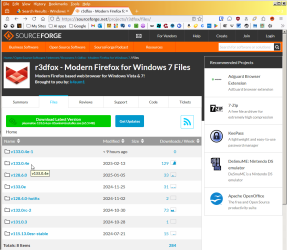
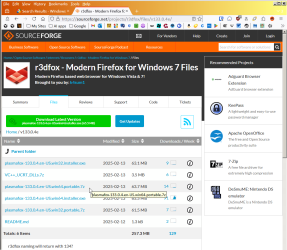
The link takes you to the sourceforge page with all the r3dfox versions. There are subfolders for the forks of Firefox 115 ESR and Firefox 128 ESR, as well -- though note, FTR, that FF 128 ESR does not work on Win7 whereas r3dfox does.

r3dfox-github-1.png

Click the link to the version you want, and you'll find the installable and portable versions in both 32-bit and 64-bit varieties.

r3dfox-github-2.png

(Aside: the "VC++..." download might be the missing DLLs I alluded to in my previous post, but I did not explore further because I have an aversion to making any permanent changes to my base Win7 system unless I find an inescapable reason to do so. In my case it wasn't inescapable because there are other ways to run r3dfox.)

BTW, my aversion to permanent changes includes browsers -- not counting IE, I have nine different browsers at my disposal, but all nine are portable versions -- so no permanent changes, easy to upgrade versions, and easy to even have multiple versions of the same browser if I should I want. For instance, I don't like committing to a new version without trying it out first, and I don't want to lose my old version while I'm testing out the newer version. Firefox, for example, had a history of just blowing away extensions I used to rely on, so I didn't want to commit to an upgrade until I verified developers had time to create compatible extensions.
 

My Computer My Computer

Computer type
PC/Desktop
Computer Manufacturer/Model Number
Dell Optiplex 7050
OS
Windows 7/8.1/10 multiboot
CPU
Intel Core i7-7700
Motherboard
Dell, Intel Q270 chipset
Memory
48GB (2x16GB Crucial DDR4-3200 + 2x8GB Hynix DDR4-2400)
Graphics Card(s)
Intel HD630 + AMD Radeon R7 450 PCIe
Monitor(s) Displays
Asus VC279 (27")
Screen Resolution
1920x1080
Hard Drives
Toshiba M.2 NVMe (256GB),
Samsung 960 Evo (500GB),
WD Red Plus 80EFBX (8TB)
The Firefox 128 ESR in your post was really making me exciting awhile. then it's noticed that it's for Windows 10 (being obsolete) than Windows 7. ;)


Anyway, by Nov 2025, Support for Windows will be only on 11 24H2.

Windows XP/7/8.1/10, Windows 11 22H2, 23H2 , , , NOT supported any longer.

Recent note by Microsoft hints, Intel 8th/9th/10th gen CPUs may be NOT supported too (NOT in last support list. Right like present Kaby Lake CPU).

WinTel is taking action to make those hardware obsolete.
 

My Computers My Computers

System One System Two

  • Computer type
    PC/Desktop
    Computer Manufacturer/Model Number
    HP Elite 800 G5
    OS
    Windows 7 Pro 64-bit
    CPU
    I7-9700
    Memory
    32 GB
  • Computer type
    Laptop
    System Manufacturer/Model Number
    ASUS UX305C
    OS
    Windows 7 Pro 64-bit
There are subfolders for the forks of Firefox 115 ESR and Firefox 128 ESR, as well -- though note, FTR, that FF 128 ESR does not work on Win7 whereas r3dfox does.

The Firefox 128 ESR in your post was really making me exciting awhile. then it's noticed that it's for Windows 10 (being obsolete) than Windows 7.


Note my post was referencing the r3dfox forks of Firefox 115 and 128.

r3dfox took the Win7-unsupported Firefox 128 ESR and back-ported that to a Win7-compatible r3dfox 128 ESR.
 

My Computer My Computer

Computer type
PC/Desktop
Computer Manufacturer/Model Number
Dell Optiplex 7050
OS
Windows 7/8.1/10 multiboot
CPU
Intel Core i7-7700
Motherboard
Dell, Intel Q270 chipset
Memory
48GB (2x16GB Crucial DDR4-3200 + 2x8GB Hynix DDR4-2400)
Graphics Card(s)
Intel HD630 + AMD Radeon R7 450 PCIe
Monitor(s) Displays
Asus VC279 (27")
Screen Resolution
1920x1080
Hard Drives
Toshiba M.2 NVMe (256GB),
Samsung 960 Evo (500GB),
WD Red Plus 80EFBX (8TB)
Reply to dg1261 #31

Your post has convinced me that I should not have downloaded then installed r3dfox latest version "133.0.4.win64" into my (C:) as I have done. Following your reply I have now managed to download the following:

plasmafox-133.0.4.en-US.win64.portable.7z which is now sitting in my (C:) "Downloads" folder.

Recalling a previous post from elsewhere, possibly yourself, I believe the above download should be copied into a new folder on my desktop then run from there. It can be moved elsewhere later on then a shortcut created. Would that be correct?

I intend to uninstall my present r3dfox shortly then use the portable version. If further evidence was required in support of using your portable versions here is what is showing on my computer at the moment:

%appdata% > Roaming > Eclipse Community > Plasmafox > Profiles
regedit > HKEY_CURRENT_USER > Software > Eclipse Community > Plasmafox
regedit > HKEY_LOCAL MACHINE > SOFTWARE > Eclipse Community > Plasmafox > TaskBarIDs
 

My Computers My Computers

System One System Two

  • Computer type
    PC/Desktop
    Computer Manufacturer/Model Number
    HP Pavilion Core i7
    OS
    Window 7 Home Premium (X64)
    Antivirus
    AVG Free
    Browser
    Firefox with Startpage
  • Computer type
    PC/Desktop
    System Manufacturer/Model Number
    HP Z240 Tower Workstation 64-bit
    OS
    Windows 7 Ultimate Service Pack 1
    Memory
    16GB
    Browser
    Firefox with Startpage
    Other Info
    Laptops x 2
    Dell Latitude E7470-i7-8GB RAM-256GB SSD- Win.7 Pro
    Dell Latitude E7270-i7-8GB Ram-256GB SSD- Win.7 Pro
Recalling a previous post from elsewhere, possibly yourself, I believe the above download should be copied into a new folder on my desktop then run from there. It can be moved elsewhere later on then a shortcut created. Would that be correct?

Correct.

Step 1: Download the .7z portable version you're interested in.

Note that if you choose one of the "Plasma" versions (e.g., 133) you may also need to download the VCC++ from the same SourceForge directory. (To confirm my suspicion back in post #29, this does indeed resolve the issue I had with r3dfox 133 complaining of a missing DLL on my Win7 system. The 131 version does not need the extra VCC++ stuff.)

Step 2: Create a folder on your desktop and name it something relevant, such as "r3dfox 133".

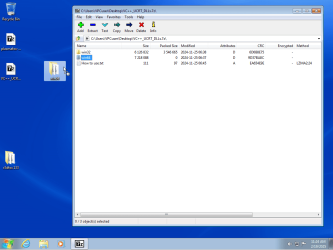
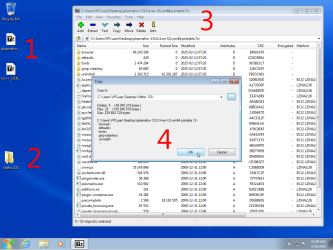
Step 3: Launch 7-Zip and open the .7z file you downloaded.

Step 4: Extract the contents to the "r3dfox 133" folder you created.

step03.png

Step 5: If you need it, open the VCC++ download in 7-Zip. Drag and drop either the Win32 or Win64 folder (consistent with whichever r3dfox flavor you downloaded) to your desktop. Then open that folder and move or copy its contents to the "r3dfox 133" folder.

step05.png
step06.png

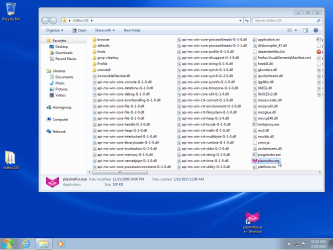
Done. That's all there is to "installing" a portable version. You can now delete (or archive for safekeeping) the .7z files and delete the copy of the VCC++ "Win64" folder you placed on your desktop.

Now you can open the "r3dfox 133" folder and launch the r3dfox or plasma .exe.

step08.png

You may optionally wish to create a shortcut on your desktop to the .exe so that it can be launched more easily. Note you can move the "r3dfox 133" folder off your desktop if you prefer a cleaner look, in which case a shortcut to wherever you put it can come in quite handy.

Note for future: Remember that by using portable versions, you can have more than one version on your computer at a time. For instance, let's say a r3dfox 140 eventually becomes available. You can put it in its own folder and have access to both 133 and 140. That allows you to start migrating to 140 at your leisure without having to leave 133 until you're ready to.
 

My Computer My Computer

Computer type
PC/Desktop
Computer Manufacturer/Model Number
Dell Optiplex 7050
OS
Windows 7/8.1/10 multiboot
CPU
Intel Core i7-7700
Motherboard
Dell, Intel Q270 chipset
Memory
48GB (2x16GB Crucial DDR4-3200 + 2x8GB Hynix DDR4-2400)
Graphics Card(s)
Intel HD630 + AMD Radeon R7 450 PCIe
Monitor(s) Displays
Asus VC279 (27")
Screen Resolution
1920x1080
Hard Drives
Toshiba M.2 NVMe (256GB),
Samsung 960 Evo (500GB),
WD Red Plus 80EFBX (8TB)
Thanks again dg1261 for your reply.

I did find it a bit complicated, particularly as I do not have 7-Zip and have never used it. However after a few failed attempts I have managed to get the unzipped folder on my desktop.

I now have r3dfox portable up and running. I was not sure where to place the r3dfox133 folder and ended up putting it in my (C:) alongside Program Files & Program Files (x86) etc, if that is not a good idea what would be a better place?

One concern I had when installing, my AVG Antivirus Free came up with a warning with the following message:

"We've blocked plasmafox.exe because it was infected with IDP.Generic"

After all the trouble I had getting here I did not wish to fail again so in "More Options" I allowed an exemption for it as it most likely was a false positive.
 

My Computers My Computers

System One System Two

  • Computer type
    PC/Desktop
    Computer Manufacturer/Model Number
    HP Pavilion Core i7
    OS
    Window 7 Home Premium (X64)
    Antivirus
    AVG Free
    Browser
    Firefox with Startpage
  • Computer type
    PC/Desktop
    System Manufacturer/Model Number
    HP Z240 Tower Workstation 64-bit
    OS
    Windows 7 Ultimate Service Pack 1
    Memory
    16GB
    Browser
    Firefox with Startpage
    Other Info
    Laptops x 2
    Dell Latitude E7470-i7-8GB RAM-256GB SSD- Win.7 Pro
    Dell Latitude E7270-i7-8GB Ram-256GB SSD- Win.7 Pro
One concern I had when installing, my AVG Antivirus Free came up with a warning with the following message:

"We've blocked plasmafox.exe because it was infected with IDP.Generic"

After all the trouble I had getting here I did not wish to fail again so in "More Options" I allowed an exemption for it as it most likely was a false positive.

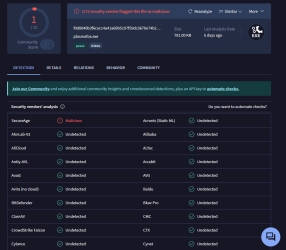
Yeah, looks like a false positive to me. Virustotal says only one of 72 vendors claims that file is malicious. Interestingly, Virustotal says the Avast/AVG engine (5th line down) did not detect anything wrong with it.

virustotal-plasmafox.png
 

My Computer My Computer

Computer type
PC/Desktop
Computer Manufacturer/Model Number
Dell Optiplex 7050
OS
Windows 7/8.1/10 multiboot
CPU
Intel Core i7-7700
Motherboard
Dell, Intel Q270 chipset
Memory
48GB (2x16GB Crucial DDR4-3200 + 2x8GB Hynix DDR4-2400)
Graphics Card(s)
Intel HD630 + AMD Radeon R7 450 PCIe
Monitor(s) Displays
Asus VC279 (27")
Screen Resolution
1920x1080
Hard Drives
Toshiba M.2 NVMe (256GB),
Samsung 960 Evo (500GB),
WD Red Plus 80EFBX (8TB)
Finally got it set up just as I was hoping with the Startpage Search Engine and Homepage with UBlock Origin included.

As fate would have it I have now seen the following for Win.7:

Mozilla has announced that Firefox 115 ESR will remain supported until at least September 2025. Last Firefox will be ESR115.27, this could mean that there will be another support extension after evaluation in August 2025.
 

My Computers My Computers

System One System Two

  • Computer type
    PC/Desktop
    Computer Manufacturer/Model Number
    HP Pavilion Core i7
    OS
    Window 7 Home Premium (X64)
    Antivirus
    AVG Free
    Browser
    Firefox with Startpage
  • Computer type
    PC/Desktop
    System Manufacturer/Model Number
    HP Z240 Tower Workstation 64-bit
    OS
    Windows 7 Ultimate Service Pack 1
    Memory
    16GB
    Browser
    Firefox with Startpage
    Other Info
    Laptops x 2
    Dell Latitude E7470-i7-8GB RAM-256GB SSD- Win.7 Pro
    Dell Latitude E7270-i7-8GB Ram-256GB SSD- Win.7 Pro
I was not sure where to place the r3dfox133 folder and ended up putting it in my (C:) alongside Program Files & Program Files (x86) etc, if that is not a good idea what would be a better place?

You may want to rethink the idea of mixing portable apps in with the places traditionally used by your installed programs. You could confuse yourself later trying to remember which folder is a portable app and which is an installed app, which might entail assorted registry entries or pieces of itself in other system folders (e.g., "appdata" and "programdata"). That could have an impact on remembering how to go about upgrading or deleting any particular app in the future.

I'd suggest keeping portable apps together in a separate folder so that it's instantly visible which portable apps you have, and readily apparant how to upgrade or delete any if and when you choose.

I use quite a lot of portable apps -- for virtually anything I install, I'll first check if it has a portable version and choose that instead of an installable version if I can. For an example, I keep mine in "D:\Browsers" and "D:\PortableApps":

portapps.png

(Incidentally, if you look closely you might spot I have multiple versions of four apps at the moment -- Audacity, FoxitReader, Ventoy, and VirtualDub -- where I haven't fully migrated off the older version yet. You can't do that with installable apps!)

BTW, note that even 7-Zip has a portable version, too.

Aside, FWIW:
My system has four drives (2 SSDs and 2 HDDs), and you'll notice I have chosen *not* to keep my portable apps on the OS "C:" partition. That provides a unique advantage when it comes to imaging or restoring the OS partition. I could restore an image of the OS partition from even a year ago (which I regularly do -- see my "Rolling Clean Install" strategy) and I'll still have the current complement of my browsers and portable apps, without having to update any of them after the image restore.

Anyway, just more food for thought in configuring your own system.
 

My Computer My Computer

Computer type
PC/Desktop
Computer Manufacturer/Model Number
Dell Optiplex 7050
OS
Windows 7/8.1/10 multiboot
CPU
Intel Core i7-7700
Motherboard
Dell, Intel Q270 chipset
Memory
48GB (2x16GB Crucial DDR4-3200 + 2x8GB Hynix DDR4-2400)
Graphics Card(s)
Intel HD630 + AMD Radeon R7 450 PCIe
Monitor(s) Displays
Asus VC279 (27")
Screen Resolution
1920x1080
Hard Drives
Toshiba M.2 NVMe (256GB),
Samsung 960 Evo (500GB),
WD Red Plus 80EFBX (8TB)
Hi, I posted about 2 weeks ago, and I've been setting up my r3dFox, on my Win7. I've copied over my bookmarks and set a theme
A few problems:

1--I had previously removed Bitwarden because it stopped working on Win 7. The people at Bitwarden said they can't guarantee it for 7. My vault is still at their site. I've downloaded a new copy, and tried installing it again, and I get an error that it can't install because there's something wrong with my internet connection. There's nothing wrong with my connection.

2--So I installed the extension just for Firefox, from firefox extensions site, but the passwords don't appear in the context menu.

3--I work online and sometimes have 8-9 tabs open, and I need to flip back and forth all day. On Waterfox Classic I had "Colorful Tabs," which colors each tab a different color. None of the color-tabs extensions for r3dFox work. I've tried all of them. The best I got was to color the current tab.

4--I've copied my userchrome.css and usercontent.css from Waterfox, but none of it works. The most important things to me are
4a--already visited URLs appear in orange in text at sites.
4b--I had 2 rows of bookmarks across the top, but I can't find any extension that does that, so I probably had it in my usercontent.css.
Does anyone here do coding?
 

My Computer My Computer

Computer type
PC/Desktop
Computer Manufacturer/Model Number
HP p6-2020t
OS
Win 7 Ult 64-bit
CPU
G620 2.6GHZ Pentium R
Memory
6 GB
Monitor(s) Displays
25" HPLV2311
Screen Resolution
1920 x 1200
Hard Drives
1 SATA, 1 exterior SATA
Case
HP
Cooling
PSU
Antivirus
Glasswire
Browser
Waterfox; Firefox; Chrome for work
Other Info
Firewall--Glasswire
Similar specs in Gateway DX4200
Verizon FIOS Wired network

1 other Win7 computer-- has SSD
Back
Top