Solved Blue screen shutdown - about 3 years since the last bsod help on here

CHRISX

New member
Member
VIP
Local time
9:03 AM
Messages
117
Location
LONDON UK
Hello Members,

My Computer suffered a Bluescreen / BSOD shutdown on Sunday night - I was not actually doing anything on it and was out of the room when it happened - at the time I only had an email account open and one other website.

I was able to restart it in Safe Mode and the BSOD did not happen again straight away and my computer was left on for another few hours to see if it was O.K. - there was no further BSOD on Sunday night.

On Monday my Computer had been on for quite a few hours with no problems before a period of time in the evening when I was away from it again / out of the room - almost nothing had been accessed on my computer throughout Monday I just had it turned on but when I looked at the screen [displayed on my T.V.] there was a BSOD.

I mentioned the computer screen view was displayed on my T.V. because I often have it like that where I go back to look at the computer or do something on it between watching T.V. programs.

I think it was about 3 years ago that I was helped on here with a previous BSOD by some very knowledgeable and helpful Members.

I have uploaded the zip file that was created tonight [Tuesday approx. 01:30] by downloading and running the Forum instructed DM Log Collector file.

Could some BSOD Expert Members please look at the zip file results and help me to rectify whatever has caused the 2 x recent BSOD`s please.

I have very little knowledge of `Computing` as I just use my computer for Emailing, online Shopping and browsing various UK online Newspapers to read up on current events so any advice or instructions would need to be described in simple terms please.

The only recent Software change to my Computer was that I had to uninstall Microsoft Security Essentials because it would not update and I then downloaded and installed AVAST Antivirus the Free version - but that was about 3 or 4 weeks ago and the computer has been on all day every day since the installation without any problems until Sunday night.

Thanks for reading this and hopefully being able to help me with this - my use of the Computer is vitally important to me because I am Housebound and have to be able to order Grocery Shopping Home deliveries online.

Chris
 

Attachments

Last edited:

My Computer My Computer

At a glance

WINDOWS 7 HOME PREMIUM
Computer type
PC/Desktop
Computer Manufacturer/Model Number
ACER 3800
OS
WINDOWS 7 HOME PREMIUM
Keyboard
LOGITECH WIRELESS
Mouse
LOGITECH WIRELESS
Internet Speed
2.5Mbps
Antivirus
AVAST 2025 FREE VERSION
Browser
FIREFOX OR GOOGLE CHROME
Hello Members,

My Computer suffered a Bluescreen / BSOD shutdown on Sunday night - I was not actually doing anything on it and was out of the room when it happened - at the time I only had an email account open and one other website.

I was able to restart it in Safe Mode and the BSOD did not happen again straight away and my computer was left on for another few hours to see if it was O.K. - there was no further BSOD on Sunday night.

On Monday my Computer had been on for quite a few hours with no problems before a period of time in the evening when I was away from it again / out of the room - almost nothing had been accessed on my computer throughout Monday I just had it turned on but when I looked at the screen [displayed on my T.V.] there was a BSOD.

I mentioned the computer screen view was displayed on my T.V. because I often have it like that where I go back to look at the computer or do something on it between watching T.V. programs.

I think it was about 3 years ago that I was helped on here with a previous BSOD by some very knowledgeable and helpful Members.

I have uploaded the zip file that was created tonight [Tuesday approx. 01:30] by downloading and running the Forum instructed DM Log Collector file.

Could some BSOD Expert Members please look at the zip file results and help me to rectify whatever has caused the 2 x recent BSOD`s please.

I have very little knowledge of `Computing` as I just use my computer for Emailing, online Shopping and browsing various UK online Newspapers to read up on current events so any advice or instructions would need to be described in simple terms please.

The only recent Software change to my Computer was that I had to uninstall Microsoft Security Essentials because it would not update and I then downloaded and installed AVAST Antivirus the Free version - but that was about 3 or 4 weeks ago and the computer has been on all day every day since the installation without any problems until Sunday night.

Thanks for reading this and hopefully being able to help me with this - my use of the Computer is vitally important to me because I am Housebound and have to be able to order Grocery Shopping Home deliveries online.

Chris
Hello All,

I wondered if there was some reason why after my post had been read 141 times no-one replied ?

I was hoping that one or more of the BSOD experts on here might be kind enough to view the zip file that I attached to my first request for help message and might be able to identify what caused the recent 2 x BSOD events on my Computer.

I thought that if some BSOD expert Forum Members did view the zip file and were not able to identify any likely cause that they might post a reply to let me know that.

Could one or more of the Forum BSOD experts please look at the zip file attached to my first message and let me know if it does show a probable cause for the 2 x BSOD events on my Computer and if so what should I do to rectify the cause ?

I would really appreciate some help from some of the very knowledgeable Members on this excellent Forum please.

Because I am old and Housebound if my Computer becomes unusable I would not even be able to have Food / Supermarket Groceries delivered to my home and I have no other way of obtaining Food etc.

Chris
 

My Computer My Computer

At a glance

WINDOWS 7 HOME PREMIUM
Computer type
PC/Desktop
Computer Manufacturer/Model Number
ACER 3800
OS
WINDOWS 7 HOME PREMIUM
Keyboard
LOGITECH WIRELESS
Mouse
LOGITECH WIRELESS
Internet Speed
2.5Mbps
Antivirus
AVAST 2025 FREE VERSION
Browser
FIREFOX OR GOOGLE CHROME
Hello All,

I wondered if there was some reason why after my post had been read 141 times no-one replied ?

I was hoping that one or more of the BSOD experts on here might be kind enough to view the zip file that I attached to my first request for help message and might be able to identify what caused the recent 2 x BSOD events on my Computer.

I thought that if some BSOD expert Forum Members did view the zip file and were not able to identify any likely cause that they might post a reply to let me know that.

Could one or more of the Forum BSOD experts please look at the zip file attached to my first message and let me know if it does show a probable cause for the 2 x BSOD events on my Computer and if so what should I do to rectify the cause ?

I would really appreciate some help from some of the very knowledgeable Members on this excellent Forum please.

Because I am old and Housebound if my Computer becomes unusable I would not even be able to have Food / Supermarket Groceries delivered to my home and I have no other way of obtaining Food etc.

Chris
Hello All,

Unfortunately I have had another BSOD event on my Computer at about 18:35 BST tonight.

On my Computer I only had 2 Email accounts / programs and an online Newspaper website open when it happened.

I am reluctant to ask Members for help out of sympathy but because of my absolute reliance on my Computer I have no choice.

As I mentioned in my previous posts because I am Housebound with various physical disabilities I would be in serious trouble if my
Computer failed because I would not even be able to arrange online Supermarket Grocery / Food Home deliveries and I have no
other way to get Food.

Could one of the BSOD Expert Members please look at the zip files attached to my original / first support request message above
and today`s attached zip files and let me know what has caused these BSOD events - I would be very grateful.

Hopefully one of the Forum`s BSOD Experts will try to help me because without my Computer I really would be in serious trouble.

Thanks for reading this.

Chris

P.S: zip file created as per Forum instructions attached.
 

Attachments

My Computer My Computer

At a glance

WINDOWS 7 HOME PREMIUM
Computer type
PC/Desktop
Computer Manufacturer/Model Number
ACER 3800
OS
WINDOWS 7 HOME PREMIUM
Keyboard
LOGITECH WIRELESS
Mouse
LOGITECH WIRELESS
Internet Speed
2.5Mbps
Antivirus
AVAST 2025 FREE VERSION
Browser
FIREFOX OR GOOGLE CHROME
Hello All,

Unfortunately I have had another BSOD event on my Computer at about 18:35 BST tonight.

On my Computer I only had 2 Email accounts / programs and an online Newspaper website open when it happened.

I am reluctant to ask Members for help out of sympathy but because of my absolute reliance on my Computer I have no choice.

As I mentioned in my previous posts because I am Housebound with various physical disabilities I would be in serious trouble if my
Computer failed because I would not even be able to arrange online Supermarket Grocery / Food Home deliveries and I have no
other way to get Food.

Could one of the BSOD Expert Members please look at the zip files attached to my original / first support request message above
and today`s attached zip files and let me know what has caused these BSOD events - I would be very grateful.

Hopefully one of the Forum`s BSOD Experts will try to help me because without my Computer I really would be in serious trouble.

Thanks for reading this.

Chris

P.S: zip file created as per Forum instructions attached.

Hello again,

My Computer suffered another BSOD event at about 00:40 today / Sunday.

I have attached another zip file created by the Forum`s dm log collector.exe facility.

Could a Forum BSOD Expert please look at the 3 x zip files that I have attached to these messages and let me know what is causing these BSOD events and if possible what I need to do to resolve the problem ?

I was not downloading anything or on any unusual websites - I had 2 x Email account websites open and a Supermarket Grocery ordering website plus a UK National online Newspaper website open.

When all of these BSOD`s have occured my quite old Computer would have been turned on for quite a few hours - between 9 and 12 hours - is it possible that overheating could produce these BSOD`s ?

If that had been the cause would there be any indication of that in the 3 x different zip files that I have attached to my messages ?

I am getting desperate for a reply now - as I mentioned a couple of times if my Computer malfunctions because of the cause of these BSOD`s [or any other reason] I will be in real trouble because I am Housebound because of various disabilities and I have to be able to order online Supermarket Food Home deliveries - I have no other way of getting Food.

There are other online orders that I need the use of my Computer for such as for arranging Prescription Pain relief and Diabetes medication.

Could a Forum BSOD Expert please look at the 3 x different zip files that I have submitted in my request for help messages and please help me before it is too late - i.e. before my Computer becomes unusable and causes me massive problems.

Thanks for reading this - Please try to help me.

Chris

EDIT: I have just seen that my request for help has had 1671 views but that the first zip file attached to my first request for help message was only viewed 4 times.

I cannot understand why all of those Members were interested enough to view a BSOD help request but there were only 4 views of the first zip file and no-one wanted to try and help me ?
 

Attachments

Last edited:

My Computer My Computer

At a glance

WINDOWS 7 HOME PREMIUM
Computer type
PC/Desktop
Computer Manufacturer/Model Number
ACER 3800
OS
WINDOWS 7 HOME PREMIUM
Keyboard
LOGITECH WIRELESS
Mouse
LOGITECH WIRELESS
Internet Speed
2.5Mbps
Antivirus
AVAST 2025 FREE VERSION
Browser
FIREFOX OR GOOGLE CHROME
Hi Chris,

no BSOD export, but willing to look at another system report, that might shed some light
msinfo32

run the above and ZIP it....Not rar format please
 

My Computer My Computer

At a glance

W7 home premium 32bit/W7HP 64bit/w10 tp insid...E5300 dual core3gbNvidia Geforce 7100 Nforce 630i
Computer type
PC/Desktop
Computer Manufacturer/Model Number
medionl/Aspire 6930G/acer x55a
OS
W7 home premium 32bit/W7HP 64bit/w10 tp insider ring
CPU
E5300 dual core
Motherboard
medion MS7366
Memory
3gb
Graphics Card(s)
Nvidia Geforce 7100 Nforce 630i
Monitor(s) Displays
avixc
Internet Speed
n (isp resticted to 72)
Antivirus
mse/pands
Browser
palemoon
Other Info
Belkin Fd7050 n USB using Railink RT2870 drivers, more upto date
Hi Chris,

no BSOD export, but willing to look at another system report, that might shed some light
msinfo32

run the above and ZIP it....Not rar format please
Hello torchwood,

Thank you very much for replying to me.

Please excuse my lack of knowledge but I wish I knew what you meant ?

The only way I know to put a zip file on here is to carry out the Forum instruction to use the DM log collector.exe to produce the 3 x different zip files that I have attached to my messages.

As I am sure that you know running the DM log collector.exe actually creates the zip file - I don`t have to do anything except attach them to my messages - and I would not know how to do anything else with the created zip files.

Please don`t be put off by me asking you to explain further please.

Thanks again.

Chris

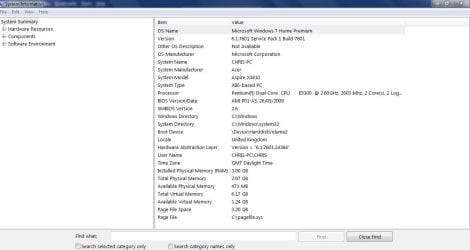
EDIT: I copied & pasted msinfo32 into my Computer Start box but that just produced a System Information onscreen display box.

I have attached a screenshot of that but I am doubting that is what you meant ?
 

Attachments

  • msinfo32 SYSTEM INFORMATION .JPG
    msinfo32 SYSTEM INFORMATION .JPG
    68.2 KB · Views: 0
Last edited:

My Computer My Computer

At a glance

WINDOWS 7 HOME PREMIUM
Computer type
PC/Desktop
Computer Manufacturer/Model Number
ACER 3800
OS
WINDOWS 7 HOME PREMIUM
Keyboard
LOGITECH WIRELESS
Mouse
LOGITECH WIRELESS
Internet Speed
2.5Mbps
Antivirus
AVAST 2025 FREE VERSION
Browser
FIREFOX OR GOOGLE CHROME

https://www.sevenforums.com/tutorials/374583-system-information-file-create-windows.html#Part2
 

My Computer My Computer

At a glance

W7 home premium 32bit/W7HP 64bit/w10 tp insid...E5300 dual core3gbNvidia Geforce 7100 Nforce 630i
Computer type
PC/Desktop
Computer Manufacturer/Model Number
medionl/Aspire 6930G/acer x55a
OS
W7 home premium 32bit/W7HP 64bit/w10 tp insider ring
CPU
E5300 dual core
Motherboard
medion MS7366
Memory
3gb
Graphics Card(s)
Nvidia Geforce 7100 Nforce 630i
Monitor(s) Displays
avixc
Internet Speed
n (isp resticted to 72)
Antivirus
mse/pands
Browser
palemoon
Other Info
Belkin Fd7050 n USB using Railink RT2870 drivers, more upto date
Hello again torchwood,

I am no doubt doing something wrong with this but when I type this - msinfo32 - into my Computer Start box and click to run as Administrator - it just produces the onscreen System Information display as attached in my previous message.

The System Information onscreen display box that I attached a screenshot of was the only information that running the msinfo32 produced - even if I could create a zip file of that which I don`t think that I can because it is just a display [?] the file would only have exactly that information in it.

When I run the msinfo32 it just displays the onscreen box I don`t have to open any file to display the information.

I really am Sorry to obviously be misunderstanding something about this - can you correct me please.

Chris

EDIT: I have realised by clicking onto one of the items on the System Information display that if I knew how to create a zip file from msinfo32 that you would then be able to click onto various items and view further information but as I wrote above running msinfo32 immediately produces the onscreen display - I don`t get a chance to try creating a zip file of it.
 
Last edited:

My Computer My Computer

At a glance

WINDOWS 7 HOME PREMIUM
Computer type
PC/Desktop
Computer Manufacturer/Model Number
ACER 3800
OS
WINDOWS 7 HOME PREMIUM
Keyboard
LOGITECH WIRELESS
Mouse
LOGITECH WIRELESS
Internet Speed
2.5Mbps
Antivirus
AVAST 2025 FREE VERSION
Browser
FIREFOX OR GOOGLE CHROME
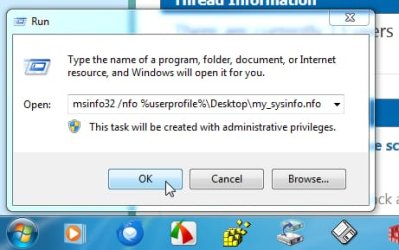
copy and paste the below line into the run box

msinfo32 /nfo "%userprofile%\Desktop\my_sysinfo.nfo"


like this
msinfo32.jpg

then click OK

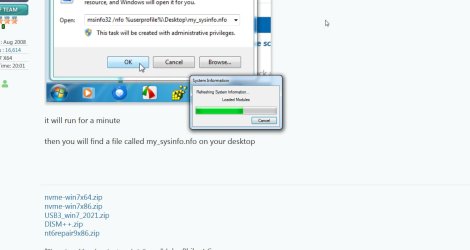
it will run for a minute like this

msinfo32-running.jpg


then you will find a file called my_sysinfo.nfo on your desktop

it has this icon

msinfo32-icon.jpg

- - - Updated - - -

*****************************************************************************

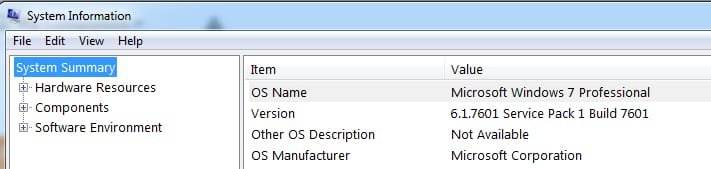
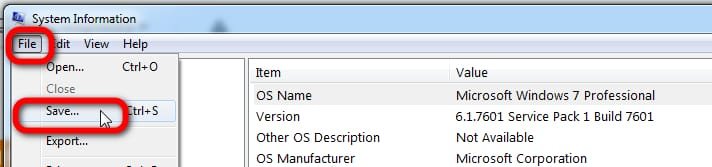
Another way is to click File >Save

msinfo1.jpg

msinfo2.jpg
 

My Computers My Computers

  • At a glance

    7 X64i5 84002x8gb 3200mhz
    Computer type
    PC/Desktop
    OS
    7 X64
    CPU
    i5 8400
    Motherboard
    gigabyte b365m ds3h
    Memory
    2x8gb 3200mhz
    Hard Drives
    various
    PSU
    pure power 11 400w cm
    Case
    Coolermaster
    Cooling
    cryorig m9i
  • At a glance

    7x64g54008gb ddr4 2400
    Computer type
    PC/Desktop
    OS
    7x64
    CPU
    g5400
    Motherboard
    ga b365m ds3h
    Memory
    8gb ddr4 2400
    PSU
    xfx pro 450w
copy and paste the below line into the run box

msinfo32 /nfo "%userprofile%\Desktop\my_sysinfo.nfo"


like this
View attachment 424849

then click OK

it will run for a minute like this

View attachment 424850


then you will find a file called my_sysinfo.nfo on your desktop

it has this icon

View attachment 424851

- - - Updated - - -

*****************************************************************************

Another way is to click File >Save

View attachment 424852

View attachment 424853
Hello SIW2,

Thank you very much for your reply. and for the detailed instructions with what should have been very helpful accompanying screenshots.

However - for some reason I don`t have the `run` box on my Computer / Windows 7 - I can only copy & paste or type items into the Start box and when I did that with the text that you very kindly suggested the System Information onscreen display came up immediately - there was no file created.

I have never seen the `run` box as displayed in your screenshots on my Computer.

Whenever I have had to download and run an item I have saved it and then gone to it and clicked onto the file to run it.

I did type run into the Start box to see if that brought up the run box display as was on your screenshots but it did not.

Sorry that these difficulties are occuring - I cannot think what is causing my Computer to seemingly not have the facility to do what you and Member torchwood have suggested ?

Do you happen to know how I could gain / regain the `run` box facility to then be able to follow the instructions that I have been given here ?

Thanks again for trying to help me I really appreciate it.

Chris.

EDIT: I hope that I have managed to create the correct file - the my_sysinfo.nfo file that you very kindly gave me instructions on.

I managed to do it by clicking onto Save on the onscreen System Information display and when another onscreen box displayed where I had to Name the file I named it my_sysinfo.nfo and Saved it - that started the onscreen `loading` green moving stripe and when that had ended I fould the file location in my Documents.

However - I found that I cannot attach the my_sysinfo.nfo file onto here - it failed to upload.

And I cannot find simple instructions on how to turn it into a zip file - I have 7zip on my Computer but I have only ever used that on very few ocassions to extract files from a zip file - never to create a zip file so I don`t know how to do that.

Sorry but I need further help / instruction to create the zip file from the my_sysinfo.nfo file please.

Thanks again to you both.

Chris
 
Last edited:

My Computer My Computer

At a glance

WINDOWS 7 HOME PREMIUM
Computer type
PC/Desktop
Computer Manufacturer/Model Number
ACER 3800
OS
WINDOWS 7 HOME PREMIUM
Keyboard
LOGITECH WIRELESS
Mouse
LOGITECH WIRELESS
Internet Speed
2.5Mbps
Antivirus
AVAST 2025 FREE VERSION
Browser
FIREFOX OR GOOGLE CHROME
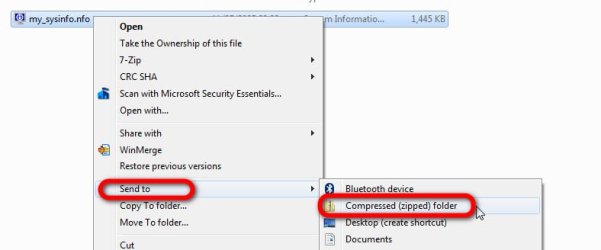
I cannot find simple instructions on how to turn it into a zip file

Right click the my_sysinfo.nfo and from the context menu select Send To > Compressed (zipped) folder

send-to-zip.jpg
 

My Computers My Computers

  • At a glance

    7 X64i5 84002x8gb 3200mhz
    Computer type
    PC/Desktop
    OS
    7 X64
    CPU
    i5 8400
    Motherboard
    gigabyte b365m ds3h
    Memory
    2x8gb 3200mhz
    Hard Drives
    various
    PSU
    pure power 11 400w cm
    Case
    Coolermaster
    Cooling
    cryorig m9i
  • At a glance

    7x64g54008gb ddr4 2400
    Computer type
    PC/Desktop
    OS
    7x64
    CPU
    g5400
    Motherboard
    ga b365m ds3h
    Memory
    8gb ddr4 2400
    PSU
    xfx pro 450w
Hello again SIW2,

Thank you very much - that could not have been any easier - Sorry that I just either did not know or if I have ever done that before it would have been years ago and I had forgotten how.

I only use my Computer for ordering online Supermarket grocery home deliveries, Emailing and using UK online Newspapers - I don`t often even use Youtube on my P.C. now because I have a `smart TV` - unless I am looking for something about my Computer on there.

Because of these very basic uses my need to have a good knowledge about Computing is really non existant until there is a problem which requires me to be able to carry out processes that I am sure are known and used by children but are not obvious to me.

I have never had any training on how to use a Computer - in 2009 I just bought one plus a wireless keyboard and mouse set - started off with a Vodaphone mobile broadband dongle [ £15.00 per Gigabite ! ] while waiting to have Broadband connected and taught myself really just the basics required to be able to use my Computer as described above.

I can only apologise to You and torchwood for the frustration that my lack of knowledge probably causes when you are trying to help me.

I am attaching the zip file - Thank you both in advance for viewing the details - I hope that something indicates what might have caused the 3 x BSOD events and what needs to be done to rectify the situation - I really appreciate both of you helping me with this.

Chris
 

Attachments

My Computer My Computer

At a glance

WINDOWS 7 HOME PREMIUM
Computer type
PC/Desktop
Computer Manufacturer/Model Number
ACER 3800
OS
WINDOWS 7 HOME PREMIUM
Keyboard
LOGITECH WIRELESS
Mouse
LOGITECH WIRELESS
Internet Speed
2.5Mbps
Antivirus
AVAST 2025 FREE VERSION
Browser
FIREFOX OR GOOGLE CHROME
Hi Chris,

some very interesting info there
99% sure 2 progs being the root causes... both have memory leakage, think of it as over-filling your petrol tank
they are Avast and DivX
Best solution is to un-install/re-install

You are also having problems with a few other things,
Windows Updates.... i'd just turn it Off
Opera also had a memory leak but can't see it on your system now

other comments
there's alot of old orphan entries not causing problems but just cluttering up your system
Tune-up utilities NOT a fan, i'd remove them
Spybot is no longer as good as it was

Believe your system could do with a good check-up
run,
MS DiskCleanup..... could take a while if you've not used it before(includes a reboot)
Disk Cleanup - Open and Use
and
sfc/scannow from a run box
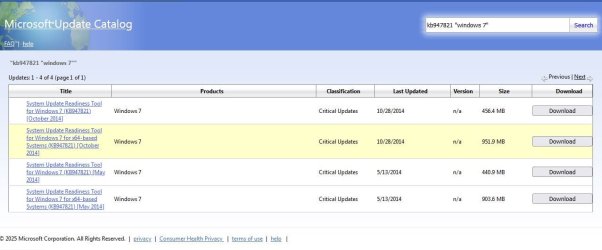
KB947821 (SURT) download from MS catalogue
(5th entry down - Oct2014)
 

My Computer My Computer

At a glance

W7 home premium 32bit/W7HP 64bit/w10 tp insid...E5300 dual core3gbNvidia Geforce 7100 Nforce 630i
Computer type
PC/Desktop
Computer Manufacturer/Model Number
medionl/Aspire 6930G/acer x55a
OS
W7 home premium 32bit/W7HP 64bit/w10 tp insider ring
CPU
E5300 dual core
Motherboard
medion MS7366
Memory
3gb
Graphics Card(s)
Nvidia Geforce 7100 Nforce 630i
Monitor(s) Displays
avixc
Internet Speed
n (isp resticted to 72)
Antivirus
mse/pands
Browser
palemoon
Other Info
Belkin Fd7050 n USB using Railink RT2870 drivers, more upto date
Hi Chris,

some very interesting info there
99% sure 2 progs being the root causes... both have memory leakage, think of it as over-filling your petrol tank
they are Avast and DivX
Best solution is to un-install/re-install

You are also having problems with a few other things,
Windows Updates.... i'd just turn it Off
Opera also had a memory leak but can't see it on your system now

other comments
there's alot of old orphan entries not causing problems but just cluttering up your system
Tune-up utilities NOT a fan, i'd remove them
Spybot is no longer as good as it was

Believe your system could do with a good check-up
run,
MS DiskCleanup..... could take a while if you've not used it before(includes a reboot)
Disk Cleanup - Open and Use
and
sfc/scannow from a run box
KB947821 (SURT) download from MS catalogue
(5th entry down - Oct2014)

Hello torchwood,

Thank you very much for viewing my Computer`s System Information file and giving me your conclusions I can imagine that was
quite time consuming so I really appreciate your knowledge and the time that you have spent helping me.

I will be carrying out all of your recommendations that I am able to do including the MS DiskCleanup and the sfc/scannow which
I have used before.

I will uninstall DIVX as I rarely use it - I have only recently installed AVAST Free version to replace Microsoft Security Essentials which
stopped being able to be updated so became useless - is there a Free Anti-virus program that you would suggest instead of AVAST ?

I was not aware that Spybot was still on my Computer as I had uninstalled it about 3 years ago when Forum BSOD Expert Member axe0 helped me with a previous BSOD and informed me that it was amongst a few `Security scanner` type programs that were conflicting with each other.

Spybot is not showing on my Computer`s list of programs or on my Revo Uninstaller list of existing programs - is there any safe
and simple way for ME [considering my lack of Computing knowledge] to find and get rid of the Spybot item that you found ?

I can only guess what `orphan entries` might be but not how to get rid of them without risking doing something wrong and
ruining my Computer.

Regarding Tune Up Utilities I have been using weekly for about 12 years, the only thing I use it for is to gain Disk space - I just
click onto a box and up comes a display of an amount of Gigabites that can be removed - mainly all old restore points and I then
click to delete them but then immediately create a new restore point [just a few hundred Megabites] - without being able to gain
Disk space like that my Computer`s C: Disk space has previously gone down to below 10GB - even now it is only at about 24GB.

My Computer`s F: Disk has 140GB of space - completely empty which I realise is a ridiculous situation and I don`t know how that
could have happened ?

I have tried researching how to change this by moving a lot of Data / Files from the C: Disk to the F: Disk but I found it far too
complicated and I did not want to risk totally ruining my Computer for the reasons I previously mentioned regarding me being
totally reliant upon it for obtaining Food and Medication etc.

I will try to turn off Windows updates as it has never been able to successfully install it`s recommended updates for about the last 3 years.

Thanks again for your help - would you be able to give me some further comments about what I wrote about:

A free alternative to AVAST - Spybot - orphan entries and my particular use of Tune Up Utilities to regularly only regain Disk space please.

Chris

I TRIED TO POST A SEPERATE MESSAGE TO YOU BUT IT WAS SOMEHOW AUTOMATICALLY MERGED WITH MY LATEST MESSAGE
TO SIW2.

I HOPE THAT YOU DO RETURN TO THE MESSAGE ABOVE AND SEE MY FURTHER MESSAGE BELOW HERE:

Hello again torchwood,

I have uninstalled the AVAST Antivirus software and the various DIVX programs and have reinstated Microsoft Security Essentials thanks to Member SIW2 helping me with links to a Microsoft update and MicrosoftEasyFix which re-enabled MSE to be able to download updates.

I had previously had to uninstall MSE when it stopped being able to update and had installed AVAST which you identified as probably contributing to cause my 3 x recent BSOD events.

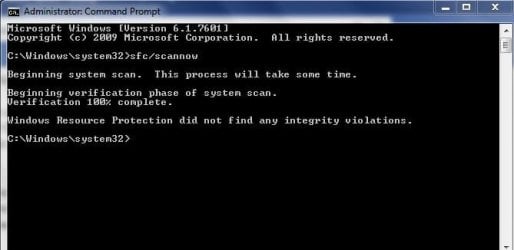
I ran sfc/scannow which did not show any problems but I thought that when I had ran that previously quite some time ago there was a full onscreen box of text after the scan - I am wondering if it worked correctly - I am attaching a screenshot of the result.

To run sfc/scannow I opened Command prompt / run as Administrator - typed in sfc/scannow and hit the Enter key to start the scan.

Regarding the Microsoft update from the Microsoft update catelogue that you gave me a link to - when I clicked onto the link and went to the Catelogue webpage there were 4 x updates listed - 2 are showing that they are 64bit versions and although the first / top one is dated October 2014 I wanted to check with you whether this is correct for my Computer`s 32bit version of Windows 7 Home Premium ?

I have attached a screenshot of the Microsoft Update Catelogue webpage so that you can see what I mean.

I ran DiskCleanup which analysed my Computer`s C: Disk and only found 14.4 MB of space to gain without removing items that were not recommended for removal - are you surprised by that considering what you saw when you viewed the System Information files ?

Thank you very much for your help - I have really appreciated your knowledge and the time that you spent viewing the System Information files and writing your conclusions - could you please help me a little more with a few more answers please.

Chris

P.S: Before you replied to me on here and then viewed my Computer`s System Information files I had been wondering if my Computer had been over heating which I thought might have been causing the BSOD events - although it is well ventilated all around the Desktop unit casing I am sure that I have heard the Fan running more frequently and for longer periods and not just on really warm days.

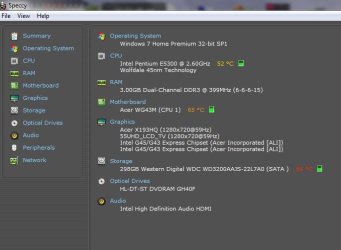
I have had a program called Speccy on my Computer for years - never been any use to me but I left it on there - when opening it there are temperature measurements showing for the Motherboard etc. - they look quite high Centigrade temperatures to me - mid 50`s - mid 60`s Centigrade ?

I have attached a screenshot of that Speccy result from earlier today - do you think that the various temperatures showing are normal operating temperatures / O.K. ?

I am guessing that the small green indicator box adjacent to those temperatures would go to red if there was an overheat temperature ?

Thanks again, Chris
 

Attachments

  • SFCSCANNOW SCREENSHOT - NO PROBLEMS FOUND.JPG
    SFCSCANNOW SCREENSHOT - NO PROBLEMS FOUND.JPG
    29.6 KB · Views: 16
  • MICROSOFT CATELOGUE SCREENSHOT - WHICH UPDATE FOR MY 32bit WINDOWS 7 HOME PREMIUM.JPG
    MICROSOFT CATELOGUE SCREENSHOT - WHICH UPDATE FOR MY 32bit WINDOWS 7 HOME PREMIUM.JPG
    63.2 KB · Views: 0
  • COMPUTER OPERATING TEMPERATURES - TUESDAY 13 APRIL 2025 - COMPUTER ON FOR 3.5 HOURS - SPECCY PRO.JPG
    COMPUTER OPERATING TEMPERATURES - TUESDAY 13 APRIL 2025 - COMPUTER ON FOR 3.5 HOURS - SPECCY PRO.JPG
    40.9 KB · Views: 19
Last edited:

My Computer My Computer

At a glance

WINDOWS 7 HOME PREMIUM
Computer type
PC/Desktop
Computer Manufacturer/Model Number
ACER 3800
OS
WINDOWS 7 HOME PREMIUM
Keyboard
LOGITECH WIRELESS
Mouse
LOGITECH WIRELESS
Internet Speed
2.5Mbps
Antivirus
AVAST 2025 FREE VERSION
Browser
FIREFOX OR GOOGLE CHROME
Last edited:

My Computers My Computers

  • At a glance

    7 X64i5 84002x8gb 3200mhz
    Computer type
    PC/Desktop
    OS
    7 X64
    CPU
    i5 8400
    Motherboard
    gigabyte b365m ds3h
    Memory
    2x8gb 3200mhz
    Hard Drives
    various
    PSU
    pure power 11 400w cm
    Case
    Coolermaster
    Cooling
    cryorig m9i
  • At a glance

    7x64g54008gb ddr4 2400
    Computer type
    PC/Desktop
    OS
    7x64
    CPU
    g5400
    Motherboard
    ga b365m ds3h
    Memory
    8gb ddr4 2400
    PSU
    xfx pro 450w
mse will work if you install the update and run the MicrosoftEasyFix


64 bit update

windows6.1-kb3140245-x64_5b067ffb69a94a6e5f9da89ce88c658e52a0dec0.msu

32 bit update

windows6.1-kb3140245-x86_cdafb409afbe28db07e2254f40047774a0654f18.msu


If you already have the update installed, it will say not applicable so you can just run the easyfix

EasyFix

MicrosoftEasyFix51044.msi
Hello again SIW2,

So that I don`t get this wrong after I have uninstalled the AVAST Anti-virus program can you please just verify whether I have
understood this correctly:

I will find a download for Microsoft Security Essentials and download and open / run it to install it on my Computer - then download the MSE update by clicking onto the link that you very kindly provided - will that indicate on the MSE onscreen display that it is updating ?

After that MSE update and with the MSE display still on the screen I then click onto the link that you provided for
MicrosoftEasyFix ?

Will there be any display or visible indication that MicrosoftEasyFix is fixing the MSE ?

Thank you very much for your help with creating the System Information zip file and for this help with hopefully being able to
have MSE protecting my Computer again I much prefer it to AVAST which I find intrusive with multiple interupting offers daily
to upgrade to the paid version.

Chris
 

My Computer My Computer

At a glance

WINDOWS 7 HOME PREMIUM
Computer type
PC/Desktop
Computer Manufacturer/Model Number
ACER 3800
OS
WINDOWS 7 HOME PREMIUM
Keyboard
LOGITECH WIRELESS
Mouse
LOGITECH WIRELESS
Internet Speed
2.5Mbps
Antivirus
AVAST 2025 FREE VERSION
Browser
FIREFOX OR GOOGLE CHROME
1. install the kb314025 update

2. run the easy fix

then mse will be able to get the definition updates

doesnt matter if you install mse after 1 and 2 above

mse 64 bit :ar: x64-win7.zip

The mse definition updates are SHA2 signed like most recent things. Therefore your win7 should also have the sha2 update

if it doesnt already you can get the sha2 update here
windows6.1-kb4474419-v3-x64_b5614c6cea5cb4e198717789633dca16308ef79c.msu
 

My Computers My Computers

  • At a glance

    7 X64i5 84002x8gb 3200mhz
    Computer type
    PC/Desktop
    OS
    7 X64
    CPU
    i5 8400
    Motherboard
    gigabyte b365m ds3h
    Memory
    2x8gb 3200mhz
    Hard Drives
    various
    PSU
    pure power 11 400w cm
    Case
    Coolermaster
    Cooling
    cryorig m9i
  • At a glance

    7x64g54008gb ddr4 2400
    Computer type
    PC/Desktop
    OS
    7x64
    CPU
    g5400
    Motherboard
    ga b365m ds3h
    Memory
    8gb ddr4 2400
    PSU
    xfx pro 450w
1. install the kb314025 update

2. run the easy fix

then mse will be able to get the definition updates

doesnt matter if you install mse after 1 and 2 above

mse 64 bit :ar: x64-win7.zip

Hello again SIW2,

I uninstalled MSE when it was no longer able to receive updates so I thought that I would have to download and install it onto my Computer as the first step - or is it that the update and fix are general Microsoft updates ?

Just to make sure for my P.C. would it be the 64bit version of MSE - I would have been looking for the 32bit version in error ?

Chris
 
Last edited:

My Computer My Computer

At a glance

WINDOWS 7 HOME PREMIUM
Computer type
PC/Desktop
Computer Manufacturer/Model Number
ACER 3800
OS
WINDOWS 7 HOME PREMIUM
Keyboard
LOGITECH WIRELESS
Mouse
LOGITECH WIRELESS
Internet Speed
2.5Mbps
Antivirus
AVAST 2025 FREE VERSION
Browser
FIREFOX OR GOOGLE CHROME
the update and fix are general Microsoft updates

yes

and mse cannot get the definition updates without them
 

My Computers My Computers

  • At a glance

    7 X64i5 84002x8gb 3200mhz
    Computer type
    PC/Desktop
    OS
    7 X64
    CPU
    i5 8400
    Motherboard
    gigabyte b365m ds3h
    Memory
    2x8gb 3200mhz
    Hard Drives
    various
    PSU
    pure power 11 400w cm
    Case
    Coolermaster
    Cooling
    cryorig m9i
  • At a glance

    7x64g54008gb ddr4 2400
    Computer type
    PC/Desktop
    OS
    7x64
    CPU
    g5400
    Motherboard
    ga b365m ds3h
    Memory
    8gb ddr4 2400
    PSU
    xfx pro 450w
yes

and mse cannot get the definition updates without them
Hello again SIW2,

Just an update as you and torchwood have been so helpful to me:

Following Member torchwood`s very helpful advice I have uninstalled AVAST [glad to get rid of it] and DIVX which I did not use very often anyway.

I then turned on Windows Defender which had been turned off by AVAST and proceeded to obtain Microsoft Security Essentials again.

I had some slight problems this morning while trying to obtain the correct MSE download - when I used your link to a download location it took me to `One Drive` webpage where there was no mention at all of MSE so I was reluctant to click onto the download button even though I was sure that you gave me the correct link to download MSE I wanted to be very careful in case something had changed.

I then tried 2 x websites that I think are reputable and known to have safe virus free software downloads - Softonic and CNET - but when I downloaded the MSE 64bit version and tried to install it I received a message that it was not compatible with my Computer and to check if I need the 64bit version or the 32bit version - after receiving that error message I deleted the MSE.exe file and downloaded it again from the CNET website but when clicking onto it to run as Administrator I received the same message so the 64bit version seemed wrong for my Computer unless there was something wrong with both MSE.exe download files ?

I then thought to go again to the link for the MSE 64bit version that you kindly included in your message but on clicking onto it that produced an onscreen display about a zip file and because I thought that I might do something wrong with that and that a 64bit version had already been rejected by my Computer I decided not to go ahead with that yet until I tried to find out if there is a 32bit version of MSE to try.

I had been previously thinking that I needed a 32bit version because my Windows 7 Home Premium is a 32bit version ?

I could not find a 32bit version of MSE on any known `trustworthy` downloads website but luckily although I had uninstalled MSE using my Revo Uninstaller program earlier this year I found that I still had the original 10+ year old MSE.exe installation file which I opened / ran and watched it install and update which obviously because the file was 10+ years old took a very long time and 804 MB`s of updates - my broadband download `speed` rarely exceeds 2.5Mbps and today it was particularly slow - the update download took about 15 minutes.

It had not previously occured to me that I might still have the original MSE.exe installation file because after I uninstalled MSE I thought of it as totally gone.

Obviously your excellent help in providing the links to the 32bit Microsoft update [which was already on my Computer] and the MicrosoftEasyFix which I downloaded and installed have fixed my previous problem of MSE not being able to download updates.

Thank you very much for your help with that - I am very pleased to have MSE protecting my Computer again.

I will now try to carry out some more of Member torchwood`s very helpful suggestions.

Chris

SIW2, I hope that you don`t mind me putting a message to torchwood below here:

- - - Updated - - -
Hello torchwood,

I tried to post another message to you letting you know what I have done regarding your recommendations and asking some questions but that message was somehow merged with this message to SIW2 so I had to delete it having copied the text and I have had to edit the message into my previous reply to you.

Could you please go back to my previous reply to you so that you can see my new message - Thanks, Chris
 
Last edited:

My Computer My Computer

At a glance

WINDOWS 7 HOME PREMIUM
Computer type
PC/Desktop
Computer Manufacturer/Model Number
ACER 3800
OS
WINDOWS 7 HOME PREMIUM
Keyboard
LOGITECH WIRELESS
Mouse
LOGITECH WIRELESS
Internet Speed
2.5Mbps
Antivirus
AVAST 2025 FREE VERSION
Browser
FIREFOX OR GOOGLE CHROME
Back
Top