Solved Win 7 version with install.esd copied into Win 10 installation media ?

Muffin Top

New member
Member
Local time
1:03 PM
Messages
77
Like the title says, I took the quick and easy solution for UEFI installation of Win 7, by transferring the install.wim to the Win 10 USB.

I have licenses for both 10 & 7 on the machine, but I see the Win 7 methodology for branding is not used in the Win 10 USB.

So this easy installation gives me the base version of Win 7, even though I have Ultimate product keys.

Anyone know how to force Ultimate, so I can access my 32gb RAM, instead of being limited to 8gb ?

By the way, this 10/7 installation method appears to work around a lot of the issues in class 2 UEFI. When I turn off CSM, I can still hear it boot up (so I'm assuming that adding the GPU driver to my set-up will fix the video issue). The only shortcoming I can perceive at the moment is having to go back to CSM if I ever need to use the recovery environment.
 

My Computers My Computers

  • At a glance

    10 trying for 7x64i7 6th gen32G
    Computer type
    PC/Desktop
    Computer Manufacturer/Model Number
    Dell Opti 7050
    OS
    10 trying for 7x64
    CPU
    i7 6th gen
    Memory
    32G
    Hard Drives
    1T SSD; 2T HDD
  • Computer type
    PC/Desktop

My Computers My Computers

  • At a glance

    7 X64i5 84002x8gb 3200mhz
    Computer type
    PC/Desktop
    OS
    7 X64
    CPU
    i5 8400
    Motherboard
    gigabyte b365m ds3h
    Memory
    2x8gb 3200mhz
    Hard Drives
    various
    PSU
    pure power 11 400w cm
    Case
    Coolermaster
    Cooling
    cryorig m9i
  • At a glance

    7x64g54008gb ddr4 2400
    Computer type
    PC/Desktop
    OS
    7x64
    CPU
    g5400
    Motherboard
    ga b365m ds3h
    Memory
    8gb ddr4 2400
    PSU
    xfx pro 450w
Thanks so much. It looks like the only way is to buy a second key? Not the end of the world, now that they're so cheap.

Since I'm buying a second key, should I upgrade to Enterprise? Or is Ultimate equally good?

I haven't decided yet whether my path to secure boot will be BypassESU or Simplix. The latter is relatively straightforward on an updated machine, only adding post-2020 cumulative updates. My concern about Simplix is their slipstreaming of drivers. My Optiplex 7050 seems to be finicky about drivers, although maybe I'm worrying too much about driver glitches that I've observed prior to installing updates.

- - - Updated - - -

It looks like this post is unfavorable about Enterprise :


https://www.sevenforums.com/install...me-premium-ultimate-can-done.html#post1689618
 

My Computers My Computers

  • At a glance

    10 trying for 7x64i7 6th gen32G
    Computer type
    PC/Desktop
    Computer Manufacturer/Model Number
    Dell Opti 7050
    OS
    10 trying for 7x64
    CPU
    i7 6th gen
    Memory
    32G
    Hard Drives
    1T SSD; 2T HDD
  • Computer type
    PC/Desktop
If you already have an Ultimate key why do you want another.
 

My Computers My Computers

  • At a glance

    7 X64i5 84002x8gb 3200mhz
    Computer type
    PC/Desktop
    OS
    7 X64
    CPU
    i5 8400
    Motherboard
    gigabyte b365m ds3h
    Memory
    2x8gb 3200mhz
    Hard Drives
    various
    PSU
    pure power 11 400w cm
    Case
    Coolermaster
    Cooling
    cryorig m9i
  • At a glance

    7x64g54008gb ddr4 2400
    Computer type
    PC/Desktop
    OS
    7x64
    CPU
    g5400
    Motherboard
    ga b365m ds3h
    Memory
    8gb ddr4 2400
    PSU
    xfx pro 450w
The Win 7 methodology for branding is not used by the Win 10 installation media. That's why installing the Win 7 image via the Win 10 USB gave me a basic Win 7, even though I entered an Ultimate key and used the install.wim from an Ultimate DVD.

I'm sort of hoping that going through the telephone activation process, and entering its telephone code for my Win 7 key, will allow my system to recognize that I've already paid for an Ultimate key.
 

My Computers My Computers

  • At a glance

    10 trying for 7x64i7 6th gen32G
    Computer type
    PC/Desktop
    Computer Manufacturer/Model Number
    Dell Opti 7050
    OS
    10 trying for 7x64
    CPU
    i7 6th gen
    Memory
    32G
    Hard Drives
    1T SSD; 2T HDD
  • Computer type
    PC/Desktop
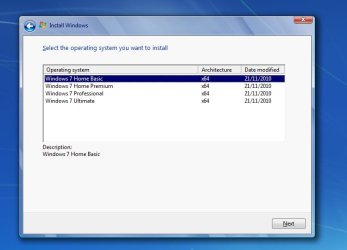
The "ultimate" dvd has this ei.cfg file

Code:
[EditionID]
Ultimate
[Channel]
Retail
[VL]
0

with ei.cfg removed all editions are offerred any one can be selected to install

editions.jpg
 

My Computers My Computers

  • At a glance

    7 X64i5 84002x8gb 3200mhz
    Computer type
    PC/Desktop
    OS
    7 X64
    CPU
    i5 8400
    Motherboard
    gigabyte b365m ds3h
    Memory
    2x8gb 3200mhz
    Hard Drives
    various
    PSU
    pure power 11 400w cm
    Case
    Coolermaster
    Cooling
    cryorig m9i
  • At a glance

    7x64g54008gb ddr4 2400
    Computer type
    PC/Desktop
    OS
    7x64
    CPU
    g5400
    Motherboard
    ga b365m ds3h
    Memory
    8gb ddr4 2400
    PSU
    xfx pro 450w
Thanks, but I don't see that in the Win 10 USB.
 

My Computers My Computers

  • At a glance

    10 trying for 7x64i7 6th gen32G
    Computer type
    PC/Desktop
    Computer Manufacturer/Model Number
    Dell Opti 7050
    OS
    10 trying for 7x64
    CPU
    i7 6th gen
    Memory
    32G
    Hard Drives
    1T SSD; 2T HDD
  • Computer type
    PC/Desktop
did you try the anytime upgrade? I posted a link with screenshots. I have done it several times.
 

My Computers My Computers

  • At a glance

    7 X64i5 84002x8gb 3200mhz
    Computer type
    PC/Desktop
    OS
    7 X64
    CPU
    i5 8400
    Motherboard
    gigabyte b365m ds3h
    Memory
    2x8gb 3200mhz
    Hard Drives
    various
    PSU
    pure power 11 400w cm
    Case
    Coolermaster
    Cooling
    cryorig m9i
  • At a glance

    7x64g54008gb ddr4 2400
    Computer type
    PC/Desktop
    OS
    7x64
    CPU
    g5400
    Motherboard
    ga b365m ds3h
    Memory
    8gb ddr4 2400
    PSU
    xfx pro 450w
Thanks, I will. I just have a couple more things to try before the anytime upgrade :

(1) I just discovered that none of the Dell/Intel GPU drivers on Dell's website will work with Win 7 (even though they have six driver packages claiming to support Win 7).

(2) Since I don't know how else to fix the VGA graphics issue in UEFI without CSM, it looks like I should give UEFISeven a try. If I can get to secure boot with UEFISeven, then I may not need Win 10 installation media to deploy my Win 7 install.esd.

(3) I still need to perform telephone activation. I should verify that won't correct the issue before I buy an additional license for anytime upgrade.

(4) If UEFISeven turns out to be too painful for purposes of secure boot (e.g., learning how to flash my firmware to trust UEFISeven's files), then my back-up plan would be to get cheap graphics cards that still have Win 7 drivers. In that case, I'll continue using my Win 10 USB, and then I'll have to double up on licenses for anytime upgrades, if telephone activation doesn't solve the problem.
 

My Computers My Computers

  • At a glance

    10 trying for 7x64i7 6th gen32G
    Computer type
    PC/Desktop
    Computer Manufacturer/Model Number
    Dell Opti 7050
    OS
    10 trying for 7x64
    CPU
    i7 6th gen
    Memory
    32G
    Hard Drives
    1T SSD; 2T HDD
  • Computer type
    PC/Desktop
I still need to perform telephone activation.

why ?


no additional key is needed for anytime upgrade. Any valid ultimate key can be entered to upgrade the edition. The edition upgrades but it does not activate at that stage.

after it has upgraded to Ultimate edition you can the enter the ultimate key in the usual way to activate.
 

My Computers My Computers

  • At a glance

    7 X64i5 84002x8gb 3200mhz
    Computer type
    PC/Desktop
    OS
    7 X64
    CPU
    i5 8400
    Motherboard
    gigabyte b365m ds3h
    Memory
    2x8gb 3200mhz
    Hard Drives
    various
    PSU
    pure power 11 400w cm
    Case
    Coolermaster
    Cooling
    cryorig m9i
  • At a glance

    7x64g54008gb ddr4 2400
    Computer type
    PC/Desktop
    OS
    7x64
    CPU
    g5400
    Motherboard
    ga b365m ds3h
    Memory
    8gb ddr4 2400
    PSU
    xfx pro 450w
Thanks, I think what you're saying is for anytime upgrade I use the same key that I entered at installation?

I had this one Win 7 key I was planning to use for this machine, so I entered it at installation. So now I should enter the same key for anytime upgrade?

It certainly would make sense, I've just gotten used to Microsoft not making sense.
 

My Computers My Computers

  • At a glance

    10 trying for 7x64i7 6th gen32G
    Computer type
    PC/Desktop
    Computer Manufacturer/Model Number
    Dell Opti 7050
    OS
    10 trying for 7x64
    CPU
    i7 6th gen
    Memory
    32G
    Hard Drives
    1T SSD; 2T HDD
  • Computer type
    PC/Desktop
I still need to perform telephone activation.

why ?


no additional key is needed for anytime upgrade. Any valid ultimate key can be entered to upgrade the edition. The edition upgrades but it does not activate at that stage.

after it has upgraded to Ultimate edition you can the enter the ultimate key in the usual way to activate.

- - - Updated - - -

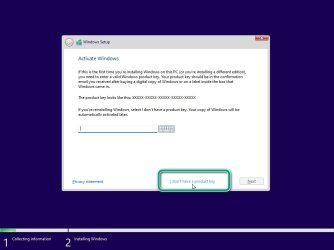
In case anybody wants to use win10 setup to install win7

win10-7-1.jpg

then all editions are available

win10-7-2.jpg
 

My Computers My Computers

  • At a glance

    7 X64i5 84002x8gb 3200mhz
    Computer type
    PC/Desktop
    OS
    7 X64
    CPU
    i5 8400
    Motherboard
    gigabyte b365m ds3h
    Memory
    2x8gb 3200mhz
    Hard Drives
    various
    PSU
    pure power 11 400w cm
    Case
    Coolermaster
    Cooling
    cryorig m9i
  • At a glance

    7x64g54008gb ddr4 2400
    Computer type
    PC/Desktop
    OS
    7x64
    CPU
    g5400
    Motherboard
    ga b365m ds3h
    Memory
    8gb ddr4 2400
    PSU
    xfx pro 450w
Ahhhh, thanks so much.

- - - Updated - - -

Ya know, it's probably not too late. I could just re-install right now, prior to telephone activation.

One key is not a lot of money, but there's the hassle of another transaction.
 

My Computers My Computers

  • At a glance

    10 trying for 7x64i7 6th gen32G
    Computer type
    PC/Desktop
    Computer Manufacturer/Model Number
    Dell Opti 7050
    OS
    10 trying for 7x64
    CPU
    i7 6th gen
    Memory
    32G
    Hard Drives
    1T SSD; 2T HDD
  • Computer type
    PC/Desktop
Speaking of activation. It works if you install KB3138612 first

or enable the TLS 1.2 protocol, for that matter.
 

My Computer My Computer

At a glance

Windows 7 Home Premium
Computer type
PC/Desktop
OS
Windows 7 Home Premium

My Computers My Computers

  • At a glance

    10 trying for 7x64i7 6th gen32G
    Computer type
    PC/Desktop
    Computer Manufacturer/Model Number
    Dell Opti 7050
    OS
    10 trying for 7x64
    CPU
    i7 6th gen
    Memory
    32G
    Hard Drives
    1T SSD; 2T HDD
  • Computer type
    PC/Desktop
Thanks, but I probably have this via windows update. At least that's what the linked article suggests.

Maybe I'll just re-install right away, because SIW's pictures make it look like that will avoid the need to buy another license.
 

My Computers My Computers

  • At a glance

    10 trying for 7x64i7 6th gen32G
    Computer type
    PC/Desktop
    Computer Manufacturer/Model Number
    Dell Opti 7050
    OS
    10 trying for 7x64
    CPU
    i7 6th gen
    Memory
    32G
    Hard Drives
    1T SSD; 2T HDD
  • Computer type
    PC/Desktop
no additional key is needed for anytime upgrade. Any valid ultimate key can be entered to upgrade the edition. The edition upgrades but it does not activate at that stage.

after it has upgraded to Ultimate edition you can the enter the ultimate key in the usual way to activate.
Ahhh, thanks again. Yes, I just used anytime update, and it appears to have worked by entering the exact same key.


On my next machine, I'll try the approach depicted.
 

My Computers My Computers

  • At a glance

    10 trying for 7x64i7 6th gen32G
    Computer type
    PC/Desktop
    Computer Manufacturer/Model Number
    Dell Opti 7050
    OS
    10 trying for 7x64
    CPU
    i7 6th gen
    Memory
    32G
    Hard Drives
    1T SSD; 2T HDD
  • Computer type
    PC/Desktop
Success: Step (1) install.esd copied from Win 7 dvd into Win 10 installation USB. Installed in UEFI + CSM.

Step (2) installed cheap graphics card that appeared to have drivers with good support for both Win 7 & Win 8.1. Rationale is that Dell/Intel drivers for Optiplex 7050 advertised as Win 7 would not install. And Dell's mobo does not support simultaneous use of integrated and dedicated graphics. Mobo requires selection of the expansion card to be made via firmware.

After step (2), CSM is no longer needed for graphics. However, on this machine, turning off CSM also turns off the USB 2 drivers. So I'm using PS2 keyboard and mouse until I find the USB driver.

Step (3) updated via Simplix. Now I have UEFI + Secure Boot. I'm ready to browse the internet safely, by running System Restore after every internet session. Assuming Secure Boot should protect me from BIOS malware. And System Restore should protect me from everything else.

Tomorrow I'll try to figure out how to access the USB driver that I thought was adopted by Simplix.

- - - Updated - - -

One more update on this solution. Since the Dell/Intel USB drivers are a known conundrum, there's a USB 3 thread over on MDL. While that thread is mostly about slipstreaming, its original post also includes a link to stand-alone generic USB drivers that got worked over by saint canonkang and one of his buddies on the WinRaid forums.

So this might be the only other third-party software that's needed (besides an ESU bypass, such as Simplix) for a good secure-boot set-up on the Optiplex 7050. I'm not 100% sure, yet, if this third-party USB driver is needed.

The internet implies that problems with the Dell USB driver can depend on the order in which it's installed. For example, first update the system with Simplex. Then accept Dell USB drivers from Windows Update. Taking them in this order may (or may not) work, I haven't had a chance to try this reverse ordering yet.
 

My Computers My Computers

  • At a glance

    10 trying for 7x64i7 6th gen32G
    Computer type
    PC/Desktop
    Computer Manufacturer/Model Number
    Dell Opti 7050
    OS
    10 trying for 7x64
    CPU
    i7 6th gen
    Memory
    32G
    Hard Drives
    1T SSD; 2T HDD
  • Computer type
    PC/Desktop
Back
Top