
Removing Windows XP SP3 on Dual Boot with Windows 7

Sari

New member
Local time
7:29 PM
Messages
12
I Cleaned installed Windows 7 (64bit) to dual boot with my already existing Windows XP SP3 (32bit). Everything is great and life is fantastic!
I'm ready to remove XP now.
Any suggestions on the steps to follow, and remove XP, without screwing up my fast, great and fully working Windows 7.
Thanx.
 

Attachments
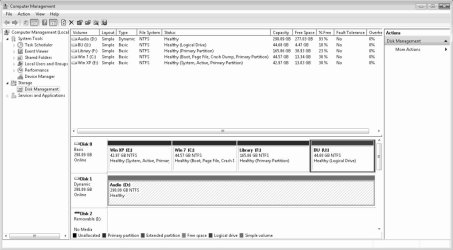
  • Disk Management.jpg
    Disk Management.jpg
    71.8 KB · Views: 696

My Computer My Computer

At a glance

Windows 7 (64bit)intel Q6600 @ 2.40 GHz Core2 Quad8 GBNvidia GeForce 3700SE/7200GS
Computer Manufacturer/Model Number
Intel DP35DP
OS
Windows 7 (64bit)
CPU
intel Q6600 @ 2.40 GHz Core2 Quad
Motherboard
intel DP35DP
Memory
8 GB
Graphics Card(s)
Nvidia GeForce 3700SE/7200GS
Sound Card
Disabled in Bios
Monitor(s) Displays
Acer X223W
Hard Drives
Inernal
WDC WD3200AAKS-00B3A0 (320.07 GB) -- drive 0
WDC WD3200AAKS-00B3A0 (320.07 GB) -- drive 1
External
2 TB
PSU
450 w
Case
Rack Mount
Well, holy cow your XP partition is huge! Mine is 16GB and only using half of it. It seems like you've got some backing up to do before doing anything to that partition.
 

My Computer My Computer

At a glance

XP, Seven, 2008R2AMD, Intel, VIACorsair, Kingston, etc.ATI, NVIDIA
Computer Manufacturer/Model Number
Too many to list.
OS
XP, Seven, 2008R2
CPU
AMD, Intel, VIA
Motherboard
Various
Memory
Corsair, Kingston, etc.
Graphics Card(s)
ATI, NVIDIA
Monitor(s) Displays
Samsung
Hard Drives
Maxtor, Western Digital
Keyboard
qwerty
Internet Speed
22 Mb/s @ home, 1 Gb/s @ server
Other Info
All of my systems still run fastest on XP 32-bit for the most part. Win7 is fun to play with, but I still prefer XP for raw speed, security, and functionality.
Everything is fully backed up!
 

My Computer My Computer

At a glance

Windows 7 (64bit)intel Q6600 @ 2.40 GHz Core2 Quad8 GBNvidia GeForce 3700SE/7200GS
Computer Manufacturer/Model Number
Intel DP35DP
OS
Windows 7 (64bit)
CPU
intel Q6600 @ 2.40 GHz Core2 Quad
Motherboard
intel DP35DP
Memory
8 GB
Graphics Card(s)
Nvidia GeForce 3700SE/7200GS
Sound Card
Disabled in Bios
Monitor(s) Displays
Acer X223W
Hard Drives
Inernal
WDC WD3200AAKS-00B3A0 (320.07 GB) -- drive 0
WDC WD3200AAKS-00B3A0 (320.07 GB) -- drive 1
External
2 TB
PSU
450 w
Case
Rack Mount
Then all you have to do is delete everything on the E: drive except for the boot folder and the file bootmgr (without it your system won't boot anymore).

If you want to delete the entire partition (there isn't much reason to) you will have to move the boot manager or do startup repair.
 

My Computer My Computer

At a glance

XP, Seven, 2008R2AMD, Intel, VIACorsair, Kingston, etc.ATI, NVIDIA
Computer Manufacturer/Model Number
Too many to list.
OS
XP, Seven, 2008R2
CPU
AMD, Intel, VIA
Motherboard
Various
Memory
Corsair, Kingston, etc.
Graphics Card(s)
ATI, NVIDIA
Monitor(s) Displays
Samsung
Hard Drives
Maxtor, Western Digital
Keyboard
qwerty
Internet Speed
22 Mb/s @ home, 1 Gb/s @ server
Other Info
All of my systems still run fastest on XP 32-bit for the most part. Win7 is fun to play with, but I still prefer XP for raw speed, security, and functionality.
Use a partition manager like free Partition Wizard disk. Back up all files. Boot into PW, rightclick on XP partition then delete, then rightclick on Win7 mark active and Resize partition, dragging left border all the way over the deleted XP space.

After operations run, change disk to WIn7 installer, boot into Repair my Computer and run startup repair 3 times to recover Win7 boot.
 
Solved

gregrocker,

Thanx! It worked like a charm. It only took minutes. Thanks again.
 

My Computer My Computer

At a glance

Windows 7 (64bit)intel Q6600 @ 2.40 GHz Core2 Quad8 GBNvidia GeForce 3700SE/7200GS
Computer Manufacturer/Model Number
Intel DP35DP
OS
Windows 7 (64bit)
CPU
intel Q6600 @ 2.40 GHz Core2 Quad
Motherboard
intel DP35DP
Memory
8 GB
Graphics Card(s)
Nvidia GeForce 3700SE/7200GS
Sound Card
Disabled in Bios
Monitor(s) Displays
Acer X223W
Hard Drives
Inernal
WDC WD3200AAKS-00B3A0 (320.07 GB) -- drive 0
WDC WD3200AAKS-00B3A0 (320.07 GB) -- drive 1
External
2 TB
PSU
450 w
Case
Rack Mount
gregrocker,

Thanx! It worked like a charm. It only took minutes. Thanks again.


Your welcome, Sari. This is becoming the most popular issue here: bailing out of XP or Vista dual boots within just a few days (or hours!) :rolleyes:
 
I downloaded the student special on 7 - no iso - no bootable disc. How can I accomplish this XPtermination without them?
 

My Computer My Computer

At a glance

windows7 ProfessionalPentium M2 gigFireGL T2
Computer Manufacturer/Model Number
IBM Thinkpad T42p
OS
windows7 Professional
CPU
Pentium M
Memory
2 gig
Graphics Card(s)
FireGL T2
Sound Card
Sound Max
Monitor(s) Displays
onboard
Hard Drives
150g
Internet Speed
DSL
wahoobob, type Backup in the start box and make a backup image of your HDD stored externally or on a partition (formatted primary) you create on a secondary (or if necessary your current) hard drive. This will allow you to reimage the HDD in 15 minutes in case operations fail.

But the even more important reason for doing this step is it will offer you to make a Win7 repair disk which you burn to CD. This will give you the repair console needed to recover your Win7 installation since you don't have the installer. You will need to be able to boot into this disk to run Startup Repair to recover after deleting your XP partiition. Or boot into repair to "Recover using an image" to reimage HDD if you need to start over.

It would be helpful if you can post a screenshot of your Disk Management map, using the snipping tool on the start>programs menu then attaching the file using the paper clip in reply box.

Normally, you would use a 3rd party partition manager like free Partition Wizard burned to disk, boot into it to delete the Xp partition, mark Windows 7 active, resize/move the 7 partition to include the deleted XP space, then boot into the Win7 installer/repair disk and run Startup Repair 3 times as there are multiple issues.

Also take a look at this tutorial from our top dualboot expert here to see if it might apply to the download you have, as converting it into a bootable ISO to burn to DVD would be much preferable to just having the files for Win7 plus you would have the needed repair console: http://www.sevenforums.com/tutorials/30470-make-bootable-iso-student-d-l.html
 
Great!! the step in there that creates the repair disk seems to be missing in all the other explanations. I'll try this tonight... and the verdict is - oops, now my 7 install is called illegal. I don't know that I made the 7 partition active as that command was not shown in gparted that I saw. I made the partition bootable. Anyway, your advice to make an image of the drive will come in handy!!;) Now I will wait to see if the bootable disc that Digital River is supposed to send me ever arrives. They are the hardest people to deal with I have encountered... I don't know why MS does business with them.

OK Disk arrived and it is not a bootable disk, just the copy of the download... I tried the whole thing again, I found that I could make E actve with 7's disc manager then use gparted to change the partitions. Delete C with XP on it, Grow E with 7 on it... then use the recovery disc I made to run the boot repair three times. It seemed to be working, then it took a long time to create my desktop and at the end I was given a blank screen with a small note at the bottom that said my seven, build 7600 was not a legal copy (or some words to that effect). So, back to the image and back to XP/7 dual boot. My XP is on the partition marked C and 7 is on E. C is Bootable and E is active.
what now?
 
Last edited:

My Computer My Computer

At a glance

windows7 ProfessionalPentium M2 gigFireGL T2
Computer Manufacturer/Model Number
IBM Thinkpad T42p
OS
windows7 Professional
CPU
Pentium M
Memory
2 gig
Graphics Card(s)
FireGL T2
Sound Card
Sound Max
Monitor(s) Displays
onboard
Hard Drives
150g
Internet Speed
DSL
Let us know how it goes. And be sure to make a Win7 Backup image after you're done so you never have to reinstall Win7 again.
 
OK Disk arrived and it is not a bootable disk, just the copy of the download... I tried the whole thing again, I found that I could make E actve with 7's disc manager then use gparted to change the partitions. Delete C with XP on it, Grow E with 7 on it... then use the recovery disc I made to run the boot repair three times. It seemed to be working, then it took a long time to create my desktop and at the end I was given a blank screen with a small note at the bottom that said my seven, build 7600 was not a legal copy (or some words to that effect). So, back to the image and back to XP/7 dual boot. My XP is on the partition marked C and 7 is on E. C is Bootable and E is active.
what now?
 

My Computer My Computer

At a glance

windows7 ProfessionalPentium M2 gigFireGL T2
Computer Manufacturer/Model Number
IBM Thinkpad T42p
OS
windows7 Professional
CPU
Pentium M
Memory
2 gig
Graphics Card(s)
FireGL T2
Sound Card
Sound Max
Monitor(s) Displays
onboard
Hard Drives
150g
Internet Speed
DSL
Removing xp partition

Then all you have to do is delete everything on the E: drive except for the boot folder and the file bootmgr (without it your system won't boot anymore).

If you want to delete the entire partition (there isn't much reason to) you will have to move the boot manager or do startup repair.

I have a problem with this... the boot folder is hidden and I don't know if I just "move" it that the machine will still boot. Also, many of the files in the Windows folder are protected and won't let me delete them. Any suggestions?
 

My Computer My Computer

At a glance

windows7 ProfessionalPentium M2 gigFireGL T2
Computer Manufacturer/Model Number
IBM Thinkpad T42p
OS
windows7 Professional
CPU
Pentium M
Memory
2 gig
Graphics Card(s)
FireGL T2
Sound Card
Sound Max
Monitor(s) Displays
onboard
Hard Drives
150g
Internet Speed
DSL
Bob: it's time to make bootable DVD out of your files so you can boot into it and do a formatted clean install.

http://www.sevenforums.com/tutorials/30470-make-bootable-iso-student-d-l.html

Back up your files, boot from the new Win7 DVD and choose Custom>Advanced drive tools to delete, Create New as you wish, and format to install.

You have the key which came with the download, right?

Right... but I am not ready to tackle this right now... so I might just live with the small stuff until I decide to put a linux distro in that partition and then I'll use GRUB.

Sorry to have caused you to answer so often, but this is windows craziness to a linux guy.:sick:
 

My Computer My Computer

At a glance

windows7 ProfessionalPentium M2 gigFireGL T2
Computer Manufacturer/Model Number
IBM Thinkpad T42p
OS
windows7 Professional
CPU
Pentium M
Memory
2 gig
Graphics Card(s)
FireGL T2
Sound Card
Sound Max
Monitor(s) Displays
onboard
Hard Drives
150g
Internet Speed
DSL
final notes and thanks

Bob: it's time to make bootable DVD out of your files so you can boot into it and do a formatted clean install.

http://www.sevenforums.com/tutorials/30470-make-bootable-iso-student-d-l.html

Back up your files, boot from the new Win7 DVD and choose Custom>Advanced drive tools to delete, Create New as you wish, and format to install.

You have the key which came with the download, right?

Right... but I am not ready to tackle this right now... so I might just live with the small stuff until I decide to put a linux distro in that partition and then I'll use GRUB.

Sorry to have caused you to answer so often, but this is windows craziness to a linux guy.:sick:

Well, its the next day and I used the down and dirty - brute force type fix. (Linux training?) I saved the files I needed, made an image of where I was on an external hard drive (just in case), formatted the harddrive with GPartEd then put a minimum XP install just to have a "qualifying" OS. Next I upgraded to 7 and reinstalled my Major software and files. Many of the drivers needed to be updated at this point and since I'm using a Thinkpad I went to Lenovo and downloaded their excellent updating software. If you use IBM or Lenovo you should have this software!! And after some online updating and restarting time everything works. Even the ultranav, green on-screen bars for sound, and shock absorber, even the wireless radio and bluetooth control software are now just like they should be. So now I'm making the new image on the external hard drive. I will probably buy a large thumbdrive later and put it on there, too. I don't want to have to install again... ever. Thanks for your patience and expert help.
 

My Computer My Computer

At a glance

windows7 ProfessionalPentium M2 gigFireGL T2
Computer Manufacturer/Model Number
IBM Thinkpad T42p
OS
windows7 Professional
CPU
Pentium M
Memory
2 gig
Graphics Card(s)
FireGL T2
Sound Card
Sound Max
Monitor(s) Displays
onboard
Hard Drives
150g
Internet Speed
DSL
Glad you got it up and running.

A few pointers for future use:

You didn't need to install XP to have a qualifying OS to Upgrade. There is a workaround posted all over the internet which is also given out by MS tech support. Or just run a Repair install (Upgrade over itself in Win7) from the new Win7 desktop which will then take the key.

You are smart to rely on the backup image as you never again need to reinstall either.

Believe it or not, the Win7 installer is nearly driver-complete, with newer ones coming in quickly from Windows Updates. This is because MS funded the partnership (WHQL) with all manufacturers to build Win7 drivers, so it has them first.

I hope you didn't replace newer drivers that MS had first. Win7 has a whole different driver situation than any previous OS.
 
No problem with drivers. As you say, between the excellent Lenovo support and a couple of upgrades after the OS is registered, everything JUST WORKS... even the Thinkpad peculiarities like the green on-screen bars for volume, tap to select on the ultra nav, etc, so XP is gone, Linux is gone (for now) and I'm a happy user.
 

My Computer My Computer

At a glance

windows7 ProfessionalPentium M2 gigFireGL T2
Computer Manufacturer/Model Number
IBM Thinkpad T42p
OS
windows7 Professional
CPU
Pentium M
Memory
2 gig
Graphics Card(s)
FireGL T2
Sound Card
Sound Max
Monitor(s) Displays
onboard
Hard Drives
150g
Internet Speed
DSL
Back
Top