Forget XP as Guest -- Run Windows 2003 Server

jimbo45

New member
Guru
Gold Member
VIP
Local time
5:15 PM
Messages
5,941
Location
Hafnarfjörður IS
Hi all

Particularly those running XP as a Guest VM.

I'd switch to running W2003 Server Standard edition instead - there's very very few programs that won't run on W2003 compared with XP and since its a server it's lightning fast compared with "Bog standard" XP.

The standard version defaults to 4 concurrent users BTW.

(I haven't tried Windows server 2003 R2 - just the bog standard Windows 2003 with SP2 and fixes plus IE8).

Even Photoshop CS4 installs and I tested it with 2 concurrent users -- still faster than ONE user on XP. (I know photoshop CS4 runs really well and fast on W7 X-64 and in 64 bit mode too - but I need more licenses to install on other machines -- after XMAS:cry:).

Office 2007 also installs -- no probs.

Note that MSE won't work in it but malwarebytes antimalware is fine.

There are some issues running a server as a workstation - however if you follow the linked instructions you can make it behave like a normal workstation OS and its fine.

How to convert your Windows Server 2003... to a Workstation!


I still need some XP stuff which is why I'm running Windows 2003 server rather than windows 2008 server.


All your XP drivers (old printers etc still seem to work). RDP works much much better (It is after all a SERVER).

Running a 1.6GB ( even that's debatable whether I need that amount of RAM on W2008 server for my use) Guest on Windows x-64 host seems to be a great combination

Finally Bye Bye XP completely.

W2003 server guest performs for me as a VM much better than XP does in NATIVE mode. :D

(Acronis users - For backups just use vmware clone virtual machine or run from the stand alone bootable media as Acronis knows its a server and won't install the desktop product. But as I said the stand alone backup works as well as "Cloning" your VM ).

Cheers
jimbo
 

My Computer

Computer type
PC/Desktop
Computer Manufacturer/Model Number
Custom built, several laptops HP/ASUS
OS
Linux CENTOS 7 / various Windows OS'es and servers
CPU
Intel i7 Intel i5
Memory
8GB, 16GB
Graphics Card(s)
On Motherboard
Sound Card
Realtek HD audio
Monitor(s) Displays
Apple Cinema display, Samsung LCD
Screen Resolution
1920 X 1080
Hard Drives
4 X 1TB SATA
Mouse
Toshiba wireless laser
Internet Speed
> 20MB up
How does server 2k3 compare to Xp in VM, interms of resurce and overheads?
 

My Computer

Computer Manufacturer/Model Number
Lenovo ThinkPad T60
OS
Windows 7 Ultimate 64Bit
CPU
GenuineIntel Intel(R) Core(TM) DuoCore T2400 @ 1.83GHz
Motherboard
Intel(R) 82801G (ICH7 Family)
Memory
2.00 GB
Graphics Card(s)
Mobile Intel(R) 945 Express Chipset
Sound Card
SoundMAX Integrated Digital HD Audio
Monitor(s) Displays
ThinkPad Display
Screen Resolution
1400x1050
Hard Drives
100Gb SATA
Keyboard
Standard Keyboard
Mouse
HID-compliant Mouse
Internet Speed
Cable Broadband - 54Mbps
Other Info
Intel(R) PRO/1000 PL Network Connection
11a/b/g Wireless LAN Mini PCI Express Adapter
How does server 2k3 compare to Xp in VM, interms of resurce and overheads?


Hi there

Because its a server everything is built for "multi -user" operation so things like memory and system resources within the server are highly optimized - unlike a single user system.

Of course the actual load will be dependent on what activity is taking place within the Guest itself -- if you have 4 users all running complex CPU hogging programs and working on large photoshop CS4 files well its the same as anything else as you obviously can overload it just like any other system.

Also don't do too much in the HOST system - although on a QUAD 12GB RAM system giving approx 2GB and a single processor to the Windows 2003 server isn't likely to make much difference to the HOST machine.

I've watched a DVD movie on the HOST w7 machine whilst I've had 3 users just testing running Office 2007 and photoshop on the guest server -- no problems.

Test it out -- you can download Windows 2003 from Technet -- use the standard version (also note I haven't tested the R2 version -- I think licensing is different -- perhaps someone could test it and see if you are allowed 4 user sessions before additional licenses are required).

Note I haven't supplied any actual data here -- but I've been around systems long enough to know what "decent response time is" and W2003 server by any stretch of the imagination vastly outperforms XP.

I think you'll also find loads of topics on Windows 2003 server versus XP on the net - just google a bit.

Why not just try it -- the nice thing about virtual machines is that if they don't work or you don't like them -- then just junk them.

(also once you've tried this you won't want to bother with XP mode ever again).

Cheers
jimbo
 

My Computer

Computer type
PC/Desktop
Computer Manufacturer/Model Number
Custom built, several laptops HP/ASUS
OS
Linux CENTOS 7 / various Windows OS'es and servers
CPU
Intel i7 Intel i5
Memory
8GB, 16GB
Graphics Card(s)
On Motherboard
Sound Card
Realtek HD audio
Monitor(s) Displays
Apple Cinema display, Samsung LCD
Screen Resolution
1920 X 1080
Hard Drives
4 X 1TB SATA
Mouse
Toshiba wireless laser
Internet Speed
> 20MB up
Thanks for the detailed reply. Reason i'm asking is that my rather old machine has only 2Gb RAM. Currently my XPM is set to 512MB and when in use it's doing 65% CPU utilisation. As a guide, if i install server 2k3 and not have too much apps running, how much RAM will i need to allocate to it?
 

My Computer

Computer Manufacturer/Model Number
Lenovo ThinkPad T60
OS
Windows 7 Ultimate 64Bit
CPU
GenuineIntel Intel(R) Core(TM) DuoCore T2400 @ 1.83GHz
Motherboard
Intel(R) 82801G (ICH7 Family)
Memory
2.00 GB
Graphics Card(s)
Mobile Intel(R) 945 Express Chipset
Sound Card
SoundMAX Integrated Digital HD Audio
Monitor(s) Displays
ThinkPad Display
Screen Resolution
1400x1050
Hard Drives
100Gb SATA
Keyboard
Standard Keyboard
Mouse
HID-compliant Mouse
Internet Speed
Cable Broadband - 54Mbps
Other Info
Intel(R) PRO/1000 PL Network Connection
11a/b/g Wireless LAN Mini PCI Express Adapter
Hi there
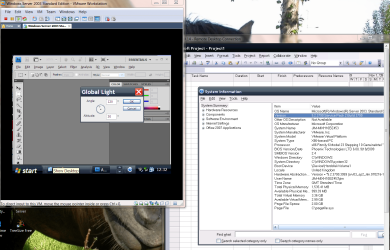
Have a look at this

2 Users running - 1 running Photoshop CS4 (quite intensive)
the other running MS project

RAM allocated to the VM -- 1.6 GB
Physical (I.E REAL) Ram available 1.0 GB ( actually 999.39 MB)
That's with 2 users both doing "Real work".

(That's the system information taken from the "Virtual Machine").

Screen dump enc.

You can actually run W2K3 server in a VM as little as 384MB but on a 2GB machine I'd give it say 768MB to start with - and you can always increase the RAM afterwards when you have more on your main machine.

Only allocate a SINGLE processor however to your VM - even if you ghave a dual or quad core.

Cheers
jimbo
 

Attachments

  • w2003serv.png
    w2003serv.png
    165.2 KB · Views: 79

My Computer

Computer type
PC/Desktop
Computer Manufacturer/Model Number
Custom built, several laptops HP/ASUS
OS
Linux CENTOS 7 / various Windows OS'es and servers
CPU
Intel i7 Intel i5
Memory
8GB, 16GB
Graphics Card(s)
On Motherboard
Sound Card
Realtek HD audio
Monitor(s) Displays
Apple Cinema display, Samsung LCD
Screen Resolution
1920 X 1080
Hard Drives
4 X 1TB SATA
Mouse
Toshiba wireless laser
Internet Speed
> 20MB up
You talk about multiple users.

Any reason to do this on a single workstation used by one person at a time?
 

My Computer

OS
Windows 7 Professional
CPU
Intel Q9400 @ 2.66GHz
Memory
8.00 GB
Of course, this assumes that everybody has a Server 2003 disc lying around they can install from :)
 

My Computer

Computer Manufacturer/Model Number
Self-Built in July 2009
OS
Windows 7 Ultimate x64
CPU
Intel Q9550 2.83Ghz OC'd to 3.40Ghz
Motherboard
Gigabyte GA-EP45-UD3R rev. 1.1, F12 BIOS
Memory
8GB G.Skill PI DDR2-800, 4-4-4-12 timings
Graphics Card(s)
EVGA 1280MB Nvidia GeForce GTX570
Sound Card
Realtek ALC899A 8 channel onboard audio
Monitor(s) Displays
23" Acer x233H
Screen Resolution
1920x1080
Hard Drives
Intel X25-M 80GB Gen 2 SSD
Western Digital 1TB Caviar Black, 32MB cache. WD1001FALS
PSU
Corsair 620HX modular
Case
Antec P182
Cooling
stock
Keyboard
ABS M1 Mechanical
Mouse
Logitech G9 Laser Mouse
Internet Speed
15/2 cable modem
Other Info
Windows and Linux enthusiast. Logitech G35 Headset.
Hi there
You can download W2k3 server from Technet -- loads of people on these Forums have technet subscriptions.

Update - I've switched to W2K3 R2 server -- also good -

Note however the automatic activation doesn't work so DON'T enter activation key for unattended guest machine install but after installation go to CHANGE PRODUCT KEY -- enter the key from technet and then it activates OK.


I like W2K8 server as well -- but some legacy stuff I use won't work on it so I'm sticking for a while to w2K3 server.


The good thing also about running a virtual server is that if you want to run an application on the virtual machine such as a Database application you don't have to logon to the server - you can logon directly to the application. This means you could have one user say using MySQl and another running say a SAP logon or ORACLE while the vm machine itself is running quietly in the background.

If you use something like XP as a VM you can't logon to an application running on the VM from outside the VM unless you actually logon first to the VM.

In other words you need to actually logon to the XP machine first as a user and then logon to the application.

For example

Oracle DB application running on the VM - users logon to the ORACLE APP and not the VM . RDP not needed.

If I run this on an XP machine I need to logon to the ORACLE DB from within XP.
(That's why the virtual machine is called a SERVER).


To Cluent - there's good reason to have more than one user on a workstation for some applications - especially if you are designing database applications which update the database.

Doesn't have to be a "real" user whilst testing but it does need a separate user ID etc even if the same person is testing the application.

Bit difficult to explain if you haven't messed around with this but it's quite useful if you've ever done Database testing and you want to check what happens for example when 2 or more concurrent users try and access the DB. (Programmers will know this often as re-entrant code).

Database stuff usually works fine when you test with ONE user but you should test with more to see if your query code is robust enough -- for example I'm sure the software in these Forums works properly for Multi - user edits and updates without locking the entire DB each time a user posts / changes a post -- think how horrendous the response time would be if only one user could change something at a time.

Cheers
jimbo
 

My Computer

Computer type
PC/Desktop
Computer Manufacturer/Model Number
Custom built, several laptops HP/ASUS
OS
Linux CENTOS 7 / various Windows OS'es and servers
CPU
Intel i7 Intel i5
Memory
8GB, 16GB
Graphics Card(s)
On Motherboard
Sound Card
Realtek HD audio
Monitor(s) Displays
Apple Cinema display, Samsung LCD
Screen Resolution
1920 X 1080
Hard Drives
4 X 1TB SATA
Mouse
Toshiba wireless laser
Internet Speed
> 20MB up
Back
Top