What did i Disable?

DarkDavil

Avatar thanks to BFK :D
I've been messing around with my laptop's internal settings lately, and i must've done something to make my laptop do this... It sometimes randomly goes back to original aero graphics... like the one where its that solid color of blue and all. But if i simply run the troubleshooter to enable transparency, it goes back to normal. It usually goes back to the original aero when im closing a game(or some large program) and when i turn of IoBIt's gamebooster, or when i turn off the turbo mode in Tune-Up Utilities 2010(Which is great btw) :D

Here is an enclosed ss of the issue... Capture.PNG
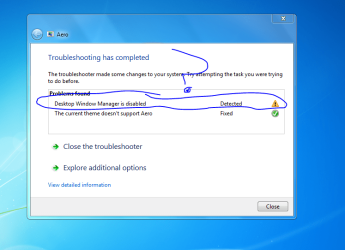
EDIT: That second error is irrelevant, i was jst making sure a certain theme worked/or didnt.. it didnt :D
 

My Computer

Computer Manufacturer/Model Number
HP dv6000t CTO Entertainment Lappy |My Desktop @ Bottom
OS
7 x64/ Back-Track 4
CPU
Intel Core 2 Duo CPU 8300@ 2.4 Ghz
Motherboard
HP's Own
Memory
4096 MB DDR2
Graphics Card(s)
Nvidia 8400M GS
Sound Card
Altec Lansing (The usual on Laptops )
Monitor(s) Displays
Laptop Screen. 17' Wide.
Screen Resolution
1280 x 800
Hard Drives
150 GB HDD.
Cooling
2 External Fans, Undervolted, Coolant
Keyboard
Norm. Cheap Random Keyboard
Mouse
Norm. Cheap Random Mouse
Other Info
This is my Homemade Desktop :)
HDD: Western Digital Caviar Blue 320GB 16MB 7200RPM SATA2
And more to come in a bit! :D
I've been messing around with my laptop's internal settings lately, and i must've done something to make my laptop do this... It sometimes randomly goes back to original aero graphics... like the one where its that solid color of blue and all. But if i simply run the troubleshooter to enable transparency, it goes back to normal. It usually goes back to the original aero when im closing a game(or some large program) and when i turn of IoBIt's gamebooster, or when i turn off the turbo mode in Tune-Up Utilities 2010(Which is great btw) :D

Here is an enclosed ss of the issue... View attachment 35405

EDIT: That second error is irrelevant, i was jst making sure a certain theme worked/or didnt.. it didnt :D

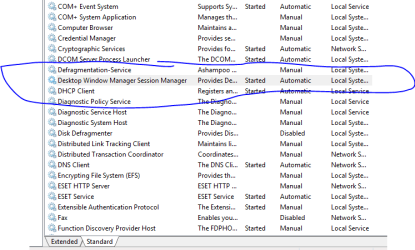
Looks like you have changed the desktop window manager settings in services, check to see if it's still set to auto start.
 

My Computer

Computer Manufacturer/Model Number
Home Brew
OS
Windows 7 Ultimate Vista Ultimate x64
CPU
Core 2 Duo E8500 3.16Ghz @ 3.8Ghz
Motherboard
eVGA 750i FTW
Memory
2x2Gigs Patriot PC2-6400 LL
Graphics Card(s)
Inno3D GeForce GTX260 216 SP
Monitor(s) Displays
ASUS VW222U 22" 2ms Response time
Screen Resolution
1680x1050
Hard Drives
SATA 150GB
SATA II 250GB
USB IDE 750GB Ext.
PSU
HYTEC 600W & Thermaltake 650W Toughpower Power Exp
Case
Thermaltake Armor LCS (Liquid Cooling System)
Cooling
Liquid Cooling System
Keyboard
Logitech G15 Gaming Keyboard
Mouse
Logitech G9 Gaming Mouse
Don't know what you did, but type services.msc in the start search box , right click Windows Manager (properties) and select 'automatic'.
 

My Computer

Computer type
PC/Desktop
Computer Manufacturer/Model Number
Bruce ... somewhere in his 40's
OS
Windows 7 Ultimate 32bit SP1
CPU
Intel(R) Core(TM)2 Quad CPU @ 2.40GHz, 2400 MHz
Motherboard
INTEL/D975XBX2
Memory
4 GB
Graphics Card(s)
ATI Radeon HD 2600 Pro
Monitor(s) Displays
Samsung SyncMaster 914v
Screen Resolution
1280 x 1024
Hard Drives
2/500GB each ... ST3500630AS ATA Device.
One is not connected
PSU
Rocketfish 700 W
Case
G.Skill Gigabyte Chassis
Keyboard
Standard PS/2 Keyboard
Mouse
Microsoft PS/2 Mouse
Internet Speed
DSL
Antivirus
Avira Internet Security
Browser
IE 11
Other Info
ATI HDMI Audio
Don't know what you did, but type services.msc in the start search box , right click Windows Manager (properties) and select 'automatic'.

Yea, i had tried that before, but i cannot seem to find the "Windows manager" nor the one GriM stated.. :( Here's a ss -->Capture1.PNG
 

My Computer

Computer Manufacturer/Model Number
HP dv6000t CTO Entertainment Lappy |My Desktop @ Bottom
OS
7 x64/ Back-Track 4
CPU
Intel Core 2 Duo CPU 8300@ 2.4 Ghz
Motherboard
HP's Own
Memory
4096 MB DDR2
Graphics Card(s)
Nvidia 8400M GS
Sound Card
Altec Lansing (The usual on Laptops )
Monitor(s) Displays
Laptop Screen. 17' Wide.
Screen Resolution
1280 x 800
Hard Drives
150 GB HDD.
Cooling
2 External Fans, Undervolted, Coolant
Keyboard
Norm. Cheap Random Keyboard
Mouse
Norm. Cheap Random Mouse
Other Info
This is my Homemade Desktop :)
HDD: Western Digital Caviar Blue 320GB 16MB 7200RPM SATA2
And more to come in a bit! :D
Back
Top