Dave's Quick Search Installed on W7 7100 64 bit

I have added sections to the instructions to enable script editing and protecting DQSD registry entries from registry cleaners.

Muad, thanks a lot!
I also think you may wanna add that step about allowing active content - I think it was one of the culprits in my case...
 

My Computer My Computer

At a glance

Windows XP Pro SP3; Windows 7201x64Intel Duo quad2Gb; 8gb1gb nVidia
Computer Manufacturer/Model Number
Dell XPS; Dell Precision M6400
OS
Windows XP Pro SP3; Windows 7201x64
CPU
Intel Duo quad
Memory
2Gb; 8gb
Graphics Card(s)
1gb nVidia
Monitor(s) Displays
Dell 27"
Screen Resolution
1920x1280
Hard Drives
160+500
Internet Speed
FiOS 20/20
Muad, thanks a lot!
I also think you may wanna add that step about allowing active content - I think it was one of the culprits in my case...

I did. I put it in the second section on enabling menu file access.

Thanks for paying attention!
 

My Computer My Computer

At a glance

XP Pro & Vista Home Premium (x86); Windows Ul...
OS
XP Pro & Vista Home Premium (x86); Windows Ultimate 7600 x64 Retail

My Computer My Computer

At a glance

Windows XP Pro SP3; Windows 7201x64Intel Duo quad2Gb; 8gb1gb nVidia
Computer Manufacturer/Model Number
Dell XPS; Dell Precision M6400
OS
Windows XP Pro SP3; Windows 7201x64
CPU
Intel Duo quad
Memory
2Gb; 8gb
Graphics Card(s)
1gb nVidia
Monitor(s) Displays
Dell 27"
Screen Resolution
1920x1280
Hard Drives
160+500
Internet Speed
FiOS 20/20

My Computer My Computer

At a glance

XP Pro & Vista Home Premium (x86); Windows Ul...
OS
XP Pro & Vista Home Premium (x86); Windows Ultimate 7600 x64 Retail
Totally...
couple of things I noticed:
1) text is badly readable.. is it in the settings somewhere?
2) old ugly border problem... (or the lack of thereof.. it ends at the taskbar limits)
 

My Computer My Computer

At a glance

Windows XP Pro SP3; Windows 7201x64Intel Duo quad2Gb; 8gb1gb nVidia
Computer Manufacturer/Model Number
Dell XPS; Dell Precision M6400
OS
Windows XP Pro SP3; Windows 7201x64
CPU
Intel Duo quad
Memory
2Gb; 8gb
Graphics Card(s)
1gb nVidia
Monitor(s) Displays
Dell 27"
Screen Resolution
1920x1280
Hard Drives
160+500
Internet Speed
FiOS 20/20
Totally...
couple of things I noticed:
1) text is badly readable.. is it in the settings somewhere?
2) old ugly border problem... (or the lack of thereof.. it ends at the taskbar limits)

There are some Vista specific themes in the C:\Program Files\Quick Search Deskbar\themes\vista folder with an explanation in the readme file.

Read that and make sure you are using the one of the 2 Vista themes (widescreen has bigger fonts).

The readability depends on the Vista desktop color and/or the transparency setting in Aero. It uses white text so darker desktops/less transparency works best.
 

My Computer My Computer

At a glance

XP Pro & Vista Home Premium (x86); Windows Ul...
OS
XP Pro & Vista Home Premium (x86); Windows Ultimate 7600 x64 Retail
There are some Vista specific themes in the C:\Program Files\Quick Search Deskbar\themes\vista folder with an explanation in the readme file.

Read that and make sure you are using the one of the 2 Vista themes (widescreen has bigger fonts).

The readability depends on the Vista desktop color and/or the transparency setting in Aero. It uses white text so darker desktops/less transparency works best.
Oh, thanks, I'll check it out!
 

My Computer My Computer

At a glance

Windows XP Pro SP3; Windows 7201x64Intel Duo quad2Gb; 8gb1gb nVidia
Computer Manufacturer/Model Number
Dell XPS; Dell Precision M6400
OS
Windows XP Pro SP3; Windows 7201x64
CPU
Intel Duo quad
Memory
2Gb; 8gb
Graphics Card(s)
1gb nVidia
Monitor(s) Displays
Dell 27"
Screen Resolution
1920x1280
Hard Drives
160+500
Internet Speed
FiOS 20/20
And it works nicely! Thanks again man!
 

My Computer My Computer

At a glance

Windows XP Pro SP3; Windows 7201x64Intel Duo quad2Gb; 8gb1gb nVidia
Computer Manufacturer/Model Number
Dell XPS; Dell Precision M6400
OS
Windows XP Pro SP3; Windows 7201x64
CPU
Intel Duo quad
Memory
2Gb; 8gb
Graphics Card(s)
1gb nVidia
Monitor(s) Displays
Dell 27"
Screen Resolution
1920x1280
Hard Drives
160+500
Internet Speed
FiOS 20/20
UPDATE:

Added ADDENDUM FOR DQSD THEME APPEARANCE/READABILITY to the instructions.
 

My Computer My Computer

At a glance

XP Pro & Vista Home Premium (x86); Windows Ul...
OS
XP Pro & Vista Home Premium (x86); Windows Ultimate 7600 x64 Retail

My Computer My Computer

At a glance

Windows XP Pro SP3; Windows 7201x64Intel Duo quad2Gb; 8gb1gb nVidia
Computer Manufacturer/Model Number
Dell XPS; Dell Precision M6400
OS
Windows XP Pro SP3; Windows 7201x64
CPU
Intel Duo quad
Memory
2Gb; 8gb
Graphics Card(s)
1gb nVidia
Monitor(s) Displays
Dell 27"
Screen Resolution
1920x1280
Hard Drives
160+500
Internet Speed
FiOS 20/20
what about windows 7 32 bit

i can't install it on windows 7 32 bit. any suggestions on how to do that?

Thanks
 

My Computer My Computer

At a glance

windows 7
OS
windows 7
i can't install it on windows 7 32 bit. any suggestions on how to do that?

Thanks


What kind of errors are you getting? If using the EXE version did you run it as and Administrator?
 

My Computer My Computer

At a glance

XP Pro & Vista Home Premium (x86); Windows Ul...
OS
XP Pro & Vista Home Premium (x86); Windows Ultimate 7600 x64 Retail
all of what i did is on the attachment screen shot.

i also tried to use the windows 7 theme supplied in the DQSD user mail archives. Nothing worked.
 

Attachments

  • Untitled.png
    Untitled.png
    50.4 KB · Views: 37

My Computer My Computer

At a glance

windows 7
OS
windows 7
all of what i did is on the attachment screen shot.

i also tried to use the windows 7 theme supplied in the DQSD user mail archives. Nothing worked.

Well the first error is what it is... you cannot install the DQSD 64-bit install kit on 32-bit Windows.

The second error I have seen before on other 32-bit Windows (XP and Vista). What happens if you just click "Continue"?

Hmmmm... if I could just remember... but it is late now :sleepy:

Since it is a Java Script error, have you installed the latest Java Run-time from Sun? See link below.

Download Free Java Software - Sun Microsystems

Next go to INTERNET OPTIONS>ADVANCED and make sure both "Disable Script Debugging" options are clicked "ON".

Later!
 

My Computer My Computer

At a glance

XP Pro & Vista Home Premium (x86); Windows Ul...
OS
XP Pro & Vista Home Premium (x86); Windows Ultimate 7600 x64 Retail
all of what i did is on the attachment screen shot.

i also tried to use the windows 7 theme supplied in the DQSD user mail archives. Nothing worked.

Well the first error is what it is... you cannot install the DQSD 64-bit install kit on 32-bit Windows.

The second error I have seen before on other 32-bit Windows (XP and Vista). What happens if you just click "Continue"?

Hmmmm... if I could just remember... but it is late now :sleepy:

Since it is a Java Script error, have you installed the latest Java Run-time from Sun? See link below.

Download Free Java Software - Sun Microsystems

Next go to INTERNET OPTIONS>ADVANCED and make sure both "Disable Script Debugging" options are clicked "ON".

Later!

okay here is what i did:

i did not have java installed (totally forgot about it, this is a clean install of windows 7, do you think im missing something else?) , i installed Java from the link you gave me, then uninstalled and reinstalled DQSD 4.0 as an admin.

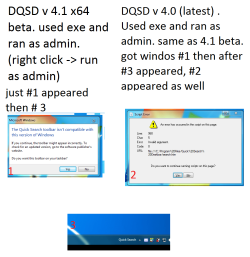
still get the 1st window (incompatible with this version of windows) and still only get "quick search" without the actual search bar. i also get the script errors.

I made sure the "Disable Script Debugging" is clicked on.

i always click yes, and continue. nothing happens. still stuck with "quick search" in the bottom without the actual search bar.

note that i did copy the win 7 theme after installing DQSD (i copied everything in the "PlaceIntoYour.ProgramFiles.Quick Search Deskbar.Folder" to "C:\Program Files\Quick Search Deskbar"

basically, nothing changed after installing java.

Any input will help. Thanks a lot.

Regards
 

My Computer My Computer

At a glance

windows 7
OS
windows 7
okay here is what i did:

i did not have java installed (totally forgot about it, this is a clean install of windows 7, do you think im missing something else?) , i installed Java from the link you gave me, then uninstalled and reinstalled DQSD 4.0 as an admin.

still get the 1st window (incompatible with this version of windows) and still only get "quick search" without the actual search bar. i also get the script errors.


You are installing the WRONG version of DQSD. You cannot install the 64-bit version on Windows 32-bit.

Install the regular DQSD 32-bit install kit.
 

My Computer My Computer

At a glance

XP Pro & Vista Home Premium (x86); Windows Ul...
OS
XP Pro & Vista Home Premium (x86); Windows Ultimate 7600 x64 Retail
okay


You are installing the WRONG version of DQSD. You cannot install the 64-bit version on Windows 32-bit.

Install the regular DQSD 32-bit install kit.

that is what i have been doing. just in case though, i did reinstall the normal 32 bit . i still keep getting the incompatible windows version.

if you think im using a wrong version. just give me the exact download link for DQSD and i will redownload & reinstall. although i do not think that is the issue.

Thanks again

regards
 

My Computer My Computer

At a glance

windows 7
OS
windows 7
Hmmmm.....

Did you unlock the TaskBar and re-size the DQSD window?

HOW did you uninstall the 64 bit version? The ONLY way you can get the "incompatible version" error is by installing the wrong version (64bit on 32bit OS). The 64-bit kit is not available as an EXE AFAIK and does not have and "Uninstall" option in the "Program Features" Control Panel.

Turn off the "Quick Search" Toolbar in the Taskbar and delete the "Quick Search Deskbar" install folder. Restart the computer.

AFAIK the latest 32bit install kit is:

Download Dave's Quick Search Deskbar from SourceForge.net

It is a BETA but an OLD BETA.....
 

My Computer My Computer

At a glance

XP Pro & Vista Home Premium (x86); Windows Ul...
OS
XP Pro & Vista Home Premium (x86); Windows Ultimate 7600 x64 Retail
i do not know what the problem was, i think it was related to not clearing all the DQSD old files when i tried it with the other version. anyways, i manually cleaned everything, restarted, reinstalled using the link you gave me. unlocked the task bar and resized and it worked! the incompatible windows version popup did appear though, i do not know what to make of that. nonetheless, it is working now.

thanks for your time, i truly appreciate it.
 

My Computer My Computer

At a glance

windows 7
OS
windows 7
i do not know what the problem was, i think it was related to not clearing all the DQSD old files when i tried it with the other version. anyways, i manually cleaned everything, restarted, reinstalled using the link you gave me. unlocked the task bar and resized and it worked! the incompatible windows version popup did appear though, i do not know what to make of that. nonetheless, it is working now.

thanks for your time, i truly appreciate it.

Unfortunately I am running 64-bit so I could not duplicate your symptoms exactly but I am glad you have it working now. :thumbsup:
 

My Computer My Computer

At a glance

XP Pro & Vista Home Premium (x86); Windows Ul...
OS
XP Pro & Vista Home Premium (x86); Windows Ultimate 7600 x64 Retail
Back
Top