BSOD - Need Help with minidump files

skibum

New member
Local time
1:48 PM
Messages
17
I have been having system crashes intermittantly and need some help undestanding my minidump files... Here's what I am seeing:

Microsoft (R) Windows Debugger Version 6.11.0001.404 AMD64
Copyright (c) Microsoft Corporation. All rights reserved.


Loading Dump File [C:\Windows\Minidump\111709-25490-01.dmp]
Mini Kernel Dump File: Only registers and stack trace are available

Symbol search path is: SRV*c:\symbols*Symbol information
Executable search path is:
Windows 7 Kernel Version 7600 MP (8 procs) Free x64
Product: WinNt, suite: TerminalServer SingleUserTS
Built by: 7600.16385.amd64fre.win7_rtm.090713-1255
Machine Name:
Kernel base = 0xfffff800`02a5e000 PsLoadedModuleList = 0xfffff800`02c9be50
Debug session time: Tue Nov 17 20:07:10.583 2009 (GMT+1)
System Uptime: 0 days 10:04:53.441
Loading Kernel Symbols
...............................................................
................................................................
..........................
Loading User Symbols
Loading unloaded module list
.....
*******************************************************************************
* *
* Bugcheck Analysis *
* *
*******************************************************************************

Use !analyze -v to get detailed debugging information.

BugCheck A0, {9, ffffffffc0000001, 1, 0}

Probably caused by : ntkrnlmp.exe ( nt!PopEndMirroring+145 )

Followup: MachineOwner
---------

0: kd> !analyze -v
*******************************************************************************
* *
* Bugcheck Analysis *
* *
*******************************************************************************

INTERNAL_POWER_ERROR (a0)
The power policy manager experienced a fatal error.
Arguments:
Arg1: 0000000000000009, A fatal error occured while preparing the hibernate file.
Arg2: ffffffffc0000001, Status code
Arg3: 0000000000000001, Mirroring phase
Arg4: 0000000000000000

Debugging Details:
------------------


BUGCHECK_STR: 0xA0

CUSTOMER_CRASH_COUNT: 1

DEFAULT_BUCKET_ID: VISTA_DRIVER_FAULT

PROCESS_NAME: System

CURRENT_IRQL: 2

LAST_CONTROL_TRANSFER: from fffff80002d1b665 to fffff80002acff00

STACK_TEXT:
fffff880`089e1b08 fffff800`02d1b665 : 00000000`000000a0 00000000`00000009 ffffffff`c0000001 00000000`00000001 : nt!KeBugCheckEx
fffff880`089e1b10 fffff800`02d17464 : ffffffff`ffffffff ffffffff`ffffffff 00000000`001b49fa 00000000`00000000 : nt!PopEndMirroring+0x145
fffff880`089e1be0 fffff800`02d1b925 : fffff880`089e1d00 fffff880`00000008 00000000`00000000 fffffa80`00000008 : nt!MmDuplicateMemory+0xb64
fffff880`089e1cd0 fffff800`02d73166 : fffffa80`0912a040 fffffa80`0550a680 00000000`00000000 fffff800`02ac7d87 : nt!PopTransitionToSleep+0xd5
fffff880`089e1d40 fffff800`02aae486 : fffff800`02c48e80 fffffa80`0912a040 fffff800`02c56c40 fffff880`0123fa90 : nt!PspSystemThreadStartup+0x5a
fffff880`089e1d80 00000000`00000000 : 00000000`00000000 00000000`00000000 00000000`00000000 00000000`00000000 : nt!KxStartSystemThread+0x16


STACK_COMMAND: kb

FOLLOWUP_IP:
nt!PopEndMirroring+145
fffff800`02d1b665 cc int 3

SYMBOL_STACK_INDEX: 1

SYMBOL_NAME: nt!PopEndMirroring+145

FOLLOWUP_NAME: MachineOwner

MODULE_NAME: nt

IMAGE_NAME: ntkrnlmp.exe

DEBUG_FLR_IMAGE_TIMESTAMP: 4a5bc600

FAILURE_BUCKET_ID: X64_0xA0_IO_DUMPSTACK_INIT_ERROR_nt!PopEndMirroring+145

BUCKET_ID: X64_0xA0_IO_DUMPSTACK_INIT_ERROR_nt!PopEndMirroring+145

Followup: MachineOwner


Any ideas?

Thanks,

Skibum
 

My Computer My Computer

At a glance

Windows 7 Professionali7 920 @ 3.8GHzCorsair 6Gb DDR3 1600MHzHD 4870 1GB
OS
Windows 7 Professional
CPU
i7 920 @ 3.8GHz
Motherboard
Asus P6t Deluxe V2
Memory
Corsair 6Gb DDR3 1600MHz
Graphics Card(s)
HD 4870 1GB
Monitor(s) Displays
Dell 2209WA
Hard Drives
Spinpoint 1GB
PSU
Seasonic 850W
Case
Silverstone
Cooling
Titan FENRIR
Go to Control Panel > Device Manager and see if any entry has a yellow flag beside it.

Have you updated your driver either from Windows update or the manufacturers site?
 

My Computer My Computer

At a glance

Windows 7 Pro & Vista Home PremiumAthlon 64 3800+ (Orleans) 2.40GHz2GB DDR2 RAM DIMMNVIDIA GeForce 8500 GT 512 MB memory HDMI out
Computer Manufacturer/Model Number
Cheap $399.00 E-Machine
OS
Windows 7 Pro & Vista Home Premium
CPU
Athlon 64 3800+ (Orleans) 2.40GHz
Motherboard
Winfast
Memory
2GB DDR2 RAM DIMM
Graphics Card(s)
NVIDIA GeForce 8500 GT 512 MB memory HDMI out
Sound Card
creative X-Fi Exteme 7..1 channel
Monitor(s) Displays
Acer V223W 22" widescreen DVI
Screen Resolution
1680x1050
Hard Drives
WDC WD5 500GB
WDC WD25 250GB
PSU
OCZ 550 watt
Case
Gateway
Cooling
2 fans
Keyboard
Dell
Mouse
Sony Vaio
Internet Speed
18MB/s down - .72MB /s up
Go to Control Panel > Device Manager and see if any entry has a yellow flag beside it.

Have you updated your driver either from Windows update or the manufacturers site?


Hi, No yellow flags. I am all up to date with drivers from Microsoft. Any driver in specific that I should be looking at?

Thanks!
 

My Computer My Computer

At a glance

Windows 7 Professionali7 920 @ 3.8GHzCorsair 6Gb DDR3 1600MHzHD 4870 1GB
OS
Windows 7 Professional
CPU
i7 920 @ 3.8GHz
Motherboard
Asus P6t Deluxe V2
Memory
Corsair 6Gb DDR3 1600MHz
Graphics Card(s)
HD 4870 1GB
Monitor(s) Displays
Dell 2209WA
Hard Drives
Spinpoint 1GB
PSU
Seasonic 850W
Case
Silverstone
Cooling
Titan FENRIR
Go to Start > Run and type cmd. Now type sfc /scannow

Do you have a restore point you could go back to?

How much memory do you have installed?

Go the Start Help and Support and type in memory test. It will give you the link to run it near the bottom of the page..
 

My Computer My Computer

At a glance

Windows 7 Pro & Vista Home PremiumAthlon 64 3800+ (Orleans) 2.40GHz2GB DDR2 RAM DIMMNVIDIA GeForce 8500 GT 512 MB memory HDMI out
Computer Manufacturer/Model Number
Cheap $399.00 E-Machine
OS
Windows 7 Pro & Vista Home Premium
CPU
Athlon 64 3800+ (Orleans) 2.40GHz
Motherboard
Winfast
Memory
2GB DDR2 RAM DIMM
Graphics Card(s)
NVIDIA GeForce 8500 GT 512 MB memory HDMI out
Sound Card
creative X-Fi Exteme 7..1 channel
Monitor(s) Displays
Acer V223W 22" widescreen DVI
Screen Resolution
1680x1050
Hard Drives
WDC WD5 500GB
WDC WD25 250GB
PSU
OCZ 550 watt
Case
Gateway
Cooling
2 fans
Keyboard
Dell
Mouse
Sony Vaio
Internet Speed
18MB/s down - .72MB /s up
Go to Start > Run and type cmd. Now type sfc /scannow

Do you have a restore point you could go back to?

How much memory do you have installed?

Go the Start Help and Support and type in memory test. It will give you the link to run it near the bottom of the page..


Yes I could go back to a restore point but this has been happening for a while now.. I will look into that.

I have 6 GB Corsair 1600MHz, Asus P6t Deluxe V2, I7 Core 920 overclocked to 4.0 GHz.

I can run prime95 all night long without a failure and temps stay below 72C so I do not think it is my overclocking....

?

Thanks -
 

My Computer My Computer

At a glance

Windows 7 Professionali7 920 @ 3.8GHzCorsair 6Gb DDR3 1600MHzHD 4870 1GB
OS
Windows 7 Professional
CPU
i7 920 @ 3.8GHz
Motherboard
Asus P6t Deluxe V2
Memory
Corsair 6Gb DDR3 1600MHz
Graphics Card(s)
HD 4870 1GB
Monitor(s) Displays
Dell 2209WA
Hard Drives
Spinpoint 1GB
PSU
Seasonic 850W
Case
Silverstone
Cooling
Titan FENRIR
Go to Start > Run and type cmd. Now type sfc /scannow

Do you have a restore point you could go back to?

How much memory do you have installed?

Go the Start Help and Support and type in memory test. It will give you the link to run it near the bottom of the page..


Sorry, I forgot to tell you what the sfc /scannow said:

"Winows Resource Protection did not find any integrity violations"
 

My Computer My Computer

At a glance

Windows 7 Professionali7 920 @ 3.8GHzCorsair 6Gb DDR3 1600MHzHD 4870 1GB
OS
Windows 7 Professional
CPU
i7 920 @ 3.8GHz
Motherboard
Asus P6t Deluxe V2
Memory
Corsair 6Gb DDR3 1600MHz
Graphics Card(s)
HD 4870 1GB
Monitor(s) Displays
Dell 2209WA
Hard Drives
Spinpoint 1GB
PSU
Seasonic 850W
Case
Silverstone
Cooling
Titan FENRIR
Do you have a file called hiberfil.sys in the root of the c: drive.'

If you can't see it, go to Control panel > Folder Options, and uncheck Hide protected operating system files, check show hidden files
 

My Computer My Computer

At a glance

Windows 7 Pro & Vista Home PremiumAthlon 64 3800+ (Orleans) 2.40GHz2GB DDR2 RAM DIMMNVIDIA GeForce 8500 GT 512 MB memory HDMI out
Computer Manufacturer/Model Number
Cheap $399.00 E-Machine
OS
Windows 7 Pro & Vista Home Premium
CPU
Athlon 64 3800+ (Orleans) 2.40GHz
Motherboard
Winfast
Memory
2GB DDR2 RAM DIMM
Graphics Card(s)
NVIDIA GeForce 8500 GT 512 MB memory HDMI out
Sound Card
creative X-Fi Exteme 7..1 channel
Monitor(s) Displays
Acer V223W 22" widescreen DVI
Screen Resolution
1680x1050
Hard Drives
WDC WD5 500GB
WDC WD25 250GB
PSU
OCZ 550 watt
Case
Gateway
Cooling
2 fans
Keyboard
Dell
Mouse
Sony Vaio
Internet Speed
18MB/s down - .72MB /s up
Do you have a file called hiberfil.sys in the root of the c: drive.'

If you can't see it, go to Control panel > Folder Options, and uncheck Hide protected operating system files, check show hidden files


Yes I do. Not sure what to do with it... : )
 

My Computer My Computer

At a glance

Windows 7 Professionali7 920 @ 3.8GHzCorsair 6Gb DDR3 1600MHzHD 4870 1GB
OS
Windows 7 Professional
CPU
i7 920 @ 3.8GHz
Motherboard
Asus P6t Deluxe V2
Memory
Corsair 6Gb DDR3 1600MHz
Graphics Card(s)
HD 4870 1GB
Monitor(s) Displays
Dell 2209WA
Hard Drives
Spinpoint 1GB
PSU
Seasonic 850W
Case
Silverstone
Cooling
Titan FENRIR
Leave it, ot has to do with Power settings

Try downloadin this freeware utility that allows abetter readable Blue screen errors:

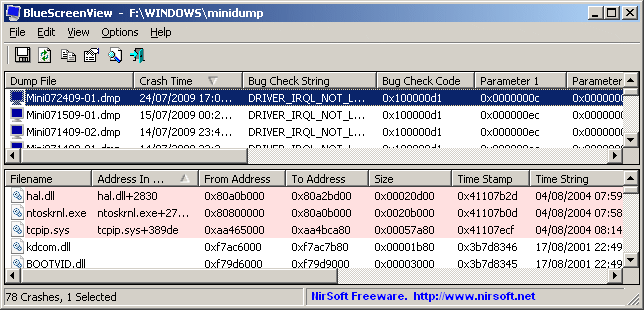
BlueScreenView v1.15
Description

BlueScreenView scans all your minidump files created during 'blue screen of death' crashes, and displays the information about all crashes in one table. For each crash, BlueScreenView displays the minidump filename, the date/time of the crash, the basic crash information displayed in the blue screen (Bug Check Code and 4 parameters), and the details of the driver or module that possibly caused the crash (filename, product name, file description, and file version).

For each crash displayed in the upper pane, you can view the details of the device drivers loaded during the crash in the lower pane. BlueScreenView also mark the drivers that their addresses found in the crash stack, so you can easily locate the suspected drivers that possibly caused the crash.
bluescreenview.gif
 

My Computer My Computer

At a glance

Windows 7 Pro & Vista Home PremiumAthlon 64 3800+ (Orleans) 2.40GHz2GB DDR2 RAM DIMMNVIDIA GeForce 8500 GT 512 MB memory HDMI out
Computer Manufacturer/Model Number
Cheap $399.00 E-Machine
OS
Windows 7 Pro & Vista Home Premium
CPU
Athlon 64 3800+ (Orleans) 2.40GHz
Motherboard
Winfast
Memory
2GB DDR2 RAM DIMM
Graphics Card(s)
NVIDIA GeForce 8500 GT 512 MB memory HDMI out
Sound Card
creative X-Fi Exteme 7..1 channel
Monitor(s) Displays
Acer V223W 22" widescreen DVI
Screen Resolution
1680x1050
Hard Drives
WDC WD5 500GB
WDC WD25 250GB
PSU
OCZ 550 watt
Case
Gateway
Cooling
2 fans
Keyboard
Dell
Mouse
Sony Vaio
Internet Speed
18MB/s down - .72MB /s up
Thanks for that! It appears the driver that is causing the problem is:

ntoskrnl.exe

Any ideas what I ned to update?
 

My Computer My Computer

At a glance

Windows 7 Professionali7 920 @ 3.8GHzCorsair 6Gb DDR3 1600MHzHD 4870 1GB
OS
Windows 7 Professional
CPU
i7 920 @ 3.8GHz
Motherboard
Asus P6t Deluxe V2
Memory
Corsair 6Gb DDR3 1600MHz
Graphics Card(s)
HD 4870 1GB
Monitor(s) Displays
Dell 2209WA
Hard Drives
Spinpoint 1GB
PSU
Seasonic 850W
Case
Silverstone
Cooling
Titan FENRIR
Could you please upload a creen shot?
 

My Computer My Computer

At a glance

Windows 7 Pro & Vista Home PremiumAthlon 64 3800+ (Orleans) 2.40GHz2GB DDR2 RAM DIMMNVIDIA GeForce 8500 GT 512 MB memory HDMI out
Computer Manufacturer/Model Number
Cheap $399.00 E-Machine
OS
Windows 7 Pro & Vista Home Premium
CPU
Athlon 64 3800+ (Orleans) 2.40GHz
Motherboard
Winfast
Memory
2GB DDR2 RAM DIMM
Graphics Card(s)
NVIDIA GeForce 8500 GT 512 MB memory HDMI out
Sound Card
creative X-Fi Exteme 7..1 channel
Monitor(s) Displays
Acer V223W 22" widescreen DVI
Screen Resolution
1680x1050
Hard Drives
WDC WD5 500GB
WDC WD25 250GB
PSU
OCZ 550 watt
Case
Gateway
Cooling
2 fans
Keyboard
Dell
Mouse
Sony Vaio
Internet Speed
18MB/s down - .72MB /s up
Could you please upload a creen shot?


Do you mean a BSOD screen shot? It happens intermittantly and I have been unable to figure out how to copy the BSOD...
 

My Computer My Computer

At a glance

Windows 7 Professionali7 920 @ 3.8GHzCorsair 6Gb DDR3 1600MHzHD 4870 1GB
OS
Windows 7 Professional
CPU
i7 920 @ 3.8GHz
Motherboard
Asus P6t Deluxe V2
Memory
Corsair 6Gb DDR3 1600MHz
Graphics Card(s)
HD 4870 1GB
Monitor(s) Displays
Dell 2209WA
Hard Drives
Spinpoint 1GB
PSU
Seasonic 850W
Case
Silverstone
Cooling
Titan FENRIR
No, a screen shot of the Blue screen program that you downloaded.

BlueScreenView Features

  • Automatically scans your current minidump folder and displays the list of all crash dumps, including crash dump date/time and crash details.
  • Allows you to view a blue screen which is very similar to the one that Windows displayed during the crash.
  • BlueScreenView enumerates the memory addresses inside the stack of the crash, and find all drivers/modules that might be involved in the crash.
  • BlueScreenView also allows you to work with another instance of Windows, simply by choosing the right minidump folder (In Advanced Options).
  • BlueScreenView automatically locate the drivers appeared in the crash dump, and extract their version resource information, including product name, file version, company, and file description.
 

My Computer My Computer

At a glance

Windows 7 Pro & Vista Home PremiumAthlon 64 3800+ (Orleans) 2.40GHz2GB DDR2 RAM DIMMNVIDIA GeForce 8500 GT 512 MB memory HDMI out
Computer Manufacturer/Model Number
Cheap $399.00 E-Machine
OS
Windows 7 Pro & Vista Home Premium
CPU
Athlon 64 3800+ (Orleans) 2.40GHz
Motherboard
Winfast
Memory
2GB DDR2 RAM DIMM
Graphics Card(s)
NVIDIA GeForce 8500 GT 512 MB memory HDMI out
Sound Card
creative X-Fi Exteme 7..1 channel
Monitor(s) Displays
Acer V223W 22" widescreen DVI
Screen Resolution
1680x1050
Hard Drives
WDC WD5 500GB
WDC WD25 250GB
PSU
OCZ 550 watt
Case
Gateway
Cooling
2 fans
Keyboard
Dell
Mouse
Sony Vaio
Internet Speed
18MB/s down - .72MB /s up
Could you please upload a creen shot?


Do you mean a BSOD screen shot? It happens intermittantly and I have been unable to figure out how to copy the BSOD...

Hi and welcome

Ski
One thing you can do to remedy this situation is to run a system file check. It will verify and repair your system files

to run type cmd in search>right click and run as admin> SFC /SCANNOW

Let us know the results.

Another thing you can do is to download and run memtestx86 and run it for several hours to check the ram

If you are overclocking stop
If you have a raid--update driver

these probably wont fix the situation but will narrow the number of things that could be causing it

Hope this helps and let us know if yu need help with any of this


Ken J++
 

My Computer My Computer

At a glance

Win 8 Release candidate 8400[email protected]4 gigsNvidia 9600M
Computer Manufacturer/Model Number
HP Pavillion dv-7 1005 Tx
OS
Win 8 Release candidate 8400
CPU
[email protected]
Memory
4 gigs
Graphics Card(s)
Nvidia 9600M
Sound Card
HD built-in
Monitor(s) Displays
17" Wxga
Screen Resolution
1440x900
Cooling
none
Internet Speed
45Mb down 5Mb up
sorry... here it is:

moz-screenshot.png
moz-screenshot-1.png
 

My Computer My Computer

At a glance

Windows 7 Professionali7 920 @ 3.8GHzCorsair 6Gb DDR3 1600MHzHD 4870 1GB
OS
Windows 7 Professional
CPU
i7 920 @ 3.8GHz
Motherboard
Asus P6t Deluxe V2
Memory
Corsair 6Gb DDR3 1600MHz
Graphics Card(s)
HD 4870 1GB
Monitor(s) Displays
Dell 2209WA
Hard Drives
Spinpoint 1GB
PSU
Seasonic 850W
Case
Silverstone
Cooling
Titan FENRIR

My Computer My Computer

At a glance

Windows 7 Professionali7 920 @ 3.8GHzCorsair 6Gb DDR3 1600MHzHD 4870 1GB
OS
Windows 7 Professional
CPU
i7 920 @ 3.8GHz
Motherboard
Asus P6t Deluxe V2
Memory
Corsair 6Gb DDR3 1600MHz
Graphics Card(s)
HD 4870 1GB
Monitor(s) Displays
Dell 2209WA
Hard Drives
Spinpoint 1GB
PSU
Seasonic 850W
Case
Silverstone
Cooling
Titan FENRIR
It's definatly a hard ware issue,.

if you were over clocking at any point in time you may have damaged something

Go to Start > Run, type msconfig and click the Startup tab, uncheck all entries, then try tapping the F8 key until you get to the black screen and choose Last Known Good Configuration.
 

My Computer My Computer

At a glance

Windows 7 Pro & Vista Home PremiumAthlon 64 3800+ (Orleans) 2.40GHz2GB DDR2 RAM DIMMNVIDIA GeForce 8500 GT 512 MB memory HDMI out
Computer Manufacturer/Model Number
Cheap $399.00 E-Machine
OS
Windows 7 Pro & Vista Home Premium
CPU
Athlon 64 3800+ (Orleans) 2.40GHz
Motherboard
Winfast
Memory
2GB DDR2 RAM DIMM
Graphics Card(s)
NVIDIA GeForce 8500 GT 512 MB memory HDMI out
Sound Card
creative X-Fi Exteme 7..1 channel
Monitor(s) Displays
Acer V223W 22" widescreen DVI
Screen Resolution
1680x1050
Hard Drives
WDC WD5 500GB
WDC WD25 250GB
PSU
OCZ 550 watt
Case
Gateway
Cooling
2 fans
Keyboard
Dell
Mouse
Sony Vaio
Internet Speed
18MB/s down - .72MB /s up
It's definatly a hard ware issue,.

if you were over clocking at any point in time you may have damaged something

Go to Start > Run, type msconfig and click the Startup tab, uncheck all entries, then try tapping the F8 key until you get to the black screen and choose Last Known Good Configuration.


YIKES! Not what I wanted to hear.... I will go back to a retore point and see what happens.... I actually have been very anal about my overclock. very slow, steady. Watched temps very closely.

I just want to really thank you! The time you have spent.... I really appreciate it!
 

My Computer My Computer

At a glance

Windows 7 Professionali7 920 @ 3.8GHzCorsair 6Gb DDR3 1600MHzHD 4870 1GB
OS
Windows 7 Professional
CPU
i7 920 @ 3.8GHz
Motherboard
Asus P6t Deluxe V2
Memory
Corsair 6Gb DDR3 1600MHz
Graphics Card(s)
HD 4870 1GB
Monitor(s) Displays
Dell 2209WA
Hard Drives
Spinpoint 1GB
PSU
Seasonic 850W
Case
Silverstone
Cooling
Titan FENRIR
Thanks,

I hope thing go well after the restore.
 

My Computer My Computer

At a glance

Windows 7 Pro & Vista Home PremiumAthlon 64 3800+ (Orleans) 2.40GHz2GB DDR2 RAM DIMMNVIDIA GeForce 8500 GT 512 MB memory HDMI out
Computer Manufacturer/Model Number
Cheap $399.00 E-Machine
OS
Windows 7 Pro & Vista Home Premium
CPU
Athlon 64 3800+ (Orleans) 2.40GHz
Motherboard
Winfast
Memory
2GB DDR2 RAM DIMM
Graphics Card(s)
NVIDIA GeForce 8500 GT 512 MB memory HDMI out
Sound Card
creative X-Fi Exteme 7..1 channel
Monitor(s) Displays
Acer V223W 22" widescreen DVI
Screen Resolution
1680x1050
Hard Drives
WDC WD5 500GB
WDC WD25 250GB
PSU
OCZ 550 watt
Case
Gateway
Cooling
2 fans
Keyboard
Dell
Mouse
Sony Vaio
Internet Speed
18MB/s down - .72MB /s up
Which test in Prime 95 were you using? Small fft's large fft's or Prime Blend?
 

My Computer My Computer

At a glance

Windows 7 Ult, Windows 8.1 Pro,Q9650-4.275GHz, E8600 4.5GHz, E6750-3.8GHzG.Skill PC2 9600 1200Mhz 5 5 5 15 2TGTX480
Computer type
PC/Desktop
Computer Manufacturer/Model Number
Home built
OS
Windows 7 Ult, Windows 8.1 Pro,
CPU
Q9650-4.275GHz, E8600 4.5GHz, E6750-3.8GHz
Motherboard
Evga 780i FTW
Memory
G.Skill PC2 9600 1200Mhz 5 5 5 15 2T
Graphics Card(s)
GTX480
Sound Card
Asus Xonar D2
Monitor(s) Displays
HannsG
Screen Resolution
1680X1050
Hard Drives
GSkill Phoenix Pro 120GB SSD
PSU
ThermalTake Toughpower 1000Watt modular
Case
ThermalTake XaserV
Cooling
Xigmatek S1283
Keyboard
Logitech G15
Mouse
Logitech G9
Internet Speed
T1
Back
Top