- Local time
- 3:48 AM
- Messages
- 41
Hmm this did not work either. Same response as when I tried to ping the earlier address.
My Computer
- OS
- Windows 7 Ultimate


Thread jackers lol

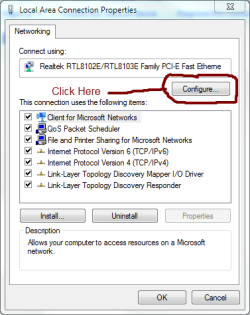
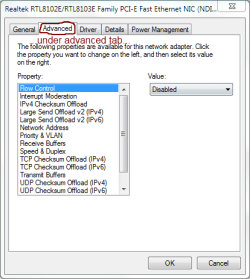
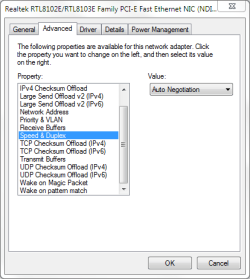
Another thing to try would be to try changing your duplex setting on your card. Click start>run type ncpa.cpl right click on your card, choose properties, click configure near the top under the name of your card, go to the advanced tab, find the duplex setting, and change from auto to 100 full, reboot....if that doesn't work then change to 100 half, and reboot. See attachments....still not giving up.

Very kind of you to make the special effort, it is indeed appreciated. It's good to hear that you have managed to resolve your problem thanks for posting and joining our community, we hope to continue to see you around.Another thing to try would be to try changing your duplex setting on your card. Click start>run type ncpa.cpl right click on your card, choose properties, click configure near the top under the name of your card, go to the advanced tab, find the duplex setting, and change from auto to 100 full, reboot....if that doesn't work then change to 100 half, and reboot. See attachments....still not giving up.
--- I never sign up for a forum, and this is in fact my first forum post after being online for 14 years -- but I registered today just to say THANK YOU for helping me with this (even though you posted this almost two years ago!) --- I tried everything you suggested and the duplex setting worked for me! I hope the original owner of this post solved his/her problem!