corrupt bootloader? or i just f***ed vista

Himie

New member
Local time
5:58 PM
Messages
10
well i recently had to reinstall windows 7 due installing magiciso which made W7 useless... now i installed back W7 in my second partition but when i start up my comp i got 3 choices to boot: Windows 7, Windows 7, Microsoft Windows Vista. the first W7 is the one im using right now and the second is the other one i had on my third partition which no longer exists.

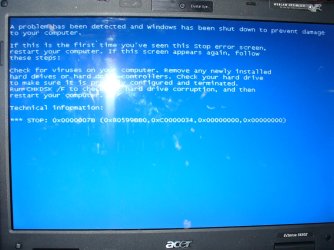
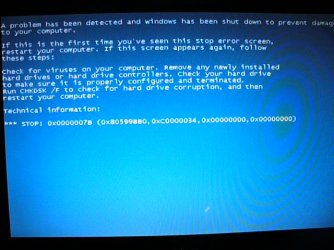
i dont mind having 2 Window 7's displayed at boot up but my problem is when i try to load vista i get the boot screen but after 1 second the screen goes corrupt, i get a BSoD for .5 seconds and it goes back to the BIOS and the select OS screen

i already tried using easybcd to reinstall the boot loader but it doesnt work, i tried start up repair and i dont know what else to do can someone help me? =(
 

My Computer My Computer

At a glance

Windows 7
OS
Windows 7
sooo i rewrote the bcd with easybcd but vista still wont boot and now i cant choose to boot windows7 my comp is useless now D:

i tried setting a boot flag to the w7 partition with parted magic but all it does is to show a "unable to find bootmgr. press ctrl+alt+delete to reboot" message.

is there a way to add the w7 partition to the mbr/bcd/w.e so i can boot w7, save my important stuff and reinstall vista from my recovery disk? i tried using my ubuntu 7.10 live cd to save my data but the loader gets stuck maybe the disk got scratchy its kinda old
 

My Computer My Computer

At a glance

Windows 7
OS
Windows 7
well i copied vistas bootmgr and other boot files to the 7 partition using parted magic (somehow now it allowed me to copy files which it didnt before), backed up stuff, changed the boot flag to the 7 partition but when i was loading w7 i got the vista boot screen and a dos boot screen? well i dont care i got back to 7 without problems but i dont really want to reformat the vista partition back to factory default..again... so is there a way to fix the vista boot up? seems like is not the bootloader since before i used to be able to choose a OS and im using it to boot 7&vista (still vista crashes after like 3 seconds~! D: ) maybe someone could send me their boot files so i could use them or something.... plz someone help? :(
 

My Computer My Computer

At a glance

Windows 7
OS
Windows 7
well i copied vistas bootmgr and other boot files to the 7 partition using parted magic (somehow now it allowed me to copy files which it didnt before), backed up stuff, changed the boot flag to the 7 partition but when i was loading w7 i got the vista boot screen and a dos boot screen? well i dont care i got back to 7 without problems but i dont really want to reformat the vista partition back to factory default..again... so is there a way to fix the vista boot up? seems like is not the bootloader since before i used to be able to choose a OS and im using it to boot 7&vista (still vista crashes after like 3 seconds~! D: ) maybe someone could send me their boot files so i could use them or something.... plz someone help? :(

have you tried a vista recovery disk ?

you can get it from neosmart files :geek:
 

My Computer My Computer

At a glance

win7 ultimate / virtual boxIntel Core i7 3770K,1155, Ivy BridgeGSkill Ripjaws Z Series 1600 CL 9.0 16GBKFA2 GeForce GTX 670 EX OC 2048MB GDDR5 PCI-E...
Computer Manufacturer/Model Number
built my own
OS
win7 ultimate / virtual box
CPU
Intel Core i7 3770K,1155, Ivy Bridge
Motherboard
MSI Z77A-G43
Memory
GSkill Ripjaws Z Series 1600 CL 9.0 16GB
Graphics Card(s)
KFA2 GeForce GTX 670 EX OC 2048MB GDDR5 PCI-E gfx card
Sound Card
onboard Nvidia HDMI audio
Monitor(s) Displays
ASUS VK222H 22" widescreen LCD monitor
Screen Resolution
1680x1050
Hard Drives
Kingston 128gb SSD
OCZ Vertex 90gb SSD
500GB WDCaviar 16mb 5000KS
320GB WDCaviar 16mb 3200AAKS sata 2
1TB Samsung 16mb HD103SJ sata 2
PSU
Corsair HX 750W ATX2.2 Modular
Cooling
Antec 25 Kuhler H2O 620
Keyboard
logitech
Mouse
logitech MX518
Internet Speed
7mb adsl
Hello Himie...

There should be an easy solution to your problem. Can you please open an elevated CMD in windows 7 and type :

BCDEDIT {enter}

and post a screenshot? We should be able to fix it.
Also please post a list of your hard drive letters, telling us which partition has vista and which one has Windows 7.
 

My Computer My Computer

At a glance

Windows 7 RC 7100 32bit/64bitIntel Core2Duo E4500 2.20 GHz2x1GB Kinsgston DDR2 800MHzNvidia 8500GT
Computer Manufacturer/Model Number
ENIAC
OS
Windows 7 RC 7100 32bit/64bit
CPU
Intel Core2Duo E4500 2.20 GHz
Motherboard
ASUS P5LD2-X/1333
Memory
2x1GB Kinsgston DDR2 800MHz
Graphics Card(s)
Nvidia 8500GT
Sound Card
Onboard High Definition Audio Device
Monitor(s) Displays
Sony Bravia 42"
Case
LINKW 2222
Cooling
Standard Intel
Keyboard
Some cheap one
Mouse
Microsoft Intellimouse something
Internet Speed
24MBps ADSL
have you tried a vista recovery disk ?

you can get it from neosmart files :geek:
yes i already tried it keeps saying it cannot repair it =/
and system restore also doesnt work...and i dont wanna use that advanced cmd solution since i might end up getting it worse
Hello Himie...

There should be an easy solution to your problem. Can you please open an elevated CMD in windows 7 and type :

BCDEDIT {enter}

and post a screenshot? We should be able to fix it.
Also please post a list of your hard drive letters, telling us which partition has vista and which one has Windows 7.

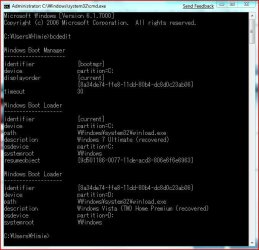
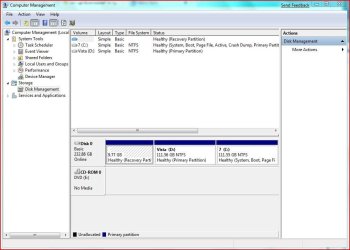
thx i just attached it hope it helps...
 

Attachments

  • Capture.JPG
    Capture.JPG
    64.1 KB · Views: 183
  • parititions.JPG
    parititions.JPG
    74.9 KB · Views: 77

My Computer My Computer

At a glance

Windows 7
OS
Windows 7
Ok, we need to try a few things:

1st: Open again an elevated command prompt and type :

bcdedit {enter}

You will get the screen you posted above.
Now you will notice on vista's listing, next to identifier is a long CLSID within {xxxxxxx-xxxxxx-xxxxx-xxxx} etc. Copy that and use it below as follows: type:

bcdedit /set {your_vista_identifier} detecthal yes

full example: bcdedit /set {34235345-345345-345-345345} detecthal yes
(include the { } )
be sure to include your identifier, not the one above.

Reboot and see if there are changes in Vista's install. If not, reboot again , select Vista from the boot menu using the arrows, and press F8.
This will give you more boot options.
Select Disable automatic restart on system failure. (or something)
This will pause the BSOD and you can read what it says. Write down any readable information and post back.

Good luck.
 

My Computer My Computer

At a glance

Windows 7 RC 7100 32bit/64bitIntel Core2Duo E4500 2.20 GHz2x1GB Kinsgston DDR2 800MHzNvidia 8500GT
Computer Manufacturer/Model Number
ENIAC
OS
Windows 7 RC 7100 32bit/64bit
CPU
Intel Core2Duo E4500 2.20 GHz
Motherboard
ASUS P5LD2-X/1333
Memory
2x1GB Kinsgston DDR2 800MHz
Graphics Card(s)
Nvidia 8500GT
Sound Card
Onboard High Definition Audio Device
Monitor(s) Displays
Sony Bravia 42"
Case
LINKW 2222
Cooling
Standard Intel
Keyboard
Some cheap one
Mouse
Microsoft Intellimouse something
Internet Speed
24MBps ADSL
Repair from the Install Disk

Himie,

You can use your install disk to run the Recovery Program.

Boot from the recovery disk ( Press the any key when it says )

select your Keyboard layout than select " Repair My Computer "

Windows will search for installed OS and correct the problem if
possible.

This has worked for me.
Good Luck
Richard
 

My Computer My Computer

At a glance

windows 7 RTMIntel core 2 6400 @2.13GHz2 Gig.NVIDIA GeForce 7300 GT
Computer Manufacturer/Model Number
Dell DXP061
OS
windows 7 RTM
CPU
Intel core 2 6400 @2.13GHz
Motherboard
Dell ??
Memory
2 Gig.
Graphics Card(s)
NVIDIA GeForce 7300 GT
Sound Card
High Definition Audio Device - Microsoft
Monitor(s) Displays
Dell LCD
Screen Resolution
1280 x 1024 75 hertz
Hard Drives
WDC WD2500JS-75NCB3 ATA Device

WDC WD5000AAKS-65YGA0 ATA Device
Keyboard
Logitech Cordless
Mouse
Logitech Cordless
Internet Speed
760k
Ok, we need to try a few things:

1st: Open again an elevated command prompt and type :

bcdedit {enter}

You will get the screen you posted above.
Now you will notice on vista's listing, next to identifier is a long CLSID within {xxxxxxx-xxxxxx-xxxxx-xxxx} etc. Copy that and use it below as follows: type:

bcdedit /set {your_vista_identifier} detecthal yes

full example: bcdedit /set {34235345-345345-345-345345} detecthal yes
(include the { } )
be sure to include your identifier, not the one above.

Reboot and see if there are changes in Vista's install. If not, reboot again , select Vista from the boot menu using the arrows, and press F8.
This will give you more boot options.
Select Disable automatic restart on system failure. (or something)
This will pause the BSOD and you can read what it says. Write down any readable information and post back.

Good luck.
ok i will post the results
Himie,

You can use your install disk to run the Recovery Program.

Boot from the recovery disk ( Press the any key when it says )

select your Keyboard layout than select " Repair My Computer "

Windows will search for installed OS and correct the problem if
possible.

This has worked for me.
Good Luck
Richard

i already tried it keeps saying that it cannot repair it
 
Last edited:

My Computer My Computer

At a glance

Windows 7
OS
Windows 7
nope it didnt work... =(
 

Attachments

  • P1010605.JPG
    P1010605.JPG
    163.3 KB · Views: 84
  • P1010606.JPG
    P1010606.JPG
    58.9 KB · Views: 112

My Computer My Computer

At a glance

Windows 7
OS
Windows 7
Ok.

Boot from your Windows 7 (not vista) dvd rom and select the option "repair my computer"

When it searches for installations, it will find both Vista and Win7.
Select Vista and choose startup repair. See if it fixes anything ( I know you've tried it, try it again) If it doesn't help, do a full disk check on your vista partition. If none of these help, sorry, you'll need to re-install Vista.
It's a 30 min installation time and another 30 mins probably for drivers/software. Will save you more time than to try to fix it.

Please try the above and good luck
 

My Computer My Computer

At a glance

Windows 7 RC 7100 32bit/64bitIntel Core2Duo E4500 2.20 GHz2x1GB Kinsgston DDR2 800MHzNvidia 8500GT
Computer Manufacturer/Model Number
ENIAC
OS
Windows 7 RC 7100 32bit/64bit
CPU
Intel Core2Duo E4500 2.20 GHz
Motherboard
ASUS P5LD2-X/1333
Memory
2x1GB Kinsgston DDR2 800MHz
Graphics Card(s)
Nvidia 8500GT
Sound Card
Onboard High Definition Audio Device
Monitor(s) Displays
Sony Bravia 42"
Case
LINKW 2222
Cooling
Standard Intel
Keyboard
Some cheap one
Mouse
Microsoft Intellimouse something
Internet Speed
24MBps ADSL
Ok.

Boot from your Windows 7 (not vista) dvd rom and select the option "repair my computer"

When it searches for installations, it will find both Vista and Win7.
Select Vista and choose startup repair. See if it fixes anything ( I know you've tried it, try it again) If it doesn't help, do a full disk check on your vista partition. If none of these help, sorry, you'll need to re-install Vista.
It's a 30 min installation time and another 30 mins probably for drivers/software. Will save you more time than to try to fix it.

Please try the above and good luck

oh well thx for helping anyway its better than not to try anything and how do i make a full check on the disk?
 

My Computer My Computer

At a glance

Windows 7
OS
Windows 7
Open "Computer", Right-click on your VISTA hard disk and choose properties. Under tools tab, choose Disk Check.

A dialog will appear with 2 options. Check both options and press OK.
You might get a message "Windows cannot check the disk while it's being used. Do you want to schedule a disk check on next restart?"
Click yes and restart. It will scan the disk for errors and attempt to fix them. Then, try booting into Windows Vista and see if it worked.
 

My Computer My Computer

At a glance

Windows 7 RC 7100 32bit/64bitIntel Core2Duo E4500 2.20 GHz2x1GB Kinsgston DDR2 800MHzNvidia 8500GT
Computer Manufacturer/Model Number
ENIAC
OS
Windows 7 RC 7100 32bit/64bit
CPU
Intel Core2Duo E4500 2.20 GHz
Motherboard
ASUS P5LD2-X/1333
Memory
2x1GB Kinsgston DDR2 800MHz
Graphics Card(s)
Nvidia 8500GT
Sound Card
Onboard High Definition Audio Device
Monitor(s) Displays
Sony Bravia 42"
Case
LINKW 2222
Cooling
Standard Intel
Keyboard
Some cheap one
Mouse
Microsoft Intellimouse something
Internet Speed
24MBps ADSL
Have you tried using EasyBCD to delete one or more of the Boot items.

From your screen shot I would delete the first one. It is a duplicate and the other
two are " Recovered " which is from the restore procedure.

If that does not work, try deleting all but one.

If that does not work, Delete all three and create new boot files
using EasyBCD. Not using the recreate section but the section which
creates them one at a time.

Richard
 

My Computer My Computer

At a glance

windows 7 RTMIntel core 2 6400 @2.13GHz2 Gig.NVIDIA GeForce 7300 GT
Computer Manufacturer/Model Number
Dell DXP061
OS
windows 7 RTM
CPU
Intel core 2 6400 @2.13GHz
Motherboard
Dell ??
Memory
2 Gig.
Graphics Card(s)
NVIDIA GeForce 7300 GT
Sound Card
High Definition Audio Device - Microsoft
Monitor(s) Displays
Dell LCD
Screen Resolution
1280 x 1024 75 hertz
Hard Drives
WDC WD2500JS-75NCB3 ATA Device

WDC WD5000AAKS-65YGA0 ATA Device
Keyboard
Logitech Cordless
Mouse
Logitech Cordless
Internet Speed
760k
Hi Richard,

The first entry in the screenshot is bootmgr , the next is the bootloader for Win7, the third is the bootloader for Vista.

Hope it helps

SIW2
 

My Computers My Computers

  • At a glance

    7 X64i5 84002x8gb 3200mhz
    Computer type
    PC/Desktop
    OS
    7 X64
    CPU
    i5 8400
    Motherboard
    gigabyte b365m ds3h
    Memory
    2x8gb 3200mhz
    Hard Drives
    various
    PSU
    pure power 11 400w cm
    Case
    Coolermaster
    Cooling
    cryorig m9i
  • At a glance

    7x64g54008gb ddr4 2400
    Computer type
    PC/Desktop
    OS
    7x64
    CPU
    g5400
    Motherboard
    ga b365m ds3h
    Memory
    8gb ddr4 2400
    PSU
    xfx pro 450w
I Understand, but something is wrong somewhere, so why not try
replacing all three.

Richard

Otherwise it appears that a clean install is the only option.
 

My Computer My Computer

At a glance

windows 7 RTMIntel core 2 6400 @2.13GHz2 Gig.NVIDIA GeForce 7300 GT
Computer Manufacturer/Model Number
Dell DXP061
OS
windows 7 RTM
CPU
Intel core 2 6400 @2.13GHz
Motherboard
Dell ??
Memory
2 Gig.
Graphics Card(s)
NVIDIA GeForce 7300 GT
Sound Card
High Definition Audio Device - Microsoft
Monitor(s) Displays
Dell LCD
Screen Resolution
1280 x 1024 75 hertz
Hard Drives
WDC WD2500JS-75NCB3 ATA Device

WDC WD5000AAKS-65YGA0 ATA Device
Keyboard
Logitech Cordless
Mouse
Logitech Cordless
Internet Speed
760k
Back
Top