
Cannot Get Gadgets to Install

mgrahn

New member
Hi all, I just did a clean install of windows 7 ultimate x64 on my laptop.

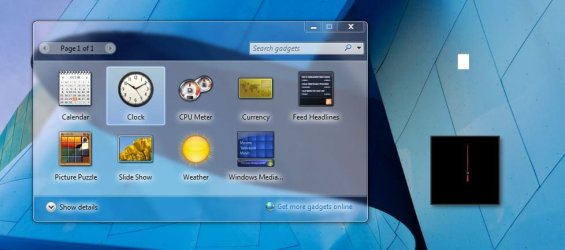
I cannot get any gadgets to install from the Desktop Gadgets Gallery. See attachment of my desktop. I drag the clock and CPU meter gadgets and get a white rectangle for the CPU meter and a black background for the Clock.

I believe I have tried all of the suggested tweaks in the forum.

My system configuration:
Dell XPS 1530
Windows 7 Ultimate (x64) (build 7600)
2.50 gigahertz Intel Core2 Duo
NVIDIA GeForce 8600M GT
McAfee VirusScan Version 99.9.99

thanks for any help


Attachments
  • GadgetsProblem.JPG
    GadgetsProblem.JPG
    60.5 KB · Views: 67

My Computer

Computer Manufacturer/Model Number
Dell XPS 1530
OS
Windows 7 Ultimate x64
CPU
2.50 gigahertz Intel Core2 T9300 Duo
Motherboard
Dell Inc. 0D501F
Memory
Dual In Line Memory Module 2GB,667,256X64,8K,200
Graphics Card(s)
NVIDIA GeForce 8600M GT
Sound Card
High Definition Audio Device
Monitor(s) Displays
Liquid Crystal Display 15.4WXGA+
Screen Resolution
1440 x 900
Hard Drives
WDC WD3200BEVT-75ZCT2 [Hard drive] (320.07 GB)
Other Info
McAfee VirusScan Version 99.9.99
Hi all, I just did a clean install of windows 7 ultimate x64 on my laptop.

I cannot get any gadgets to install from the Desktop Gadgets Gallery. See attachment of my desktop. I drag the clock and CPU meter gadgets and get a white rectangle for the CPU meter and a black background for the Clock.

I believe I have tried all of the suggested tweaks in the forum.

My system configuration:
Dell XPS 1530
Windows 7 Ultimate (x64) (build 7600)
2.50 gigahertz Intel Core2 Duo
NVIDIA GeForce 8600M GT
McAfee VirusScan Version 99.9.99

thanks for any help


Hi and welcome

Gadgets need to be installed. Simply dragging them to the desktop wont do it. When you douple click on the gadget what happens? any error messages?

Look in task manager and see if the process sidbar.exe is running some dependancy may be preventing it

Ken J+
 

My Computer

Computer Manufacturer/Model Number
HP Pavillion dv-7 1005 Tx
OS
Win 8 Release candidate 8400
CPU
[email protected]
Memory
4 gigs
Graphics Card(s)
Nvidia 9600M
Sound Card
HD built-in
Monitor(s) Displays
17" Wxga
Screen Resolution
1440x900
Cooling
none
Internet Speed
45Mb down 5Mb up
Right click on gadget and then install. Good Luck
 

My Computer

Computer type
PC/Desktop
Computer Manufacturer/Model Number
Dell XPS 420
OS
Windows 10, Home Clean Install
CPU
Intel Core2 processsor Q8200(2.33Ghz 1333FSB) Quad Core Tech
Motherboard
Dell
Memory
6 gb
Graphics Card(s)
ATI Radeon 256MB HD3650
Sound Card
Intergrated 7.1 Channel Audio
Monitor(s) Displays
Dell SP2009W 20"
Hard Drives
640 GB Serial ATA Hard drive
Cooling
Fan
Keyboard
Dell USB Keyboard
Mouse
Dell Premium Optical USB
Internet Speed
DSL 2.85
The same effect occurs when I double click the gadgets as when i drag them. And sidebar.exe is running......
 

My Computer

Computer Manufacturer/Model Number
Dell XPS 1530
OS
Windows 7 Ultimate x64
CPU
2.50 gigahertz Intel Core2 T9300 Duo
Motherboard
Dell Inc. 0D501F
Memory
Dual In Line Memory Module 2GB,667,256X64,8K,200
Graphics Card(s)
NVIDIA GeForce 8600M GT
Sound Card
High Definition Audio Device
Monitor(s) Displays
Liquid Crystal Display 15.4WXGA+
Screen Resolution
1440 x 900
Hard Drives
WDC WD3200BEVT-75ZCT2 [Hard drive] (320.07 GB)
Other Info
McAfee VirusScan Version 99.9.99
Back
Top