MSE - obsoletes other free AV, mal/spyware programs?

trale

New member
I'm running Win 7 64 bit. On my previous systems, I generally rely on the following 3 free utilities for system protection:

- Avira AntiVir
- Spybot Search and Destroy
- Ad-aware

I've heard a lot of good things about Microsoft Security Essentials, and at least as a AV tool it's up there with Avira, Avast, etc. But how about its effectiveness as a malware / spyware blocker, detector, and remover?

Can it safely replace all 3 of the aforementioned products? Or should I use something else in conjunction with MSE?
 

My Computer

OS
Windows 7 Ultimate 64 bit
MSE looks good so far. But I remember Onecare. I am testing MSE but so far I trust nothing as much as I trust ESET.

MSE proves at least "as" effective I will start useing it. Untill I see solid proof I got to stick with the winner.
 

My Computer

Computer Manufacturer/Model Number
I trust nobody!
OS
Windows 7 Ultimate x64/x86 Windows 7 Pro x64/x86 Windows 7 Home Premium x64/x86
CPU
Intel C2Q 9650
Motherboard
Intel
Memory
8GB DDR2800 Corsair
Graphics Card(s)
NVIDIA 260 GTX
Sound Card
Onboard
Monitor(s) Displays
Dell 2409w
Screen Resolution
1920x1080
Hard Drives
10 of em!
PSU
600 Watt FSP Group
Case
Antec
Cooling
Fresh Air
Keyboard
Microsoft
Mouse
Razer
Internet Speed
Fast enough
Use MSE along with SpywareBlaster and SpywareGuard! You can eliminate Spybot s&d and Ad-aware.

SpywareBlaster and SpywareGuard:
http://www.javacoolsoftware.com/
Spyware Guard is a real-time malware scanner

Update SpywareBlaster often and be sure that you've checked "Enable all Protection"
 

My Computer

Computer type
PC/Desktop
Computer Manufacturer/Model Number
Bruce ... somewhere in his 40's
OS
Windows 7 Ultimate 32bit SP1
CPU
Intel(R) Core(TM)2 Quad CPU @ 2.40GHz, 2400 MHz
Motherboard
INTEL/D975XBX2
Memory
4 GB
Graphics Card(s)
ATI Radeon HD 2600 Pro
Monitor(s) Displays
Samsung SyncMaster 914v
Screen Resolution
1280 x 1024
Hard Drives
2/500GB each ... ST3500630AS ATA Device.
One is not connected
PSU
Rocketfish 700 W
Case
G.Skill Gigabyte Chassis
Keyboard
Standard PS/2 Keyboard
Mouse
Microsoft PS/2 Mouse
Internet Speed
DSL
Antivirus
Avira Internet Security
Browser
IE 11
Other Info
ATI HDMI Audio
I'm running Win 7 64 bit. On my previous systems, I generally rely on the following 3 free utilities for system protection:

- Avira AntiVir
- Spybot Search and Destroy
- Ad-aware

I've heard a lot of good things about Microsoft Security Essentials, and at least as a AV tool it's up there with Avira, Avast, etc. But how about its effectiveness as a malware / spyware blocker, detector, and remover?

Can it safely replace all 3 of the aforementioned products? Or should I use something else in conjunction with MSE?
Im sure it can replace avira but it cant replace spybot and ad aware. The anti spyware part of MSE is still weak.
 

My Computer

Computer Manufacturer/Model Number
Samsung NP530U4B-S02IN
OS
Windows® 8 Pro (64-bit)
CPU
Intel® Core™ i5 Processor 2467M (1.60GHz, 3MB L3 Cache)
Motherboard
Samsung Electronics
Memory
6GB DDR3 System Memory at 1,333MHz (on BD 4GB + 2GB x 1)
Graphics Card(s)
AMD Radeon™ HD7550M 1GB DDR3 (Ext. Graphic)
Sound Card
Realtek High Definition Audio
Monitor(s) Displays
35.56cm (14.0) SuperBright 300nit HD LED Display
Screen Resolution
1366x768
Hard Drives
1TB S-ATA II Hard Drive (5400RPM) with ExpressCache 16GB SSD
Internet Speed
sucks
Antivirus
Microsoft Security Essentials
Browser
Google Chrome (Sync enabled)

My Computer

Computer type
PC/Desktop
Computer Manufacturer/Model Number
Bruce ... somewhere in his 40's
OS
Windows 7 Ultimate 32bit SP1
CPU
Intel(R) Core(TM)2 Quad CPU @ 2.40GHz, 2400 MHz
Motherboard
INTEL/D975XBX2
Memory
4 GB
Graphics Card(s)
ATI Radeon HD 2600 Pro
Monitor(s) Displays
Samsung SyncMaster 914v
Screen Resolution
1280 x 1024
Hard Drives
2/500GB each ... ST3500630AS ATA Device.
One is not connected
PSU
Rocketfish 700 W
Case
G.Skill Gigabyte Chassis
Keyboard
Standard PS/2 Keyboard
Mouse
Microsoft PS/2 Mouse
Internet Speed
DSL
Antivirus
Avira Internet Security
Browser
IE 11
Other Info
ATI HDMI Audio
I'm running Win 7 64 bit. On my previous systems, I generally rely on the following 3 free utilities for system protection:

- Avira AntiVir
- Spybot Search and Destroy
- Ad-aware

I've heard a lot of good things about Microsoft Security Essentials, and at least as a AV tool it's up there with Avira, Avast, etc. But how about its effectiveness as a malware / spyware blocker, detector, and remover?

Can it safely replace all 3 of the aforementioned products? Or should I use something else in conjunction with MSE?
Im sure it can replace avira but it cant replace spybot and ad aware. The anti spyware part of MSE is still weak.


Hi Dinesh -- this is where the server version Frontside Client Security works really well - even on a stand alone client computer. Spy and MALWARE is where this program excels and will only get better and better.

Virus detection is usually an "after the fact" activity since most viruses don't actually do anything until you execute something -- usually a program downloaded from the web or play music with embedded trojans. On this score MS does at least as well as any other one in detecting bad running programs.

As far as adpopups etc are concerned -- these are --while annoying-- legitimate programs which isn't the job of a "virus" preventer -- and in this case Yes do use a 3rd party ad / popup blocker.

People get confused with what actually infects a machine and what are just irritants. By building in the ad / popup blocker into AV software really just bloats it and introduces errors.

Leave this stuff to proper programs to handle this and concentrate on letting the av software do what it SHOULD be designed to do -- stopping infections on getting on to your machine in the first place.

The Microsoft Database is updated sometimes as much as 4 times in a single day and it has very easy tools for monitoring whats actually running on your machine, Winsock connections - important to see network inflitration attempts - and start up program management.

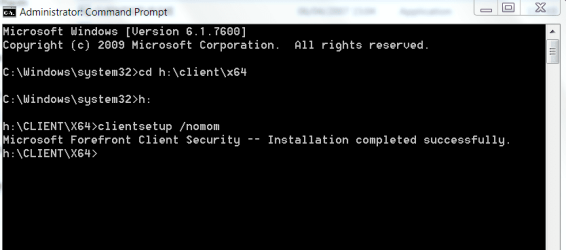
To load on a stand alone non server (or workstation) machine download the software , get into an elevated DOS prompt and change the directory to the CLIENT and install with /NOMOM parameter. You can also install in this manner on say a HOME server machine too.

Cheers
jimbo

 

My Computer

Computer type
PC/Desktop
Computer Manufacturer/Model Number
Custom built, several laptops HP/ASUS
OS
Linux CENTOS 7 / various Windows OS'es and servers
CPU
Intel i7 Intel i5
Memory
8GB, 16GB
Graphics Card(s)
On Motherboard
Sound Card
Realtek HD audio
Monitor(s) Displays
Apple Cinema display, Samsung LCD
Screen Resolution
1920 X 1080
Hard Drives
4 X 1TB SATA
Mouse
Toshiba wireless laser
Internet Speed
> 20MB up
I find that malware bytes never finds anything (except the initial microsoft false positive) whereas other programs do.
 

My Computer

Computer Manufacturer/Model Number
self built
OS
Windows 7 Professional 64-bit
CPU
Intel E8400 3GHz
Motherboard
Intel DX48BT2
Memory
Kingston PC3-10700H 4Gb
Graphics Card(s)
XFX Radeon HD 5850 BlackEd.
Sound Card
Asus Xonar DG
Monitor(s) Displays
2x Samsung SM-T220HD 22"
Screen Resolution
1680x1050 on two monitors
Hard Drives
OCZ Vertex 2 120gb 3.5" (OS)
Seagate Momentus XT 500gb
Samsung F3 1Tb (games)
2x Samsung F1 1Tb
PSU
Thermaltake ToughPower 850w
Case
Thermaltake Armor
Cooling
Scythe Mugen II
Keyboard
Microsoft Comfort Curve USB
Mouse
Razer Diamondback 3G
Internet Speed
8128/443
I use Avira Premium Suite 2009. No problems yet!
 

My Computer

Computer type
PC/Desktop
Computer Manufacturer/Model Number
HomieJunker
OS
W7 Prof 64 bit
CPU
i7-3770k
Motherboard
Sabertooth Z77
Memory
G.Skill Sniper 1866 16 GB
Graphics Card(s)
Evga GTX 770
Sound Card
Sound Blaster Z
Monitor(s) Displays
Asus VG278HE
Screen Resolution
1920 x 1080
Hard Drives
4 Seagate Barracudas 250 GB
2 Intel® X25-M 160GB
PSU
Corsair H1000X
Case
Lian-Li A77B
Cooling
Phantek 120 dual fans
Keyboard
Corsair K70 RGB
Mouse
Logitech G502
Internet Speed
FiOS Quantum
Antivirus
Avira
Browser
Chrome
I'm running Win 7 64 bit. On my previous systems, I generally rely on the following 3 free utilities for system protection:

- Avira AntiVir
- Spybot Search and Destroy
- Ad-aware

I've heard a lot of good things about Microsoft Security Essentials, and at least as a AV tool it's up there with Avira, Avast, etc. But how about its effectiveness as a malware / spyware blocker, detector, and remover?

Can it safely replace all 3 of the aforementioned products? Or should I use something else in conjunction with MSE?
Im sure it can replace avira but it cant replace spybot and ad aware. The anti spyware part of MSE is still weak.


Hi Dinesh -- this is where the server version Frontside Client Security works really well - even on a stand alone client computer. Spy and MALWARE is where this program excels and will only get better and better.

Virus detection is usually an "after the fact" activity since most viruses don't actually do anything until you execute something -- usually a program downloaded from the web or play music with embedded trojans. On this score MS does at least as well as any other one in detecting bad running programs.

As far as adpopups etc are concerned -- these are --while annoying-- legitimate programs which isn't the job of a "virus" preventer -- and in this case Yes do use a 3rd party ad / popup blocker.

People get confused with what actually infects a machine and what are just irritants. By building in the ad / popup blocker into AV software really just bloats it and introduces errors.

Leave this stuff to proper programs to handle this and concentrate on letting the av software do what it SHOULD be designed to do -- stopping infections on getting on to your machine in the first place.

The Microsoft Database is updated sometimes as much as 4 times in a single day and it has very easy tools for monitoring whats actually running on your machine, Winsock connections - important to see network inflitration attempts - and start up program management.

To load on a stand alone non server (or workstation) machine download the software , get into an elevated DOS prompt and change the directory to the CLIENT and install with /NOMOM parameter. You can also install in this manner on say a HOME server machine too.

Cheers
jimbo
Alright then I'll try it tonight.
 

My Computer

Computer Manufacturer/Model Number
Samsung NP530U4B-S02IN
OS
Windows® 8 Pro (64-bit)
CPU
Intel® Core™ i5 Processor 2467M (1.60GHz, 3MB L3 Cache)
Motherboard
Samsung Electronics
Memory
6GB DDR3 System Memory at 1,333MHz (on BD 4GB + 2GB x 1)
Graphics Card(s)
AMD Radeon™ HD7550M 1GB DDR3 (Ext. Graphic)
Sound Card
Realtek High Definition Audio
Monitor(s) Displays
35.56cm (14.0) SuperBright 300nit HD LED Display
Screen Resolution
1366x768
Hard Drives
1TB S-ATA II Hard Drive (5400RPM) with ExpressCache 16GB SSD
Internet Speed
sucks
Antivirus
Microsoft Security Essentials
Browser
Google Chrome (Sync enabled)
Hi dinesh
After it's initially installed do the following or you'll go round in a loop trying to find out what's wrong.

1) shut it down (right mouse click ===> exit).
2) perform a windows update - this will load the latest version of the program plus access to the malware DB for latest definitions.
3) now you can scan again.

The version on technet needs to be updated but if you run the update from within the program itself you'll be logged in to the WINDOWS CATALOG. This is actually reasonable since the program was essentially designed to be run as a server and updates to clients would be deployed from a server. That's why you'll see the Orange ball in the system tray the first time.


So use WINDOWS UPDATE via the normal system start menu.

Once windows update has been run then the program is updated to the latest level and further updates are carried out just like any other windows component using Windows / Microsoft update.

Now just scan (the ball will be green / grey). (should be unless your machine is infected).

you have to install it from a command prompt even though you mount the DVD / CD image

screenshot enc (run the command prompt as an administrator).

Cheers

jimbo
 

Attachments

  • fsc.png
    fsc.png
    47.6 KB · Views: 104
Last edited:

My Computer

Computer type
PC/Desktop
Computer Manufacturer/Model Number
Custom built, several laptops HP/ASUS
OS
Linux CENTOS 7 / various Windows OS'es and servers
CPU
Intel i7 Intel i5
Memory
8GB, 16GB
Graphics Card(s)
On Motherboard
Sound Card
Realtek HD audio
Monitor(s) Displays
Apple Cinema display, Samsung LCD
Screen Resolution
1920 X 1080
Hard Drives
4 X 1TB SATA
Mouse
Toshiba wireless laser
Internet Speed
> 20MB up
Hi dinesh --did you try it yet

Ok its weekend now but maybe on Monday

cheers
jimbo
 

My Computer

Computer type
PC/Desktop
Computer Manufacturer/Model Number
Custom built, several laptops HP/ASUS
OS
Linux CENTOS 7 / various Windows OS'es and servers
CPU
Intel i7 Intel i5
Memory
8GB, 16GB
Graphics Card(s)
On Motherboard
Sound Card
Realtek HD audio
Monitor(s) Displays
Apple Cinema display, Samsung LCD
Screen Resolution
1920 X 1080
Hard Drives
4 X 1TB SATA
Mouse
Toshiba wireless laser
Internet Speed
> 20MB up
Hi Jimbo, not tried it yet. Been very busy these days. I m eagerly waiting to try it out.
 

My Computer

Computer Manufacturer/Model Number
Samsung NP530U4B-S02IN
OS
Windows® 8 Pro (64-bit)
CPU
Intel® Core™ i5 Processor 2467M (1.60GHz, 3MB L3 Cache)
Motherboard
Samsung Electronics
Memory
6GB DDR3 System Memory at 1,333MHz (on BD 4GB + 2GB x 1)
Graphics Card(s)
AMD Radeon™ HD7550M 1GB DDR3 (Ext. Graphic)
Sound Card
Realtek High Definition Audio
Monitor(s) Displays
35.56cm (14.0) SuperBright 300nit HD LED Display
Screen Resolution
1366x768
Hard Drives
1TB S-ATA II Hard Drive (5400RPM) with ExpressCache 16GB SSD
Internet Speed
sucks
Antivirus
Microsoft Security Essentials
Browser
Google Chrome (Sync enabled)
Back
Top