tried to install upgrade, after final reboot, no boot

mhguda

New member
Local time
5:09 AM
Messages
20
Hello,
I have vista on my first partition, 7rc on the third (second is vista data).
I had read about how you could upgrade from the release candidate and wanted to try it. Everything seemed to go fine, until the very final reboot. (Windows was upgraded to the new version). I saw my regular boot menu again, but then windows restarted the machine one last time, and when it came back up it just sat there, nothing happened forever. And Vista won't boot anymore either - I do not even get a boot menu. Just a blank screen with a flashing cursor, and nothing happening....
I tried the repair options, but windows can't find any of my system restore points (I did set a number of them!) neither vista nor 7. From a command prompt I did try to run bcdedit and it shows that my original boot menu should still be there, but the system is unable to find it. I am completely stumped. Can someone please indicate what to do to get my system to boot?

Thanks in advance.
Margo Guda.
 

My Computer My Computer

At a glance

Windows 7
OS
Windows 7
Hello,
I have vista on my first partition, 7rc on the third (second is vista data).
I had read about how you could upgrade from the release candidate and wanted to try it. Everything seemed to go fine, until the very final reboot. (Windows was upgraded to the new version). I saw my regular boot menu again, but then windows restarted the machine one last time, and when it came back up it just sat there, nothing happened forever. And Vista won't boot anymore either - I do not even get a boot menu. Just a blank screen with a flashing cursor, and nothing happening....
I tried the repair options, but windows can't find any of my system restore points (I did set a number of them!) neither vista nor 7. From a command prompt I did try to run bcdedit and it shows that my original boot menu should still be there, but the system is unable to find it. I am completely stumped. Can someone please indicate what to do to get my system to boot?

Thanks in advance.
Margo Guda.

Hi and welcome

Can you boot into safe mode (F8)?
If so it is something in startup that is hosing the system. You can from safe mode run msconfig and do a diagnostic boot with all the extras turned off

Kenn J++
 

My Computer My Computer

At a glance

Win 8 Release candidate 8400[email protected]4 gigsNvidia 9600M
Computer Manufacturer/Model Number
HP Pavillion dv-7 1005 Tx
OS
Win 8 Release candidate 8400
CPU
[email protected]
Memory
4 gigs
Graphics Card(s)
Nvidia 9600M
Sound Card
HD built-in
Monitor(s) Displays
17" Wxga
Screen Resolution
1440x900
Cooling
none
Internet Speed
45Mb down 5Mb up
No, I cannot even get to safe mode. Power comes up, I see the first screen (when it checks the bios etc) and then when I would normally see the system check, with the list of hardware and afterwards, the boot menu, nothing but a blank screen with a blinking text cursor.
 

My Computer My Computer

At a glance

Windows 7
OS
Windows 7
You might want to read this post from the blog of a Win7 developer:

Can I do an In-Place upgrade from Windows 7 Release Candidate To Release Code??

There have been successes with upgrading RC, but due to the ton of monitoring software which was still on it (until RTM) and beta buggyness, it is a gamble at best.

Suggest you boot from the newer Win7 installer, format that partition and clean install Win7. It will reconfigure the boot menu correctly.

You could also do an in-place Upgrade over Vista, however that is always less desirable than a clean install, preferably done by booting the Win7 installer to use Custom>advanced drive tools to delete the partition, create a New one and Format.

Using the first partition now may save you some work since when you want out of Vista it will be complicated to move a Win7 installation over onto the first partition space. But we can help.
 
So no chance of rescuing what I had there by a simple boot file? I did this because I had the system working nicely, and while I had not reinstalled all my apps from vista, i did already reinstall a number of them. So I'm very unhappy with this situation. Especially since I could see it go seemingly well, and then at the last moment to have this happen... Is there really no other way??
 

My Computer My Computer

At a glance

Windows 7
OS
Windows 7
You should boot into the installer Repair console and run startup repair 3 times to recover the boot to whichever 7 installation will cooperate, probably the RC 2nd parittion. It will attempt several fixes before finally rewriting the MBR.

This should give you the ability to boot into F8 on new install to run the following fix.

The blinking cursor after install is a frequent issue for which this fix by Zidane has helped some:

IF YOU REACH A BLACK SCREEN WITH A CURSOR DURING THE WINDOWS 7 INSTALL THE FOLLOWING COULD HELP.

When installing Windows 7 let it get to the part where it reboots (for the second time) just after the' completing installation' stage. When it restarts press F8 and boot the new install in safe mode.


Alternatively leave the install running until you reach the 'black screen' and do a hard reboot (hold power for 5 seconds). On restart you'll be asked if you want to boot into safe mode, click 'yes'.

While booting in safe mode you'll eventually get an error saying "setup cannot continue in safe mode. click ok to reboot". don't press OK!. Press shift F10 and type "compmgmt.msc" and hit enter. When the computer management screen comes up go to device manager and disable the video card (not uninstall it). You will still get video so don't worry.

Close device manager and click 'ok' on the message and continue the install as normal, alternatively just do a reset. When the machine reboots this time you should have video, albeit it at a crippled resolution. Find the Windows 7 driver and attempt to install.

There are several other things we can try to recover your Vista upgrade, but eventually you may want to decide to delete it and move the RC into that space. If you made no changes to the RC during the Vista Upgrade it's boot is almost always recoverable with Startup Repair.

Perhaps a better idea is to obtain a copy of Win7 or the unlocked RTM (to choose a version) and clean install that in the first partition so that you can copy over files from RC, then insert a paid key after the 120 days you can postpone its activation.
 
You can also run Startup Repair from the booted Win7 Installer as it automates all the boot repair commands. It sometimes needs to be run several times if there is more than one issue.
 
Gregrocker, I tried the following: ran the installation again from the dvd, and this time attempted a clean install, over the one that would not boot. (Those files should still be there in a safe location, according to SETUP). Ran the whole thing, and up came the boot menu. I even tried to boot Vista, and got to the login screen. Then I restarted and got the Windows Setup screens. Then another reboot, and the story repeated. It now tries to boot from the dvd, and after I don't press a key, just sits there...
I read the stuff about the mbr, and I am now wondering: is my problem the fact that my mbr gets overwritten somehow, or is it the graphics driver, as your instructions above seem to suggest? If I try the mbr rewrite, will I now make it impossible to boot my vista partition? Because now, that ability is still there somewhere - after the setup process finished I did get to that menu, and I don't want to lose that.
Also, I am unsure about the video card. This is a laptop - there is just the standard vga interface in the device manager. Do I disable that, and then where do I find the driver afterwards if I do?
It's a confusing situation...
 

My Computer My Computer

At a glance

Windows 7
OS
Windows 7
No attempt to run Startup Repair 3 times to recover the boot? Instead you run a clean install over the Upgrade without even attempting the known fix for blinking cursor after Upgrade I posted above . You can find your video driver to backup on the Support Downloads page for your model laptop.

But since you have gone forward with an attempt to clean install before trying the fix, you now have overwritten the Upgrade attempt and there may/may not be a windows.old folder that contains your files from the Upgrade attempt.

You can try the fix now to see if you can start it up, but the problem here is likely that you are using a beta RC which was warned by MS (my first post above) not to attempt to Upgrade, using it for the even more risky attempt to Upgrade your Vista.

I am assuming you have your Vista files backed up since you have a partition named Vista files? So what I would do now is either copy over to the first partition your working RC in the 3rd partition, or boot into the installer and do a true clean install to that first partition by selecting Custom>Advanced drive tools to delete the botched Vista upgrade, Create a New partition there, format and install.
 
No attempt to run Startup Repair 3 times to recover the boot? Instead you run a clean install over the Upgrade without even attempting the known fix for blinking cursor after Upgrade I posted above . You can find your video driver to backup on the Support Downloads page for your model laptop.

Actually, YES. Result, every time I tried: Windows 7 has no boot problem, it booted correctly (says repair utility). Vista cannot be repaired. No reason is given.

But since you have gone forward with an attempt to clean install before trying the fix, you now have overwritten the Upgrade attempt and there may/may not be a windows.old folder that contains your files from the Upgrade attempt.

Luckily for me, there is.

You can try the fix now to see if you can start it up, but the problem here is likely that you are using a beta RC which was warned by MS (my first post above) not to attempt to Upgrade, using it for the even more risky attempt to Upgrade your Vista.

I did not try to upgrade Vista - only the 7 RC. And even the clean install resulted in the same situation.

I am assuming you have your Vista files backed up since you have a partition named Vista files? So what I would do now is either copy over to the first partition your working RC in the 3rd partition, or boot into the installer and do a true clean install to that first partition by selecting Custom>Advanced drive tools to delete the botched Vista upgrade, Create a New partition there, format and install.

I tried the MBR solution, and that did the trick. I am now faced with my regular boot menu, my VISTA boots normally, only the 7 installation is a clean install. But the stuff I installed under the RC is still there, in the windows.old folder. I think I will just copy the stuff, reinstall what I had installed, and proceed from there. Thanks everyone - especially for the MBR tip.
 

My Computer My Computer

At a glance

Windows 7
OS
Windows 7
Install Upgrade, after final reboot, no boot - Solution

Hi.
I installed windows 7 yesterday and mine too initially had the same problem. Either do not reboot your system after the FINAL installation is completed(it asks you to, but don't) or if it persits try not upgrading the launch manager(uncheck this option).
Good luck.

Ps. Final installation is when you upgrade launch manager and some other drivers
 

My Computer My Computer

At a glance

Windows 7X2 Dual-Core4GBATI Radeon 3200
Computer Manufacturer/Model Number
AMD ATHLON
OS
Windows 7
CPU
X2 Dual-Core
Memory
4GB
Graphics Card(s)
ATI Radeon 3200
Sound Card
Conexant High Definition Audio
Hard Drives
250GB
I tried the MBR solution, and that did the trick. I am now faced with my regular boot menu, my VISTA boots normally, only the 7 installation is a clean install. But the stuff I installed under the RC is still there, in the windows.old folder. I think I will just copy the stuff, reinstall what I had installed, and proceed from there. Thanks everyone - especially for the MBR tip.

After you make sure you have all your files retrieved, you can delete the windows.old folder using Disk Cleanup.

That MBR bootsect command is automated in Windows 7 Startup Repair. It will run it last after trying the repair (bootrec) commands, then finally rewrite MBR (bootsect). This is why it takes 3 tries in Startup Repair.

Glad it all worked out for ya.
 
I tried the MBR solution, and that did the trick. I am now faced with my regular boot menu, my VISTA boots normally, only the 7 installation is a clean install. But the stuff I installed under the RC is still there, in the windows.old folder. I think I will just copy the stuff, reinstall what I had installed, and proceed from there. Thanks everyone - especially for the MBR tip.

After you make sure you have all your files retrieved, you can delete the windows.old folder using Disk Cleanup.

That MBR bootsect command is automated in Windows 7 Startup Repair. It will run it last after trying the repair (bootrec) commands, then finally rewrite MBR (bootsect). This is why it takes 3 tries in Startup Repair.

Glad it all worked out for ya.

Except that this time, where I have the untouched Vista on drive C, and the updated 7 on E, the startup repair utility does not recognize the last failed boot of 7 - it reports no problem every time I tried to repair the system. I think I tried seven times, in all, before giving up. In fact the last time when it rebooted and I got my regular menu (just before the first run) I actually booted into Vista to see if I still could. I could. Then rebooting and going into 7 and it runs for the first time and reboots again (and I could not see where to prevent that - it went on without any input from me) I was back at the black screen, blinking cursor, that I now know signifies no MBR. But yes I'm glad too it worked out in the end.
 

My Computer My Computer

At a glance

Windows 7
OS
Windows 7
I tried the MBR solution, and that did the trick. I am now faced with my regular boot menu, my VISTA boots normally, only the 7 installation is a clean install. But the stuff I installed under the RC is still there, in the windows.old folder. I think I will just copy the stuff, reinstall what I had installed, and proceed from there. Thanks everyone - especially for the MBR tip.

After you make sure you have all your files retrieved, you can delete the windows.old folder using Disk Cleanup.

That MBR bootsect command is automated in Windows 7 Startup Repair. It will run it last after trying the repair (bootrec) commands, then finally rewrite MBR (bootsect). This is why it takes 3 tries in Startup Repair.

Glad it all worked out for ya.

Except that this time, where I have the untouched Vista on drive C, and the updated 7 on E, the startup repair utility does not recognize the last failed boot of 7 - it reports no problem every time I tried to repair the system. I think I tried seven times, in all, before giving up. In fact the last time when it rebooted and I got my regular menu (just before the first run) I actually booted into Vista to see if I still could. I could. Then rebooting and going into 7 and it runs for the first time and reboots again (and I could not see where to prevent that - it went on without any input from me) I was back at the black screen, blinking cursor, that I now know signifies no MBR. But yes I'm glad too it worked out in the end.

Interesting to hear. This may be why some are reporting better luck using EasyBCD beta to repair or rewrite MBR in 7.

But Startup Repair is supposed to run those same commands after trying all of its tests.

Did it tell you there was no problem when it found the installation, or after you went ahead into the Recovery Tools menu and clicked on Startup Repair three times?
 
After you make sure you have all your files retrieved, you can delete the windows.old folder using Disk Cleanup.

That MBR bootsect command is automated in Windows 7 Startup Repair. It will run it last after trying the repair (bootrec) commands, then finally rewrite MBR (bootsect). This is why it takes 3 tries in Startup Repair.

Glad it all worked out for ya.

Except that this time, where I have the untouched Vista on drive C, and the updated 7 on E, the startup repair utility does not recognize the last failed boot of 7 - it reports no problem every time I tried to repair the system. I think I tried seven times, in all, before giving up. In fact the last time when it rebooted and I got my regular menu (just before the first run) I actually booted into Vista to see if I still could. I could. Then rebooting and going into 7 and it runs for the first time and reboots again (and I could not see where to prevent that - it went on without any input from me) I was back at the black screen, blinking cursor, that I now know signifies no MBR. But yes I'm glad too it worked out in the end.

Interesting to hear. This may be why some are reporting better luck using EasyBCD beta to repair or rewrite MBR in 7.

But Startup Repair is supposed to run those same commands after trying all of its tests.

Did the booted Repair console tell you there was no problem when it first found the installation to repair, or after you went into the Recovery Tools menu and clicked on Startup Repair three times?

Startup Repair found the installation and after all its tests said there was no problem with it. (This was the 7 installation. With the Vista, it said Startup Repair could not repair it, but gave no details.) Then when I went to the Recovery Tools menu and clicked on Startup Repair three times, every time it came back it gave me the no problem with the installation message. I did not try with the Vista installation from that menu, though. I was too scared by then that if it says it cannot repair that installation and I force something, I'd really have no way of getting my system back in working order. Do you think I should have tried the startup repair 3 times on the Vista installation? But you'd still think it would be able to find the lack of an MBR for any installation?
 

My Computer My Computer

At a glance

Windows 7
OS
Windows 7
Except that this time, where I have the untouched Vista on drive C, and the updated 7 on E, the startup repair utility does not recognize the last failed boot of 7 - it reports no problem every time I tried to repair the system. I think I tried seven times, in all, before giving up. In fact the last time when it rebooted and I got my regular menu (just before the first run) I actually booted into Vista to see if I still could. I could. Then rebooting and going into 7 and it runs for the first time and reboots again (and I could not see where to prevent that - it went on without any input from me) I was back at the black screen, blinking cursor, that I now know signifies no MBR. But yes I'm glad too it worked out in the end.

Interesting to hear. This may be why some are reporting better luck using EasyBCD beta to repair or rewrite MBR in 7.

But Startup Repair is supposed to run those same commands after trying all of its tests.

Did the booted Repair console tell you there was no problem when it first found the installation to repair, or after you went into the Recovery Tools menu and clicked on Startup Repair three times?

Startup Repair found the installation and after all its tests said there was no problem with it. (This was the 7 installation. With the Vista, it said Startup Repair could not repair it, but gave no details.) Then when I went to the Recovery Tools menu and clicked on Startup Repair three times, every time it came back it gave me the no problem with the installation message. I did not try with the Vista installation from that menu, though. I was too scared by then that if it says it cannot repair that installation and I force something, I'd really have no way of getting my system back in working order. Do you think I should have tried the startup repair 3 times on the Vista installation? But you'd still think it would be able to find the lack of an MBR for any installation?


Not if Vista is starting, you were right not to mess with it. Since Win7 controls the boot menu, it needed to repair the MBR.

Strange that Win7 would maintain a dual-boot menu which works to get into Vista but not repair its own startup.

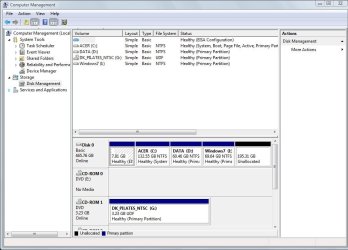
If you have not reinstalled, perhaps you could post a screenshot of your Vista Disk Management map using the Snipping tool in Start Menu, attaching file using paper clip in reply box.

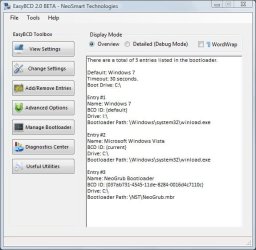
Then download in Vista EasyBCD 2.0 beta which can rebuild the Win7 MBR, and post its front panel findings back as a screenshot, too.

View attachment 40162

Gonna forward this thread to SIW2 to take a look, advise on Easy beta's use here and maybe spot if anything has been overlooked.
 
Here are the two screenshots.
I did not have to download easybcd 2 (beta) as that is what I am already using. You can see I had a triple boot set up, with the third loading ubuntu (on an external disk).
I am not sure what you mean when you say 7 is managing the boot menu - remember I had the Vista on this machine first, and initially a 7 RC, on a -then - new partition. This is an acer notebook with Vista pre-installed.
I think 7 never gets control of the boot menu - and that may be my problem. I do remember that when I installed the RC on my XP machine it did take over control of the boot menu, and in order to get that machine to dual-boot I had to build a boot menu from scratch, since when 7 took over it did not recognize the older OS at all - it just booted me straight into 7. I then downloaded and ran easybcd and put the entry for xp back since I only wanted to try 7 out on that machine. And so far I'm not going to be messing with it either. I like it fine but now that I've been through this I may just wait until all the wrinkles have been ironed out of 7.
 

Attachments

  • ScreenHunter_01 Dec. 04 09.59.jpg
    ScreenHunter_01 Dec. 04 09.59.jpg
    74.4 KB · Views: 7
  • ScreenHunter_02 Dec. 04 10.08.jpg
    ScreenHunter_02 Dec. 04 10.08.jpg
    43.4 KB · Views: 7

My Computer My Computer

At a glance

Windows 7
OS
Windows 7
The problem seems to be that NeoGrub bootloader which is on the same drive C: as MBR. Can you remove it using Add/Remove in EasyBCD? It's blocking repair of the MBR.

Then boot into Win7 DVD and try running Startup Repair 3 times.

Since you may need to reinstall 7 to overcome the GRUB corruption, you might consider deleting that EISA partition in the prime lower address, either extend Vista into that space (using Partition Wizard CD) or delete Vista and move or reinstall Win7 there.

But first try running Startup Repair 3 times to rewrite the MBR, after deleting that GRUB bootloader using EasyBCD.

If that fails, boot back into Repair Command Line and run "bootrec.exe /fixboot" and "bootrec.exe /fixmbr" then restart,

or if those don't work "Bootsect.exe /nt60 all /force".
 
Back
Top