
Uninstall XP Dual boot 7 and XP

rob9804

New member
Local time
8:47 AM
Messages
9
hi
i would like to uninstall windows xp from my win 7 xp dual boot(xp was installed first)

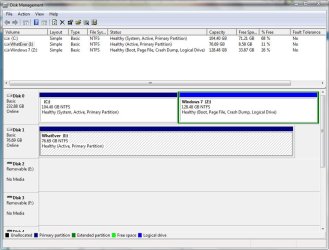
ok so i have 1 hard drive partioned as you can see in the pic


i have alot of programs on win 7 that i would like to keep..

how do i go about uninstalling xp?

i have EasyBCD 1.7.2 and Partition Wizard 4.1
 

Attachments
  • Capture.JPG
    Capture.JPG
    93.2 KB · Views: 110

My Computer My Computer

OS
windows 7
CPU
amd 3800+ @ 2.25ghz
Motherboard
asus m2a-vm
Memory
2gb
Graphics Card(s)
ati hd 3650 512mb
Sound Card
realtek onboard
Monitor(s) Displays
acer al1706
Hard Drives
1 hard drive partioned into to parts
hi
i would like to uninstall windows xp from my win 7 xp dual boot(xp was installed first)

ok so i have 1 hard drive partioned as you can see in the pic


i have alot of programs on win 7 that i would like to keep..

how do i go about uninstalling xp?

i have EasyBCD 1.7.2 and Partition Wizard 4.1


You will need Partition WIzard and bootable Windows 7 installer/Repair disk

First back up your data as moving operations can fail. Suggest you make a Win7 Backup Image saved to external so you can start over if necessary.

Boot into Partition Wizard and rightclick delete XP.

Next right click I:Whatever partition and Modify: Set Inactive

Rightclick Win7 and Modify>Set Active, then rightclick Resize/Move and drag the left border all the way over to include all of the deleted XP space, then adjust right border as desired

You can make any data partitions now or wait until later.

Apply all operations.

Now boot into Win7 DVD Repair My Computer and run Startup Repair 3 times as it will try several fixes before rewriting the MBR.
 
ok about booting partion wizard this means burn it to disk?

if so can i do it with out boot to disk as i only have 1 cd left and i would rather not waste it on such a small use once file..
 

My Computer My Computer

OS
windows 7
CPU
amd 3800+ @ 2.25ghz
Motherboard
asus m2a-vm
Memory
2gb
Graphics Card(s)
ati hd 3650 512mb
Sound Card
realtek onboard
Monitor(s) Displays
acer al1706
Hard Drives
1 hard drive partioned into to parts
OFF TOPIC

gregrocker:

...and run Startup Repair 3 times as it will try several fixes before rewriting the MBR.

If you don't mind me asking, is there any MS documentation that supports this? I keep READING this in post and having hard time buying it...

Thanks-
 

My Computer My Computer

Computer Manufacturer/Model Number
Home Grown
OS
Windows 7 Ultimate (64)
CPU
i7-2600K
Motherboard
Asus P8P67-M Pro
Memory
G.SKILL Ripjaws X Series 8GB (2 x 4GB)
Graphics Card(s)
ATI 5750
Sound Card
On-Board
Monitor(s) Displays
LG W2486L
Screen Resolution
1920X1080
Hard Drives
Intel X-25M 80 Gig SSD | Intel X-25M 160 Gig SSD | WD Black 500MB - External eSata
PSU
Zalman ZM770-XT 770 Watts
Case
Antec 180 mini
Cooling
Cooler Master V8
Internet Speed
15MB - Cable
Other Info
Sissy OC - 4.6 @ 1.3175 24/7 | 18' Idle - 55' Load
ok i decided that burning it to disk would probaily be a good idea so i burned it to my one and only dvd.. and guess what? it burned fine i restart and set it so it boots the dvd first and it starts up says something about isolinux and then says it "failed to boot click here to try agian" and thats all it does...so i guess i have to try and do it though the program
 

My Computer My Computer

OS
windows 7
CPU
amd 3800+ @ 2.25ghz
Motherboard
asus m2a-vm
Memory
2gb
Graphics Card(s)
ati hd 3650 512mb
Sound Card
realtek onboard
Monitor(s) Displays
acer al1706
Hard Drives
1 hard drive partioned into to parts
ok about booting partion wizard this means burn it to disk?

if so can i do it with out boot to disk as i only have 1 cd left and i would rather not waste it on such a small use once file..

You can run it from OS.
 
...and run Startup Repair 3 times as it will try several fixes before rewriting the MBR.

If you don't mind me asking, is there any MS documentation that supports this? I keep READING this in post and having hard time buying it...

Thanks-

I learned this from the top dual boot expert here SIW2.

The bootrec/boosect commands once given for boot recovery no longer need to be given out because Startup Repair has automated them.

You can see the tests Startup Repair attempts and completes by looking at its log before rebooting.

Haven't really had any reason to argue with 100% success in about 80+ dual boot removals we have done here since Win7 release.
 
Last edited:
ok i delted the xp install and set the "i" drive to inactive but it wont let me set the z drive as active
 

Attachments

  • Capture.JPG
    Capture.JPG
    88.4 KB · Views: 64

My Computer My Computer

OS
windows 7
CPU
amd 3800+ @ 2.25ghz
Motherboard
asus m2a-vm
Memory
2gb
Graphics Card(s)
ati hd 3650 512mb
Sound Card
realtek onboard
Monitor(s) Displays
acer al1706
Hard Drives
1 hard drive partioned into to parts
Just noticed Win7 partition is logical which cannot be set active.

Modify to primary and then set active.

Suggest you Resize/Move your Win7 over onto old XP space.

Then boot from WIn7 DVD and run Startup Repair 3 times until OS boots up.
 
should i also set it as primary drive and not logical?
 

My Computer My Computer

OS
windows 7
CPU
amd 3800+ @ 2.25ghz
Motherboard
asus m2a-vm
Memory
2gb
Graphics Card(s)
ati hd 3650 512mb
Sound Card
realtek onboard
Monitor(s) Displays
acer al1706
Hard Drives
1 hard drive partioned into to parts
ok gonna try it wish me luck

yes its greyed out i have to restart to resize it and to set it as primary....so im not sure how im gonna set it to active once i restart
 

My Computer My Computer

OS
windows 7
CPU
amd 3800+ @ 2.25ghz
Motherboard
asus m2a-vm
Memory
2gb
Graphics Card(s)
ati hd 3650 512mb
Sound Card
realtek onboard
Monitor(s) Displays
acer al1706
Hard Drives
1 hard drive partioned into to parts
NO! Don't Apply until all operations are completed, as the steps given say.

It won't restart now without XP MBR.

If you have already restarted then boot into the Win7 DVD and run Startup Repair 3 times.

I believe the command to mark partition active is automated in Startup Repair, but if not:

Open Command line, type
DISKPART
LIST DISK
SELECT DISK # (for Win7 disk)
LIST PARTITION
SELECT PARTITION # (for Win7 partition)
ACTIVE
EXIT

Then rerun Startup Repair 3 times to get it started up.
 
no i havent restarted yet....but i did delete the xp install so idk what to do

by delteing it i think i messed it up...prob gonna have to reinstall win 7?
 

My Computer My Computer

OS
windows 7
CPU
amd 3800+ @ 2.25ghz
Motherboard
asus m2a-vm
Memory
2gb
Graphics Card(s)
ati hd 3650 512mb
Sound Card
realtek onboard
Monitor(s) Displays
acer al1706
Hard Drives
1 hard drive partioned into to parts
ok it looks like i can get xp back by using the "partition recovery wizard" if needed....not doing anything tho till i hear back
 

My Computer My Computer

OS
windows 7
CPU
amd 3800+ @ 2.25ghz
Motherboard
asus m2a-vm
Memory
2gb
Graphics Card(s)
ati hd 3650 512mb
Sound Card
realtek onboard
Monitor(s) Displays
acer al1706
Hard Drives
1 hard drive partioned into to parts
No going back now.

You only need to complete all of the steps given in #2 before Applying them and restarting.

Then boot into the Windows 7 DVD and run Startup Repair 3 times.

We have done this about 80 times here since Win7 came out and it has never failed.

What is your hesitation?
 
ok i followed your adive and i got it working now i had to run start up repeir a few times before it worked.(just like you said)
thx alot for your help wouldnt have done it by myself..

you rock man :party:
 

My Computer My Computer

OS
windows 7
CPU
amd 3800+ @ 2.25ghz
Motherboard
asus m2a-vm
Memory
2gb
Graphics Card(s)
ati hd 3650 512mb
Sound Card
realtek onboard
Monitor(s) Displays
acer al1706
Hard Drives
1 hard drive partioned into to parts
Back
Top