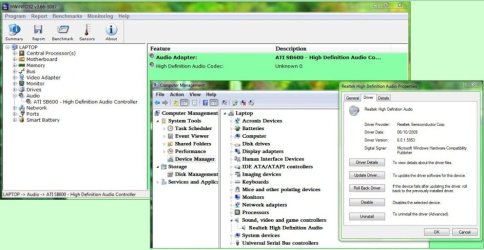
This guide is broken up into a number of parts:
Drivers instruct Windows exactly what hardware you have and what it does, along with any specific features. Manufacturers usually release new drivers frequently to keep their products updated and add new features. Performance is also usually improved, so it is absolutely vital to keep all your drivers updated. Use a driver sweeper for some drivers too.
GUIDELINES:
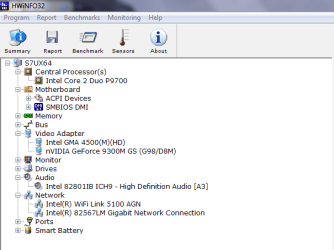
Finding drivers is usually easy. First you need to find out what is in your pc. I'd recommend HWInfo32. Install it and open it. Note the chipset and BIOS type/date then close the summary window. Then open up the tabs:
The drivers you want to update:
AMD: AMD Chipsets
SIS: SiS - Welcom to Silicon Integrated Systems Corporation.
NVIDIA: Drivers - Download NVIDIA Drivers
INTEL: http://downloadcenter.intel.com/Sea...=Intel®+Chipset+Software+Installation+Utility
DRIVER SWEEPER:
Use Driver Sweeper if you are updating some drivers. Driver Sweeper is a program that will remove leftovers from key drivers, namely graphics and sound. The first thing to do is to ensure that you have new and possibly old drivers on hand. Also, if you have 2 graphics cards - I have Intel and Nvidia in my ultraportable - don't do this. The manufacturer will most likely have different instructions. Otherwise, this should work, along with SLI/Crossfire. Uninstall the drivers from control panel with the exception of ATI drivers. If you have ATI run the new installer, uninstall the old drivers, reboot, and then use Driver Sweeper. Reboot into 7 again and then re-run the Catalyst installer, this time choosing to install the new driver. For anything else uninstall anything other related like control panels. Reboot at the end:
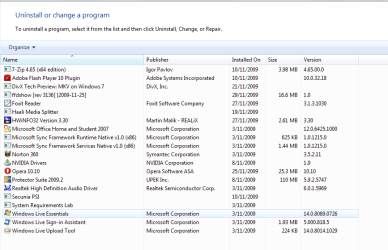
Reboot into safe mode and then run driver sweeper.

Select Analyse and then clean - choose the right drivers you want removed! It will be all of them, just select the right ones above. Reboot once more into safe mode and install the newest drivers. Then reboot into Windows. Use driver sweeper if it can clean up any of your drivers. This will most likely be sound and display, but the app is updated and some more support will come for other bits of hardware.
DEVICE MANAGER UPDATES:
In device manager, right click the device and select update, try the internet and then try choosing from installed drivers. Also, use the Unknown Devices app from Halfdone Development to identify any hardware (usually) that has a question mark.
Otherwise install any drivers over old ones unless you find different instructions for the piece of hardware. The .txt readme will have instructions or the site. Some installers uninstall old drivers, tell you to reboot, then run the installer again to install the new ones. After you install graphics drivers re-run the Windows Experience Index assessment. If you follow these simple steps your PC will run better and driver problems shouldn't exist.. If you can't get any 7 drivers, then it might time for new hardware that has support.
v2.0
- Intro to drivers
- Driver guidelines
- Finding & updating drivers
- Using Driver Sweeper
- Device Manger updates
Drivers instruct Windows exactly what hardware you have and what it does, along with any specific features. Manufacturers usually release new drivers frequently to keep their products updated and add new features. Performance is also usually improved, so it is absolutely vital to keep all your drivers updated. Use a driver sweeper for some drivers too.
GUIDELINES:
- Install them in safe mode if you can. Otherwise, use safe mode if a normal 7 install fails. If you've built a new pc, then you'll most likely install the drivers in 7, not safe mode.
- Don't bother with driver programs. Get them yourself. Do you trust a random app to stick a driver in the right place and ensure its installed correctly on top of a driver install? Use them only - only - if you really can't find drivers and then uninstall them.
- Reboot. Always reboot after each driver. Even better after you install them, reboot again later in the day.
- Make sure it matches your hardware and for laptops, the model, and whether its x86 or x64.
- Create a folder in your browser with links to your hardware and check this once a week.
- Use Driver Sweeper for your graphics card and sound drivers. This will clean up any leftover junk in safe mode.
- Try and find WHQL - Windows Hardware Quality Labs - drivers that have been certified by Microsoft.
- Keep a backup of the latest drivers on an external hard disk in case 7 dies. If you use a backed up image, then recent drivers are available.
Finding drivers is usually easy. First you need to find out what is in your pc. I'd recommend HWInfo32. Install it and open it. Note the chipset and BIOS type/date then close the summary window. Then open up the tabs:
The drivers you want to update:
- Chipset
- BIOS
- NIC (Network Interface Device) for Ethernet and Wireless.
- Sound
- Graphics Card
- DVD drive firmware if necessary
- Anything proprietary if necessary, such as Webcam etc.
AMD: AMD Chipsets
SIS: SiS - Welcom to Silicon Integrated Systems Corporation.
NVIDIA: Drivers - Download NVIDIA Drivers
INTEL: http://downloadcenter.intel.com/Sea...=Intel®+Chipset+Software+Installation+Utility
DRIVER SWEEPER:
Use Driver Sweeper if you are updating some drivers. Driver Sweeper is a program that will remove leftovers from key drivers, namely graphics and sound. The first thing to do is to ensure that you have new and possibly old drivers on hand. Also, if you have 2 graphics cards - I have Intel and Nvidia in my ultraportable - don't do this. The manufacturer will most likely have different instructions. Otherwise, this should work, along with SLI/Crossfire. Uninstall the drivers from control panel with the exception of ATI drivers. If you have ATI run the new installer, uninstall the old drivers, reboot, and then use Driver Sweeper. Reboot into 7 again and then re-run the Catalyst installer, this time choosing to install the new driver. For anything else uninstall anything other related like control panels. Reboot at the end:
Reboot into safe mode and then run driver sweeper.
Select Analyse and then clean - choose the right drivers you want removed! It will be all of them, just select the right ones above. Reboot once more into safe mode and install the newest drivers. Then reboot into Windows. Use driver sweeper if it can clean up any of your drivers. This will most likely be sound and display, but the app is updated and some more support will come for other bits of hardware.
DEVICE MANAGER UPDATES:
In device manager, right click the device and select update, try the internet and then try choosing from installed drivers. Also, use the Unknown Devices app from Halfdone Development to identify any hardware (usually) that has a question mark.
Otherwise install any drivers over old ones unless you find different instructions for the piece of hardware. The .txt readme will have instructions or the site. Some installers uninstall old drivers, tell you to reboot, then run the installer again to install the new ones. After you install graphics drivers re-run the Windows Experience Index assessment. If you follow these simple steps your PC will run better and driver problems shouldn't exist.. If you can't get any 7 drivers, then it might time for new hardware that has support.
v2.0
Last edited by a moderator: