My Computer
- Computer Manufacturer/Model Number
- Toshiba
- OS
- Windows 7 Ultimate 32 bit
- Memory
- 1 GB

Well mate, I dont see MSN Messenger is installed onto the computer, hence how am i supposed to uninstall it?This is what to do
Uninstall, completely. Do it from comtrol panel programs
Install again. Make sure to do if from administrator account. Make sure all other windows are closed
turn off A/V anti virus and firewall.
Make sure they are compatible with your ver of 7 32 or 64 bit
I wish you luck

Try to installing Microsoft Visual C++ 2008 Redistributable Package (x86) then try as Richard told it good to turned off A/V and Firewall
http://www.microsoft.com/downloads/details.aspx?FamilyID=9b2da534-3e03-4391-8a4d-074b9f2bc1bf&displaylang=en)
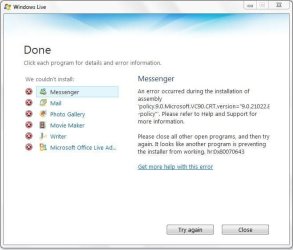
Well i found out that i have Visual C++ 2005 Redistribute version 8.0.56336What version VC++ do you have in Program Features .. I believe there is two different version of VC ++ is in there if not in registry .. You might have to find policy.9.0.Microsoft.VC90 in registry and delete them both and reboot the system then try ..
Good luck
Well mate, I dont see MSN Messenger is installed onto the computer, hence how am i supposed to uninstall it?This is what to do
Uninstall, completely. Do it from comtrol panel programs
Install again. Make sure to do if from administrator account. Make sure all other windows are closed
turn off A/V anti virus and firewall.
Make sure they are compatible with your ver of 7 32 or 64 bit
I wish you luck
Mate nice to see that your trying to help but in my regedit, i dont see the specified pathRemove the all the Visual C++
Try to got to Start > regedit
HKEY_LOCAL_MACHINE\SOFTWARE\Microsoft\Windows\CurrentVersion\SideBySide\Installations\x86_policy.9.0.Microsoft.VC90.CRT_1fc8b3b9a1e18e3b_9.0.21022.8_x-ww_f88706bb
Here you can see like 5 similar keys delete all of them which have x86_policy.9.0.Microsoft.VC90.CRT
Then go to
C:\WINDOWS\WinSxS\Policies and delete x86_policy.9.0.Microsoft.VC90.CRT from there
Then reboot and try to just run the setup

