
new to windows 7 and need help

derekryans

New member
Local time
9:37 AM
Messages
2
Hello all...I recently bought a new laptop, it's HP dv4-2045dx and it came with Windows 7. As soon as I bought it, I realized it was running slow and after googling, I installed a registry cleaner to help speed things up. It worked. :)
Next, I deleted all the programs I didn't want and installed Adobe Master Suite CS3 and Microsoft Office 2007. Other than those I also installed skype.
Everything was fine until I ran Windows Update...
All of a sudden my skype doesn't work! It signs on but I can't receive or make calls. Same thing with MSN Messenger, I can't call anyone. I thought maybe it was my webcam so I tried to open the Smart Media Web Cam software, but it did not open.
Next thing I realized is that my external hard drive is plugged in and read by the computer but when i click on the safely remove device icon, my drive is greyed out and there is no way to eject it.
Oh and one more thing, I can't seem to click on files to to open them through MS Office. I have to open MS Office first and then click file --> open, etc.
Any help I can get is greatly appreciated.
I've attached a screen shot picture of my properties under my computer. sorry if i didn't provide enough info...
 

Attachments
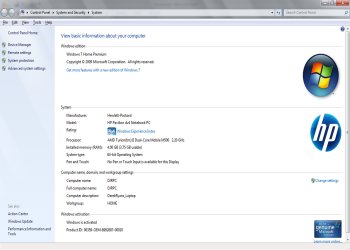
  • windows7.jpg
    windows7.jpg
    177.3 KB · Views: 118

My Computer My Computer

Computer Manufacturer/Model Number
HP dv4-2045dx
OS
Windows 7
CPU
2.20 GHz AMD Turion II Dual-Core Mobile Processor M500
Memory
4GB
Graphics Card(s)
ATI Radeon HD 4200 Graphics
Sound Card
Altec Lansing with SRS Premium Sound
Hard Drives
320 GB (7200 RPM)
You should block the Windows product key in the image!
 

My Computer My Computer

Computer Manufacturer/Model Number
H.P. / Acer / H.P.
OS
7 Ultimate 32Bit / Ubuntu 9.10 64Bit / 9.10 64Bit
CPU
AMD Athlon X2 64 / Pentium T4200 / Pentium T4300
Memory
4Gb DDR2 PC6400 800Mhz / 3Gb PC6400 / 2Gb PC6400
Graphics Card(s)
ATI HD3650 / Intel 4500HD / Intel 4500HD
Sound Card
Onboard Realtek / Realtek / Conexant
Monitor(s) Displays
Viewsonic 24" / Laptop 12.1" / Laptop 17"
Screen Resolution
1920x1200 / 1280x800 / 1440x900
Hard Drives
System: 320Gb SATA 3G. 250Gb Second Internal, 320Gb/1000Gb Externals.
Laptop 1: 250Gb
Laptop 2: 320Gb
Cooling
Fan.
Keyboard
H.P. / Acer / H.P.
Mouse
Labtec Laser.
Internet Speed
10Mb/s
Hello all...I recently bought a new laptop, it's HP dv4-2045dx and it came with Windows 7. As soon as I bought it, I realized it was running slow and after googling, I installed a registry cleaner to help speed things up. It worked. :)
Next, I deleted all the programs I didn't want and installed Adobe Master Suite CS3 and Microsoft Office 2007. Other than those I also installed skype.
Everything was fine until I ran Windows Update...
All of a sudden my skype doesn't work! It signs on but I can't receive or make calls. Same thing with MSN Messenger, I can't call anyone. I thought maybe it was my webcam so I tried to open the Smart Media Web Cam software, but it did not open.
Next thing I realized is that my external hard drive is plugged in and read by the computer but when i click on the safely remove device icon, my drive is greyed out and there is no way to eject it.
Oh and one more thing, I can't seem to click on files to to open them through MS Office. I have to open MS Office first and then click file --> open, etc.
Any help I can get is greatly appreciated.
I've attached a screen shot picture of my properties under my computer. sorry if i didn't provide enough info...

Use system restore to go back to a point prior to the updates. When you get the updates again, install one at a time. When you find the problem update do not install. Your updates must be set to you will update manually and not automatically.

Before installing the updates make sure that you have a system restore point, so when you find the problem update you can go back to the point prior to installation.
 

My Computer My Computer

Computer type
PC/Desktop
Computer Manufacturer/Model Number
Dell XPS 420
OS
Windows 10, Home Clean Install
CPU
Intel Core2 processsor Q8200(2.33Ghz 1333FSB) Quad Core Tech
Motherboard
Dell
Memory
6 gb
Graphics Card(s)
ATI Radeon 256MB HD3650
Sound Card
Intergrated 7.1 Channel Audio
Monitor(s) Displays
Dell SP2009W 20"
Hard Drives
640 GB Serial ATA Hard drive
Cooling
Fan
Keyboard
Dell USB Keyboard
Mouse
Dell Premium Optical USB
Internet Speed
DSL 2.85
Hi -- My first thought is that if the Registry Cleaner is a free one, uninstall it. I have had problems with them messing up more than they help. I would also due a virus scan on it. Try that and see if it does any good and get back with us.
 

My Computer My Computer

Computer type
PC/Desktop
Computer Manufacturer/Model Number
Custom Build
OS
Windows 7 Home Premium 32-Bit - Build 7600 SP1
CPU
Intel Core i3-2120 3.30Ghz
Motherboard
Asus P8Z68-V LX Intel Z68 Socket H2 ATX
Memory
Kingston 4 GB DDR3 1333 mhz
Graphics Card(s)
AMD Radeon HD6670
Sound Card
Sound Blaster Audigy SE 24-Bit
Monitor(s) Displays
Asus VE228
Screen Resolution
1440 X 900
Hard Drives
OCZ Vertex 3 120 GB Sata 3 SSD ==
Kingston SH103/S3 120 G Hyper X 120 GB SSD ==
Western Digital 500 GB Caviar Green 7200 RPM ==
PSU
Corsair CX600M == 600 Watt
Case
NZXT Apollo - Silver with Clear Side Panel
Cooling
Three 120 mm Fans
Keyboard
Microsoft Natural 4000
Mouse
Microsoft Custom Optical 3000
Internet Speed
AT&T Fiber Optic Wireless Network
Antivirus
Microsoft Security Essentials
Browser
Chrome
Other Info
120 mm Blue LED Fan -- Three Blue LED Lazer Light Sticks
Hi -- My first thought is that if the Registry Cleaner is a free one, uninstall it. I have had problems with them messing up more than they help.

+1 on that. It always seems good up front but later on ... not so.:mad:

What's wrong with Windows regular uninstall?
 

My Computer My Computer

Computer type
PC/Desktop
Computer Manufacturer/Model Number
Custom
OS
7 x64 Ultimate
CPU
AMD Ryzen 5
Motherboard
Gigabyte GA-AB350-Gaming
Memory
16GB DDR4
Graphics Card(s)
Radeon R7 360
Monitor(s) Displays
2 x Dell U2518D
Screen Resolution
2560x1440 2560x1440
Hard Drives
WD 500GB x2
Samsung SSD 128MB (OS)
XPG SX8200 Pro M.2 2280 1TB
PSU
Antec 500
Cooling
Hyper 212 EVO
Keyboard
Logitech cordless K800
Mouse
Logitech M510
Antivirus
Avira
it worked

thanks for all the suggestions! i did the system restore and it worked. but i had a question about the registry cleaner. i used regcure, which isn't a free one...but is there something else i should be using? maybe a program to help shut down background programs? thanks again
 

My Computer My Computer

Computer Manufacturer/Model Number
HP dv4-2045dx
OS
Windows 7
CPU
2.20 GHz AMD Turion II Dual-Core Mobile Processor M500
Memory
4GB
Graphics Card(s)
ATI Radeon HD 4200 Graphics
Sound Card
Altec Lansing with SRS Premium Sound
Hard Drives
320 GB (7200 RPM)
You can even try MSCONFIG to disable the unwanted backend processes. Check hide all microsoft applications and disable all . Restart the computer and see if there is any difference . ( make sure that you don't disable any wireless devices )
 

My Computer My Computer

Computer Manufacturer/Model Number
Lenova 550
OS
windows 7
CPU
Lenova
Motherboard
Lenova
Memory
4 gb
Graphics Card(s)
Intel graphics card
Sound Card
Realtek
Hard Drives
one hard disk - Laptop -320 gb
Problem

My wife's laptop has exactly the same problem, and its the SAME model, but doesn't have any restore points created yet. Has there been any headway into solving this or will we have to return this piece of crap?

My own custom-built desktop pc has windows 7 pro and does NOT have any of these problems with skype.

We're going to try Skype 4.2 beta to see if it fixes the issue, but if it doesn't I don't know what to do, as it is clearly an HP OEM software issue or an issue related to the difference between home premium and pro in windows 7, and thus is in the background of the OS, something I have little experience in dealing with.

-edit: Found the restore points, going back to stage 1.
 
Last edited:

My Computer My Computer

OS
Windows 7 64 bit
You can even try MSCONFIG to disable the unwanted backend processes. Check hide all microsoft applications and disable all . Restart the computer and see if there is any difference . ( make sure that you don't disable any wireless devices )

This method only disables the Start-up entries, which is fairly pointless if your never going to re-enable them.

If you'd like to delete the start-up entries, CCleaner does a great job with that, and has a built in reg scanner, just picks up the basics.

It's the only Registry cleaner the majority of us trust.
 

My Computer My Computer

Computer Manufacturer/Model Number
Custom Build
OS
W7 RTM Ultimate x64
CPU
Intel Q8400 @ 2.66GHZ
Motherboard
Gigabyte GA-EG45M-UD2H
Memory
4GB DDR2-800
Graphics Card(s)
Gainward GTS 450 GLH 1GB Edition
Sound Card
Integrated 8 Channel
Monitor(s) Displays
AOC 23.6 Inch Widescreen LCD
Screen Resolution
1920x1080
Hard Drives
Seagate 500GB Internal
Western Digital 1TB Internal

Hitachi 1TB External
PSU
Apevia Java Power 500W
Case
Cooler Master HAF 922 Black
Cooling
Stock Intel CPU Fan
Keyboard
HP SK-2960 Multimedia Keyboard
Mouse
Logitech M350 Wireless Gaming Mouse
Internet Speed
1.5MB
I've had good results in cleaning up new computers using PC Decrapifier. It gets rid of bloatware down to the registry entries, but I haven't yet tried it on a Windows 7 machine... only Vista.
 

My Computer My Computer

Computer Manufacturer/Model Number
me / #1
OS
windows 7 x64 Home Premium
CPU
intel q6600
Motherboard
gigbyte ga ep45 ud3l
Memory
g.skill 8gb ddr2 1066 (pc2 8500)
Graphics Card(s)
evga geforce 9800 gtx 512 mb
Screen Resolution
1680 x 1050
Hard Drives
wd caviar black 500 gb
wd caviar black 1tb
wd elements 1tb external hd x2
PSU
raidmax 500w
Case
smilodon (yes, t'was the pretty blue lites that got me!)
CCleaner Disk and Reg cleanup tabs, and Auslogics free Disk and Registry defraggers are the only cleanup or tweaking Win7 needs.

If you don't have a restore ponit to reverse a bad Update, then the fix is to uninstall the Update.

As a last resort with severe problems before reinstall: http://www.sevenforums.com/tutorials/3413-repair-install.html?ltr=R

However it can carry corruption forward just as an in-place Upgrade does (that's what it is).
 

My Computer My Computer

Computer type
PC/Desktop
Computer Manufacturer/Model Number
The Dominator?
OS
Windows Seven Ultimate
CPU
AMD Piledriver FX 8320 @ 3.5GHz
Motherboard
ASUS M5A97 EVO R2.0
Memory
Crucial Ballistix 8GB 1600 MHz DDR3
Graphics Card(s)
ASUS GeForce GTX 970 Strix Edition @ 1.114 GHz
Sound Card
Integrated
Monitor(s) Displays
LG 23EA63V 23" IPS 1080p Monitor
Screen Resolution
1920x1080
Hard Drives
Samsung SSD 840 EVO 120 GB
1x WD GreenPower 500GB 7200RPM
1 External HDD 1TB
PSU
Corsair CX500
Case
Zalman Z9 Plus
Cooling
CPU - Corsair Hydro H80i, Case - 3x Aerocool Shark Edition
Keyboard
Xenta Backlit Keyboard (Not very good!)
Mouse
Logitech G400
Internet Speed
Download: 7 mb/s Upload: 0.76 mb/s
Antivirus
Microsoft Security Essentials
Browser
Google Chrome
Other Info
Overclockers UK Desk Pad 89 x 45 cm
1200x730x600mm Desk
Using Virtual Audio Cable to split stereo sound into Audio Technica ATH-M50 headphones and Logitech X-530 speakers.
well, I don't think that is a product KEY, it is an ID. It is about useless for anything I think. I could be wrong, I was once before.

On Reg Cleaners. I've broken more things with them than they have fixed. Although I recently installed Reg Mechanic and like it blindly clean 716 errors. So far it appears to still be OK, but I haven't determined the cause of a couple of issues yet.

It is hard to believe that a new computer/OS needs cleaning so soon. I have never found that a system sped up much after a clean. If it was slow it was always something else, like virus or hardware issues.
 

My Computer My Computer

OS
windows 7
well, I don't think that is a product KEY, it is an ID. It is about useless for anything I think. I could be wrong, I was once before.

On Reg Cleaners. I've broken more things with them than they have fixed. Although I recently installed Reg Mechanic and like it blindly clean 716 errors. So far it appears to still be OK, but I haven't determined the cause of a couple of issues yet.

It is hard to believe that a new computer/OS needs cleaning so soon. I have never found that a system sped up much after a clean. If it was slow it was always something else, like virus or hardware issues.
See a thread another user and I had a debate about. http://www.sevenforums.com/software/35224-ccleaner-registry-fixes.html
 

My Computer My Computer

Computer Manufacturer/Model Number
Custom
OS
Windows 7 Professional x64
CPU
Intel i7 2600K OC'd @ 4620 MHz
Motherboard
Asus P8Z68-V Pro
Memory
16GB GSkill Sniper 2133 Mhz (4x4GB)
Graphics Card(s)
EVGA GeForce GTX 480 SuperClocked+
Sound Card
Realtek High Definition Audio
Monitor(s) Displays
2x Acer S273HLbmii 27"
Screen Resolution
2 x 1920x1080
Hard Drives
64GB Crucial M4 SSD

Storage: Hitachi 1TB 5400RPM, Samsung 1.5TB 5400RPM
PSU
Corsair HW Series 750w (modular)
Case
Cooler Master HAF 932 Advanced Blue Edition
Cooling
CM Hyper 212+ CPU cooler, 3x 230mm + 1x 140mm case fans
Keyboard
Logitech MK320 (wireless)
Mouse
Logitech MK320 (wireless)
Internet Speed
30 Mb/s : 2 Mb/s
On the topic of reg cleaner, i wouldn't touch one with a 60 foot pole.

Do more bad then good.

CCleaner or nothing i say!
 

My Computer My Computer

Computer Manufacturer/Model Number
Custom Build
OS
W7 RTM Ultimate x64
CPU
Intel Q8400 @ 2.66GHZ
Motherboard
Gigabyte GA-EG45M-UD2H
Memory
4GB DDR2-800
Graphics Card(s)
Gainward GTS 450 GLH 1GB Edition
Sound Card
Integrated 8 Channel
Monitor(s) Displays
AOC 23.6 Inch Widescreen LCD
Screen Resolution
1920x1080
Hard Drives
Seagate 500GB Internal
Western Digital 1TB Internal

Hitachi 1TB External
PSU
Apevia Java Power 500W
Case
Cooler Master HAF 922 Black
Cooling
Stock Intel CPU Fan
Keyboard
HP SK-2960 Multimedia Keyboard
Mouse
Logitech M350 Wireless Gaming Mouse
Internet Speed
1.5MB
Just be sure to back up before you do anything with your registry, and don't touch anything you don't know about.
 

My Computer My Computer

Computer Manufacturer/Model Number
Custom
OS
Windows 7 Professional x64
CPU
Intel i7 2600K OC'd @ 4620 MHz
Motherboard
Asus P8Z68-V Pro
Memory
16GB GSkill Sniper 2133 Mhz (4x4GB)
Graphics Card(s)
EVGA GeForce GTX 480 SuperClocked+
Sound Card
Realtek High Definition Audio
Monitor(s) Displays
2x Acer S273HLbmii 27"
Screen Resolution
2 x 1920x1080
Hard Drives
64GB Crucial M4 SSD

Storage: Hitachi 1TB 5400RPM, Samsung 1.5TB 5400RPM
PSU
Corsair HW Series 750w (modular)
Case
Cooler Master HAF 932 Advanced Blue Edition
Cooling
CM Hyper 212+ CPU cooler, 3x 230mm + 1x 140mm case fans
Keyboard
Logitech MK320 (wireless)
Mouse
Logitech MK320 (wireless)
Internet Speed
30 Mb/s : 2 Mb/s
Back
Top