Hello all...
My goal is to run a Win7/Win7 dual boot system with one installation for day to day operations (MAIN) and then second installation strictly for gaming (GAMER).
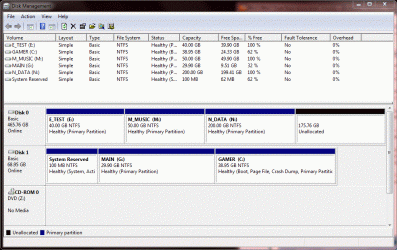
I have successfully installed Win7 twice. During clean install i created 30GB partition (C: ) and put MAIN there. No problems. I loaded that up and from within Disk Management created a second partition on the same physical drive and named it (D: ).
I booted from the Win7 install DVD and then installed GAMER to the (D: ) partition. No problems. I am able to boot into each installation (MAIN and GAMER) from the boot manager without any troubles.
When I boot into the MAIN installation, the system path/partition is (C: ) and the os files for the second installation, GAMER, can be seen on (D: ) just fine.
However, when i boot into the GAMER installation, its system path is also (C: ) and the partition for MAIN somehow got renamed to (G: )
I would like it so that when I boot into MAIN (which was installed to C: ), that partition stays named (C: ) and when i boot into GAMER (which was installed to D: ), that partition stays named (D: ). Eventhough both installations see themselves as (C: ) when i boot into them, it does not seem to cause any problems.
So how should I do my second Win7 installation to a partition named (D: ) and force it to keep that name when i boot into it?
Thanks,
Jeff
My goal is to run a Win7/Win7 dual boot system with one installation for day to day operations (MAIN) and then second installation strictly for gaming (GAMER).
I have successfully installed Win7 twice. During clean install i created 30GB partition (C: ) and put MAIN there. No problems. I loaded that up and from within Disk Management created a second partition on the same physical drive and named it (D: ).
I booted from the Win7 install DVD and then installed GAMER to the (D: ) partition. No problems. I am able to boot into each installation (MAIN and GAMER) from the boot manager without any troubles.
When I boot into the MAIN installation, the system path/partition is (C: ) and the os files for the second installation, GAMER, can be seen on (D: ) just fine.
However, when i boot into the GAMER installation, its system path is also (C: ) and the partition for MAIN somehow got renamed to (G: )
I would like it so that when I boot into MAIN (which was installed to C: ), that partition stays named (C: ) and when i boot into GAMER (which was installed to D: ), that partition stays named (D: ). Eventhough both installations see themselves as (C: ) when i boot into them, it does not seem to cause any problems.
So how should I do my second Win7 installation to a partition named (D: ) and force it to keep that name when i boot into it?
Thanks,
Jeff
My Computer
At a glance
Windows 7 64-bitIntel Core 2 Quad Q9550 @ 2.83GHz (no OC)OCZ Reaper HPC 4GB (2 x 2GB) DDR2 1066 (PC2 8...2x EVGA GeForce GTX 260 in SLI
- Computer Manufacturer/Model Number
- Self-built
- OS
- Windows 7 64-bit
- CPU
- Intel Core 2 Quad Q9550 @ 2.83GHz (no OC)
- Motherboard
- EVGA nForce 780i SLI
- Memory
- OCZ Reaper HPC 4GB (2 x 2GB) DDR2 1066 (PC2 8500)
- Graphics Card(s)
- 2x EVGA GeForce GTX 260 in SLI
- Sound Card
- onboard Realtek
- Monitor(s) Displays
- Dell 24" 2405FPW
- Screen Resolution
- 1920x1200
- Hard Drives
- Disk 1: WD Raptor 34GB x2 in RAID0
Disk 2: WD Caviar Blue 500GB 7200 RPM 16MB Cache SATA 3.0Gb
- PSU
- Rosewill Xtreme Series RX950 950W
- Case
- Antec Twelve Hundred Black Steel ATX Full Tower
- Cooling
- Air