Hi everyone! I'm new in the forums, so hey all! 
One of my first questions here:
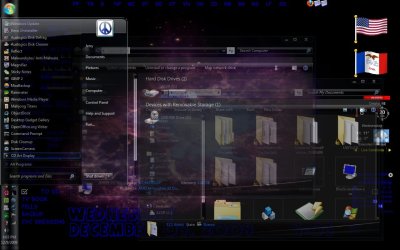
So I was in class a few minutes ago, and while the professor was lecturing I saw one of my classmates (with Windows 7, ofcourse) opening up a few explorer windows. I was kind of surprised (and envious) to see that the white area that was supposed to be, well, white, was transparent in hers! I was sure it was transparent and not just a background photo similar to her desktop background since when she moved the windows, it basically acted like the glass window panes Aero is all about! It also has the glare/blur kind of effect I see on the Aero interface..
So how did she do it? Did she use a theme or something?
One of my first questions here:
So I was in class a few minutes ago, and while the professor was lecturing I saw one of my classmates (with Windows 7, ofcourse) opening up a few explorer windows. I was kind of surprised (and envious) to see that the white area that was supposed to be, well, white, was transparent in hers! I was sure it was transparent and not just a background photo similar to her desktop background since when she moved the windows, it basically acted like the glass window panes Aero is all about! It also has the glare/blur kind of effect I see on the Aero interface..
So how did she do it? Did she use a theme or something?
My Computer
- Computer Manufacturer/Model Number
- Acer Extensa 4630G
- OS
- Windows 7 Ultimate x64
- CPU
- Intel Core 2 Duo T9600
- Motherboard
- Intel PM45
- Memory
- 2x 2GB soDIMM
- Graphics Card(s)
- NVIDIA GeForce 9300M GS
- Hard Drives
- Western Digital Scorpio Blue 320GB