
Trying to install Win XP mode

holydevil

New member
I have win 7 ultimate, so it should work, right? Well, it won't. I run the installer for it, and it says it is installing, and then it says it is finished. It doesn't show up in the program files, and it doesn't show up in the start menu like it should.

I checked the install path, which was "c:\program files\windows xp mode"

That folder was there, but the only things in that folder were:
KEY.txt
VXPEULA.txt
Windows XP Mode base.vhd
and a folder called tutorial which just had a few html and gif files.

Any help? If you need more details, let me know.
 

My Computer

Computer Manufacturer/Model Number
I built it myself
OS
Windows 7 64 bit
CPU
i5 2500k overclocked to 4.3 GHz
Motherboard
Asus something, I don't feel like finding the model number.
Memory
12 GB DDR3 1066MHz
Graphics Card(s)
Radeon HD 5870
Sound Card
whatever realtek 8 channel thing is built into the mobo
Monitor(s) Displays
emachines and acer
Screen Resolution
both are 1080p
Hard Drives
Internal desktop hard drives:
WD Black 2 TB (7200 rpm)
Samsung spinpoint 1 TB (7200 rpm)
External hard drive (usb 3.0!):
Samsung spinpoint eco green 2 TB (5400 rpm)
Spare unused hard drives:
WD black 1 TB (7200 rpm)
WD green 500 GB (idk rpm)
PSU
1080 watts
Case
Xclio (can't find model number)
Cooling
see other info
Keyboard
el cheapo basic keyboard; I hate fancy keyboards.
Mouse
R.A.T. 7 (it's friggin awesome)
Internet Speed
12 Mb/s (usually hovers around 11.5 Mb/s for speed tests)
Other Info
Case fans:
2 x 180mm top fans (256 color led)
1 x 250mm front fan (256 color led)
1 x 120mm rear fan
Cpu cooler: Scythe Yasya (massive thing with a 120mm fan)
Psu fan: 180mm (blue led)
gpu fan: idk, at least it's not loud.
Did you also install Virtual PC as told on the download page? It is needed to run XP Mode.

Kari
 

Attachments

  • VPC_dl.PNG
    VPC_dl.PNG
    15.6 KB · Views: 46

My Computer

Computer type
Laptop
Computer Manufacturer/Model Number
HP ENVY 17-1150eg
OS
Windows 10 Pro x64 EN-GB
CPU
1.6 GHz Intel Core i7-720QM Processor
Memory
6 GB
Graphics Card(s)
ATI Mobility Radeon HD 5850 Graphics
Sound Card
Beats sound system with integrated subwoofer
Monitor(s) Displays
17" laptop display, 22" LED and 32" Full HD TV through HDMI
Screen Resolution
1600*900 (1), 1920*1080 (2&3)
Hard Drives
Internal: 2 x 500 GB SATA Hard Disk Drive 7200 rpm
External: 2TB for backups, 3TB USB3 network drive for media
Cooling
As Envy runs a bit warm, I have it on a Cooler Master pad
Keyboard
Logitech diNovo Media Desktop Laser (bluetooth)
Mouse
Logitech Performance Mouse MX
Internet Speed
50/10 Mbps VDSL
Antivirus
Windows Defender 4.3.9431.0
Browser
Maxthon 3.5.2., IE11

My Computer

Computer Manufacturer/Model Number
I built it myself
OS
Windows 7 64 bit
CPU
i5 2500k overclocked to 4.3 GHz
Motherboard
Asus something, I don't feel like finding the model number.
Memory
12 GB DDR3 1066MHz
Graphics Card(s)
Radeon HD 5870
Sound Card
whatever realtek 8 channel thing is built into the mobo
Monitor(s) Displays
emachines and acer
Screen Resolution
both are 1080p
Hard Drives
Internal desktop hard drives:
WD Black 2 TB (7200 rpm)
Samsung spinpoint 1 TB (7200 rpm)
External hard drive (usb 3.0!):
Samsung spinpoint eco green 2 TB (5400 rpm)
Spare unused hard drives:
WD black 1 TB (7200 rpm)
WD green 500 GB (idk rpm)
PSU
1080 watts
Case
Xclio (can't find model number)
Cooling
see other info
Keyboard
el cheapo basic keyboard; I hate fancy keyboards.
Mouse
R.A.T. 7 (it's friggin awesome)
Internet Speed
12 Mb/s (usually hovers around 11.5 Mb/s for speed tests)
Other Info
Case fans:
2 x 180mm top fans (256 color led)
1 x 250mm front fan (256 color led)
1 x 120mm rear fan
Cpu cooler: Scythe Yasya (massive thing with a 120mm fan)
Psu fan: 180mm (blue led)
gpu fan: idk, at least it's not loud.
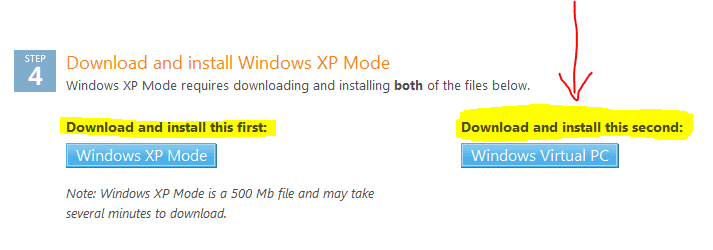
If you don't find Windows Virtual PC menu in Start Menu > All Programs, open the folder Your_Username > Virtual Machines and start Xp Mode from there.

Kari
 

My Computer

Computer type
Laptop
Computer Manufacturer/Model Number
HP ENVY 17-1150eg
OS
Windows 10 Pro x64 EN-GB
CPU
1.6 GHz Intel Core i7-720QM Processor
Memory
6 GB
Graphics Card(s)
ATI Mobility Radeon HD 5850 Graphics
Sound Card
Beats sound system with integrated subwoofer
Monitor(s) Displays
17" laptop display, 22" LED and 32" Full HD TV through HDMI
Screen Resolution
1600*900 (1), 1920*1080 (2&3)
Hard Drives
Internal: 2 x 500 GB SATA Hard Disk Drive 7200 rpm
External: 2TB for backups, 3TB USB3 network drive for media
Cooling
As Envy runs a bit warm, I have it on a Cooler Master pad
Keyboard
Logitech diNovo Media Desktop Laser (bluetooth)
Mouse
Logitech Performance Mouse MX
Internet Speed
50/10 Mbps VDSL
Antivirus
Windows Defender 4.3.9431.0
Browser
Maxthon 3.5.2., IE11
If you don't find Windows Virtual PC menu in Start Menu > All Programs, open the folder Your_Username > Virtual Machines and start Xp Mode from there.

Kari

That folder doesn't exist. As I said above, it only installed a few files.

The installer took less than ten seconds to do the installing part, which for a 500 MB installer, that's really fast. I need some way to make the installer copy every file instead of just a few files that don't appear to be needed for operation.
 

My Computer

Computer Manufacturer/Model Number
I built it myself
OS
Windows 7 64 bit
CPU
i5 2500k overclocked to 4.3 GHz
Motherboard
Asus something, I don't feel like finding the model number.
Memory
12 GB DDR3 1066MHz
Graphics Card(s)
Radeon HD 5870
Sound Card
whatever realtek 8 channel thing is built into the mobo
Monitor(s) Displays
emachines and acer
Screen Resolution
both are 1080p
Hard Drives
Internal desktop hard drives:
WD Black 2 TB (7200 rpm)
Samsung spinpoint 1 TB (7200 rpm)
External hard drive (usb 3.0!):
Samsung spinpoint eco green 2 TB (5400 rpm)
Spare unused hard drives:
WD black 1 TB (7200 rpm)
WD green 500 GB (idk rpm)
PSU
1080 watts
Case
Xclio (can't find model number)
Cooling
see other info
Keyboard
el cheapo basic keyboard; I hate fancy keyboards.
Mouse
R.A.T. 7 (it's friggin awesome)
Internet Speed
12 Mb/s (usually hovers around 11.5 Mb/s for speed tests)
Other Info
Case fans:
2 x 180mm top fans (256 color led)
1 x 250mm front fan (256 color led)
1 x 120mm rear fan
Cpu cooler: Scythe Yasya (massive thing with a 120mm fan)
Psu fan: 180mm (blue led)
gpu fan: idk, at least it's not loud.
Just throwing some ideas out there...
1. Did you enable virtualization before installing?
2. Have you tried upgrading your BIOS?
3. Maybe you need to uninstall, then install as an administrator?
4. Maybe your download got corrupted...is it 469MB?
 

My Computer

Computer Manufacturer/Model Number
Cyberpower, Inc.
OS
Windows 7 Professional (x64)
CPU
AMD Phenom II X4 955 Black Edition
Motherboard
Gigabyte AMD MA770T-UD3P AM3 DDR3 1666+/1333/1066
Memory
6GB (3 x 2GB) Kingston DDR3 1333 SDRAM
Graphics Card(s)
NVIDIA GeForce GTX 260
Sound Card
Onboard 7.1 Sound
Monitor(s) Displays
Samsung 24" SyncMaster 2422
Screen Resolution
1920 x 1200
Hard Drives
500GB Sata II 3.0GB 16MB 7200RPM,
Western Digital 1TB USB 2.0 External Hard Drive
PSU
Kingwin 700 Watt Power Supply
Case
Silver X-Cruiser 2 Mid No Power
Cooling
Asetek 120MM Watercooler
Keyboard
HTK-1001
Mouse
Razer Viper
Internet Speed
Incoming: 2496 kbps, Outgoing: 512 kbps
Piggybacking onto HolyDevil's thread here ...

I have tried to install XPMode several times and each time it says it can't finish setup because there is already another VM on my system. But there isn't.
 

My Computer

Computer type
PC/Desktop
Computer Manufacturer/Model Number
Custom
OS
7 x64 Ultimate
CPU
AMD Ryzen 5
Motherboard
Gigabyte GA-AB350-Gaming
Memory
16GB DDR4
Graphics Card(s)
Radeon R7 360
Monitor(s) Displays
2 x Dell U2518D
Screen Resolution
2560x1440 2560x1440
Hard Drives
WD 500GB x2
Samsung SSD 128MB (OS)
XPG SX8200 Pro M.2 2280 1TB
PSU
Antec 500
Cooling
Hyper 212 EVO
Keyboard
Logitech cordless K800
Mouse
Logitech M510
Antivirus
Avira
Piggybacking onto HolyDevil's thread here ...

I have tried to install XPMode several times and each time it says it can't finish setup because there is already another VM on my system. But there isn't.

Upgrade your BIOS. See this thread.
 

My Computer

Computer Manufacturer/Model Number
Cyberpower, Inc.
OS
Windows 7 Professional (x64)
CPU
AMD Phenom II X4 955 Black Edition
Motherboard
Gigabyte AMD MA770T-UD3P AM3 DDR3 1666+/1333/1066
Memory
6GB (3 x 2GB) Kingston DDR3 1333 SDRAM
Graphics Card(s)
NVIDIA GeForce GTX 260
Sound Card
Onboard 7.1 Sound
Monitor(s) Displays
Samsung 24" SyncMaster 2422
Screen Resolution
1920 x 1200
Hard Drives
500GB Sata II 3.0GB 16MB 7200RPM,
Western Digital 1TB USB 2.0 External Hard Drive
PSU
Kingwin 700 Watt Power Supply
Case
Silver X-Cruiser 2 Mid No Power
Cooling
Asetek 120MM Watercooler
Keyboard
HTK-1001
Mouse
Razer Viper
Internet Speed
Incoming: 2496 kbps, Outgoing: 512 kbps

My Computer

Computer type
PC/Desktop
Computer Manufacturer/Model Number
Custom
OS
7 x64 Ultimate
CPU
AMD Ryzen 5
Motherboard
Gigabyte GA-AB350-Gaming
Memory
16GB DDR4
Graphics Card(s)
Radeon R7 360
Monitor(s) Displays
2 x Dell U2518D
Screen Resolution
2560x1440 2560x1440
Hard Drives
WD 500GB x2
Samsung SSD 128MB (OS)
XPG SX8200 Pro M.2 2280 1TB
PSU
Antec 500
Cooling
Hyper 212 EVO
Keyboard
Logitech cordless K800
Mouse
Logitech M510
Antivirus
Avira
I had the same exact problem with my Gigabyte motherboard and AMD processor. Let us know if it works out! :)
 

My Computer

Computer Manufacturer/Model Number
Cyberpower, Inc.
OS
Windows 7 Professional (x64)
CPU
AMD Phenom II X4 955 Black Edition
Motherboard
Gigabyte AMD MA770T-UD3P AM3 DDR3 1666+/1333/1066
Memory
6GB (3 x 2GB) Kingston DDR3 1333 SDRAM
Graphics Card(s)
NVIDIA GeForce GTX 260
Sound Card
Onboard 7.1 Sound
Monitor(s) Displays
Samsung 24" SyncMaster 2422
Screen Resolution
1920 x 1200
Hard Drives
500GB Sata II 3.0GB 16MB 7200RPM,
Western Digital 1TB USB 2.0 External Hard Drive
PSU
Kingwin 700 Watt Power Supply
Case
Silver X-Cruiser 2 Mid No Power
Cooling
Asetek 120MM Watercooler
Keyboard
HTK-1001
Mouse
Razer Viper
Internet Speed
Incoming: 2496 kbps, Outgoing: 512 kbps
OK!

I updated my G-MA790X-UD4P from the @BIOS. First time went through the built in link to server and it SAID it was updating to the latest version (F9) but after going through all the hoops (and getting the same error message) I foind it actually only upgraded to the 5a BIOS.

Went back to the Gigabyte d/l site and got ver. 9 and then back to @BIOS to install it. Reset all my BIOS settings, booted up and then completed the install of XPMode without a hitch. :party: :party: :party:

Its up and running as we speak.
 

My Computer

Computer type
PC/Desktop
Computer Manufacturer/Model Number
Custom
OS
7 x64 Ultimate
CPU
AMD Ryzen 5
Motherboard
Gigabyte GA-AB350-Gaming
Memory
16GB DDR4
Graphics Card(s)
Radeon R7 360
Monitor(s) Displays
2 x Dell U2518D
Screen Resolution
2560x1440 2560x1440
Hard Drives
WD 500GB x2
Samsung SSD 128MB (OS)
XPG SX8200 Pro M.2 2280 1TB
PSU
Antec 500
Cooling
Hyper 212 EVO
Keyboard
Logitech cordless K800
Mouse
Logitech M510
Antivirus
Avira
WinXP Mode - Installation problems

I am running Win 7 Ultimate (RTM) fully patched & up to date.
BIOS is the latest for this system. Hardware-Assisted Virtulization Tool confirms
that this PC is able to run virtual mode. (Havdetectiontool.exe & Securable.exe)
Files downloaded from:
Download Windows XP Mode
I run WindowsXPMode.exe installer. It says it is installing, and then it says it is finished. It doesn't show up in the start menu like it should. (See instructions from MS below). I have installed and uninstalled this several times and always the result is the same.

(Once you have installed Windows XP Mode, click the Windows 7 Start button
Win7StartBtn-Icon.gif
, then select All Programs > Windows Virtual PC > Windows XP Mode to begin setup. For information on how to set up Windows Virtual PC and Windows XP Mode, check out "Running Windows XP Mode with Windows Virtual PC".)

The install path, is:- "c:\program files\windows xp mode"
This folder contains the following folders and files:

KEY.txt
VXPEULA.txt
Windows XP Mode base.vhd
A folder called Tutorial which has a few html and gif files.

If I attempt to run Windows6.1..KB958559-x64.msu I get the following message:
The update is not applicable to your computer.

Does anyone have an idea as to what the problem is?
The system spec:
Acer Travelmate 7520
AMD Turion 64 x2
4Gb Ram
Harddrive 320Gb & 250Gb
 

My Computer

Computer Manufacturer/Model Number
Acer Travelmate 7520
OS
Windows 7
CPU
AMD Turion 64x2 Mobile Technology TL-60
Motherboard
North Bridge ATI RS690/RS690M South Bridge ATISB600
Memory
2 x 2Gb Kingston DDR2 667 modules
Graphics Card(s)
ATI Radeon Xpress 1250
Sound Card
Realtek HighDefination Audio
Monitor(s) Displays
Acer B170PW06 V2 17.2"
Hard Drives
Hitachi HTS542525K9SA00 250Gb 5400RPM ATA (Two Acer factory parttitions C & D + hidden installation parttition)
WDC WD3200BEKT 320Gb 7200RPM ATA (One parttition)
Case
Acer notebook 17"
Cooling
heatsink & cooling fan
Back
Top