

- Local time
- 6:25 AM
- Messages
- 299
Solved:Bypass Open with dialogue for known filetypes
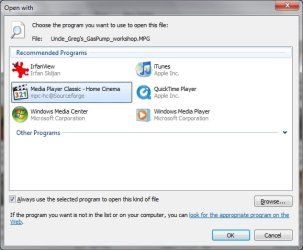
I use Media Player Classic as my default audio and video player. I have all compatible formats set to open with MPC by default. However, despite setting .WMV or .MPG videos to open with MPC, each time I double-click on one of these filetypes from Explorer, I receive the pictured 'Open With' dialogue.
Why do certain formats present this dialogue, whereas others like .AVI or .MOV do not? You will see from the image that the MPC is already recognized as the default program to open .MPG files. So why does this annoying box pop up? How can I bypass the dialogue entirely so that the .MPG and .WMV files open up in MPC directly? Thanks!
Update: Reinstall of Media Player Classic fixed the file association 'Open with' problem
I use Media Player Classic as my default audio and video player. I have all compatible formats set to open with MPC by default. However, despite setting .WMV or .MPG videos to open with MPC, each time I double-click on one of these filetypes from Explorer, I receive the pictured 'Open With' dialogue.
Why do certain formats present this dialogue, whereas others like .AVI or .MOV do not? You will see from the image that the MPC is already recognized as the default program to open .MPG files. So why does this annoying box pop up? How can I bypass the dialogue entirely so that the .MPG and .WMV files open up in MPC directly? Thanks!
Update: Reinstall of Media Player Classic fixed the file association 'Open with' problem
Attachments
Last edited:
My Computer
At a glance
Win 7 Professional 32-bitIntel Core 2 Duo CPU T5750 @ 2.00 GHz3GB
- Computer Manufacturer/Model Number
- Gateway M6827
- OS
- Win 7 Professional 32-bit
- CPU
- Intel Core 2 Duo CPU T5750 @ 2.00 GHz
- Memory
- 3GB
- Monitor(s) Displays
- ViewSonic Vx900
- Screen Resolution
- 1280x1024
- Hard Drives
- 150GB Hard Drive

