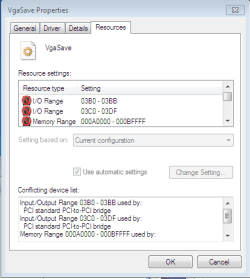
Conflict devices... Strange and hard trouble

Angro

New member
Local time
3:40 AM
Messages
7
Ok, let's start!
The problem-conflict in my computer. When i am was on XP all works fine. I have mobo ASUS M2A-VM with onboard AMD Chipset on it (AMD 690G) In BIOS all settings are correct, main display adapter device is PCIe, like it should be. This is very strange, because i heard many fairytales words about Windows Update, that that thing works like a charm and so on... That this thing is automatically downloading drivers and so on. But my VGA is not rare, ASUS EN8600 GT Silent. I was shocked when saw, that my device detected as VgaSave. Really need help. Some screenshots u can see in attachments
And big sorries for mistakes, I am Russian, so...
 

Attachments

  • Capture.PNG
    Capture.PNG
    23.2 KB · Views: 22
  • Capture2.PNG
    Capture2.PNG
    9.4 KB · Views: 17
  • Capture3.PNG
    Capture3.PNG
    8 KB · Views: 29
Last edited:

My Computer My Computer

At a glance

Windows 7 x86 & Arch LinuxAMD Athlon 64 X2 3800+3 GBASUS EN8600 GT
OS
Windows 7 x86 & Arch Linux
CPU
AMD Athlon 64 X2 3800+
Motherboard
ASUS M2A-VM
Memory
3 GB
Graphics Card(s)
ASUS EN8600 GT
Sound Card
Onboard HD Audio
Monitor(s) Displays
Samsung SyncMaster 940N
Screen Resolution
1280x1024
Internet Speed
1 mbit/s
I was in fear of this...
The updating of BIOS is terrible or pretty and fluffy? :D
 

My Computer My Computer

At a glance

Windows 7 x86 & Arch LinuxAMD Athlon 64 X2 3800+3 GBASUS EN8600 GT
OS
Windows 7 x86 & Arch Linux
CPU
AMD Athlon 64 X2 3800+
Motherboard
ASUS M2A-VM
Memory
3 GB
Graphics Card(s)
ASUS EN8600 GT
Sound Card
Onboard HD Audio
Monitor(s) Displays
Samsung SyncMaster 940N
Screen Resolution
1280x1024
Internet Speed
1 mbit/s
It's easy but first try only updating your chipset drivers. That may do the trick alone, although latest bios is always best.

The page I linked to should have instructions in the bios utilities section, along with the latest bios in bios section too.
 

My Computer My Computer

At a glance

Windows 7
OS
Windows 7
It's easy but first try only updating your chipset drivers. That may do the trick alone, although latest bios is always best.

The page I linked to should have instructions in the bios utilities section, along with the latest bios in bios section too.

I've tried to update the chipset drivers. Unfortunately, nothing happens.
UPD
OMG, i need a floppy drive to update bios?
 

My Computer My Computer

At a glance

Windows 7 x86 & Arch LinuxAMD Athlon 64 X2 3800+3 GBASUS EN8600 GT
OS
Windows 7 x86 & Arch Linux
CPU
AMD Athlon 64 X2 3800+
Motherboard
ASUS M2A-VM
Memory
3 GB
Graphics Card(s)
ASUS EN8600 GT
Sound Card
Onboard HD Audio
Monitor(s) Displays
Samsung SyncMaster 940N
Screen Resolution
1280x1024
Internet Speed
1 mbit/s
I've tried to update the chipset drivers. Unfortunately, nothing happens.

Ya, then the bios update will fix that for you, along with disabling things as I've said.
 

My Computer My Computer

At a glance

Windows 7
OS
Windows 7
OMG, i really need a floppy drive to update bios?
The problem is that i don't have this...
 

My Computer My Computer

At a glance

Windows 7 x86 & Arch LinuxAMD Athlon 64 X2 3800+3 GBASUS EN8600 GT
OS
Windows 7 x86 & Arch Linux
CPU
AMD Athlon 64 X2 3800+
Motherboard
ASUS M2A-VM
Memory
3 GB
Graphics Card(s)
ASUS EN8600 GT
Sound Card
Onboard HD Audio
Monitor(s) Displays
Samsung SyncMaster 940N
Screen Resolution
1280x1024
Internet Speed
1 mbit/s
They might have Winflash to update from Windows. If you use that, close all software not needed for Windows to run, first. This included 3rd party firewall and antivirus.

If not, you can make a bootable cd with dos on it. Then you can update from there if you put latest bios and dos updater software on it as well while burning.
 

My Computer My Computer

At a glance

Windows 7
OS
Windows 7
Guys, listen to my story. And remember, that Winflash is evil!
I've downloaded last update for bios and tried to install it trough the Winflash. The install was ok, but when i rebooted my machine i saw NOTHING. Only the black screen. I've almost get sh**ted...
That's very good, that ASUS put little more programs than only BIOS for dumb people like me. This recovery program ask me my motherboard CD. My shaking hand put it into drive... The flashing of BIOS from backup firmware was complete succesfully and i had take a deep breath... Never use the winflash.
It was a hard day. Tomorrow I'll update the BIOS from the DOS like it should be and will post in this thread. I am going to sleep. Bye
 

My Computer My Computer

At a glance

Windows 7 x86 & Arch LinuxAMD Athlon 64 X2 3800+3 GBASUS EN8600 GT
OS
Windows 7 x86 & Arch Linux
CPU
AMD Athlon 64 X2 3800+
Motherboard
ASUS M2A-VM
Memory
3 GB
Graphics Card(s)
ASUS EN8600 GT
Sound Card
Onboard HD Audio
Monitor(s) Displays
Samsung SyncMaster 940N
Screen Resolution
1280x1024
Internet Speed
1 mbit/s
GREAT THANKS!!
All works like a charm!
 

My Computer My Computer

At a glance

Windows 7 x86 & Arch LinuxAMD Athlon 64 X2 3800+3 GBASUS EN8600 GT
OS
Windows 7 x86 & Arch Linux
CPU
AMD Athlon 64 X2 3800+
Motherboard
ASUS M2A-VM
Memory
3 GB
Graphics Card(s)
ASUS EN8600 GT
Sound Card
Onboard HD Audio
Monitor(s) Displays
Samsung SyncMaster 940N
Screen Resolution
1280x1024
Internet Speed
1 mbit/s
Guys, listen to my story. And remember, that Winflash is evil!
I've downloaded last update for bios and tried to install it trough the Winflash. The install was ok, but when i rebooted my machine i saw NOTHING. Only the black screen. I've almost get sh**ted...
That's very good, that ASUS put little more programs than only BIOS for dumb people like me. This recovery program ask me my motherboard CD. My shaking hand put it into drive... The flashing of BIOS from backup firmware was complete succesfully and i had take a deep breath... Never use the winflash.
It was a hard day. Tomorrow I'll update the BIOS from the DOS like it should be and will post in this thread. I am going to sleep. Bye


I have flashed through win64 even and it worked. =P If your very careful about how it goes it should work fine, although some MB's compat miles will vary. Though you don't need a floppy, you can use a usb device as well....

Boot From A USB Flash/Pen/Key Drive

There are other sites for it, but either way it's a ****ing lifesaver.... Not like the candy, but works just as good ;)
 

My Computer My Computer

At a glance

Windows 7, LinuxAMD Phemon II x2 3@37501G Crucial 16668800GT OC (custom OC)
Computer Manufacturer/Model Number
Custom
OS
Windows 7, Linux
CPU
AMD Phemon II x2 3@3750
Motherboard
ASRock M3A770DE
Memory
1G Crucial 1666
Graphics Card(s)
8800GT OC (custom OC)
Sound Card
Sound Blaster Live! (never changes!)
Monitor(s) Displays
Vivitron 22"
Screen Resolution
1600x1200
Hard Drives
Western Digital 120G/160G SATA
Maxtor 80G IDE
PSU
450w
Case
Unknown
Cooling
Custom Air cooled
Keyboard
Logitech
Mouse
Logitech M-BZ15A Laser
Internet Speed
Cable 10mbit
Back
Top