Do a backup of your E-mails! - great application!

Creer

IT SecurityEnthusiast
Guru
Local time
10:32 AM
Messages
340
Hi,

This time I would like to tell you about, maybe not well known, but excellent software which can provide you easy and reliable your E-mails backup strategy.
I'm talking about MailStore Home - it's free, but in the past it was a paid software.
I'm using MailStore Home for almost year and I recommend it to anyone who wants to have a backup of the emails on own computer.

This is how the main menu looks like:
start540.jpg


MailStore Home Archives Email From:
Microsoft Outlook 2000, XP, 2003 and 2007
Microsoft Outlook Express and Windows Mail
Microsoft Exchange Server Mailboxes
Hosted Microsoft Exchange Mailboxes
Mozilla Thunderbird and SeaMonkey
POP3 and IMAP (including webmail services such as Gmail and Yahoo)
.eml and other files


Download site:
Free email archiving and backup software - MailStore Home


HTH,
Creer
 

My Computer My Computer

Computer type
PC/Desktop
Computer Manufacturer/Model Number
Self Built
OS
Windows 7 Home Premium x32 SP1
CPU
x2 2.6 GHz
Motherboard
Asus
Memory
A-Data 2GB DDR2-800
Graphics Card(s)
ATI X1250
Sound Card
SB 5.1 Live!
Hard Drives
WD and Seagate FAP
PSU
Tagan TG-480-U01
Keyboard
BTC 6300
Mouse
Logitech VX Nano
Antivirus
None
Hi there
For outlook why not just use pfbkup.exe or even the archive function.

For Outlook express just change the data area where the folders are stored and just save these with Windows express.

For other email clients this might be OK but I'm now trying to "minimize" the number of 3rd party apps I have on machines. Maintenance and serial numbers etc etc gets ever more complex so I'm "Going back to the roots".

A 3rd party app for me now has to do ALL of the following

1) Is it SIGNIFICANTLY better than what is available in the standard system.

2) Is it cost effective.

3) Is the manufacturer / developer still going to be around a few years later or are you going to get stuck with some obsolete app a few years down the road.

Paid apps that I use that MS has no better or equal equivalent for (to ??) are things like Photoshop CS4, Acronis True Image (MS backup is getting better but still doesn't have anything like the functionality yet), some audio editing software, DVD authoring, Winamp,MS Office. (Open Office does a passable job but still doesn't compare with "the real thing" especially as MS office - even the Enterprise version can be sourced HEAVILY discounted -- either as a student, via MS Use at Home programs --get your employer to sign up) or technet /msdn.

Free 3rd party apps - MySQL, WAMP server, µTorrent

Jury's still out - Firefox vs IE8.

(Corporate apps like SAP with its front end GUI, Oracle, Eclipse IDE etc don't count of course since you HAVE to use these if you are working at a site which has these.)

Cheers
jimbo
 

My Computer My Computer

Computer type
PC/Desktop
Computer Manufacturer/Model Number
Custom built, several laptops HP/ASUS
OS
Linux CENTOS 7 / various Windows OS'es and servers
CPU
Intel i7 Intel i5
Memory
8GB, 16GB
Graphics Card(s)
On Motherboard
Sound Card
Realtek HD audio
Monitor(s) Displays
Apple Cinema display, Samsung LCD
Screen Resolution
1920 X 1080
Hard Drives
4 X 1TB SATA
Mouse
Toshiba wireless laser
Internet Speed
> 20MB up
If I have to compare archiving system in Windows Live Mail (I'm using it) to MailStorage Home - I think it is better in MailStorage Home.

Let me explain.
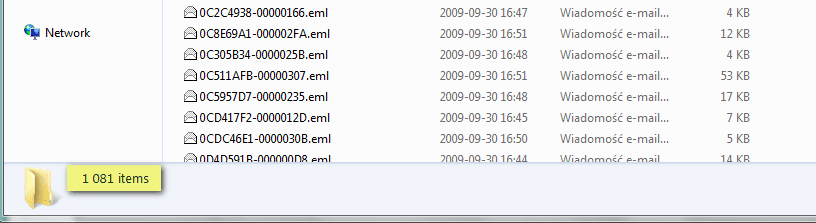
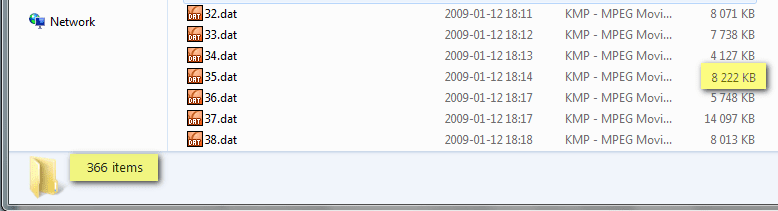
Windows Live Mail archive my every single email - mail by mail and it looks like this im my WLM folder vs MailStorage Home which compact all mails into .dat files (in attach)


Also MailStorage Home offers easily via GUI searching in your emails. It's great solution for me.

Note first screen with eml files is from A account, second screen with dat files is from B account which store summary ~7,400 mails compacted into 366 dat files.
 

Attachments

  • wlm.png
    wlm.png
    7.8 KB · Views: 24
  • msh.png
    msh.png
    6.8 KB · Views: 18
Last edited:

My Computer My Computer

Computer type
PC/Desktop
Computer Manufacturer/Model Number
Self Built
OS
Windows 7 Home Premium x32 SP1
CPU
x2 2.6 GHz
Motherboard
Asus
Memory
A-Data 2GB DDR2-800
Graphics Card(s)
ATI X1250
Sound Card
SB 5.1 Live!
Hard Drives
WD and Seagate FAP
PSU
Tagan TG-480-U01
Keyboard
BTC 6300
Mouse
Logitech VX Nano
Antivirus
None
Does it store your emails online or just backs them up locally?
 

My Computer My Computer

Computer Manufacturer/Model Number
self built
OS
Windows 7 Professional 64-bit
CPU
Intel E8400 3GHz
Motherboard
Intel DX48BT2
Memory
Kingston PC3-10700H 4Gb
Graphics Card(s)
XFX Radeon HD 5850 BlackEd.
Sound Card
Asus Xonar DG
Monitor(s) Displays
2x Samsung SM-T220HD 22"
Screen Resolution
1680x1050 on two monitors
Hard Drives
OCZ Vertex 2 120gb 3.5" (OS)
Seagate Momentus XT 500gb
Samsung F3 1Tb (games)
2x Samsung F1 1Tb
PSU
Thermaltake ToughPower 850w
Case
Thermaltake Armor
Cooling
Scythe Mugen II
Keyboard
Microsoft Comfort Curve USB
Mouse
Razer Diamondback 3G
Internet Speed
8128/443
Does it store your emails online or just backs them up locally?

Of course locally! You can backup your emails to HDD or USB drive or CD/DVD.
 

My Computer My Computer

Computer type
PC/Desktop
Computer Manufacturer/Model Number
Self Built
OS
Windows 7 Home Premium x32 SP1
CPU
x2 2.6 GHz
Motherboard
Asus
Memory
A-Data 2GB DDR2-800
Graphics Card(s)
ATI X1250
Sound Card
SB 5.1 Live!
Hard Drives
WD and Seagate FAP
PSU
Tagan TG-480-U01
Keyboard
BTC 6300
Mouse
Logitech VX Nano
Antivirus
None
Does it store your emails online or just backs them up locally?

locally.

if back-up online. add password to the file or zip it for your own protection.
 

My Computer My Computer

OS
Windows 7 Pro x64
CPU
Intel Core 2 Quad Q6600 [2.4Ghz] OC speeds 3.2Ghz
Motherboard
ASUS P5QL-E
Memory
Kingston HyperX KHX8500D2K2-4G 1066Mhz 8GB (2GB*4)
Graphics Card(s)
ASUS GeForce GTX 550 Ti
Sound Card
OnBoard
Monitor(s) Displays
Samsung SyncMaster T220
Screen Resolution
1680*1050
Hard Drives
Intel SSD 320 Series 80GB
PSU
Corsair TX750W
Case
CM 690 II
Cooling
Cooler Master Hyper 212+
Keyboard
Logitech G510
Mouse
Logitech G400
Internet Speed
50Mb :D
Thanks, installed and ran a backup, seems a handy little utility.
 

My Computer My Computer

Computer Manufacturer/Model Number
self built
OS
Windows 7 Professional 64-bit
CPU
Intel E8400 3GHz
Motherboard
Intel DX48BT2
Memory
Kingston PC3-10700H 4Gb
Graphics Card(s)
XFX Radeon HD 5850 BlackEd.
Sound Card
Asus Xonar DG
Monitor(s) Displays
2x Samsung SM-T220HD 22"
Screen Resolution
1680x1050 on two monitors
Hard Drives
OCZ Vertex 2 120gb 3.5" (OS)
Seagate Momentus XT 500gb
Samsung F3 1Tb (games)
2x Samsung F1 1Tb
PSU
Thermaltake ToughPower 850w
Case
Thermaltake Armor
Cooling
Scythe Mugen II
Keyboard
Microsoft Comfort Curve USB
Mouse
Razer Diamondback 3G
Internet Speed
8128/443

My Computer My Computer

Computer type
PC/Desktop
Computer Manufacturer/Model Number
Self Built
OS
Windows 7 Home Premium x32 SP1
CPU
x2 2.6 GHz
Motherboard
Asus
Memory
A-Data 2GB DDR2-800
Graphics Card(s)
ATI X1250
Sound Card
SB 5.1 Live!
Hard Drives
WD and Seagate FAP
PSU
Tagan TG-480-U01
Keyboard
BTC 6300
Mouse
Logitech VX Nano
Antivirus
None
Can the mail that is backuped be restored easily back to Live mail or do they remain as data files?
 

My Computer My Computer

Computer Manufacturer/Model Number
Dell Studio XPS435
OS
Wiindows7 Ultimate x64
CPU
I7-920(2.66GHZ)
Motherboard
Dell Inc. 0X501H
Memory
8Gb DDR3 sdram at 1066MHZ
Graphics Card(s)
Nvidia GEFORCE GTS 240
Sound Card
SOUNDBLASTER X-FI XTREME
Monitor(s) Displays
23" flat HP
Screen Resolution
1024X768
Hard Drives
1-WD75o1AALS-00J7B1[750Gb,32767Kb],
2-WD6402AALS-00L3B2 [640,32767KbGb
PSU
475 Watts
Keyboard
yes
Mouse
yes
Other Info
BIOS A14 10/26/09
Can the mail that is backuped be restored easily back to Live mail or do they remain as data files?

Hi,

there is an option Export E-mail (and one of the option to choose is "Windows Mail") but I haven't tested it so far, so I can't tell you if it works.
 

My Computer My Computer

Computer type
PC/Desktop
Computer Manufacturer/Model Number
Self Built
OS
Windows 7 Home Premium x32 SP1
CPU
x2 2.6 GHz
Motherboard
Asus
Memory
A-Data 2GB DDR2-800
Graphics Card(s)
ATI X1250
Sound Card
SB 5.1 Live!
Hard Drives
WD and Seagate FAP
PSU
Tagan TG-480-U01
Keyboard
BTC 6300
Mouse
Logitech VX Nano
Antivirus
None
I'm afraid nothing beats leaving your mail on the server, and that's a totally free solution to eMail archivage and restoration to your local archives in the even of losses, changes in hardware, etc :D
 

My Computer My Computer

Computer Manufacturer/Model Number
Custom built machine
OS
W7 x64
CPU
Intel Q9300 2.5Ghz Quad LGA775 (Would like Q9650)
Motherboard
Gigabyte GA-EP45T-UD3R (F6 Bios)
Memory
4Gb OCZ Gold 1,333Mhz
Graphics Card(s)
Palit HD4850 O/C Sonic 512Mb DDR3, Dual DViD's
Sound Card
Azalia to twin Samson 50w Studio Monitors
Monitor(s) Displays
Twin Dell (E-IPS) U2311H 23.6" Screens
Screen Resolution
1920 x 1080 @ 60Hz
Hard Drives
Crucial M4 SSD, archives on twin Western Digital Caviar Black WD2002FAEX, 2TB, 7200rpm HDD's, Samsung Ritemaster CD/DVD Burner...
PSU
OCZ 600w
Case
Lian-Li PC8 acoustifoamed' aluminium tower
Cooling
Scythe 140mm Zipang
Keyboard
Cherry PS/2 custom model
Mouse
Lenovo USB laser "Thinkpad" Mouse
Internet Speed
ADSL2+ @14Mbps downstream & Cat6 Gigabit Ethernet
Antivirus
NOD32
Browser
Opera
Other Info
Silicon Dust HD Homerun Dual FTA (Ethernet) TV Tuners, Dray Tek Vigor 2850Vn router and 8x HP Gigabit Switch. Lian-Li CR26 Card Reader, Canon MF4430 iSensys laser printer/scanner.
I'm afraid nothing beats leaving your mail on the server, and that's a totally free solution to eMail archivage and restoration to your local archives in the even of losses, changes in hardware, etc :D
My brother kept all his email since 2001 on yahoo mail. Then they lost all of it and they blamed him for not using a better password!
 

My Computer My Computer

Computer type
PC/Desktop
Computer Manufacturer/Model Number
OQO 2+
OS
Windows 8 Pro w/MC 32-bit
CPU
Intel Atom 1.86 GHz
Motherboard
OQO 2+
Memory
2 GB
Graphics Card(s)
Intel GMA 500
Sound Card
IDT
Monitor(s) Displays
LCD
Screen Resolution
800 x 480 (portable) 1280 x 1024 (docked)
Hard Drives
64 GB SSD
PSU
9 Ah Battery (portable) or OQO Brick (docked)
Case
Shirt Pocket Sized
Cooling
Tiny Fan
Keyboard
Slide out (portable) DiNovo Edge (docked)
Mouse
Eraser head (portable) Logitech Bluetooth (docked)
Internet Speed
WWAN or 802.11G (portable) T1 (docked)
Browser
IE 10
Other Info
DVD-RW OQO Docking Station
This application is very slow, takes ages to backup and doest not have the restore option. The export mail option will not export to WLM. So for WLM users looking to backup and restore between computers, this is not the correct option.
 

My Computer My Computer

OS
Windows 7 Ultimate - 64bit
Importing backed up OE files into Outlook

I recently purchased a new desktop running Windows 7. I was a diehard Outlook Express user for many years and was diligent about backing up all of my e-mails to transfer to my new PC. Of course, since OE is gone, I am now running Outlook for my e-mail client (WLM doesn't appeal to me at all). I have tried to import the dbx files into Outlook, but haven't had any luck.

In an earlier post, someone mentioned "For Outlook express just change the data area where the folders are stored and just save these with Windows express." Can someone explain the "Windows express" to me?

Thanks in advance.
 

My Computer My Computer

OS
Windows 7
...In an earlier post...
I think he means (in post #2) that in OE you don't need a backup program. Just copy the location tree in Windows Explorer where the OE files are stored to the place where you want to back them up. The easiest way to restore them is to use the File/Import feature to bring the backed up emails into a clean install of WLM.

BTW, this also applies to OE and Vista's Windows Mail. In all 3 cases you can use the Options/Maintenance feature of the mail program to find out where the "message store" is located within Windows Explorer.
 

My Computer My Computer

Computer type
PC/Desktop
Computer Manufacturer/Model Number
OQO 2+
OS
Windows 8 Pro w/MC 32-bit
CPU
Intel Atom 1.86 GHz
Motherboard
OQO 2+
Memory
2 GB
Graphics Card(s)
Intel GMA 500
Sound Card
IDT
Monitor(s) Displays
LCD
Screen Resolution
800 x 480 (portable) 1280 x 1024 (docked)
Hard Drives
64 GB SSD
PSU
9 Ah Battery (portable) or OQO Brick (docked)
Case
Shirt Pocket Sized
Cooling
Tiny Fan
Keyboard
Slide out (portable) DiNovo Edge (docked)
Mouse
Eraser head (portable) Logitech Bluetooth (docked)
Internet Speed
WWAN or 802.11G (portable) T1 (docked)
Browser
IE 10
Other Info
DVD-RW OQO Docking Station
I recently purchased a new desktop running Windows 7. I was a diehard Outlook Express user for many years and was diligent about backing up all of my e-mails to transfer to my new PC. Of course, since OE is gone, I am now running Outlook for my e-mail client (WLM doesn't appeal to me at all). I have tried to import the dbx files into Outlook, but haven't had any luck.

In an earlier post, someone mentioned "For Outlook express just change the data area where the folders are stored and just save these with Windows express." Can someone explain the "Windows express" to me?

Thanks in advance.
Welcome to the club. All your problems start now. I have been unrelentlessly looking for solutions just simply to copy folders from WLM to WLM and there is no solution. Please keep us posted about your above problem and if u do find a solution, all the best.
 

My Computer My Computer

OS
Windows 7 Ultimate - 64bit
Back
Top