
Lost my pinned folders

dabedoo

New member
Local time
2:03 PM
Messages
43
Hi,

I suddenly lost all my pinned folders from my explorer taskbar icon ?

And I dont get any visited folders history anymore ?!?

How the get them back ?

Thxx
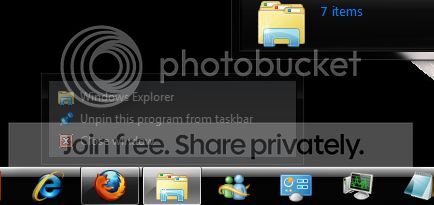


Capture-71.jpg
 

My Computer My Computer

OS
Win Seven Ultimate RTM
CPU
Intel Core i7 920
Motherboard
Intel DX 58SO
Memory
4 gigs ram
Graphics Card(s)
Nvidia GTX 260
Sound Card
Digidesign
Monitor(s) Displays
Acer 26"
Screen Resolution
1920*1200
Case
Antec
Cooling
Noctua
Internet Speed
Lan

My Computer My Computer

Computer type
PC/Desktop
Computer Manufacturer/Model Number
Self built custom
OS
64-bit Windows 11 Pro for Workstations
CPU
Intel i7-8700K OC'd to 5 GHz
Motherboard
ASUS ROG Maximus XI Formula Z390
Memory
64 GB (4x16GB) G.SKILL TridentZ RGB DDR4 3600 MHz
Graphics Card(s)
ASUS ROG-STRIX-GTX1080TI-O11G-GAMING
Sound Card
Integrated
Monitor(s) Displays
2 x Samsung Odyssey G7 27"
Screen Resolution
2560x1440
Hard Drives
1TB Samsung 990 PRO M.2,
4TB Samsung 990 PRO PRO M.2,
TerraMaster F8 SSD Plus NAS
PSU
Seasonic Prime Titanium 850W
Case
Thermaltake Core P3
Cooling
Corsair Hydro H115i
Keyboard
Logitech wireless K800
Mouse
Logitech MX Master 4
Internet Speed
2 Gb/s Download and 100 Mb/s Upload
Antivirus
Malwarebyte Anti-Malware Premium
Browser
Google Chrome
Other Info
Logitech Z625 speaker system,
Logitech BRIO 4K Pro webcam,
HP Color LaserJet Pro MFP M477fdn,
APC SMART-UPS RT 1000 XL - SURT1000XLI,
Galaxy S23 Plus phone
The 2 are checked since my installation and I never touched them, still no pinned folders visible ?!!?
 

My Computer My Computer

OS
Win Seven Ultimate RTM
CPU
Intel Core i7 920
Motherboard
Intel DX 58SO
Memory
4 gigs ram
Graphics Card(s)
Nvidia GTX 260
Sound Card
Digidesign
Monitor(s) Displays
Acer 26"
Screen Resolution
1920*1200
Case
Antec
Cooling
Noctua
Internet Speed
Lan
Are you using CCleaner, or any other cleaning program?
 

My Computer My Computer

Computer Manufacturer/Model Number
Custom
OS
Windows 7 Professional x64
CPU
Intel i7 2600K OC'd @ 4620 MHz
Motherboard
Asus P8Z68-V Pro
Memory
16GB GSkill Sniper 2133 Mhz (4x4GB)
Graphics Card(s)
EVGA GeForce GTX 480 SuperClocked+
Sound Card
Realtek High Definition Audio
Monitor(s) Displays
2x Acer S273HLbmii 27"
Screen Resolution
2 x 1920x1080
Hard Drives
64GB Crucial M4 SSD

Storage: Hitachi 1TB 5400RPM, Samsung 1.5TB 5400RPM
PSU
Corsair HW Series 750w (modular)
Case
Cooler Master HAF 932 Advanced Blue Edition
Cooling
CM Hyper 212+ CPU cooler, 3x 230mm + 1x 140mm case fans
Keyboard
Logitech MK320 (wireless)
Mouse
Logitech MK320 (wireless)
Internet Speed
30 Mb/s : 2 Mb/s
Can you describe what lead up to this discovery? Meaning, did you do a reboot and all of a sudden they were gone? Or did you install a new program? Were you logged in under a different account?
 

My Computer My Computer

Computer type
PC/Desktop
Computer Manufacturer/Model Number
Custom Desktop PC
OS
Windows 7 / Windows 8.1
CPU
Devils Canyon i7-4790K @ 4.8 GHz ~ 1.33v
Motherboard
Asus Z97 Deluxe
Memory
Corsair Vengeance Pro PC3-19200 DDR3 2400MHz
Graphics Card(s)
EVGA GeForce GTX 980 SuperClocked ACX 2.0
Sound Card
Realtek ALC1150 8 channels
Monitor(s) Displays
BenQ XL2720Z 27"
Screen Resolution
1920 x 1080 @ 144Hz
Hard Drives
SSD1: 512GB Samsung 850 Pro
SSD2: 1TB Samsung 850 EVO
SSD3: 1TB Samsung 850 EVO
HDD: 4TB Western Digital Black
Backup: Western Digital My Book Duo 8TB
PSU
Corsair HX1000i / CyberPower CP1500PFCLCD PFC Sinewave UPS 1
Case
Corsair Graphite 780T
Cooling
Custom single loop liquid; CPU delidded; Aerocool DS Fans
Keyboard
Logitech G710 Cherry MX Blue
Mouse
LogitechG502 Proteus Core
Internet Speed
Download: 119MBs /Upload 39.12MBs via Optimum 101 Ultra
Antivirus
MYOB
Browser
Firefox
Other Info
Cooling: EK-Supremecy MX Waterblock, XSPC AX360 Radiator, Swiftech MCP655 Series 12VDC D5 Pump, EK-RES x3 250 Reservoir, Primochill Ice Intensified Coolant, 11x AerocoolDS fans, Primochill Primoflex Avanced LRT Tubing
Hi,

I suddenly lost all my pinned folders from my explorer taskbar icon ?

And I dont get any visited folders history anymore ?!?

How the get them back ?

Thxx


Capture-71.jpg


Try in this order
Back up and restore. This should restore all personal documents to the date you select.
System Restore: should restore the OS.
System Image. This will definaltely work, but its dropping a bomb to kill ants.
 

My Computer My Computer

Computer type
PC/Desktop
Computer Manufacturer/Model Number
Dell XPS 420
OS
Windows 10, Home Clean Install
CPU
Intel Core2 processsor Q8200(2.33Ghz 1333FSB) Quad Core Tech
Motherboard
Dell
Memory
6 gb
Graphics Card(s)
ATI Radeon 256MB HD3650
Sound Card
Intergrated 7.1 Channel Audio
Monitor(s) Displays
Dell SP2009W 20"
Hard Drives
640 GB Serial ATA Hard drive
Cooling
Fan
Keyboard
Dell USB Keyboard
Mouse
Dell Premium Optical USB
Internet Speed
DSL 2.85
I'm not using any program to clean my comp, I didn't install any new program.
I found out one morning after I switched on my comp like every morning.
I'm using the admin account since there's only one account.

I'm a lil afraid of using system restore since it will mess up my folders structure that changes
almost every day.
 

My Computer My Computer

OS
Win Seven Ultimate RTM
CPU
Intel Core i7 920
Motherboard
Intel DX 58SO
Memory
4 gigs ram
Graphics Card(s)
Nvidia GTX 260
Sound Card
Digidesign
Monitor(s) Displays
Acer 26"
Screen Resolution
1920*1200
Case
Antec
Cooling
Noctua
Internet Speed
Lan
I'm not using any program to clean my comp, I didn't install any new program.
I found out one morning after I switched on my comp like every morning.
I'm using the admin account since there's only one account.

I'm a lil afraid of using system restore since it will mess up my folders structure that changes
almost every day.

System restore does not affect personal folders or documents. It changes just the OS. If you are reluctant to try SR, why not make a system image of your HD. Save it on an external device, such as an external HD. If your folders are changed, you can put everything back with the system image.
 

My Computer My Computer

Computer type
PC/Desktop
Computer Manufacturer/Model Number
Dell XPS 420
OS
Windows 10, Home Clean Install
CPU
Intel Core2 processsor Q8200(2.33Ghz 1333FSB) Quad Core Tech
Motherboard
Dell
Memory
6 gb
Graphics Card(s)
ATI Radeon 256MB HD3650
Sound Card
Intergrated 7.1 Channel Audio
Monitor(s) Displays
Dell SP2009W 20"
Hard Drives
640 GB Serial ATA Hard drive
Cooling
Fan
Keyboard
Dell USB Keyboard
Mouse
Dell Premium Optical USB
Internet Speed
DSL 2.85
Hello, I know this is old but I came across this thread searching google and figured I'd come back and post the fix that I found elsewhere. Hopefully this will help someone out!

Go to the folder: %APPDATA%\Microsoft\Windows\Recent\AutomaticDestinations

and delete the file: 1b4dd67f29cb1962.automaticDestinations-ms

REBOOT!!!

You should now be able to recreate your pinned list.

If you are still having problems with pinned items or recent items, or jump lists on a different appllication try deleting all files in the folders below to have all your lists recreated.

%APPDATA%\Microsoft\Windows\Recent\AutomaticDestinations
%APPDATA%\Microsoft\Windows\Recent\CustomDestinations

Good luck!
 
Last edited by a moderator:

My Computer My Computer

OS
Windows 7 Ultimate 64-bit
CPU
Intel Core i7 930 @ 2.80GHz
Motherboard
EVGA X58 SLI FTW3 (Socket 423)
Memory
6.0GB Triple-Channel DDR3 @ 530MHz (8-8-8-20)
Graphics Card(s)
NVIDIA GeForce GTX 460 + NVIDIA GeForce GTX 460 = SLI
Sound Card
Realtek High Definition Audio
Monitor(s) Displays
Samsung SyncMaster @ 1680x1050
Hard Drives
125GB CRUCIAL CT128M225 Solid State (SCSI)
488GB SAMSUNG SAMSUNG HD502HJ (IDE)
PSU
Antec TPQ-850 850W True Power
Case
Antec Three Hundred Black
This also just randomly happened to me.

@Tarv those folders & paths don't exist in my windows 7 x64 ultimate...

C:\Users\~username~\AppData\Roaming\Microsoft\Windows\Recent is the closest I can see to that, but it doesn't contain those two folders. I even did a full search on C:\ for those two folders and it didn't find anything.

Edit: I guess they're really really hidden files... you can't navigate to those folders but if you paste the addresses in the explorer address bar you get there.
 

My Computer My Computer

OS
Windows 7 Ultimate x64
CPU
Q9650
Motherboard
GA-x48-ds4
Memory
gskill 4gig 8500
Graphics Card(s)
EAH4870
Sound Card
xfi-xtremegamer
Monitor(s) Displays
2233rz
PSU
800w

My Computer My Computer

Computer type
PC/Desktop
Computer Manufacturer/Model Number
Self built custom
OS
64-bit Windows 11 Pro for Workstations
CPU
Intel i7-8700K OC'd to 5 GHz
Motherboard
ASUS ROG Maximus XI Formula Z390
Memory
64 GB (4x16GB) G.SKILL TridentZ RGB DDR4 3600 MHz
Graphics Card(s)
ASUS ROG-STRIX-GTX1080TI-O11G-GAMING
Sound Card
Integrated
Monitor(s) Displays
2 x Samsung Odyssey G7 27"
Screen Resolution
2560x1440
Hard Drives
1TB Samsung 990 PRO M.2,
4TB Samsung 990 PRO PRO M.2,
TerraMaster F8 SSD Plus NAS
PSU
Seasonic Prime Titanium 850W
Case
Thermaltake Core P3
Cooling
Corsair Hydro H115i
Keyboard
Logitech wireless K800
Mouse
Logitech MX Master 4
Internet Speed
2 Gb/s Download and 100 Mb/s Upload
Antivirus
Malwarebyte Anti-Malware Premium
Browser
Google Chrome
Other Info
Logitech Z625 speaker system,
Logitech BRIO 4K Pro webcam,
HP Color LaserJet Pro MFP M477fdn,
APC SMART-UPS RT 1000 XL - SURT1000XLI,
Galaxy S23 Plus phone
Back
Top