
Auto-log in not working. (INTERNET)

xXSevenXx

New member
I recently updated my router/modems firmware to try and fix this log-on problem, without successs.
Very rarely it logs on automatically.
What's wrong?
I have a Belkin G Modem Router part# F5D7632UK4A ver.601443UK.
Thanks in anticipation.
 

My Computer

Computer type
PC/Desktop
Computer Manufacturer/Model Number
Home Built
OS
Windows 7 Ultimate SP1 64- bit
CPU
Intel Core i7-3770K @3.50ghz
Motherboard
EVGA Z77 FTW
Memory
Kingston Technology 16GB (2x 8GB) 2133MHz DDR3 Non-ECC
Graphics Card(s)
EVGA GTX 670 4gb SC
Sound Card
Nil
Monitor(s) Displays
Samsung 22"
Screen Resolution
1920 x 1080 60hz
Hard Drives
OCZ Vertex 4 SSD 128GB
SAMSUNG Spinpoint F3 HD502HJ 500GB 7200 RPM
PSU
Enermax Platinax EPM1000EWT Special OC Edition
Case
Cooler Master HAF Full Tower nVIDIA Edition
Cooling
CoolerMaster Hyper 212 Plus
Keyboard
HP Wireless Keyboard
Mouse
Corsair Vengeance M90
Internet Speed
20 Mb
Other Info
ASUS DRW-24B1ST/BLK/B/AS Black SATA 24X DVD Burner
Hi xXSevenXx,

Could you please clarify (and provide a screen print if you can):

Do you mean that the saved password is not there when you log on to the modem's configuration page?
or
The modem will not connect to the internet automatically and you must log on to the configuration gui and press connect?
or something else?

I'm happy to help as soon as I am sure how or if I can.
 

My Computer

Computer Manufacturer/Model Number
Custom Hack job
OS
Windows 7 Ultimate 64 bit
CPU
Intel(R) Core(TM)2 Quad CPU Q8200 @ 2.33GHz
Motherboard
GigaByte EP45-UD3
Memory
8 GB Kingston
Graphics Card(s)
Nvidia GeForce 9600GT
Sound Card
Soundblaster Audigy
Monitor(s) Displays
AOC x2 22"
Hard Drives
2 x Samsung 500GB (RAID)
2 x Samsung 2TB
1 x WD Green 2TB
1 x Seagate 1TB
1 x Samsung 500GB
PSU
Thermaltake QFan 750W
Case
CM Scout Gaming
Cooling
Coolermaster V10
Keyboard
Microsoft Wireless Keyboard 1000
Mouse
Microsoft Wireless Optical 2000
Internet Speed
320
Other Info
Winfast PVR2000CP
LG DVD-RAM DVD/RW/DL Super Multi
Linksys WMP300Nx2 Wireless Adapter
Hi xXSevenXx,

Could you please clarify (and provide a screen print if you can):

Do you mean that the saved password is not there when you log on to the modem's configuration page?
or
The modem will not connect to the internet automatically and you must log on to the configuration gui and press connect?
or something else?

I'm happy to help as soon as I am sure how or if I can.

Yes, the modem will not connect to the internet automatically and I must log on to the configuration gui and press connect, several times, and click on the troubleshooting button as well.
How do I do a screen print, and of what?
 

My Computer

Computer type
PC/Desktop
Computer Manufacturer/Model Number
Home Built
OS
Windows 7 Ultimate SP1 64- bit
CPU
Intel Core i7-3770K @3.50ghz
Motherboard
EVGA Z77 FTW
Memory
Kingston Technology 16GB (2x 8GB) 2133MHz DDR3 Non-ECC
Graphics Card(s)
EVGA GTX 670 4gb SC
Sound Card
Nil
Monitor(s) Displays
Samsung 22"
Screen Resolution
1920 x 1080 60hz
Hard Drives
OCZ Vertex 4 SSD 128GB
SAMSUNG Spinpoint F3 HD502HJ 500GB 7200 RPM
PSU
Enermax Platinax EPM1000EWT Special OC Edition
Case
Cooler Master HAF Full Tower nVIDIA Edition
Cooling
CoolerMaster Hyper 212 Plus
Keyboard
HP Wireless Keyboard
Mouse
Corsair Vengeance M90
Internet Speed
20 Mb
Other Info
ASUS DRW-24B1ST/BLK/B/AS Black SATA 24X DVD Burner
No Need for the screen print, I understand.

It looks like it is not processing the connect handshake from your ISP, or its not sending or receiving one.

A few things you can do.
1. Contact your ISP, they can verify if they are receiving/sending a handshake and may be able to solve this for you.

2. On extremely rare occasions networks require the modem to be booted first. I've seen this only 3 times in the last 5 years in IT. Each occasion has been a small home network where the modem has DHCP enabled and the wireless router is a separate device.

Lets test yours:
- Connect the PC directly to the modem and unplug any other devices (routers, other PC's, including wireless connected systems).
- Turn everything off
- Turn on the modem, wait 5 mins
- Turn on the PC
- See if the modem connects.

If the modem connects automatically, you can gradually add your other devices and vary the times until you find what works best for your network.
 

My Computer

Computer Manufacturer/Model Number
Custom Hack job
OS
Windows 7 Ultimate 64 bit
CPU
Intel(R) Core(TM)2 Quad CPU Q8200 @ 2.33GHz
Motherboard
GigaByte EP45-UD3
Memory
8 GB Kingston
Graphics Card(s)
Nvidia GeForce 9600GT
Sound Card
Soundblaster Audigy
Monitor(s) Displays
AOC x2 22"
Hard Drives
2 x Samsung 500GB (RAID)
2 x Samsung 2TB
1 x WD Green 2TB
1 x Seagate 1TB
1 x Samsung 500GB
PSU
Thermaltake QFan 750W
Case
CM Scout Gaming
Cooling
Coolermaster V10
Keyboard
Microsoft Wireless Keyboard 1000
Mouse
Microsoft Wireless Optical 2000
Internet Speed
320
Other Info
Winfast PVR2000CP
LG DVD-RAM DVD/RW/DL Super Multi
Linksys WMP300Nx2 Wireless Adapter
No Need for the screen print, I understand.

It looks like it is not processing the connect handshake from your ISP, or its not sending or receiving one.

A few things you can do.
1. Contact your ISP, they can verify if they are receiving/sending a handshake and may be able to solve this for you.

2. On extremely rare occasions networks require the modem to be booted first. I've seen this only 3 times in the last 5 years in IT. Each occasion has been a small home network where the modem has DHCP enabled and the wireless router is a separate device.

Lets test yours:
- Connect the PC directly to the modem and unplug any other devices (routers, other PC's, including wireless connected systems).
- Turn everything off
- Turn on the modem, wait 5 mins
- Turn on the PC
- See if the modem connects.

If the modem connects automatically, you can gradually add your other devices and vary the times until you find what works best for your network.
I only have the one device, and I always turn the modem/router on first.
 

My Computer

Computer type
PC/Desktop
Computer Manufacturer/Model Number
Home Built
OS
Windows 7 Ultimate SP1 64- bit
CPU
Intel Core i7-3770K @3.50ghz
Motherboard
EVGA Z77 FTW
Memory
Kingston Technology 16GB (2x 8GB) 2133MHz DDR3 Non-ECC
Graphics Card(s)
EVGA GTX 670 4gb SC
Sound Card
Nil
Monitor(s) Displays
Samsung 22"
Screen Resolution
1920 x 1080 60hz
Hard Drives
OCZ Vertex 4 SSD 128GB
SAMSUNG Spinpoint F3 HD502HJ 500GB 7200 RPM
PSU
Enermax Platinax EPM1000EWT Special OC Edition
Case
Cooler Master HAF Full Tower nVIDIA Edition
Cooling
CoolerMaster Hyper 212 Plus
Keyboard
HP Wireless Keyboard
Mouse
Corsair Vengeance M90
Internet Speed
20 Mb
Other Info
ASUS DRW-24B1ST/BLK/B/AS Black SATA 24X DVD Burner
Ok, that's good to know.

For the record, normally I'd pick firmware or reset as a fix for this issue too; but you've done both of those and I guess you reconfigured your modem manually (i.e. not from a back up bin file)?

So I can see why you posted this here! What we need to do is try no narrow down the point of failure and rule out other hardware/environment issues.

Please try turning the modem on and waiting 5 mins, then turning on the PC OR checking the lights on the modem to see if it connects to your ISP's server after 5 minutes. If checking the lights, you can leave the PC off (this rules out voltage issues on the LAN cable (or USB cable if you are connecting via USB).

This is a type of isolation test and even if it doesn't fix your issue, it's valuable information to pass on to your ISP when you call them.

In a full isolation test, you would need to rule out each piece of hardware as an issue; but this requires replacement parts, if you have them or can borrow, great.

If Connecting via broadband (non cable)
- Phone cable
- Inline Filters
- Modem
- USB or LAN cable (depending which you use)

Replace one item at a time and check to see if it makes a difference. It's important to have the modem turned off for at least 3 mins between each try to ensure that it's RAM has cleared correctly and to wait at least 5 mins for connection. If you are lucky you'll find a faulty cable that is causing data corruption or voltage surges.

If not, call your ISP after all tests (that you are able to complete) are completed and the problem is not fixed. This issue may not be your modem at all and could be at their end.

If it turns out to defiantly be the modem, I would contact the manufacturer.

I know isolation tests are damn frustrating so I wish you luck!
 

My Computer

Computer Manufacturer/Model Number
Custom Hack job
OS
Windows 7 Ultimate 64 bit
CPU
Intel(R) Core(TM)2 Quad CPU Q8200 @ 2.33GHz
Motherboard
GigaByte EP45-UD3
Memory
8 GB Kingston
Graphics Card(s)
Nvidia GeForce 9600GT
Sound Card
Soundblaster Audigy
Monitor(s) Displays
AOC x2 22"
Hard Drives
2 x Samsung 500GB (RAID)
2 x Samsung 2TB
1 x WD Green 2TB
1 x Seagate 1TB
1 x Samsung 500GB
PSU
Thermaltake QFan 750W
Case
CM Scout Gaming
Cooling
Coolermaster V10
Keyboard
Microsoft Wireless Keyboard 1000
Mouse
Microsoft Wireless Optical 2000
Internet Speed
320
Other Info
Winfast PVR2000CP
LG DVD-RAM DVD/RW/DL Super Multi
Linksys WMP300Nx2 Wireless Adapter
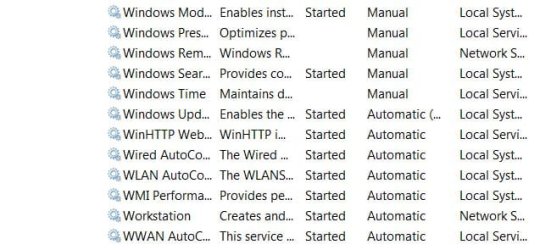
I think I solved the problem by going to services.msc and turning everything connected to wireless to automatic.
 

Attachments

  • Capture.JPG
    Capture.JPG
    55.4 KB · Views: 33

My Computer

Computer type
PC/Desktop
Computer Manufacturer/Model Number
Home Built
OS
Windows 7 Ultimate SP1 64- bit
CPU
Intel Core i7-3770K @3.50ghz
Motherboard
EVGA Z77 FTW
Memory
Kingston Technology 16GB (2x 8GB) 2133MHz DDR3 Non-ECC
Graphics Card(s)
EVGA GTX 670 4gb SC
Sound Card
Nil
Monitor(s) Displays
Samsung 22"
Screen Resolution
1920 x 1080 60hz
Hard Drives
OCZ Vertex 4 SSD 128GB
SAMSUNG Spinpoint F3 HD502HJ 500GB 7200 RPM
PSU
Enermax Platinax EPM1000EWT Special OC Edition
Case
Cooler Master HAF Full Tower nVIDIA Edition
Cooling
CoolerMaster Hyper 212 Plus
Keyboard
HP Wireless Keyboard
Mouse
Corsair Vengeance M90
Internet Speed
20 Mb
Other Info
ASUS DRW-24B1ST/BLK/B/AS Black SATA 24X DVD Burner
:party:

I'm glad it's fixed; but it is strange. The modem is a separate hardware device and nothing that you change on the PC should effect it connecting to the ISP.

UNLESS
The the PC is trying to send info when the modem is connecting. In which case the isolation test would have found it as the modem would have connected before the PC was turned on.

I wish we could narrow down to exactly what the issue was/is. BUT if it works mate, I'm as happy as you are! :D. Just continue to monitor it, you know what to do if the problem reoccurs and I'm always happy to help!

Enjoy your XMas.
 

My Computer

Computer Manufacturer/Model Number
Custom Hack job
OS
Windows 7 Ultimate 64 bit
CPU
Intel(R) Core(TM)2 Quad CPU Q8200 @ 2.33GHz
Motherboard
GigaByte EP45-UD3
Memory
8 GB Kingston
Graphics Card(s)
Nvidia GeForce 9600GT
Sound Card
Soundblaster Audigy
Monitor(s) Displays
AOC x2 22"
Hard Drives
2 x Samsung 500GB (RAID)
2 x Samsung 2TB
1 x WD Green 2TB
1 x Seagate 1TB
1 x Samsung 500GB
PSU
Thermaltake QFan 750W
Case
CM Scout Gaming
Cooling
Coolermaster V10
Keyboard
Microsoft Wireless Keyboard 1000
Mouse
Microsoft Wireless Optical 2000
Internet Speed
320
Other Info
Winfast PVR2000CP
LG DVD-RAM DVD/RW/DL Super Multi
Linksys WMP300Nx2 Wireless Adapter
Back
Top