MSconfig can only see 1 processor on a quad core

sukh101

New member
Local time
12:16 AM
Messages
3
Hi,

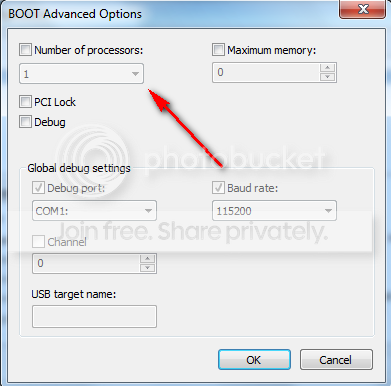
I was just doing some tweaking with the processes running at startup, and while I was in msconfig, I looked under the "boot" tab to see that apparently I only have 1 processor. When I clicked the dropdown menu, it still only gave me the option for 1.

Does this mean the commputer is not accessing the other 3? Does it actually mean anything??

Dell Studio Intel Quad Core Q9400 2.66GHz
Win 7 64-bit
4GB RAM

Please help!

Thanks

Sukh
 

My Computer My Computer

At a glance

Windows 7 64-bitIntel Quad Core Q94004GBNVIDIA 9800 GT
Computer Manufacturer/Model Number
Dell Studio
OS
Windows 7 64-bit
CPU
Intel Quad Core Q9400
Memory
4GB
Graphics Card(s)
NVIDIA 9800 GT
Monitor(s) Displays
ASUS 24" 16:9 HDMI
Hard Drives
1tb
Hi,

I was just doing some tweaking with the processes running at startup, and while I was in msconfig, I looked under the "boot" tab to see that apparently I only have 1 processor. When I clicked the dropdown menu, it still only gave me the option for 1.

Does this mean the commputer is not accessing the other 3? Does it actually mean anything??

Dell Studio Intel Quad Core Q9400 2.66GHz
Win 7 64-bit
4GB RAM

Please help!

Thanks

Sukh

No, this is for diagnostics (and other things) If "task manager" is showing all 4 cores, you are in good shape. Don't change the settings in MSCONFIG on the Boot tab.

Hope this helps. Welcome to the forum!
 

My Computer My Computer

At a glance

Windows 7 Professional x64Intel Core i7 8604GB DDR3 Mushkin 1600Mhz @ 7-8-7-20MSI GTS250 1GB DDR3 Twin Frozr
Computer Manufacturer/Model Number
Keeps changing - (Custom)
OS
Windows 7 Professional x64
CPU
Intel Core i7 860
Motherboard
Gigabyte GA-P55-UD4P
Memory
4GB DDR3 Mushkin 1600Mhz @ 7-8-7-20
Graphics Card(s)
MSI GTS250 1GB DDR3 Twin Frozr
Sound Card
Onboard realtek
Monitor(s) Displays
Samsung SyncMaster 24" P2450 + Samsung 20" 2033
Screen Resolution
1920 X 1080 and 1600 X 900 (#2 system 1440 X 900)
Hard Drives
Patriot Inferno 120GB SSD + 3 WD Blue 640GB drives
PSU
Corsair 750 HX Modular
Case
Lancool PC-K62
Cooling
Cooler Master TX3 CPU cooler and 4-140mm and 1-120mm case
Keyboard
Gigabyte USB keyboard
Mouse
Microsoft wireless laser mouse 5000
Internet Speed
7 Mb down 1.5 up
Other Info
System #2: AMD Phenom II X6 1055T (Freezer 7 Pro cooler) - Gigabyte 880GMA-UD2H - WD 500GB Black - 9500GT (1GB) 500W OCZ modular PSU - Antec 200 case. System #3 (LapTop) Core 2 Duo T6670 - 320GB 7200RPM HD - 4GB DDR3 RAM.
Hi,

I was just doing some tweaking with the processes running at startup, and while I was in msconfig, I looked under the "boot" tab to see that apparently I only have 1 processor. When I clicked the dropdown menu, it still only gave me the option for 1.

Does this mean the commputer is not accessing the other 3? Does it actually mean anything??

Dell Studio Intel Quad Core Q9400 2.66GHz
Win 7 64-bit
4GB RAM

Please help!

Thanks

Sukh
Can only tell you what I know. I go to boot and I see one processor. I go to the drop down menu I see 1
2
3
4

Mine shows what I would expect.
I have a quad core Q8200

To be upfront, this is not my area of expertise, I told you what I know and it may help. If not we have many experts here in many areas, one will be by to help out.
 

My Computer My Computer

At a glance

Windows 10, Home Clean InstallIntel Core2 processsor Q8200(2.33Ghz 1333FSB)...6 gbATI Radeon 256MB HD3650
Computer type
PC/Desktop
Computer Manufacturer/Model Number
Dell XPS 420
OS
Windows 10, Home Clean Install
CPU
Intel Core2 processsor Q8200(2.33Ghz 1333FSB) Quad Core Tech
Motherboard
Dell
Memory
6 gb
Graphics Card(s)
ATI Radeon 256MB HD3650
Sound Card
Intergrated 7.1 Channel Audio
Monitor(s) Displays
Dell SP2009W 20"
Hard Drives
640 GB Serial ATA Hard drive
Cooling
Fan
Keyboard
Dell USB Keyboard
Mouse
Dell Premium Optical USB
Internet Speed
DSL 2.85
Hi,

I was just doing some tweaking with the processes running at startup, and while I was in msconfig, I looked under the "boot" tab to see that apparently I only have 1 processor. When I clicked the dropdown menu, it still only gave me the option for 1.

Does this mean the commputer is not accessing the other 3? Does it actually mean anything??

Dell Studio Intel Quad Core Q9400 2.66GHz
Win 7 64-bit
4GB RAM

Please help!

Thanks

Sukh
Can only tell you what I know. I go to boot and I see one processor. I go to the drop down menu I see 1
2
3
4

Mine shows what I would expect.
I have a quad core Q8200

To be upfront, this is not my area of expertise, I told you what I know and it may help. If not we have many experts here in many areas, one will be by to help out.

I must say, I never even realised that the core information was there. So Thanks.
Mine shows the same as richc46's and my taskbar shows all 4 processors in use, so I'm not worried for my configuration.
Check Yours.
 

Attachments

  • performance.png
    performance.png
    17.3 KB · Views: 731

My Computer My Computer

At a glance

Windows 7 Ultimate 64 bitIntel(R) Core(TM)2 Quad CPU Q8200 @ 2.33GHz8 GB KingstonNvidia GeForce 9600GT
Computer Manufacturer/Model Number
Custom Hack job
OS
Windows 7 Ultimate 64 bit
CPU
Intel(R) Core(TM)2 Quad CPU Q8200 @ 2.33GHz
Motherboard
GigaByte EP45-UD3
Memory
8 GB Kingston
Graphics Card(s)
Nvidia GeForce 9600GT
Sound Card
Soundblaster Audigy
Monitor(s) Displays
AOC x2 22"
Hard Drives
2 x Samsung 500GB (RAID)
2 x Samsung 2TB
1 x WD Green 2TB
1 x Seagate 1TB
1 x Samsung 500GB
PSU
Thermaltake QFan 750W
Case
CM Scout Gaming
Cooling
Coolermaster V10
Keyboard
Microsoft Wireless Keyboard 1000
Mouse
Microsoft Wireless Optical 2000
Internet Speed
320
Other Info
Winfast PVR2000CP
LG DVD-RAM DVD/RW/DL Super Multi
Linksys WMP300Nx2 Wireless Adapter
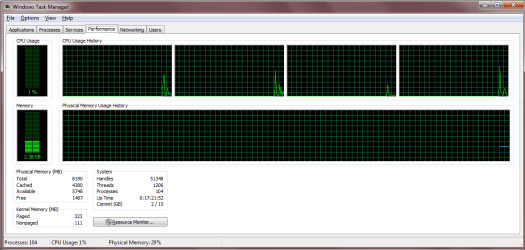
Thanks for the quick response! This may sound basic, but in task manager i only have one CPU graph. When I look at view >> CPU history, I can see that "one graph per CPU" has the black circle next to it, so I'm assuming there should be four graphs?

Again, is one graph ok? My knowledge is quite basic but I'm discovering new things...
 

My Computer My Computer

At a glance

Windows 7 64-bitIntel Quad Core Q94004GBNVIDIA 9800 GT
Computer Manufacturer/Model Number
Dell Studio
OS
Windows 7 64-bit
CPU
Intel Quad Core Q9400
Memory
4GB
Graphics Card(s)
NVIDIA 9800 GT
Monitor(s) Displays
ASUS 24" 16:9 HDMI
Hard Drives
1tb
Ill check and see what I have
 

My Computer My Computer

At a glance

Windows 10, Home Clean InstallIntel Core2 processsor Q8200(2.33Ghz 1333FSB)...6 gbATI Radeon 256MB HD3650
Computer type
PC/Desktop
Computer Manufacturer/Model Number
Dell XPS 420
OS
Windows 10, Home Clean Install
CPU
Intel Core2 processsor Q8200(2.33Ghz 1333FSB) Quad Core Tech
Motherboard
Dell
Memory
6 gb
Graphics Card(s)
ATI Radeon 256MB HD3650
Sound Card
Intergrated 7.1 Channel Audio
Monitor(s) Displays
Dell SP2009W 20"
Hard Drives
640 GB Serial ATA Hard drive
Cooling
Fan
Keyboard
Dell USB Keyboard
Mouse
Dell Premium Optical USB
Internet Speed
DSL 2.85
Yes, I have one, also.

Sorry, i show 4
 

My Computer My Computer

At a glance

Windows 10, Home Clean InstallIntel Core2 processsor Q8200(2.33Ghz 1333FSB)...6 gbATI Radeon 256MB HD3650
Computer type
PC/Desktop
Computer Manufacturer/Model Number
Dell XPS 420
OS
Windows 10, Home Clean Install
CPU
Intel Core2 processsor Q8200(2.33Ghz 1333FSB) Quad Core Tech
Motherboard
Dell
Memory
6 gb
Graphics Card(s)
ATI Radeon 256MB HD3650
Sound Card
Intergrated 7.1 Channel Audio
Monitor(s) Displays
Dell SP2009W 20"
Hard Drives
640 GB Serial ATA Hard drive
Cooling
Fan
Keyboard
Dell USB Keyboard
Mouse
Dell Premium Optical USB
Internet Speed
DSL 2.85
Hi,

I was just doing some tweaking with the processes running at startup, and while I was in msconfig, I looked under the "boot" tab to see that apparently I only have 1 processor. When I clicked the dropdown menu, it still only gave me the option for 1.

Does this mean the commputer is not accessing the other 3? Does it actually mean anything??

Dell Studio Intel Quad Core Q9400 2.66GHz
Win 7 64-bit
4GB RAM

Please help!

Thanks

Sukh

No, this is for diagnostics (and other things) If "task manager" is showing all 4 cores, you are in good shape. Don't change the settings in MSCONFIG on the Boot tab.

Hope this helps. Welcome to the forum!


Nate,

Apparantly I am not in good shape, the task manager only shows 1cpu, any ideas?
 

My Computer My Computer

At a glance

Windows 7 64-bitIntel Quad Core Q94004GBNVIDIA 9800 GT
Computer Manufacturer/Model Number
Dell Studio
OS
Windows 7 64-bit
CPU
Intel Quad Core Q9400
Memory
4GB
Graphics Card(s)
NVIDIA 9800 GT
Monitor(s) Displays
ASUS 24" 16:9 HDMI
Hard Drives
1tb
i assume you are talking about this one. This always shows 1. Setting the others on is for diagnostics. Some people think setting them on makes the system run faster - but that is not so.

nrprocessors.png
 

My Computer My Computer

At a glance

Vista, Windows7, Mint Mate, Zorin, Windows 8from 1.6GHz Duo to i7
Computer Manufacturer/Model Number
HP, Dell, Gateway, Toshiba - 4 laptops and 2 desktops
OS
Vista, Windows7, Mint Mate, Zorin, Windows 8
CPU
from 1.6GHz Duo to i7
Monitor(s) Displays
2x HP w2207
Hard Drives
5x HDD, 7x SSD, 12x Externals
Keyboard
with trackball - no mices
Mouse
Trackball mice
Internet Speed
DSL 6000

My Computer My Computer

At a glance

Windows 7 Professional x64Intel Core i7 8604GB DDR3 Mushkin 1600Mhz @ 7-8-7-20MSI GTS250 1GB DDR3 Twin Frozr
Computer Manufacturer/Model Number
Keeps changing - (Custom)
OS
Windows 7 Professional x64
CPU
Intel Core i7 860
Motherboard
Gigabyte GA-P55-UD4P
Memory
4GB DDR3 Mushkin 1600Mhz @ 7-8-7-20
Graphics Card(s)
MSI GTS250 1GB DDR3 Twin Frozr
Sound Card
Onboard realtek
Monitor(s) Displays
Samsung SyncMaster 24" P2450 + Samsung 20" 2033
Screen Resolution
1920 X 1080 and 1600 X 900 (#2 system 1440 X 900)
Hard Drives
Patriot Inferno 120GB SSD + 3 WD Blue 640GB drives
PSU
Corsair 750 HX Modular
Case
Lancool PC-K62
Cooling
Cooler Master TX3 CPU cooler and 4-140mm and 1-120mm case
Keyboard
Gigabyte USB keyboard
Mouse
Microsoft wireless laser mouse 5000
Internet Speed
7 Mb down 1.5 up
Other Info
System #2: AMD Phenom II X6 1055T (Freezer 7 Pro cooler) - Gigabyte 880GMA-UD2H - WD 500GB Black - 9500GT (1GB) 500W OCZ modular PSU - Antec 200 case. System #3 (LapTop) Core 2 Duo T6670 - 320GB 7200RPM HD - 4GB DDR3 RAM.
error sorry
 

My Computer My Computer

At a glance

Windows 10, Home Clean InstallIntel Core2 processsor Q8200(2.33Ghz 1333FSB)...6 gbATI Radeon 256MB HD3650
Computer type
PC/Desktop
Computer Manufacturer/Model Number
Dell XPS 420
OS
Windows 10, Home Clean Install
CPU
Intel Core2 processsor Q8200(2.33Ghz 1333FSB) Quad Core Tech
Motherboard
Dell
Memory
6 gb
Graphics Card(s)
ATI Radeon 256MB HD3650
Sound Card
Intergrated 7.1 Channel Audio
Monitor(s) Displays
Dell SP2009W 20"
Hard Drives
640 GB Serial ATA Hard drive
Cooling
Fan
Keyboard
Dell USB Keyboard
Mouse
Dell Premium Optical USB
Internet Speed
DSL 2.85
Did some research, but cannot vouch for it. Win 7 HP can utilize only one processor. But 64 bit, like mine can use more.
 

My Computer My Computer

At a glance

Windows 10, Home Clean InstallIntel Core2 processsor Q8200(2.33Ghz 1333FSB)...6 gbATI Radeon 256MB HD3650
Computer type
PC/Desktop
Computer Manufacturer/Model Number
Dell XPS 420
OS
Windows 10, Home Clean Install
CPU
Intel Core2 processsor Q8200(2.33Ghz 1333FSB) Quad Core Tech
Motherboard
Dell
Memory
6 gb
Graphics Card(s)
ATI Radeon 256MB HD3650
Sound Card
Intergrated 7.1 Channel Audio
Monitor(s) Displays
Dell SP2009W 20"
Hard Drives
640 GB Serial ATA Hard drive
Cooling
Fan
Keyboard
Dell USB Keyboard
Mouse
Dell Premium Optical USB
Internet Speed
DSL 2.85
Also check your MOBO Bios to ensure that all is configured correctly.

In Intel's I think hyperthreading needs to be enabled (hyper something anyway), sorry I cant be more helpful. Perhaps just resetting it to the defaults will help.
 

My Computer My Computer

At a glance

Windows 7 Ultimate 64 bitIntel(R) Core(TM)2 Quad CPU Q8200 @ 2.33GHz8 GB KingstonNvidia GeForce 9600GT
Computer Manufacturer/Model Number
Custom Hack job
OS
Windows 7 Ultimate 64 bit
CPU
Intel(R) Core(TM)2 Quad CPU Q8200 @ 2.33GHz
Motherboard
GigaByte EP45-UD3
Memory
8 GB Kingston
Graphics Card(s)
Nvidia GeForce 9600GT
Sound Card
Soundblaster Audigy
Monitor(s) Displays
AOC x2 22"
Hard Drives
2 x Samsung 500GB (RAID)
2 x Samsung 2TB
1 x WD Green 2TB
1 x Seagate 1TB
1 x Samsung 500GB
PSU
Thermaltake QFan 750W
Case
CM Scout Gaming
Cooling
Coolermaster V10
Keyboard
Microsoft Wireless Keyboard 1000
Mouse
Microsoft Wireless Optical 2000
Internet Speed
320
Other Info
Winfast PVR2000CP
LG DVD-RAM DVD/RW/DL Super Multi
Linksys WMP300Nx2 Wireless Adapter
Did some research, but cannot vouch for it. Win 7 HP can utilize only one processor. But 64 bit, like mine can use more.


HMM, that sounds strange. Can you link the reference please.
 

My Computer My Computer

At a glance

Vista, Windows7, Mint Mate, Zorin, Windows 8from 1.6GHz Duo to i7
Computer Manufacturer/Model Number
HP, Dell, Gateway, Toshiba - 4 laptops and 2 desktops
OS
Vista, Windows7, Mint Mate, Zorin, Windows 8
CPU
from 1.6GHz Duo to i7
Monitor(s) Displays
2x HP w2207
Hard Drives
5x HDD, 7x SSD, 12x Externals
Keyboard
with trackball - no mices
Mouse
Trackball mice
Internet Speed
DSL 6000

My Computer My Computer

At a glance

Windows 10, Home Clean InstallIntel Core2 processsor Q8200(2.33Ghz 1333FSB)...6 gbATI Radeon 256MB HD3650
Computer type
PC/Desktop
Computer Manufacturer/Model Number
Dell XPS 420
OS
Windows 10, Home Clean Install
CPU
Intel Core2 processsor Q8200(2.33Ghz 1333FSB) Quad Core Tech
Motherboard
Dell
Memory
6 gb
Graphics Card(s)
ATI Radeon 256MB HD3650
Sound Card
Intergrated 7.1 Channel Audio
Monitor(s) Displays
Dell SP2009W 20"
Hard Drives
640 GB Serial ATA Hard drive
Cooling
Fan
Keyboard
Dell USB Keyboard
Mouse
Dell Premium Optical USB
Internet Speed
DSL 2.85
Did some research, but cannot vouch for it. Win 7 HP can utilize only one processor. But 64 bit, like mine can use more.

Windows 7 Home Premium only supports a single physical socket. As far as I know, there is no practical limit to the number of CPU cores within that one socketed CPU.

Win7 Pro and Ultimate support 2 sockets.

I believe there's no difference between the 32 and 64 bit versions as regards htese limits.

I can't explain why you're not seeing all 4 cores. It's not due to a fundamental Win7 limitation, though. (Win7 Home Premium 32 bit sees both cores of the AMD CPU in my notebook, for example.)
 

My Computer My Computer

At a glance

Windows 7 Pro X64 SP1Intel Core I7-3930k16 GB Gskill DDR3-2133eVGA GTX680
Computer Manufacturer/Model Number
homegrown
OS
Windows 7 Pro X64 SP1
CPU
Intel Core I7-3930k
Motherboard
Asus P9X79 Pro
Memory
16 GB Gskill DDR3-2133
Graphics Card(s)
eVGA GTX680
Sound Card
Creative X-Fi Titanium
Monitor(s) Displays
As PA246Q
Screen Resolution
1920 X 1200
Hard Drives
Corsair Force GT, 120 GB
WDC 1.5TB Caviar Black
PSU
PCP&C Silencer 750 Crossfire
Case
Silverstone FT02
Cooling
Noctua NH-D14
Keyboard
cheap Logitech USB
Mouse
Microsoft Intellimouse Explorer (old optical) USB
Internet Speed
6Mb cable
Other Info
Pioneer BDR-205
Samsung SH-203B
Monsoon 5.1 speakers
Did some research, but cannot vouch for it. Win 7 HP can utilize only one processor. But 64 bit, like mine can use more.


HMM, that sounds strange. Can you link the reference please.

Please read my whole post, I said that I could not vouch for it. Here it is.


Only one processor showing up in Task Manager


I think this is a fairy tale. My win7 runs on both of my duo core processors. I think the guy that said that in the thread you linked is wrong.

PS: I did read your whole post - I even quoted the whole post. No problem.
 

My Computer My Computer

At a glance

Vista, Windows7, Mint Mate, Zorin, Windows 8from 1.6GHz Duo to i7
Computer Manufacturer/Model Number
HP, Dell, Gateway, Toshiba - 4 laptops and 2 desktops
OS
Vista, Windows7, Mint Mate, Zorin, Windows 8
CPU
from 1.6GHz Duo to i7
Monitor(s) Displays
2x HP w2207
Hard Drives
5x HDD, 7x SSD, 12x Externals
Keyboard
with trackball - no mices
Mouse
Trackball mice
Internet Speed
DSL 6000
,

I had a thought, if you can get into bios, there might be a setting for max cpu or max ram. If it is checked uncheck it.

Before you do anything like this, I suggest a System Image.
 

My Computer My Computer

At a glance

Windows 10, Home Clean InstallIntel Core2 processsor Q8200(2.33Ghz 1333FSB)...6 gbATI Radeon 256MB HD3650
Computer type
PC/Desktop
Computer Manufacturer/Model Number
Dell XPS 420
OS
Windows 10, Home Clean Install
CPU
Intel Core2 processsor Q8200(2.33Ghz 1333FSB) Quad Core Tech
Motherboard
Dell
Memory
6 gb
Graphics Card(s)
ATI Radeon 256MB HD3650
Sound Card
Intergrated 7.1 Channel Audio
Monitor(s) Displays
Dell SP2009W 20"
Hard Drives
640 GB Serial ATA Hard drive
Cooling
Fan
Keyboard
Dell USB Keyboard
Mouse
Dell Premium Optical USB
Internet Speed
DSL 2.85
I have a similar problem

So basically i have the same problem i have a quad core processor (AMD Athlon II X4 635) and i can only pick up to 3 to boot in msconfig also on task manager it only shows 3.... ive noticed this just recently and since the day i bought this computer i swear it was booting with 4 the whole time.
 

My Computer My Computer

At a glance

Windows 7 Home Premium 64bitAMD Athlon II X4 6354 GB
Computer Manufacturer/Model Number
HP Pavilion p600 Series
OS
Windows 7 Home Premium 64bit
CPU
AMD Athlon II X4 635
Memory
4 GB
Problem

So on the attachment it basically explains my problem.. only 3 cores boot up

Processor2.png
 

My Computer My Computer

At a glance

Windows 7 Home Premium 64bitAMD Athlon II X4 6354 GB
Computer Manufacturer/Model Number
HP Pavilion p600 Series
OS
Windows 7 Home Premium 64bit
CPU
AMD Athlon II X4 635
Memory
4 GB
Back
Top