Pogo.com not working with IE 8

belikexp

New member
Power User
Local time
9:34 AM
Messages
222
I have tried playing Pogo.com with IE 8. It does not work. But I can use Firefox.

I have tried uninstalling/installing Java, checking settings, clearing cache. Pogo does not work in IE 8.

I came across this blog: lcadaver.net/blog/?cat=32

Thank you for contacting Pogo.com Customer Support.

In response to your previous email as you said that you are using IE 8 to play pogo games. Please be informed Because Internet Explorer 8 is a Beta Release Candidate at the moment, Internet Explorer 8 is not yet an official Pogo supported browser. Although, you might be able to access some features of Pogo (such as certain games) in Internet Explorer 8, other features might not always work as well as with supported browsers.


Can anyone confirm pogo.com can not play games with Internet Explorer 8?
 

My Computer My Computer

Computer Manufacturer/Model Number
Built by Mark
OS
Windows 7 x64
CPU
Intel Core i7 930
Motherboard
Gigabyte GA-X58A-UD3R Bios F5
Memory
OCZ 6GBkit OCZ3G1600LV6GK 8-8-8-24-2T 1.65V
Graphics Card(s)
(2) HIS ATI Radeon HD 5770 CROSSFIRE (H577QT1GD)
Sound Card
On board Realtek HD
Monitor(s) Displays
Samsung SyncMaster 2343 22" Wide Screen
Screen Resolution
2048x1152
Hard Drives
Two Western Digital 320 Gig Blue series WDC WD3200AAKS-00L9A0
PSU
Corsiar 750 watts TX750W
Case
Antec NINE Hundred Two (air filters & adjustable fan speed)
Cooling
Cooler Master Hyper 212 Plus CPU cooler
Keyboard
Logitech
Mouse
Logitech MX310
Internet Speed
20 meg down/ 5 meg up
Other Info
Hewlett Packard Deskjet 932C printer
Epson 4990 Photo scanner
And here's the offical reply from pogo tech support.

Hi There,

Thank you for contacting again.

As your have mentioned that you're using Internet Explorer version 8.0. Please be aware that Pogo.com does not officially supports this browser version. So in your situation, we recommend trying the new FireFox browser instead, since it works generally well with Pogo games and is becoming increasingly popular a choice for general browsing.

Here are the steps you'll need to follow to download and configure FireFox.

1. Go to http://www.getfirefox.com
2. Click the "Free Download" link in the upper left part of the screen.
3. When asked to run or install the application, choose "Run", "Install", or "Yes".
4. After Firefox is installed, try Pogo games again. Hopefully they will run smoothly now.

If I can help you with anything else, please write back and let me know.

Pogo Christian
Customer Support
EA.com/Pogo
 

My Computer My Computer

Computer Manufacturer/Model Number
Built by Mark
OS
Windows 7 x64
CPU
Intel Core i7 930
Motherboard
Gigabyte GA-X58A-UD3R Bios F5
Memory
OCZ 6GBkit OCZ3G1600LV6GK 8-8-8-24-2T 1.65V
Graphics Card(s)
(2) HIS ATI Radeon HD 5770 CROSSFIRE (H577QT1GD)
Sound Card
On board Realtek HD
Monitor(s) Displays
Samsung SyncMaster 2343 22" Wide Screen
Screen Resolution
2048x1152
Hard Drives
Two Western Digital 320 Gig Blue series WDC WD3200AAKS-00L9A0
PSU
Corsiar 750 watts TX750W
Case
Antec NINE Hundred Two (air filters & adjustable fan speed)
Cooling
Cooler Master Hyper 212 Plus CPU cooler
Keyboard
Logitech
Mouse
Logitech MX310
Internet Speed
20 meg down/ 5 meg up
Other Info
Hewlett Packard Deskjet 932C printer
Epson 4990 Photo scanner
I'm also having issues with this new system at Pogo.com. IE8 and Firefox both have the same issues.
The game window will load, but within one minute it says it has lost connection to the server. The window
in IE will completely close out, and in Firefox I get the error box telling me about the lost connection.

I've tried it with windows firewall disabled and have disabled the Google and Windows add-ons. I've added the pogo site to my 'trusted' sites in the internet options also. Nothing so far seems to work.

Pogo error screen says it 'pings' the website every 30 seconds or so, is there a setting that I need to adjust
to allow this action? (if that has anything to do with the interruption/connection loss).

Thanks in advance for any responses.
 

My Computer My Computer

Computer Manufacturer/Model Number
Toshiba A505-S6980
OS
windows 7
CPU
Intel dual core T6600
Memory
4GB DDR2
Graphics Card(s)
Intell 4500MHD
Monitor(s) Displays
16" hi-def TFT-LCD
Hard Drives
500GB Serial ATA 5400rpm
And I am having other issues with Pogo.com:

1. Tried playing it last night on my new Windows 7 64bit computer and i could get to the game tables for pinnocle but every time I choose to join a table the game popup comes up but just keeps saying "game loading" forever, never does connect to an acutal game.

2. Went downstairs to a Windows 7 32bit computer and tried pogo.com there, when I was at the tables and then hit join, the game popup comes up but then i was getting an error message that "a pop-up blocker was blocking it", so went into Firefox, turned off ad pop-up blocker in options and then it worked fine.

3. Havent been back on the 64bit computer yet, to see if turning off the ad pop-up blocker fixes it there too.

TC :D
 

My Computer My Computer

Computer Manufacturer/Model Number
Custom Built
OS
Windows 7 Ultimate 64bit
CPU
Intel Quad Core Q9400 2.66ghz
Motherboard
MSI Nero 3
Memory
8GB PC2-6400 Corsair
Graphics Card(s)
Nvidia 8800GT 512mb
Sound Card
OnBoard Realtek HD
Monitor(s) Displays
Acer 24" H243H LCD
Screen Resolution
1920 x 1080
Hard Drives
120GB Seagate - OS & Programs,
1TB Seagate - Media storage,
1TB Seagate - Media2 storage
PSU
Antec Eartwatts 500W
Case
NZXT black finish, glass side, blue lighting
Cooling
Scythe CPU Cooler w/removable fan
Keyboard
Dell (old)
Mouse
Logitech G5 w/copper accents
Internet Speed
8mb download, 1mb upload
Other Info
2nd computer, asrock board, amd x2-6000 cpu (htpc use)
3rd computer, gigabyte GA-E7AUM-DS2H board, Intel E8400 cpu (htpc use)
Pogo works fine with Firefox. Export your bookmarks. Uninstall Firefox and delete the C:\Program Files (x86)\Mozilla Firefox folder. Reinstall Firefox, import bookmards and go to java.com to install java. Firefox does work fine with Pogo.
 

My Computer My Computer

Computer Manufacturer/Model Number
Built by Mark
OS
Windows 7 x64
CPU
Intel Core i7 930
Motherboard
Gigabyte GA-X58A-UD3R Bios F5
Memory
OCZ 6GBkit OCZ3G1600LV6GK 8-8-8-24-2T 1.65V
Graphics Card(s)
(2) HIS ATI Radeon HD 5770 CROSSFIRE (H577QT1GD)
Sound Card
On board Realtek HD
Monitor(s) Displays
Samsung SyncMaster 2343 22" Wide Screen
Screen Resolution
2048x1152
Hard Drives
Two Western Digital 320 Gig Blue series WDC WD3200AAKS-00L9A0
PSU
Corsiar 750 watts TX750W
Case
Antec NINE Hundred Two (air filters & adjustable fan speed)
Cooling
Cooler Master Hyper 212 Plus CPU cooler
Keyboard
Logitech
Mouse
Logitech MX310
Internet Speed
20 meg down/ 5 meg up
Other Info
Hewlett Packard Deskjet 932C printer
Epson 4990 Photo scanner
Pogo Games

Hi there, just got a new Toshiba Satellite with windows 7 and the ONLY game I couldn't get into was Word Whomp ( my favorite of course ). The rest I have no problem with. I kept getting an applet error, so did the uninstall/reinstall of both java and the firefox browser. Still nothing. I have suggested to Pogo that THEY may need to get their games compatible with 7 so people can play. I like 7 and I don't want to go back to xp.
KyAnth98
 

My Computer My Computer

Computer Manufacturer/Model Number
Toshiba Satellite L500
OS
Windows 7
CPU
intel

My Computer My Computer

Computer Manufacturer/Model Number
Built by Mark
OS
Windows 7 x64
CPU
Intel Core i7 930
Motherboard
Gigabyte GA-X58A-UD3R Bios F5
Memory
OCZ 6GBkit OCZ3G1600LV6GK 8-8-8-24-2T 1.65V
Graphics Card(s)
(2) HIS ATI Radeon HD 5770 CROSSFIRE (H577QT1GD)
Sound Card
On board Realtek HD
Monitor(s) Displays
Samsung SyncMaster 2343 22" Wide Screen
Screen Resolution
2048x1152
Hard Drives
Two Western Digital 320 Gig Blue series WDC WD3200AAKS-00L9A0
PSU
Corsiar 750 watts TX750W
Case
Antec NINE Hundred Two (air filters & adjustable fan speed)
Cooling
Cooler Master Hyper 212 Plus CPU cooler
Keyboard
Logitech
Mouse
Logitech MX310
Internet Speed
20 meg down/ 5 meg up
Other Info
Hewlett Packard Deskjet 932C printer
Epson 4990 Photo scanner
I found something that helped my problem staying connected to pogo. They sent their usually worthless 'first response' canned mail with various links to their help database. However, this time I found something useful in there.
One of their suggestions was to add 2 specific IP addresses to either your firewall settings or your router settings. Not knowing what that involved, I felt it wouldn't hurt to add them thru the control panel internet
options security tab as trusted sites and under the privacy tab as 'always allow' sites.

The IP addresses are: 159.153.236.1 and 159.153.236.12

It worked! (At least in Firefox) I can now play games at Pogo. I haven't tried in IE yet as I seldom use it anyway having been a Firefox user for many years. I will post back later with my result using IE and Pogo.
But at least for now I know I can play Pogo on Firefox with my new laptop with Windows 7, and eventually
I think the folks at Pogo will catch up to the times and get their site IE8 compatible.
 

My Computer My Computer

Computer Manufacturer/Model Number
Toshiba A505-S6980
OS
windows 7
CPU
Intel dual core T6600
Memory
4GB DDR2
Graphics Card(s)
Intell 4500MHD
Monitor(s) Displays
16" hi-def TFT-LCD
Hard Drives
500GB Serial ATA 5400rpm
Pogo Games

Hi akaRJ, I was wondering if you could play Word Whomp with those settings. I haven't had any other trouble, but keep getting an applet error trying to load just that game. I appreciate your response :) KyAnth98
 

My Computer My Computer

Computer Manufacturer/Model Number
Toshiba Satellite L500
OS
Windows 7
CPU
intel
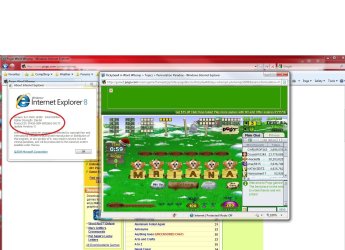
Beginning to think that for those of you having a problem with Pogo that there is something wrong somewhere on your end. As to what may be causing the problem I have no idea reason is (firewall, anti virus, anti spyware, etc causing it), but I do know that IE8 isn't the problem,

pogo.jpg

plays no problem here. Also notice the circled bit in that picture? If it was a problem with IE8 then it shouldn't work at all in the 64 bit version of IE8 (requires the 64 bit version of Java installed, and ignore any prompts to install Flash).
 

My Computer My Computer

Computer type
PC/Desktop
Computer Manufacturer/Model Number
Me
OS
Win 7 Ultimate x64
CPU
FX-8350 @ 4.6 GHz so far
Motherboard
Asus M5A97 EVO
Memory
ADATA XPG V1 Series Black 8GB DDR3 1600
Graphics Card(s)
Sapphire R9 270x Dual-X
Sound Card
Xonar DGX w/ Corsair Vengence 1300
Monitor(s) Displays
Acer S232HL Abid
Screen Resolution
1920x1080
Hard Drives
120 GB OCZ Vertex 3
500 GB Seagate 7200.12
PSU
Antec Earthwatts 650W Green
Case
Antec Three Hundred
Cooling
Cooler Master 212 EVO
Keyboard
Logitech G510
Mouse
Logitech G500s
Internet Speed
35000/3000
I also have no problems with Pogo using either IE (32 or 64 bit versions) or FF.....all games play fine...
 

My Computer My Computer

Computer Manufacturer/Model Number
Dell XPS 630i
OS
Windows 7 RTM
CPU
Intel(R) Core(TM)2 Duo CPU E8500 @3.16GHz 3.16GHz
Motherboard
Dell XPS 6301
Memory
3GB
Graphics Card(s)
ATI Radeon HD 3870 x2
Sound Card
Creative X-Fi-Audio Processor
Monitor(s) Displays
Dell 2208WFP(Digital) x 2
Screen Resolution
1680 x 1050
Hard Drives
Dual 500 Gig
Keyboard
Logitech G15
Mouse
Logitech MX518
Internet Speed
20MB Cable
pogo

Thank you Stormy13, turns out that it was the shockwave flash that was causing the problem, didn't even know it was installed :( However, when I read your post, I checked, and now I can play my favorite game:) Thank you!!! KyAnth98
 

My Computer My Computer

Computer Manufacturer/Model Number
Toshiba Satellite L500
OS
Windows 7
CPU
intel
I tried running games from pogo with IE8 and I get an error.

As for installing 32-bit and 64-bit drivers of java; the default IE8 browser is 32 bit.

I installed both 32 bit and 64 bit drivers and I still can't run games at pogo.com. Java never loads.

Pogo games runs fine on Firefox.
 

My Computer My Computer

Computer Manufacturer/Model Number
Built by Mark
OS
Windows 7 x64
CPU
Intel Core i7 930
Motherboard
Gigabyte GA-X58A-UD3R Bios F5
Memory
OCZ 6GBkit OCZ3G1600LV6GK 8-8-8-24-2T 1.65V
Graphics Card(s)
(2) HIS ATI Radeon HD 5770 CROSSFIRE (H577QT1GD)
Sound Card
On board Realtek HD
Monitor(s) Displays
Samsung SyncMaster 2343 22" Wide Screen
Screen Resolution
2048x1152
Hard Drives
Two Western Digital 320 Gig Blue series WDC WD3200AAKS-00L9A0
PSU
Corsiar 750 watts TX750W
Case
Antec NINE Hundred Two (air filters & adjustable fan speed)
Cooling
Cooler Master Hyper 212 Plus CPU cooler
Keyboard
Logitech
Mouse
Logitech MX310
Internet Speed
20 meg down/ 5 meg up
Other Info
Hewlett Packard Deskjet 932C printer
Epson 4990 Photo scanner
Everyone that can run pogo games with IE8; are you sure you can run Pogo games? For example,
Online Slots and free casino games from Pogo.com .

Pogo games run fine with Firefox. If it's running with Firefox then what is preventing java from loading in IE8?
I'm starting to think it's an MS conspiracy. :)
 

My Computer My Computer

Computer Manufacturer/Model Number
Built by Mark
OS
Windows 7 x64
CPU
Intel Core i7 930
Motherboard
Gigabyte GA-X58A-UD3R Bios F5
Memory
OCZ 6GBkit OCZ3G1600LV6GK 8-8-8-24-2T 1.65V
Graphics Card(s)
(2) HIS ATI Radeon HD 5770 CROSSFIRE (H577QT1GD)
Sound Card
On board Realtek HD
Monitor(s) Displays
Samsung SyncMaster 2343 22" Wide Screen
Screen Resolution
2048x1152
Hard Drives
Two Western Digital 320 Gig Blue series WDC WD3200AAKS-00L9A0
PSU
Corsiar 750 watts TX750W
Case
Antec NINE Hundred Two (air filters & adjustable fan speed)
Cooling
Cooler Master Hyper 212 Plus CPU cooler
Keyboard
Logitech
Mouse
Logitech MX310
Internet Speed
20 meg down/ 5 meg up
Other Info
Hewlett Packard Deskjet 932C printer
Epson 4990 Photo scanner
Other than that isn't my kind of game, it loads and plays just fine in IE8 here (and the 64 bit version at that).
 

My Computer My Computer

Computer type
PC/Desktop
Computer Manufacturer/Model Number
Me
OS
Win 7 Ultimate x64
CPU
FX-8350 @ 4.6 GHz so far
Motherboard
Asus M5A97 EVO
Memory
ADATA XPG V1 Series Black 8GB DDR3 1600
Graphics Card(s)
Sapphire R9 270x Dual-X
Sound Card
Xonar DGX w/ Corsair Vengence 1300
Monitor(s) Displays
Acer S232HL Abid
Screen Resolution
1920x1080
Hard Drives
120 GB OCZ Vertex 3
500 GB Seagate 7200.12
PSU
Antec Earthwatts 650W Green
Case
Antec Three Hundred
Cooling
Cooler Master 212 EVO
Keyboard
Logitech G510
Mouse
Logitech G500s
Internet Speed
35000/3000
Hi akaRJ, I was wondering if you could play Word Whomp with those settings. I haven't had any other trouble, but keep getting an applet error trying to load just that game. I appreciate your response :) KyAnth98


Hi,

No luck with IE8 and pogo and now have lost the ability to play pogo with firefox again. Thought I had it fixd but something went wrong and now I can open the site and cannot play any games.

Very Frustrating.
 

My Computer My Computer

Computer Manufacturer/Model Number
Toshiba A505-S6980
OS
windows 7
CPU
Intel dual core T6600
Memory
4GB DDR2
Graphics Card(s)
Intell 4500MHD
Monitor(s) Displays
16" hi-def TFT-LCD
Hard Drives
500GB Serial ATA 5400rpm
Hi akaRJ, I was wondering if you could play Word Whomp with those settings. I haven't had any other trouble, but keep getting an applet error trying to load just that game. I appreciate your response :) KyAnth98


Hi,There must have been an update that gave me a headache. Got pogo to work, with settings from previous post. Then it didn't work, now after doing a system restore, pogo is again working (with Firefox, not with IE), including word whomp.


Not sure what to say what caused the couple of days of problems, some MS update or another update.
 

My Computer My Computer

Computer Manufacturer/Model Number
Toshiba A505-S6980
OS
windows 7
CPU
Intel dual core T6600
Memory
4GB DDR2
Graphics Card(s)
Intell 4500MHD
Monitor(s) Displays
16" hi-def TFT-LCD
Hard Drives
500GB Serial ATA 5400rpm
No problems with iE8 on that site here... :confused:

j90voh.png
 

My Computer My Computer

Computer Manufacturer/Model Number
Custom built machine
OS
W7 x64
CPU
Intel Q9300 2.5Ghz Quad LGA775 (Would like Q9650)
Motherboard
Gigabyte GA-EP45T-UD3R (F6 Bios)
Memory
4Gb OCZ Gold 1,333Mhz
Graphics Card(s)
Palit HD4850 O/C Sonic 512Mb DDR3, Dual DViD's
Sound Card
Azalia to twin Samson 50w Studio Monitors
Monitor(s) Displays
Twin Dell (E-IPS) U2311H 23.6" Screens
Screen Resolution
1920 x 1080 @ 60Hz
Hard Drives
Crucial M4 SSD, archives on twin Western Digital Caviar Black WD2002FAEX, 2TB, 7200rpm HDD's, Samsung Ritemaster CD/DVD Burner...
PSU
OCZ 600w
Case
Lian-Li PC8 acoustifoamed' aluminium tower
Cooling
Scythe 140mm Zipang
Keyboard
Cherry PS/2 custom model
Mouse
Lenovo USB laser "Thinkpad" Mouse
Internet Speed
ADSL2+ @14Mbps downstream & Cat6 Gigabit Ethernet
Antivirus
NOD32
Browser
Opera
Other Info
Silicon Dust HD Homerun Dual FTA (Ethernet) TV Tuners, Dray Tek Vigor 2850Vn router and 8x HP Gigabit Switch. Lian-Li CR26 Card Reader, Canon MF4430 iSensys laser printer/scanner.
I use Win 7 64bit and Firefox. There are no problems with playing Pogo games, but you may need to set game3.pogo.com as an exception to Tools; Options; content tab; block popup windows; exceptions button.

Possibly you may need to disable Popup Blocker addon.
 

My Computer My Computer

Computer Manufacturer/Model Number
Asus CG5270
OS
Windows 7 Home Premium
CPU
Intel Core 2 Quad
Memory
8 GB
Monitor(s) Displays
23" Acer Widescreen
Back
Top