Your Favorite Feature in Win7

Stevo

New member
Local time
10:34 AM
Messages
14
I am very new to win7. I have been using xp since 2005. With all these new features I am sure I have not stumbled upon some of the best. What is your favorite feature and why? This will give me some insite as to what I am missing out on.

Thanks,
Steve

Oh and Happy Holidays to everyone.
 

My Computer My Computer

OS
win7 pro
CPU
amd phenom II 940 x4 3.0 ghz
Motherboard
asus m3A78-t
Memory
mushkin 4 gig 2 sticks
Graphics Card(s)
ati 4870hd 512
Monitor(s) Displays
hp f1905
Hard Drives
maxtor 300 g
My fav feature of the moment is the 'snipping tool' (but I change daily ;) ). It's a nice little way to capture a screen print and although it reminds me of the mac I'm not complaining.

I'm also a huge fan of Win7 of tablet PC's, the touch screen is amazing.
 

My Computer My Computer

Computer Manufacturer/Model Number
Custom Hack job
OS
Windows 7 Ultimate 64 bit
CPU
Intel(R) Core(TM)2 Quad CPU Q8200 @ 2.33GHz
Motherboard
GigaByte EP45-UD3
Memory
8 GB Kingston
Graphics Card(s)
Nvidia GeForce 9600GT
Sound Card
Soundblaster Audigy
Monitor(s) Displays
AOC x2 22"
Hard Drives
2 x Samsung 500GB (RAID)
2 x Samsung 2TB
1 x WD Green 2TB
1 x Seagate 1TB
1 x Samsung 500GB
PSU
Thermaltake QFan 750W
Case
CM Scout Gaming
Cooling
Coolermaster V10
Keyboard
Microsoft Wireless Keyboard 1000
Mouse
Microsoft Wireless Optical 2000
Internet Speed
320
Other Info
Winfast PVR2000CP
LG DVD-RAM DVD/RW/DL Super Multi
Linksys WMP300Nx2 Wireless Adapter
I like the Libraries feature best, as it allows me to maintain single Videos, Pictures, Documents "folders", when in reality all of those various file types are spread across 8 hard drives. It make file management a breeze.

Second would be the Search functions. It operates way faster than it ever could on Vista, and when used in combination with your regular Explorer functions, actually makes using a computer fun again (unlike the thankfully retired dinosaur that was XP)

There's a lot more features of 7 that I like, but the Libraries and Search are my favorites.
 

My Computer My Computer

Computer type
PC/Desktop
Computer Manufacturer/Model Number
Virtual Machine
OS
Windows 7 Professional 32-bit SP1
CPU
AMD A4/A6
Motherboard
Intel Corporation 440BX Desktop Reference Platform
Memory
3.00GB EDO
Graphics Card(s)
VMware SVGA 3D
Sound Card
High Definition Audio Device
Monitor(s) Displays
Generic Non-PnP Monitor on VMware SVGA 3D
Screen Resolution
1440x900
Hard Drives
1 x 60GB VMware Virtual SATA Hard Drive ATA Device
Antivirus
Kaspersky Total Security
I actually like the built in system restore and system image.
 

My Computer My Computer

Computer type
PC/Desktop
Computer Manufacturer/Model Number
Dell XPS 420
OS
Windows 10, Home Clean Install
CPU
Intel Core2 processsor Q8200(2.33Ghz 1333FSB) Quad Core Tech
Motherboard
Dell
Memory
6 gb
Graphics Card(s)
ATI Radeon 256MB HD3650
Sound Card
Intergrated 7.1 Channel Audio
Monitor(s) Displays
Dell SP2009W 20"
Hard Drives
640 GB Serial ATA Hard drive
Cooling
Fan
Keyboard
Dell USB Keyboard
Mouse
Dell Premium Optical USB
Internet Speed
DSL 2.85
My fav feature of the moment is the 'snipping tool' (but I change daily ;) ). It's a nice little way to capture a screen print and although it reminds me of the mac I'm not complaining.

I'm also a huge fan of Win7 of tablet PC's, the touch screen is amazing.


Snipping Tool was in Vista also.
 

My Computer My Computer

OS
Win7
The new task bar and the new resource monitor (available from the task manager).

And before someone says something yes it was in Vista but in W7 it is MUCH better :D
 

My Computer My Computer

Computer Manufacturer/Model Number
Scratch built
OS
Windows 7 x64 Ultimate
CPU
i7 960
Motherboard
Asus P6X58D
Memory
12 Gig Corsair Dominator
Graphics Card(s)
Nvidia 480
Sound Card
Maudio Delta 44 + breakout box
Monitor(s) Displays
Dell UltraSharp U2410 24in and Samsung 21 dual monitors
Screen Resolution
1920x1200 and 1280x1024
Hard Drives
Primary: Intel X-25M G2 160G SSD
Secondary: Segate baracuda 1.0 TB
HDs in AHCI mode.
PSU
Corasair TX850
Case
Cooler Master HAF
Cooling
Corsair H50
Keyboard
Logitech G15 + N52 game pad
Mouse
Logitech MX518
Internet Speed
15kbs down 4.5kbps up
Other Info
WEI 7.6
CPU & RAM 7.6
Graphics 7.9
Hard disk 7.7
The new task bar and the new resource monitor (available from the task manager).

And before someone says something yes it was in Vista but in W7 it is MUCH better :D


I too, like the new task bar feature of open apps and quick launch apps icons being one and the same.
 

My Computer My Computer

OS
Win7
The libraries I use alot. Very nice feature. I am now looking for the others. Keep them coming.
 

My Computer My Computer

OS
win7 pro
CPU
amd phenom II 940 x4 3.0 ghz
Motherboard
asus m3A78-t
Memory
mushkin 4 gig 2 sticks
Graphics Card(s)
ati 4870hd 512
Monitor(s) Displays
hp f1905
Hard Drives
maxtor 300 g
Not sure how good the speech recognition in Vista was, but the SR in 7 is unbelievably awesome. At least it is for me, using a mic near my mouth, rather than a desk mounted or bezel mic.
 

My Computer My Computer

OS
Win7
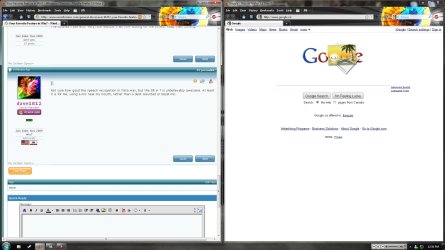
The half screen thing...I LOVE it.

Except I normally do iTunes/MSN in one and Firefox in the other. I never actually do 2 Firefox windows, that's just dumb:).
 

Attachments

  • halfhalf.jpg
    halfhalf.jpg
    151.7 KB · Views: 18

My Computer My Computer

OS
Windows 7 x64
CPU
Core 2 Duo E4500
Motherboard
Gigabyte P35-DS3R Rev 2.0
Memory
Mushkin Redline 1000MHz (5-5-5-12)
Graphics Card(s)
eVGA 8800GT 512mb
Sound Card
Onboard
Monitor(s) Displays
Viewsonic VX2260WM
Screen Resolution
1920x1080
Hard Drives
500GB Western Digital 32mb Cache
250GB Western Digital 16mb Cache
PSU
Corsair 550VX
Case
Cooler Master 690
Cooling
2x Enermax Exhaust / 1x CM Exhaust / 2x Intake
Keyboard
Logitech Multimedia
Mouse
Logitech G5
Internet Speed
2.5mpbs
The new superbar
 

My Computer My Computer

Computer Manufacturer/Model Number
Dell Studio 540
OS
Windows 7 Home Premium
CPU
Intel Core 2 Quad Q8200
Motherboard
Dell?
Memory
4gig
Graphics Card(s)
ATI Radeon HD3450
Sound Card
On Board
Monitor(s) Displays
HP1740
Screen Resolution
1280x1024
Hard Drives
WD 640gig
WD 500gig
PSU
?
Case
Dell Studio
Cooling
fans and stuff
Keyboard
yes
Mouse
Logitech MX620
Internet Speed
50meg
Definitely the Libraries feature takes first place. Second is search, and third... WMP12
 

My Computer My Computer

Computer type
Laptop
Computer Manufacturer/Model Number
Custom
OS
Windows 7 Home Premium x64
CPU
Intel Core i5 2500K
Motherboard
MSI MS-7750
Memory
8GB DDR3
Graphics Card(s)
nVidia GeForce GTX650 Ti BOOST
Sound Card
Realtek
Monitor(s) Displays
21' Philips
Screen Resolution
Full HD
Hard Drives
1TB
PSU
500W
My fav feature of the moment is the 'snipping tool' (but I change daily ;) ). It's a nice little way to capture a screen print and although it reminds me of the mac I'm not complaining.

I'm also a huge fan of Win7 of tablet PC's, the touch screen is amazing.


Snipping Tool was in Vista also.

Lol, really? I never noticed. I guess I am too old-school and used to ALT+PrtScn, CTRL+PrtScn, & ALT(tap CTRL once)+PrtScn. ;)
 

My Computer My Computer

Computer Manufacturer/Model Number
Custom Hack job
OS
Windows 7 Ultimate 64 bit
CPU
Intel(R) Core(TM)2 Quad CPU Q8200 @ 2.33GHz
Motherboard
GigaByte EP45-UD3
Memory
8 GB Kingston
Graphics Card(s)
Nvidia GeForce 9600GT
Sound Card
Soundblaster Audigy
Monitor(s) Displays
AOC x2 22"
Hard Drives
2 x Samsung 500GB (RAID)
2 x Samsung 2TB
1 x WD Green 2TB
1 x Seagate 1TB
1 x Samsung 500GB
PSU
Thermaltake QFan 750W
Case
CM Scout Gaming
Cooling
Coolermaster V10
Keyboard
Microsoft Wireless Keyboard 1000
Mouse
Microsoft Wireless Optical 2000
Internet Speed
320
Other Info
Winfast PVR2000CP
LG DVD-RAM DVD/RW/DL Super Multi
Linksys WMP300Nx2 Wireless Adapter
I like the HD Imaging software and able to make a full HD backup in less tha 5 minutes. I also like the snipping tool.
 

My Computer My Computer

Computer type
PC/Desktop
Computer Manufacturer/Model Number
Self Built
OS
Windows 10 Pro
CPU
Intel i5
Motherboard
I have a fatherboard
Memory
I'm old and lost a few chips
Graphics Card(s)
Yup
Sound Card
Yup
Monitor(s) Displays
Samsung 32" UHD
Screen Resolution
3840 x 2160
Hard Drives
Samsung 860 EVO drives
PSU
450 Watt and some fans that blow
Case
Small tower
Cooling
Yes I am cool. lol
Keyboard
Who needs a keyboard?
Mouse
Logitech Laser G7 wireless
Internet Speed
Zippy fast UP and DOWN
Antivirus
I got a shot
Browser
The new Improved EDGE 2020
Windows Mobility Center.
 

My Computer My Computer

Computer type
PC/Desktop
Computer Manufacturer/Model Number
Apple 17" iMac MA199LL (Early 2006)
OS
Windows 8 Pro (32-bit)
CPU
1.83GHz Intel Core Duo
Memory
2GB 667MHz DDR2 SDRAM (PC2-5300) (upgrade)
Graphics Card(s)
ATI Radeon X1600 with 128MB GDDR3 memory
Monitor(s) Displays
17-inch TFT active-matrix LCD, millions of colors
Screen Resolution
1440 x 900
Hard Drives
Hitachi 320GB HDT721032SLA360 7200RPM SATA II (upgrade)
Keyboard
Microsoft Wired Keyboard 600
Mouse
Microsoft Basic Optical Mouse v2.0
Internet Speed
4 Mbps
Antivirus
Microsoft Security Essentials
Browser
Google Chrome
Other Info
WEI:
Base Score: 3.9 Processor: 4.4 Memory 4.7
Graphics: 3.9 Gaming Graphics: 4.1 Primary HD: 5.9
My favourite Win 7 feature has got to be the fact that MS are actually listening to us users (Guinea Pigs) for a change, and are starting to give us what we've always wanted ... A stable operating system, visually stunning, and actively functional..... for a change :D ... after all its what we've paid for and supported for a long time :p
 

My Computer My Computer

Computer type
PC/Desktop
Computer Manufacturer/Model Number
Self Built
OS
Windows 7 Ultimate 64bit
CPU
AMD Phenom Quad core 9950 black edition
Motherboard
Gigabyte
Memory
16Gb
Graphics Card(s)
2x XFX Radeon 5850
Sound Card
PCI Express X-Fi Titanium / Logitech G35
Monitor(s) Displays
2x HP 2410i
Screen Resolution
1920x1080
Hard Drives
2x 500Gb Seagate
1x 300Gb Seagate
1x 1Tb Seagate
2x 1Tb Hitatchi
PSU
Jean Tech Storm 700W
Case
Cooler Master COSMOS S
Cooling
Akasa Evo Blue Pro
Keyboard
Logitech G15
Mouse
Mad Catz M.M.O. 7
Internet Speed
12mb
Some of my favorites might have originated in Vista, but I never used it, coming straight from XP....so here goes-

Aero Snap, Peek, and Shake.....very cool.
I just learned today what the snipping tool was.....a nice upgrade from Shift+Printscreen.
And I'm starting to really like the libraries.
And call me easily amused, but I like the desktop gadgets.:p
 

My Computer My Computer

Computer type
PC/Desktop
Computer Manufacturer/Model Number
Gigabyte Technology Co., Ltd.
OS
Win 7 Ultimate 64-bit SP1 (desktop)
CPU
Intel Core 2 Duo E8400
Motherboard
Gigabyte GA-EP35-DS3R
Memory
2x 2GB OCZ DDR II SDRAM PC2-6400
Graphics Card(s)
NVIDIA GeForce 9400GT
Monitor(s) Displays
HP 2009m(primary), Acer P191W
Screen Resolution
1600x900, 1440x900
Hard Drives
Internal:WD Caviar Black 640GB 32MB cache 7200RPM
External:Samsung Story Station 1TB HDD desktop drive
500GB Toshiba portable drive
PSU
Antec Earthwatts EA500D
Case
Antec Sonata III
Cooling
4 fans
Keyboard
Logitech Wave
Mouse
Logitech M-SBF90
Internet Speed
Slow due to home Wireless-G router
Antivirus
MSE, Hitman Pro, Malwarebytes
Browser
Chrome and Palemoon
Other Info
Laptop....Acer 5750Z-4835
15.6" HD Widescreen CineCrystal™ LED-backlit LCD Display: (1366x768 resolution, 16:9 aspect ratio)
Intel® Pentium® Processor B940 (2.0GHz, 2MB L3 cache)
Windows® 7 Home Premium,500GB Hard Drive,4GB DDR3 RAM, Intel® HD Graphics,8X DVD-Super Multi Double-Layer Drive
Multi-in-1 Digital Media Card Reader,802.11b/g/n Wi-Fi
Chrome and Palemoon, MSE, Hitman Pro
stacked pgm icons (multiple pgm instances open) and their preview - cool feature!
 
Last edited:

My Computer My Computer

Computer Manufacturer/Model Number
self built
OS
Win7 x86
CPU
PhenomII x2 550 (unlocked 4 cores)
Motherboard
Gigabyte GA-MA770T-UD3P
Memory
2x 2GB Kingston 1333
Graphics Card(s)
Gigabyte HD4850 1GB
Sound Card
onboard Realtek
Monitor(s) Displays
Samsung 2233
Screen Resolution
1920x1080
Hard Drives
2x WD 512GB green sata2
PSU
Corsair 620
Case
Armor MX+
Cooling
all stock
Keyboard
MS Digital Media 3000
Mouse
MS Mouse 3000
Internet Speed
adsl2+
OK call me a noob but what is the sniping tool? And how do I use it?
 

My Computer My Computer

OS
win7 pro
CPU
amd phenom II 940 x4 3.0 ghz
Motherboard
asus m3A78-t
Memory
mushkin 4 gig 2 sticks
Graphics Card(s)
ati 4870hd 512
Monitor(s) Displays
hp f1905
Hard Drives
maxtor 300 g
OK call me a noob but what is the sniping tool? And how do I use it?

It lives in the Start Menu tho when you see how cool it is you might wanna drag it to taskbar.

Double click on it, then select the Snip you want to take, likely Rectangular.

Draw a box around what you want to save, name the file, then attach it to anything or just open and admire it from your desktop.

Anything and everything that you want saved can be snipped from within the OS.
 
Back
Top