2 monitors and screensavers

Ashma

New member
Local time
1:06 PM
Messages
22
Hello!

I have an external LCD monitor connected to my notebook via HDMI. I’d like to be able to turn off the laptop screen or make it go black or run a screensaver ONLY on it, while I’m working/watching a film on my external display. Going into my notebooks settings and toggling from 2 displays to 1, works but is not a process I want to do as frequently as I’m having to do now.


Basically I’d like to be able to turn on and off (or blackout the screen or run screensaver) my notebooks display, as quickly as possible, while not effecting whatever is going on, on the external display.


System:
Sony Vaio AR790 Notebook
Windows 7 Professional 64-bit
Samsung SyncMaster 2493HM LCD Display (connected via HDMI)
 

My Computer My Computer

OS
Windows 7 64bit
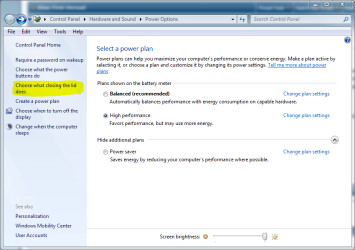
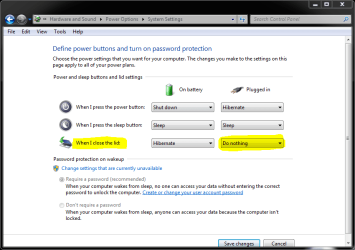
In my opinion, the fastest and easiest solution is just close the lid of your notebook. Right click power icon in notification area, choose Power Options. Click Choose what closing the lid does and set the value to Do nothing.

Just close the lid when you are watching a film on your external display.

Kari
 

Attachments

  • power_options1.PNG
    power_options1.PNG
    37.1 KB · Views: 60
  • close_lid.PNG
    close_lid.PNG
    24.7 KB · Views: 47

My Computer My Computer

Computer type
Laptop
Computer Manufacturer/Model Number
HP ENVY 17-1150eg
OS
Windows 10 Pro x64 EN-GB
CPU
1.6 GHz Intel Core i7-720QM Processor
Memory
6 GB
Graphics Card(s)
ATI Mobility Radeon HD 5850 Graphics
Sound Card
Beats sound system with integrated subwoofer
Monitor(s) Displays
17" laptop display, 22" LED and 32" Full HD TV through HDMI
Screen Resolution
1600*900 (1), 1920*1080 (2&3)
Hard Drives
Internal: 2 x 500 GB SATA Hard Disk Drive 7200 rpm
External: 2TB for backups, 3TB USB3 network drive for media
Cooling
As Envy runs a bit warm, I have it on a Cooler Master pad
Keyboard
Logitech diNovo Media Desktop Laser (bluetooth)
Mouse
Logitech Performance Mouse MX
Internet Speed
50/10 Mbps VDSL
Antivirus
Windows Defender 4.3.9431.0
Browser
Maxthon 3.5.2., IE11

Basically I’d like to be able to turn on and off (or blackout the screen or run screensaver) my notebooks display, as quickly as possible, while not effecting whatever is going on, on the external display.

As far as I am aware, what you want to do, cannot be done. You can run two different screensavers, but not work on one screen whilst the other is running a screensaver.
 

My Computer My Computer

Computer type
PC/Desktop
Computer Manufacturer/Model Number
Systems by SmartEyeball
OS
8 Pro x64
CPU
i7 3770K 4.6GHz
Motherboard
ASUS P8Z77 WS
Memory
16GB G.Skill Trident X 2666mhz
Graphics Card(s)
x2 EVGA 780 Ti Superclocked SLI
Sound Card
SB X-FI Surround 5.1 PRO USB / ATH-AD900 Headphones
Monitor(s) Displays
x3 Dell U2410 / 58" Samsung
Screen Resolution
5760*1200/ 1920*1200
Hard Drives
2x Intel 520 240GB (RAID 0) * 2x WD Caviar Blacks 2TB (RAID 0) * 2TB WD Caviar Black * Sony Optirac DVD
PSU
Silverstone Strider Evolution 1200W
Case
Thermaltake Level 10 GT Snow Edition
Cooling
Noctua NH-D14
Keyboard
Topre Realforce // Ducky Shine MX Black // Filco Ninja TKL
Mouse
Thermaltake Theron (Highly Recommended) + Razer Imperator
Antivirus
MSE
Browser
IE, FF, WaterFox
Other Info
GT Extreme V2 Sim Racing Cockpit + 40" LCD and K/B Mouse stand ▼
Fanatec CSR Elite Wheel + Clubsport V1 Pedals + CSR shifter/7G-H ▼Saitek X52 Pro ▼ TrackIR 5 Pro
Buttkicker v2 Seat Rumbler with Dedicated 5.1 and Sub Woofer attached to frame ▼
=
Bloody Big Grin
Sorry Ashma, smarteyeball is right. That is not possible, at least natively. The may be a third party app put there somewhere that will do that, and if you find one, please post back. Many people ask questions similar to that. It would be nice to get an answer.

Good luck!
 

My Computer My Computer

Computer Manufacturer/Model Number
Custom
OS
Windows 7 Professional x64
CPU
Intel i7 2600K OC'd @ 4620 MHz
Motherboard
Asus P8Z68-V Pro
Memory
16GB GSkill Sniper 2133 Mhz (4x4GB)
Graphics Card(s)
EVGA GeForce GTX 480 SuperClocked+
Sound Card
Realtek High Definition Audio
Monitor(s) Displays
2x Acer S273HLbmii 27"
Screen Resolution
2 x 1920x1080
Hard Drives
64GB Crucial M4 SSD

Storage: Hitachi 1TB 5400RPM, Samsung 1.5TB 5400RPM
PSU
Corsair HW Series 750w (modular)
Case
Cooler Master HAF 932 Advanced Blue Edition
Cooling
CM Hyper 212+ CPU cooler, 3x 230mm + 1x 140mm case fans
Keyboard
Logitech MK320 (wireless)
Mouse
Logitech MK320 (wireless)
Internet Speed
30 Mb/s : 2 Mb/s
Thanks for the response guys!

Kari, there have been too many times where I'll unplug and close my laptop while moving it to another room and forget that its in sleep when lid is closed mode and then have to wake it up. Sure waking up in Win7 is quick but I like having the lid set to do nothing.

Well so far what I was able to come up with was a program called Blackout 1.0: http://www.softpedia.com/get/Others/Miscellaneous/Blackout.shtml. I saved it to a folder I have setup for all my programs that don't have installs. Made a desktop shortcut for it and placed it in my True Launch Taskbar. So now when I'm watching a film or working on the external display, I can just click on the Blackout icon and it makes only my laptops display go black (with a small white text logo flashing slowly in the center). When I move my mouse back to my laptops screen and click, the screen comes back alive.

This is really great because I can type or click away on the external display but the blackout display on my notebook won't wake up until I move back to it. Only bug seems to be that after you activate Blackout and then wake up your screen, Blackout stays on the Taskbar but you can just right click and close it or use it again later to put the screen right back to sleep.

Only other option I'm toying with is UltraMon as the developer has given me instructions on installing the UltraMon screensaver in order to do some of what I’d like. So I'll see how that works out. I've been using UltraMon as well as DisplayFusion and even though DF seems to have more fans, I seem to favor UltraMon; will report back on all that later once I've made up my mind after more testing and tweaking.

Ash
 

My Computer My Computer

OS
Windows 7 64bit
Back
Top