
Switches and Routers.

macka7887

New member
Hey SevenForums.

I am planning on holding a LAN Party in a month or 2 and requier a bit of help because it is my first. About 6 - 10 people will be coming.

I need help on a few things and any imput people could put in would be greatly appreciated because I am very lost!

I was planning on purchasing a switch (Still not sure what to purchase yet. I am looking for something around 10 ports) and connecting it directly by a network cable to my Belkin Wireless G Universal Range Extender Router. Then connecting all the computers to the switch. All the computers connected to the switch will be running either XP, Vista or 7.

Is this going to work? What kind of settings am I going to need to change on the OS's to make them all be able to interact with each other in the games. Are their easier ways to do this?

I have no previous networking experience and am only 14, so go easy. :(

Mackenzie.
 

My Computer

Computer Manufacturer/Model Number
Custom Build.
OS
Windows 7 Ultimate 64-Bit Signature Edition Build 7600.
CPU
Intel E7400.
Motherboard
Asus P5KPL - AM/PS.
Memory
4.00GB DDR2 Ram.
Graphics Card(s)
Nvidia 8400 GS.
Monitor(s) Displays
2x 22" Inch AOC.
Screen Resolution
1680 x 1050.
Hard Drives
2x 500 GB Seagate.
1x 80GB Seagate.
Keyboard
Logitech G19.
Other Info
Logitech Z-5500 Speakers.
If all your mates machines have wireless capabilties, all you do is get them to log into your wireless network and instant networking and net access. Do they all have wireless?
 

My Computer

Computer Manufacturer/Model Number
Lenovo ThinkPad T60
OS
Windows 7 Ultimate 64Bit
CPU
GenuineIntel Intel(R) Core(TM) DuoCore T2400 @ 1.83GHz
Motherboard
Intel(R) 82801G (ICH7 Family)
Memory
2.00 GB
Graphics Card(s)
Mobile Intel(R) 945 Express Chipset
Sound Card
SoundMAX Integrated Digital HD Audio
Monitor(s) Displays
ThinkPad Display
Screen Resolution
1400x1050
Hard Drives
100Gb SATA
Keyboard
Standard Keyboard
Mouse
HID-compliant Mouse
Internet Speed
Cable Broadband - 54Mbps
Other Info
Intel(R) PRO/1000 PL Network Connection
11a/b/g Wireless LAN Mini PCI Express Adapter
If all your mates machines have wireless capabilties, all you do is get them to log into your wireless network and instant networking and net access. Do they all have wireless?

I was thinking of doing a wireless LAN but I thought that their would be more lag then doing a switch. But I don't really know because I have never done one before. Plus, I am pretty sure most of my friends computer won't have wireless cards, mine does but...

Thanks for the suggestion :)
 

My Computer

Computer Manufacturer/Model Number
Custom Build.
OS
Windows 7 Ultimate 64-Bit Signature Edition Build 7600.
CPU
Intel E7400.
Motherboard
Asus P5KPL - AM/PS.
Memory
4.00GB DDR2 Ram.
Graphics Card(s)
Nvidia 8400 GS.
Monitor(s) Displays
2x 22" Inch AOC.
Screen Resolution
1680 x 1050.
Hard Drives
2x 500 GB Seagate.
1x 80GB Seagate.
Keyboard
Logitech G19.
Other Info
Logitech Z-5500 Speakers.
I'm not sure about lags if you have 10 machines connecting to your home network at once, but wireless makes things extemely simple.
 

My Computer

Computer Manufacturer/Model Number
Lenovo ThinkPad T60
OS
Windows 7 Ultimate 64Bit
CPU
GenuineIntel Intel(R) Core(TM) DuoCore T2400 @ 1.83GHz
Motherboard
Intel(R) 82801G (ICH7 Family)
Memory
2.00 GB
Graphics Card(s)
Mobile Intel(R) 945 Express Chipset
Sound Card
SoundMAX Integrated Digital HD Audio
Monitor(s) Displays
ThinkPad Display
Screen Resolution
1400x1050
Hard Drives
100Gb SATA
Keyboard
Standard Keyboard
Mouse
HID-compliant Mouse
Internet Speed
Cable Broadband - 54Mbps
Other Info
Intel(R) PRO/1000 PL Network Connection
11a/b/g Wireless LAN Mini PCI Express Adapter
I'm not sure about lags if you have 10 machines connecting to your home network at once, but wireless makes things extemely simple.

Oh Okay thanks.

I have been reading an article and I think it pretty much was saying that you could do what I was thinking.

I have been looking at this switch. It seems to be what I am looking for.

I would still like conformation if anyone knows any more about this subject.

Thanks.
 

My Computer

Computer Manufacturer/Model Number
Custom Build.
OS
Windows 7 Ultimate 64-Bit Signature Edition Build 7600.
CPU
Intel E7400.
Motherboard
Asus P5KPL - AM/PS.
Memory
4.00GB DDR2 Ram.
Graphics Card(s)
Nvidia 8400 GS.
Monitor(s) Displays
2x 22" Inch AOC.
Screen Resolution
1680 x 1050.
Hard Drives
2x 500 GB Seagate.
1x 80GB Seagate.
Keyboard
Logitech G19.
Other Info
Logitech Z-5500 Speakers.
Hi Macca,

the link to the switch is the same as the lan party article, so I can't give you an opinion.

However, if you are unsure what to buy, you can always hire one.
 

My Computer

Computer Manufacturer/Model Number
Custom Hack job
OS
Windows 7 Ultimate 64 bit
CPU
Intel(R) Core(TM)2 Quad CPU Q8200 @ 2.33GHz
Motherboard
GigaByte EP45-UD3
Memory
8 GB Kingston
Graphics Card(s)
Nvidia GeForce 9600GT
Sound Card
Soundblaster Audigy
Monitor(s) Displays
AOC x2 22"
Hard Drives
2 x Samsung 500GB (RAID)
2 x Samsung 2TB
1 x WD Green 2TB
1 x Seagate 1TB
1 x Samsung 500GB
PSU
Thermaltake QFan 750W
Case
CM Scout Gaming
Cooling
Coolermaster V10
Keyboard
Microsoft Wireless Keyboard 1000
Mouse
Microsoft Wireless Optical 2000
Internet Speed
320
Other Info
Winfast PVR2000CP
LG DVD-RAM DVD/RW/DL Super Multi
Linksys WMP300Nx2 Wireless Adapter

My Computer

Computer Manufacturer/Model Number
Custom Build.
OS
Windows 7 Ultimate 64-Bit Signature Edition Build 7600.
CPU
Intel E7400.
Motherboard
Asus P5KPL - AM/PS.
Memory
4.00GB DDR2 Ram.
Graphics Card(s)
Nvidia 8400 GS.
Monitor(s) Displays
2x 22" Inch AOC.
Screen Resolution
1680 x 1050.
Hard Drives
2x 500 GB Seagate.
1x 80GB Seagate.
Keyboard
Logitech G19.
Other Info
Logitech Z-5500 Speakers.
I would certainly not use wireless for a LAN gaming party. Way too much lag, gaming is much better using wired connections IMO. The 8 port switches are much cheaper than a 16 port. You might be better off getting an 8 port and a 4 port switch as far as price is concerend. D-link is a good choice.
 

My Computer

Computer type
PC/Desktop
Computer Manufacturer/Model Number
Home built
OS
Windows 7 Ult, Windows 8.1 Pro,
CPU
Q9650-4.275GHz, E8600 4.5GHz, E6750-3.8GHz
Motherboard
Evga 780i FTW
Memory
G.Skill PC2 9600 1200Mhz 5 5 5 15 2T
Graphics Card(s)
GTX480
Sound Card
Asus Xonar D2
Monitor(s) Displays
HannsG
Screen Resolution
1680X1050
Hard Drives
GSkill Phoenix Pro 120GB SSD
PSU
ThermalTake Toughpower 1000Watt modular
Case
ThermalTake XaserV
Cooling
Xigmatek S1283
Keyboard
Logitech G15
Mouse
Logitech G9
Internet Speed
T1
Yes i didnt know he was doing a LAN party. Never housed one or been in one but a switch or even a hub should do it.
 

My Computer

Computer Manufacturer/Model Number
Lenovo ThinkPad T60
OS
Windows 7 Ultimate 64Bit
CPU
GenuineIntel Intel(R) Core(TM) DuoCore T2400 @ 1.83GHz
Motherboard
Intel(R) 82801G (ICH7 Family)
Memory
2.00 GB
Graphics Card(s)
Mobile Intel(R) 945 Express Chipset
Sound Card
SoundMAX Integrated Digital HD Audio
Monitor(s) Displays
ThinkPad Display
Screen Resolution
1400x1050
Hard Drives
100Gb SATA
Keyboard
Standard Keyboard
Mouse
HID-compliant Mouse
Internet Speed
Cable Broadband - 54Mbps
Other Info
Intel(R) PRO/1000 PL Network Connection
11a/b/g Wireless LAN Mini PCI Express Adapter
The switch you mention is cheap and simple. It's even got Auto Crossover so no need for cross over cabes, you can just use normal patch cables. Go for it I say. It's only a case of connecting the main router to the switch and providing all PC's with ethernet connections to the switch.
 

My Computer

Computer Manufacturer/Model Number
Acer Aspire 6920g
OS
Windows 7, Ubuntu 9.10, Vista
CPU
2.4Ghz
Motherboard
Acer Aspire 6920g
Memory
4GB
Graphics Card(s)
512MB NVIDIA GeForce 9500M
Sound Card
Integrated with Virtual Surround Sound & Dolby Home Theater
Hard Drives
320GB
Are they going to need Internet access.?

If so you can do that by just connecting an Ethernet cord (Cat5e) to your router..Then you don't have to worry about giving all the PCs IP Address as your router will assign them for you...(In most cases)

If you are not going to need internet access then a switch should work and thats really all you need..You would have to assign IP address manually..like 192.168.0.1, then .2,.3,.4,.5,.6,.7

Hope this Helps and Happy Holidays.:)
 

My Computer

Computer Manufacturer/Model Number
HP Pavilion dv5 Notebook PC
OS
Windows Seven x64
CPU
2.2 GHz Dual Core
Motherboard
Quanta 3600
Memory
4GB
Graphics Card(s)
ATI Mobility RADEON HD 3470
Sound Card
ATI
Monitor(s) Displays
Laptop
Hard Drives
ATA Hitachi HTS543215 (5400RPM)
Case
Laptop
Cooling
Fan
Internet Speed
Basic DSL 1.5 up and Down
The switch you mention is cheap and simple. It's even got Auto Crossover so no need for cross over cabes, you can just use normal patch cables. Go for it I say. It's only a case of connecting the main router to the switch and providing all PC's with ethernet connections to the switch.

I think I am going to go for that 16 port one. As you said it is very cheap. I was at my local electronic store today and they had an 8 for the same price as I can buy the D-Link 16 port. Their is definely a way I am going to be able to do it, it just might be quiet a lot of trial and error.

Are they going to need Internet access.?

If so you can do that by just connecting an Ethernet cord (Cat5e) to your router..Then you don't have to worry about giving all the PCs IP Address as your router will assign them for you...(In most cases)

If you are not going to need internet access then a switch should work and thats really all you need..You would have to assign IP address manually..like 192.168.0.1, then .2,.3,.4,.5,.6,.7

Hope this Helps and Happy Holidays.:)

Yeah all computers are going to need internet access.

For memory the router only has 4 or 5 ports on it.

I thought that a switch was going to let me have internet access and play LAN on games like on COD4...:huh:

I should also mention that my router has a DHCP server.

Merry Christmas :) :orb:
 

My Computer

Computer Manufacturer/Model Number
Custom Build.
OS
Windows 7 Ultimate 64-Bit Signature Edition Build 7600.
CPU
Intel E7400.
Motherboard
Asus P5KPL - AM/PS.
Memory
4.00GB DDR2 Ram.
Graphics Card(s)
Nvidia 8400 GS.
Monitor(s) Displays
2x 22" Inch AOC.
Screen Resolution
1680 x 1050.
Hard Drives
2x 500 GB Seagate.
1x 80GB Seagate.
Keyboard
Logitech G19.
Other Info
Logitech Z-5500 Speakers.
This is way easy and you've got it right... Purchase any hub/switch and run a cat5 from the router to the switch. Assuming that your router is setup as a DHCP server which usually the default, then all your users can plugin to the switch and DHCP will give them an address and they'll be on the net... :geek:
 

My Computer

Computer Manufacturer/Model Number
Home Grown
OS
Windows 7 Ultimate (64)
CPU
i7-2600K
Motherboard
Asus P8P67-M Pro
Memory
G.SKILL Ripjaws X Series 8GB (2 x 4GB)
Graphics Card(s)
ATI 5750
Sound Card
On-Board
Monitor(s) Displays
LG W2486L
Screen Resolution
1920X1080
Hard Drives
Intel X-25M 80 Gig SSD | Intel X-25M 160 Gig SSD | WD Black 500MB - External eSata
PSU
Zalman ZM770-XT 770 Watts
Case
Antec 180 mini
Cooling
Cooler Master V8
Internet Speed
15MB - Cable
Other Info
Sissy OC - 4.6 @ 1.3175 24/7 | 18' Idle - 55' Load
The switch you mention is cheap and simple. It's even got Auto Crossover so no need for cross over cabes, you can just use normal patch cables. Go for it I say. It's only a case of connecting the main router to the switch and providing all PC's with ethernet connections to the switch.

I think I am going to go for that 16 port one. As you said it is very cheap. I was at my local electronic store today and they had an 8 for the same price as I can buy the D-Link 16 port. Their is definely a way I am going to be able to do it, it just might be quiet a lot of trial and error.

Are they going to need Internet access.?

If so you can do that by just connecting an Ethernet cord (Cat5e) to your router..Then you don't have to worry about giving all the PCs IP Address as your router will assign them for you...(In most cases)

If you are not going to need internet access then a switch should work and thats really all you need..You would have to assign IP address manually..like 192.168.0.1, then .2,.3,.4,.5,.6,.7

Hope this Helps and Happy Holidays.:)

Yeah all computers are going to need internet access.

For memory the router only has 4 or 5 ports on it.

I thought that a switch was going to let me have internet access and play LAN on games like on COD4...:huh:

I should also mention that my router has a DHCP server.

Merry Christmas :) :orb:


You should be fine then, your router will do all the Hard work for you:p like win7clutz said you can just plug one cable from the router to the switch and now when any computer connects to the switch they all have Internet access..
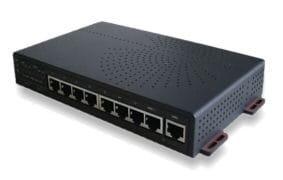
Hope this Helps..:)
 

My Computer

Computer Manufacturer/Model Number
HP Pavilion dv5 Notebook PC
OS
Windows Seven x64
CPU
2.2 GHz Dual Core
Motherboard
Quanta 3600
Memory
4GB
Graphics Card(s)
ATI Mobility RADEON HD 3470
Sound Card
ATI
Monitor(s) Displays
Laptop
Hard Drives
ATA Hitachi HTS543215 (5400RPM)
Case
Laptop
Cooling
Fan
Internet Speed
Basic DSL 1.5 up and Down
Just get an ethernet hub like this. I would thinkthe back has an ethernet port that you plug into one of your 4 ports on the router.

Unless you go and get it and try, you'll die wondering. :p
 

Attachments

  • Hub100.jpg
    Hub100.jpg
    6.8 KB · Views: 86

My Computer

Computer Manufacturer/Model Number
Lenovo ThinkPad T60
OS
Windows 7 Ultimate 64Bit
CPU
GenuineIntel Intel(R) Core(TM) DuoCore T2400 @ 1.83GHz
Motherboard
Intel(R) 82801G (ICH7 Family)
Memory
2.00 GB
Graphics Card(s)
Mobile Intel(R) 945 Express Chipset
Sound Card
SoundMAX Integrated Digital HD Audio
Monitor(s) Displays
ThinkPad Display
Screen Resolution
1400x1050
Hard Drives
100Gb SATA
Keyboard
Standard Keyboard
Mouse
HID-compliant Mouse
Internet Speed
Cable Broadband - 54Mbps
Other Info
Intel(R) PRO/1000 PL Network Connection
11a/b/g Wireless LAN Mini PCI Express Adapter
Ah okay. Thanks for the help anyone. I will post back with the results and any questions I have.

Thanks Again :)
 

My Computer

Computer Manufacturer/Model Number
Custom Build.
OS
Windows 7 Ultimate 64-Bit Signature Edition Build 7600.
CPU
Intel E7400.
Motherboard
Asus P5KPL - AM/PS.
Memory
4.00GB DDR2 Ram.
Graphics Card(s)
Nvidia 8400 GS.
Monitor(s) Displays
2x 22" Inch AOC.
Screen Resolution
1680 x 1050.
Hard Drives
2x 500 GB Seagate.
1x 80GB Seagate.
Keyboard
Logitech G19.
Other Info
Logitech Z-5500 Speakers.
Back
Top