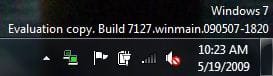
M$ Please bing back animated network icons etc.

I miss the tiny double-monitor network icon from XP terribly. It was a great indicator of things going well and things gone wrong. I don't want to give over desk space to meters or gadgets -- I want as little infringing on my work area as possible. That little icon was prefect for the job at hand.


+1

Yep, I absolutely agree, I miss it too, it was perfect in XP, and then in Vista they changed it just for the sake change, not better functionality, and in 7 it is even worse :mad:

So MS you better bring it back....pretty please :)
 

My Computer My Computer

Computer Manufacturer/Model Number
custom built
OS
Windows 7 Home Basic 64bit
CPU
Intel Core 2 Duo 6420 (2.13 Ghz)
Motherboard
Asus P5B-E Plus
Memory
2x1 GB Kingston KVR DDR2 800Mhz
Graphics Card(s)
Saphire ATI HD4870 512MB
Sound Card
Creative Audigy 4 PCI
Monitor(s) Displays
Samsung SyncMaster T220
Screen Resolution
1680x1050
Hard Drives
WD 320GB (Sata2)
Maxtor 250GB (ATA133)
Maxtor 80GB (ATA133)
PSU
Coolermaster Silent Pro 700Watt
Case
Chieftec midi tower case
Cooling
stock cpu cooler/fan
Keyboard
Logitech UltraX Premium Keyboard (usb 2.0)
Mouse
Logitech MX518 gaming grade optical mouse 1800dpi(usb2.0)
You liked the animated paperclip? I hated it.

However, I miss the tiny double-monitor network icon from XP terribly. It was a great indicator of things going well and things gone wrong. I don't want to give over desk space to meters or gadgets -- I want as little infringing on my work area as possible. That little icon was prefect for the job at hand.
This is exactly what i am saying and yes XP was the best animation. Just like that income outgoing thing.

For anyone who actually misses clippy - Here you go,

View attachment 8158

As for the network animation I think one reason it was removed from Windows 7 was that the Vista one caused so many support calls and forum posts due to it either not working or indicating an incorrect status.

Now that may not be a great reason for the change but I can understand the reasoning. I have lost count of the times I've been told "I've got a red X in the tray" on systems with perfectly working networks.

Windows 7 does have animation for the Wireless network icon of course where it indicates signal strength.

yes have had that a lot too, so why not just re-do the XP one that worked so well.

Does anyone else see the irony in starting a thread title with "M$" and then saying, "Please".

Yeah ok point taken. lol
 
Last edited by a moderator:

My Computer My Computer

Computer Manufacturer/Model Number
Home Built / Acer Aspire 7720G Laptop
OS
Windows 7 Build 7600 Laptop and desktop. Also OSX 10.5.7 and 10.6 Snow on Laptop
CPU
AMD Athlon64 Dual core 4200+ / Laptop T5750
Motherboard
Gigabyte / Acer Aspire
Memory
2 x 1Gb = 2 Gb / acer 3GB
Graphics Card(s)
Geforce 8600GT / Geforce 9300M G 256Mb
Sound Card
Terratec DMX 6fire for Music production and X-Fi Xtreme
Monitor(s) Displays
2 x 17" (Dell and Compaq) / 17" WXGA Laptop Screen
Screen Resolution
1280x1024 / 1440x900 (Full HD when conneced to 32" LCD)
Hard Drives
2x Sata 160GB 2x USB 300Gb 1x 160Gb IDE 1x USB 1TB / 250Gb Sata Laptop with Blu-ray drive
PSU
400W + Not 100% sure
Keyboard
Logitech Cordless Keyboard
Mouse
Logitech Mx 700
Internet Speed
20 Meg Down / 1 Meg up Cable
Other Info
Konica Minolta Colour Laser printer, Epson Stylus R360 (Mostly used for printing on CD's/DVD's), Cannon Scanner, Mercury surround system, about 6 external hard drives all 200Gb plus along with the normall home entertainment stuff attached.... DBox 2, XBox 360, etc. etc.
@ Studulike can you please use the Multi Quote instead of making multiple post.
 

My Computer My Computer

Computer Manufacturer/Model Number
Home Brew
OS
Windows 7 Ultimate Vista Ultimate x64
CPU
Core 2 Duo E8500 3.16Ghz @ 3.8Ghz
Motherboard
eVGA 750i FTW
Memory
2x2Gigs Patriot PC2-6400 LL
Graphics Card(s)
Inno3D GeForce GTX260 216 SP
Monitor(s) Displays
ASUS VW222U 22" 2ms Response time
Screen Resolution
1680x1050
Hard Drives
SATA 150GB
SATA II 250GB
USB IDE 750GB Ext.
PSU
HYTEC 600W & Thermaltake 650W Toughpower Power Exp
Case
Thermaltake Armor LCS (Liquid Cooling System)
Cooling
Liquid Cooling System
Keyboard
Logitech G15 Gaming Keyboard
Mouse
Logitech G9 Gaming Mouse

My Computer My Computer

Computer Manufacturer/Model Number
Home Built / Acer Aspire 7720G Laptop
OS
Windows 7 Build 7600 Laptop and desktop. Also OSX 10.5.7 and 10.6 Snow on Laptop
CPU
AMD Athlon64 Dual core 4200+ / Laptop T5750
Motherboard
Gigabyte / Acer Aspire
Memory
2 x 1Gb = 2 Gb / acer 3GB
Graphics Card(s)
Geforce 8600GT / Geforce 9300M G 256Mb
Sound Card
Terratec DMX 6fire for Music production and X-Fi Xtreme
Monitor(s) Displays
2 x 17" (Dell and Compaq) / 17" WXGA Laptop Screen
Screen Resolution
1280x1024 / 1440x900 (Full HD when conneced to 32" LCD)
Hard Drives
2x Sata 160GB 2x USB 300Gb 1x 160Gb IDE 1x USB 1TB / 250Gb Sata Laptop with Blu-ray drive
PSU
400W + Not 100% sure
Keyboard
Logitech Cordless Keyboard
Mouse
Logitech Mx 700
Internet Speed
20 Meg Down / 1 Meg up Cable
Other Info
Konica Minolta Colour Laser printer, Epson Stylus R360 (Mostly used for printing on CD's/DVD's), Cannon Scanner, Mercury surround system, about 6 external hard drives all 200Gb plus along with the normall home entertainment stuff attached.... DBox 2, XBox 360, etc. etc.
A substitute: NetWorx from SoftPerfect . . .

Check out NetWorx from Bandwidth monitor, bandwidth speed test, bandwidth and traffic monitoring tool for Windows. It's not exactly a replacement for the XP network activity icon; but it serves almost the same function and gives a lot of additional information as well. There are lots of configuration settings. Seems to work perfectly with Win 7 x64 (both 7000 and 7077). I have it monitoring all ethernet activity and set the graph to display as the system system tray icon. I also changed the colors to green for iincoming, red for outgoing and yellow for both. That way, should the icon suddenly start displaying a lot of red when I'm not sending data, I'll know something is wrong.
 

My Computer My Computer

Computer Manufacturer/Model Number
home brew
OS
Win.7.Ult.x64
CPU
Intel Core i7 970
Motherboard
Gigabyte GA-X58-UD5
Memory
12GB (6x2GB) OCZ Platinum DDR3 1600
Graphics Card(s)
Gigabyte GV-R485MC-1GH, ATI 4850, 1GB GDDR3, passive cooler
Sound Card
(on-board) Speakers - Klipsch ProMedia 2.1
Monitor(s) Displays
2x Dell U2410 (H-IPS)
Screen Resolution
1920x1200, 1920x1200
Hard Drives
System = Intel 320 160GB SSD --
Data = 2x WD2002FAEX, RAID1 (ICH10R) --
Backup = 5x WD20EARS (eSata port) --
Add'l Storage = 8x WD20EARS, RAID6 (Adaptec 5805)
PSU
PCP&C S75QB
Case
Lian Li PC-V2010B + EX-H34 expansion HD cage
Cooling
Xigmatek HDT-1283 heatsink & bracket + Scythe S-Flex SFF21E
Keyboard
Das Keyboard Professional, Logitech UltraX
Mouse
Logitech G400
Internet Speed
6.85 Mb/s down, 0.35 Mb/s up (typical)
Other Info
Pioneer DVR-217DBK burner --
stock Lian Li case fans + BS-06 PCI 140mm exhaust (all set on 'low')
1+
for the animated network icon in XP. it was the best.
 

My Computer My Computer

Computer Manufacturer/Model Number
DIY
OS
Windows 7 x64
CPU
Intel Core 2 Duo E6750
Motherboard
Gigabyte GA-P35-DS3-L V2.0
Memory
4GB G.Skill PC2-8500
Graphics Card(s)
eVGA GTX 460
Sound Card
Auzentech X-Fi Prelude 7.1
Monitor(s) Displays
Envision 2219S-1 (22")
Screen Resolution
1680x1050
Hard Drives
Samsung 750GB [SATA 2] //
Seagate FreeAgent Go 500GB
PSU
Corsair CX400
Case
Raidmax Sagitta
Cooling
Stock
Keyboard
HP Wireless Elite
Mouse
Logitech G7 Gaming Mouse
Internet Speed
1Mbit
Other Info
*Gaming Input: xBox 360 Controller + Logitech Rumblepad 2 Cordless
*Speakers: Logitech Z5500
*Headphones: Sennheiser HD555
Check out NetWorx from Bandwidth monitor, bandwidth speed test, bandwidth and traffic monitoring tool for Windows. It's not exactly a replacement for the XP network activity icon; but it serves almost the same function and gives a lot of additional information as well. There are lots of configuration settings. Seems to work perfectly with Win 7 x64 (both 7000 and 7077). I have it monitoring all ethernet activity and set the graph to display as the system system tray icon. I also changed the colors to green for iincoming, red for outgoing and yellow for both. That way, should the icon suddenly start displaying a lot of red when I'm not sending data, I'll know something is wrong.

Will take a look thanks.
 

My Computer My Computer

Computer Manufacturer/Model Number
Home Built / Acer Aspire 7720G Laptop
OS
Windows 7 Build 7600 Laptop and desktop. Also OSX 10.5.7 and 10.6 Snow on Laptop
CPU
AMD Athlon64 Dual core 4200+ / Laptop T5750
Motherboard
Gigabyte / Acer Aspire
Memory
2 x 1Gb = 2 Gb / acer 3GB
Graphics Card(s)
Geforce 8600GT / Geforce 9300M G 256Mb
Sound Card
Terratec DMX 6fire for Music production and X-Fi Xtreme
Monitor(s) Displays
2 x 17" (Dell and Compaq) / 17" WXGA Laptop Screen
Screen Resolution
1280x1024 / 1440x900 (Full HD when conneced to 32" LCD)
Hard Drives
2x Sata 160GB 2x USB 300Gb 1x 160Gb IDE 1x USB 1TB / 250Gb Sata Laptop with Blu-ray drive
PSU
400W + Not 100% sure
Keyboard
Logitech Cordless Keyboard
Mouse
Logitech Mx 700
Internet Speed
20 Meg Down / 1 Meg up Cable
Other Info
Konica Minolta Colour Laser printer, Epson Stylus R360 (Mostly used for printing on CD's/DVD's), Cannon Scanner, Mercury surround system, about 6 external hard drives all 200Gb plus along with the normall home entertainment stuff attached.... DBox 2, XBox 360, etc. etc.
Check out NetWorx from Bandwidth monitor, bandwidth speed test, bandwidth and traffic monitoring tool for Windows. It's not exactly a replacement for the XP network activity icon; but it serves almost the same function and gives a lot of additional information as well. There are lots of configuration settings. Seems to work perfectly with Win 7 x64 (both 7000 and 7077). I have it monitoring all ethernet activity and set the graph to display as the system system tray icon. I also changed the colors to green for iincoming, red for outgoing and yellow for both. That way, should the icon suddenly start displaying a lot of red when I'm not sending data, I'll know something is wrong.

Thank you mate, this is a very useful little app, i downloaded it (both the install version and the portable version) and i like it very much. And it is free too, i love it.
:geek:


Though i would still like for MS to give us our beloved little animated network/internet tray icons back. :cry:
 

My Computer My Computer

Computer Manufacturer/Model Number
custom built
OS
Windows 7 Home Basic 64bit
CPU
Intel Core 2 Duo 6420 (2.13 Ghz)
Motherboard
Asus P5B-E Plus
Memory
2x1 GB Kingston KVR DDR2 800Mhz
Graphics Card(s)
Saphire ATI HD4870 512MB
Sound Card
Creative Audigy 4 PCI
Monitor(s) Displays
Samsung SyncMaster T220
Screen Resolution
1680x1050
Hard Drives
WD 320GB (Sata2)
Maxtor 250GB (ATA133)
Maxtor 80GB (ATA133)
PSU
Coolermaster Silent Pro 700Watt
Case
Chieftec midi tower case
Cooling
stock cpu cooler/fan
Keyboard
Logitech UltraX Premium Keyboard (usb 2.0)
Mouse
Logitech MX518 gaming grade optical mouse 1800dpi(usb2.0)
1+

one more for the animated network icon in XP (it was really eXPerience)
 

My Computer My Computer

OS
Windows 7 ultimate
Check out NetWorx from Bandwidth monitor, bandwidth speed test, bandwidth and traffic monitoring tool for Windows. It's not exactly a replacement for the XP network activity icon; but it serves almost the same function and gives a lot of additional information as well. There are lots of configuration settings. Seems to work perfectly with Win 7 x64 (both 7000 and 7077). I have it monitoring all ethernet activity and set the graph to display as the system system tray icon. I also changed the colors to green for iincoming, red for outgoing and yellow for both. That way, should the icon suddenly start displaying a lot of red when I'm not sending data, I'll know something is wrong.
thanks you for this very useful app. it is very customizable too. nice! :geek:
 

My Computer My Computer

Computer Manufacturer/Model Number
DIY
OS
Windows 7 x64
CPU
Intel Core 2 Duo E6750
Motherboard
Gigabyte GA-P35-DS3-L V2.0
Memory
4GB G.Skill PC2-8500
Graphics Card(s)
eVGA GTX 460
Sound Card
Auzentech X-Fi Prelude 7.1
Monitor(s) Displays
Envision 2219S-1 (22")
Screen Resolution
1680x1050
Hard Drives
Samsung 750GB [SATA 2] //
Seagate FreeAgent Go 500GB
PSU
Corsair CX400
Case
Raidmax Sagitta
Cooling
Stock
Keyboard
HP Wireless Elite
Mouse
Logitech G7 Gaming Mouse
Internet Speed
1Mbit
Other Info
*Gaming Input: xBox 360 Controller + Logitech Rumblepad 2 Cordless
*Speakers: Logitech Z5500
*Headphones: Sennheiser HD555
Animated XP Icon Network for Win7

Here is the solution: Lan Lights

 
Last edited:

My Computer My Computer

OS
Windows 7 RC
pretty cool...

Capture9.JPG
 

My Computer My Computer

Computer Manufacturer/Model Number
Dell Vostro 1000
OS
Windows 7 Ultimate x86
CPU
AMD Sempron 3600+
Graphics Card(s)
ATI Radeon Xpress 1150
Monitor(s) Displays
Generic PnP Monitor
Screen Resolution
1200 x 800
Hard Drives
WD Scorpio Blue 500 GB (WD5000BEVT)
Mouse
Logitech V320 Cordless Optical Mouse

My Computer My Computer

Computer Manufacturer/Model Number
Self Build
OS
Windows 7 Pro 64-bit
CPU
AMD ADA5600CZBOX Dual-Core 2.8GHz
Motherboard
Gigabyte GA-MA77
Memory
8 Gig OCZ
Graphics Card(s)
Asus Geforce 8600GT PCIe
Sound Card
Onboard & MIA
Monitor(s) Displays
Dell 19"
Screen Resolution
1440 x 900
Hard Drives
3 160 Gig Western Digital (2 SATA/1 IDE)
PSU
Corsair CMPSU-550VX
Case
Antec (Server Case)
Cooling
Thermaltake on the CPU, Cooler Master case fans
Keyboard
MS Comfort Curve 2000
Mouse
Logitech LX3
Internet Speed
6-meg (if I'm lucky)
Other Info
AT&T ADSL - Westell 6100 modem, MSE, Defender, MS Office 2003, Paintshop Pro 11, Browsers: IE8, Opera, Safari
Excellent. Trying it out now. For an OS that is touted as Microsoft's most secure to date, the omission of an animated network icon is, in my opinion, a design flaw. It is useful to see if there is any unwarranted network activity as it could be the first indication of untoward system activity.
 

My Computer My Computer

Computer type
PC/Desktop
Computer Manufacturer/Model Number
Dwarf Dwf/11/2012 r09/2013
OS
Windows 8.1 Pro RTM x64
CPU
Intel Core-i5-3570K 4-core @ 3.4GHz (Ivy Bridge) (OC 4.4GHz)
Motherboard
ASRock Z77 Extreme4-M
Memory
4 x 4GB DDR3-1600 Corsair Vengeance CMZ8GX3M2A1600C9B (16GB)
Graphics Card(s)
MSI GeForce GTX770 Gaming OC 2GB
Sound Card
Realtek High Definition on board solution (ALC 898)
Monitor(s) Displays
ViewSonic VA1912w Widescreen (VGA)
Screen Resolution
1440x900
Hard Drives
OCZ Agility 3 SSD 120GB SATA III x2 (RAID 0)
Samsung HD501LJ 500GB SATA II x2
Hitachi HDS721010CLA332 1TB SATA II
Iomega 1.5TB Ext USB 2.0
WD 2.0TB Ext USB 3.0
PSU
XFX Pro Series 850W Semi-Modular
Case
Gigabyte IF233
Cooling
1 x 120mm Front Inlet 1 x 120mm Rear Exhaust
Keyboard
Microsoft Comfort Curve Keyboard 3000 (USB)
Mouse
Microsoft Comfort Mouse 3000 for Business (USB)
Internet Speed
NetGear DG834Gv3 ADSL Modem/Router (Ethernet) ~4.0 Mb/s (O2)
Antivirus
Avast! 8.0.1497
Browser
IE 11
Other Info
Optical Drive: HL-DT-ST BD-RE BH10LS30 SATA Bluray
Lexmark S305 Printer/Scanner/Copier (USB)
WEI Score: 8.1/8.1/8.5/8.5/8.25
Asus Eee PC 1011PX Netbook (Windows 7 x86 Starter)

My Computer My Computer

Computer Manufacturer/Model Number
MSI GX660r
OS
Windows 7 Home Premium x64
CPU
Intel Core i7 740qm
Memory
6GB DDR3
Graphics Card(s)
ATI Radeon HD 5870 1GB DDR5
Screen Resolution
1920*1080
Hard Drives
2x320 GB Western Digital Scorpio Blue in Raid 0
Cooling
Rocketfish Laptop Cooling Pad
Keyboard
Logitech G11 Multimedia Gaming Keyboard
Mouse
Logitech G9 Wired Precision Gaming Mouse
Other Info
Logitech x-540 5.1 Speaker System
It's actually the same one. ;)
 

My Computer My Computer

Computer type
PC/Desktop
Computer Manufacturer/Model Number
Dwarf Dwf/11/2012 r09/2013
OS
Windows 8.1 Pro RTM x64
CPU
Intel Core-i5-3570K 4-core @ 3.4GHz (Ivy Bridge) (OC 4.4GHz)
Motherboard
ASRock Z77 Extreme4-M
Memory
4 x 4GB DDR3-1600 Corsair Vengeance CMZ8GX3M2A1600C9B (16GB)
Graphics Card(s)
MSI GeForce GTX770 Gaming OC 2GB
Sound Card
Realtek High Definition on board solution (ALC 898)
Monitor(s) Displays
ViewSonic VA1912w Widescreen (VGA)
Screen Resolution
1440x900
Hard Drives
OCZ Agility 3 SSD 120GB SATA III x2 (RAID 0)
Samsung HD501LJ 500GB SATA II x2
Hitachi HDS721010CLA332 1TB SATA II
Iomega 1.5TB Ext USB 2.0
WD 2.0TB Ext USB 3.0
PSU
XFX Pro Series 850W Semi-Modular
Case
Gigabyte IF233
Cooling
1 x 120mm Front Inlet 1 x 120mm Rear Exhaust
Keyboard
Microsoft Comfort Curve Keyboard 3000 (USB)
Mouse
Microsoft Comfort Mouse 3000 for Business (USB)
Internet Speed
NetGear DG834Gv3 ADSL Modem/Router (Ethernet) ~4.0 Mb/s (O2)
Antivirus
Avast! 8.0.1497
Browser
IE 11
Other Info
Optical Drive: HL-DT-ST BD-RE BH10LS30 SATA Bluray
Lexmark S305 Printer/Scanner/Copier (USB)
WEI Score: 8.1/8.1/8.5/8.5/8.25
Asus Eee PC 1011PX Netbook (Windows 7 x86 Starter)
I really don't see the appeal of having a tiny animated icon. Your network not working? Would be obvious if you are not getting a connection or nothing is loading...right? Maybe it just me where I don't care to know ever little ounce of information about what my computer may or may not be doing and actually do some work instead of watching an animated icon....just saying...
 

My Computer My Computer

Computer type
PC/Desktop
Computer Manufacturer/Model Number
Alienware Aurora ALX R4
OS
Windows 10 Pro (x64)
CPU
Intel Core i7-3930K (3.2GHz - 4.5GHz)
Motherboard
Alienware Aurora-R4 x79
Memory
4x Samsung 4GB PC3-12800 DDR3 (16GB 1600MHz)
Graphics Card(s)
Nvidia Geforce GTX 690
Sound Card
SteelSeries Siberia Elite
Monitor(s) Displays
Dell UltraSharp U3011
Screen Resolution
2560x1600
Hard Drives
Samsung 850 Pro 256 GB, Seagate 1TB Desktop Hybrid HDD, 2x Western Digital 4TB Green HDD
PSU
875W Some Dell PSU <.<
Case
Alienware Aurora ALX
Cooling
Custom Liquid Cooling (EK CPU & GPU blocks) dual EK 480RAD
Keyboard
Logitech G710+ Mechanical
Mouse
Logitech G700s
Internet Speed
Verizon Fios (50 mbps average)
Other Info
Server: Intel NUC D54250WYK: i5-4250U, 16GB, 256 GB mSATA, Windows Server 2012 R2
I really don't see the appeal of having a tiny animated icon. Your network not working? Would be obvious if you are not getting a connection or nothing is loading...right? Maybe it just me where I don't care to know ever little ounce of information about what my computer may or may not be doing and actually do some work instead of watching an animated icon....just saying...
as stated above... It is useful to see if there is any unwarranted network activity
 

My Computer My Computer

Computer Manufacturer/Model Number
Self Build
OS
Windows 7 Pro 64-bit
CPU
AMD ADA5600CZBOX Dual-Core 2.8GHz
Motherboard
Gigabyte GA-MA77
Memory
8 Gig OCZ
Graphics Card(s)
Asus Geforce 8600GT PCIe
Sound Card
Onboard & MIA
Monitor(s) Displays
Dell 19"
Screen Resolution
1440 x 900
Hard Drives
3 160 Gig Western Digital (2 SATA/1 IDE)
PSU
Corsair CMPSU-550VX
Case
Antec (Server Case)
Cooling
Thermaltake on the CPU, Cooler Master case fans
Keyboard
MS Comfort Curve 2000
Mouse
Logitech LX3
Internet Speed
6-meg (if I'm lucky)
Other Info
AT&T ADSL - Westell 6100 modem, MSE, Defender, MS Office 2003, Paintshop Pro 11, Browsers: IE8, Opera, Safari
as stated above... It is useful to see if there is any unwarranted network activity
There is always network traffic. Just idling watching a packet scanner there is a dozen different kinds of legitimate traffic going on, to and from your computer. A little flashing icon tells you nothing you don't already know.
 

My Computer My Computer

Computer type
PC/Desktop
Computer Manufacturer/Model Number
Alienware Aurora ALX R4
OS
Windows 10 Pro (x64)
CPU
Intel Core i7-3930K (3.2GHz - 4.5GHz)
Motherboard
Alienware Aurora-R4 x79
Memory
4x Samsung 4GB PC3-12800 DDR3 (16GB 1600MHz)
Graphics Card(s)
Nvidia Geforce GTX 690
Sound Card
SteelSeries Siberia Elite
Monitor(s) Displays
Dell UltraSharp U3011
Screen Resolution
2560x1600
Hard Drives
Samsung 850 Pro 256 GB, Seagate 1TB Desktop Hybrid HDD, 2x Western Digital 4TB Green HDD
PSU
875W Some Dell PSU <.<
Case
Alienware Aurora ALX
Cooling
Custom Liquid Cooling (EK CPU & GPU blocks) dual EK 480RAD
Keyboard
Logitech G710+ Mechanical
Mouse
Logitech G700s
Internet Speed
Verizon Fios (50 mbps average)
Other Info
Server: Intel NUC D54250WYK: i5-4250U, 16GB, 256 GB mSATA, Windows Server 2012 R2
I agree

I agree bring back the network flash as in XP why waste space, memory etc with a gadget

Cmon Bill fix this
 

My Computer My Computer

OS
windows 7 home premium
Back
Top