Cant Install XP over Windows 7?

ericerics

New member
Local time
10:27 AM
Messages
25
Hi im using windows 7 atm but i dont like it at all. the visuals are great and it looks amazing but the folder setups and everything else is too much alike vista. the whole reason i sticked with XP throughout the vista phase was because i didnt like anything about vista, nothing about vista at all.

So i've decided to go back to XP but now windows 7 wont let me install XP because it says my current OS is newer and its blocking me from installing XP...

What should i do? someone help me please :(

ps. i dont have two OS's on my computer
 

My Computer My Computer

Computer Manufacturer/Model Number
GA-MA785GM-US2H
OS
Windows 7
CPU
AMD athlon(tm) II X2 245 Processor (2 CPUS), ~2.9GHz
Motherboard
Gigabyte Technology Co., Ltd.
Memory
2048MB RAM
Graphics Card(s)
ATI Radeon HD 4200
Hi im using windows 7 atm but i dont like it at all. the visuals are great and it looks amazing but the folder setups and everything else is too much alike vista. the whole reason i sticked with XP throughout the vista phase was because i didnt like anything about vista, nothing about vista at all.

So i've decided to go back to XP but now windows 7 wont let me install XP because it says my current OS is newer and its blocking me from installing XP...

What should i do? someone help me please :(

ps. i dont have two OS's on my computer

If you used the upgrade version to get Win 7, XP is no longer available for use.
 

My Computer My Computer

Computer type
PC/Desktop
Computer Manufacturer/Model Number
Dell XPS 420
OS
Windows 10, Home Clean Install
CPU
Intel Core2 processsor Q8200(2.33Ghz 1333FSB) Quad Core Tech
Motherboard
Dell
Memory
6 gb
Graphics Card(s)
ATI Radeon 256MB HD3650
Sound Card
Intergrated 7.1 Channel Audio
Monitor(s) Displays
Dell SP2009W 20"
Hard Drives
640 GB Serial ATA Hard drive
Cooling
Fan
Keyboard
Dell USB Keyboard
Mouse
Dell Premium Optical USB
Internet Speed
DSL 2.85
is there a way where i can just unstall the windows 7 OS?
 

My Computer My Computer

Computer Manufacturer/Model Number
GA-MA785GM-US2H
OS
Windows 7
CPU
AMD athlon(tm) II X2 245 Processor (2 CPUS), ~2.9GHz
Motherboard
Gigabyte Technology Co., Ltd.
Memory
2048MB RAM
Graphics Card(s)
ATI Radeon HD 4200
You have to reformat the drive. back-up all important stuff and use Darik's BOOT and NUKE.
 

My Computer My Computer

Computer type
PC/Desktop
Computer Manufacturer/Model Number
Custom Build
OS
Windows 7 Pro 64 bit
CPU
Intel i5 4670K
Motherboard
MSI Z87-GD65
Memory
16 Gb Corsair Vengeance 1600 DDR3
Graphics Card(s)
Evga GTX760 SLI
Sound Card
HD audio
Monitor(s) Displays
24 inch AOC
Screen Resolution
1920x1080
Hard Drives
Samsung 830 128GB ssd Windows 7
Samsung 830 128GB ssd Windows 8
Seagate 2TB Data and Backup
PSU
750 watt Corsair
Case
Corsair Obsidian 750D
Cooling
Corsair H110 watercooling
Keyboard
Logitech MK710
Mouse
Logitech M705
Internet Speed
50Mbps
Antivirus
MSE
Browser
Chrome
is there a way where i can just unstall the windows 7 OS?

This is an area that I really do not have too much experience, but I have read many times in this forum, that when you upgrade the upgraded OS (XP) has the key deactivated.

If I am right I would like to offer an alternative. If you don't like the icons, or color or aero effect and it cannot be changed, then we cannot help. . I love the OS, as most of the highly proficient, and intelligent people, on this site do too. I have read 100's of posts, some complaints, but no one wants to switch back.

Win 7 does support the classical look, maybe that is more to your liking? We can help you there.

We have real experts here that can help you tweek the system to be more to yourliking. Let us know your needs.

Everyone here gets their satisfaction from helping, I would enjoy helping if I can.
 

My Computer My Computer

Computer type
PC/Desktop
Computer Manufacturer/Model Number
Dell XPS 420
OS
Windows 10, Home Clean Install
CPU
Intel Core2 processsor Q8200(2.33Ghz 1333FSB) Quad Core Tech
Motherboard
Dell
Memory
6 gb
Graphics Card(s)
ATI Radeon 256MB HD3650
Sound Card
Intergrated 7.1 Channel Audio
Monitor(s) Displays
Dell SP2009W 20"
Hard Drives
640 GB Serial ATA Hard drive
Cooling
Fan
Keyboard
Dell USB Keyboard
Mouse
Dell Premium Optical USB
Internet Speed
DSL 2.85
Rich is of course corrrect. If you upgraded from XP pro to win7 MS deactivates the XP license
 

My Computer My Computer

Computer Manufacturer/Model Number
HP Pavillion dv-7 1005 Tx
OS
Win 8 Release candidate 8400
CPU
[email protected]
Memory
4 gigs
Graphics Card(s)
Nvidia 9600M
Sound Card
HD built-in
Monitor(s) Displays
17" Wxga
Screen Resolution
1440x900
Cooling
none
Internet Speed
45Mb down 5Mb up
is there a way where i can just unstall the windows 7 OS?

Hi there
EASY - at leats two different methods

1) download GPARTED
2) Re partition / format drive
3) Re-install Windows XP from the install CD.

Other method

Boot up a Dos disk / CD
run Fixmbr
now boot from Windows XP disk and install.


These licensing issues are a NON ISSUE -- you can always enter your old license code (on the ORIGINAL COMPUTER) of course -- no probs.

Even if there were just explain to MS via Phone licensing that W7 still has some issues and you need to revert back to XP for while.

I can't understand some of the posts here -- obviously people have READ stuff but actually haven't DONE IT yet.

I can assure all you peeps out there I've installed a load of this stuff till I'm blue in the face and have never had any serious licensing probs with Microsoft.

Cheers
jimbo
 

My Computer My Computer

Computer type
PC/Desktop
Computer Manufacturer/Model Number
Custom built, several laptops HP/ASUS
OS
Linux CENTOS 7 / various Windows OS'es and servers
CPU
Intel i7 Intel i5
Memory
8GB, 16GB
Graphics Card(s)
On Motherboard
Sound Card
Realtek HD audio
Monitor(s) Displays
Apple Cinema display, Samsung LCD
Screen Resolution
1920 X 1080
Hard Drives
4 X 1TB SATA
Mouse
Toshiba wireless laser
Internet Speed
> 20MB up
It is unfortunate that you cannot get along with Windows7 - it is so much better than XP that you will be really missing something. But so be it. I think you have 2 scenarios possible.

1. if you still have your XP installation disk, you might want to give Microsoft a call so that they reactivate you XP product key - because as was said, it has been used for the Win7 upgrade (if it is that what you did).
2. You buy yourself a new XP installation disk and install that.

In both cases I would first reformat the whole disk. I would use Gparted (Linux) for that ( GParted -- Live CD/USB/PXE/HD ).

Edit: I think I am repeating stuff that was posted whilst I was typing. Sorry.
 

My Computer My Computer

Computer Manufacturer/Model Number
HP, Dell, Gateway, Toshiba - 4 laptops and 2 desktops
OS
Vista, Windows7, Mint Mate, Zorin, Windows 8
CPU
from 1.6GHz Duo to i7
Monitor(s) Displays
2x HP w2207
Hard Drives
5x HDD, 7x SSD, 12x Externals
Keyboard
with trackball - no mices
Mouse
Trackball mice
Internet Speed
DSL 6000
is there a way where i can just unstall the windows 7 OS?

Hi

Back Up your DATA first.

No need to uninstall, just delete the partition.

Take a look at this tutorial:

How to Install Windows XP
>i wish it was that easy. when i try booting from the bootmenu, it just runs normally...
it says "Boot from CD:..." usually it says "Boot from CD: press any key"

i like the windows 7 visuals and stuff, but everything else is too vista-like. i really don't like vista at all, the security warnings "do you want to open this" or whatever. i like XP, although it is less safe i have anti-virus programs and firewalls to protect me from that. constantly asking me whether i want to open this or that slows me down from everything. also i cant find anything i want to find, i was struggling to find the "Run" in windows 7 when it was right there infront of me. i have many other relevant problems wherei think i cant get use to, so im just going to try to switch back

ps. i didnt upgrade.
thanks for all your help people! im going to try some of these things
 

My Computer My Computer

Computer Manufacturer/Model Number
GA-MA785GM-US2H
OS
Windows 7
CPU
AMD athlon(tm) II X2 245 Processor (2 CPUS), ~2.9GHz
Motherboard
Gigabyte Technology Co., Ltd.
Memory
2048MB RAM
Graphics Card(s)
ATI Radeon HD 4200
is there a way where i can just unstall the windows 7 OS?

Hi there
EASY - at leats two different methods

1) download GPARTED
2) Re partition / format drive
3) Re-install Windows XP from the install CD.

Other method

Boot up a Dos disk / CD
run Fixmbr
now boot from Windows XP disk and install.


These licensing issues are a NON ISSUE -- you can always enter your old license code (on the ORIGINAL COMPUTER) of course -- no probs.

Even if there were just explain to MS via Phone licensing that W7 still has some issues and you need to revert back to XP for while.

I can't understand some of the posts here -- obviously people have READ stuff but actually haven't DONE IT yet.

I can assure all you peeps out there I've installed a load of this stuff till I'm blue in the face and have never had any serious licensing probs with Microsoft.

Cheers
jimbo

for umm GPARTED can you explain how to use it please?
i've just downloaded it and its in a compressed folder but i see no .exe files
 

My Computer My Computer

Computer Manufacturer/Model Number
GA-MA785GM-US2H
OS
Windows 7
CPU
AMD athlon(tm) II X2 245 Processor (2 CPUS), ~2.9GHz
Motherboard
Gigabyte Technology Co., Ltd.
Memory
2048MB RAM
Graphics Card(s)
ATI Radeon HD 4200
is there a way where i can just unstall the windows 7 OS?

Hi there
EASY - at leats two different methods

1) download GPARTED
2) Re partition / format drive
3) Re-install Windows XP from the install CD.

Other method

Boot up a Dos disk / CD
run Fixmbr
now boot from Windows XP disk and install.


These licensing issues are a NON ISSUE -- you can always enter your old license code (on the ORIGINAL COMPUTER) of course -- no probs.

Even if there were just explain to MS via Phone licensing that W7 still has some issues and you need to revert back to XP for while.

I can't understand some of the posts here -- obviously people have READ stuff but actually haven't DONE IT yet.

I can assure all you peeps out there I've installed a load of this stuff till I'm blue in the face and have never had any serious licensing probs with Microsoft.

Cheers
jimbo

for umm GPARTED can you explain how to use it please?
i've just downloaded it and its in a compressed folder but i see no .exe files
Here is a quick tutorial on using Gparted: http://www.sevenforums.com/software/22723-hard-drive-partitions-changing-gparted.html

Cheers!
Robert
 

My Computer My Computer

OS
...
Why not just boot from the XP CD, delete all partitions and full format NTFS to install?

You do not lose activation of XP when you use it as qualifying OS for Win7 Upgrade. You are only required under the EULA not to use it if you keep Win7. Many try both on dual boot for as long as they want without problems, and several have reported that MS told them this is okay as long as they stop using XP at some point.

Perhaps you would consider trying a dual boot for awhile so you have the ability to sample Win7 as you use XP for your work. Having Win7 on the first partition makes it ideal to later delete XP when it is no longer supported or you grow to like Win7.

If you choose to Dual boot, follow this guide using Method Two for when XP is installed last: http://www.sevenforums.com/tutorials/8057-dual-boot-installation-windows-7-xp.html
 
Why not just boot from the XP CD, delete all partitions and full format NTFS to install?

You do not lose activation of XP when you use it as qualifying OS for Win7 Upgrade. You are only required under the EULA not to use it if you keep Win7. Many try both on dual boot for as long as they want without problems, and several have reported that MS told them this is okay as long as they stop using XP at some point.

Perhaps you would consider trying a dual boot for awhile so you have the ability to sample Win7 as you use XP for your work. Having Win7 on the first partition makes it ideal to later delete XP when it is no longer supported or you grow to like Win7.

If you choose to Dual boot, follow this guide using Method Two for when XP is installed last: http://www.sevenforums.com/tutorials/8057-dual-boot-installation-windows-7-xp.html

because windows 7 is preventing from doing it!
when i boot from CD in bootmenu, my system runs a normal startup...
and when i try to run my XP CD normally, it says something.. wait let me post a Screenie.
here it is: http://i356.photobucket.com/albums/oo6/mrwok101/dfgbxdb.jpg?t=1261860272
 

My Computer My Computer

Computer Manufacturer/Model Number
GA-MA785GM-US2H
OS
Windows 7
CPU
AMD athlon(tm) II X2 245 Processor (2 CPUS), ~2.9GHz
Motherboard
Gigabyte Technology Co., Ltd.
Memory
2048MB RAM
Graphics Card(s)
ATI Radeon HD 4200
Why not just boot from the XP CD, delete all partitions and full format NTFS to install?

You do not lose activation of XP when you use it as qualifying OS for Win7 Upgrade. You are only required under the EULA not to use it if you keep Win7. Many try both on dual boot for as long as they want without problems, and several have reported that MS told them this is okay as long as they stop using XP at some point.

Perhaps you would consider trying a dual boot for awhile so you have the ability to sample Win7 as you use XP for your work. Having Win7 on the first partition makes it ideal to later delete XP when it is no longer supported or you grow to like Win7.

If you choose to Dual boot, follow this guide using Method Two for when XP is installed last: http://www.sevenforums.com/tutorials/8057-dual-boot-installation-windows-7-xp.html

because windows 7 is preventing from doing it!
when i boot from CD in bootmenu, my system runs a normal startup...
and when i try to run my XP CD normally, it says something.. wait let me post a Screenie.
here it is: http://i356.photobucket.com/albums/oo6/mrwok101/dfgbxdb.jpg?t=1261860272


You are trying to run XP from Windows 7, not booting the XP CD.

Restart the computer and tap any key when prompted to boot from the CD.

If the prompt fails to appear, restart and tap the F-key given for Boot Menu on first boot screen, or Enter BIOS setup to set CD drive to boot first.

Now you can do a full format clean install which can only be done from boot mode.
 
Why not just boot from the XP CD, delete all partitions and full format NTFS to install?

You do not lose activation of XP when you use it as qualifying OS for Win7 Upgrade. You are only required under the EULA not to use it if you keep Win7. Many try both on dual boot for as long as they want without problems, and several have reported that MS told them this is okay as long as they stop using XP at some point.

Perhaps you would consider trying a dual boot for awhile so you have the ability to sample Win7 as you use XP for your work. Having Win7 on the first partition makes it ideal to later delete XP when it is no longer supported or you grow to like Win7.

If you choose to Dual boot, follow this guide using Method Two for when XP is installed last: http://www.sevenforums.com/tutorials/8057-dual-boot-installation-windows-7-xp.html

because windows 7 is preventing from doing it!
when i boot from CD in bootmenu, my system runs a normal startup...
and when i try to run my XP CD normally, it says something.. wait let me post a Screenie.
here it is: http://i356.photobucket.com/albums/oo6/mrwok101/dfgbxdb.jpg?t=1261860272


You are trying to run XP from Windows 7, not booting the XP CD.

Restart the computer and tap any key when prompted to boot from the CD.

If the prompt fails to appear, restart and tap the F-key given for Boot Menu on first boot screen, or Enter BIOS setup to set CD drive to boot first.

Now you can do a full format clean install which can only be done from boot mode.

i've mentioned above thats what happens when i run my cd.
when i run boot from the boot menu (restart thing) it wont boot...
i cant take any screenies of that part though. i would if i could
 

My Computer My Computer

Computer Manufacturer/Model Number
GA-MA785GM-US2H
OS
Windows 7
CPU
AMD athlon(tm) II X2 245 Processor (2 CPUS), ~2.9GHz
Motherboard
Gigabyte Technology Co., Ltd.
Memory
2048MB RAM
Graphics Card(s)
ATI Radeon HD 4200
OK let's troubleshoot why your CD won't boot, since XP won't run from Win7 even in elevated compatibility mode.

Do you get a prompt during bootup to "tap any key to boot from CD?"

If not, as asked earlier, can you tap the F-key given on first bootup menu for Boot Menu, then choose CD from there?

Or tap the F-key to Enter BIOS setup, then in BIOS set CD drive to boot first, save settings, restart, look for prompt.

If none of these work, where did you get the XP CD? Did you burn it yourself? Please verify CD with ImgBurn. View attachment 43841
 
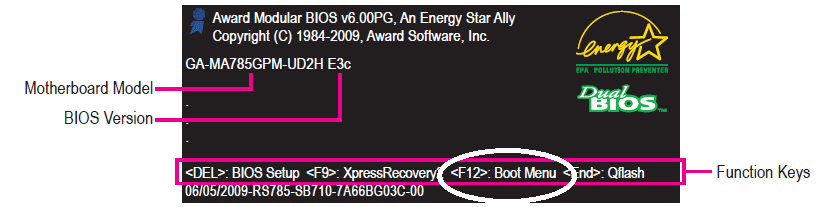
According to the motherboard manual, hit the "F12" key at this screen to enter the "Boot menu". Then select the CD / DVD drive where the XP install cd is waiting and it will boot to the XP installer?

gigibyte_boot.png
 

My Computer My Computer

OS
...
OK let's troubleshoot why your CD won't boot, since XP won't run from Win7 even in elevated compatibility mode.

Do you get a prompt during bootup to "tap any key to boot from CD?"

If not, as asked earlier, can you tap the F-key given on first bootup menu for Boot Menu, then choose CD from there?

Or tap the F-key to Enter BIOS setup, then in BIOS set CD drive to boot first, save settings, restart, look for prompt.

If none of these work, where did you get the XP CD? Did you burn it yourself? Please verify CD with ImgBurn. View attachment 43841

lol i dont think it's the CD's problem (i've used them many times in the past on other computers and this computer). I've tried 3 other CD's XP (home and pro)/Vista
they are my cousin's CDs
and it doesnt work when i tap any key... it doesn't tell me to tap a key, usually it would tell me to tap anykey to continue my boot. but ever since i've installed W7 it doesn't tell me to tap anything it just says "To Boot from CD:..." :confused:

According to the motherboard manual, hit the "F12" key at this screen to enter the "Boot menu". Then select the CD / DVD drive where the XP install cd is waiting and it will boot to the XP installer?

View attachment 43840
it doesnt work... i've tried, usually thats how i would reformat my computer but i don't know what's happenning. i've reformatted my computer many times with different window's operating systems but it seems none of them work against W7... :confused:
 

My Computer My Computer

Computer Manufacturer/Model Number
GA-MA785GM-US2H
OS
Windows 7
CPU
AMD athlon(tm) II X2 245 Processor (2 CPUS), ~2.9GHz
Motherboard
Gigabyte Technology Co., Ltd.
Memory
2048MB RAM
Graphics Card(s)
ATI Radeon HD 4200
Please tap the F-key given on first bootup screen to Enter BIOS setup, usually F2.

Look for the boot order selection menu and follow prompts to set CD drive to boot first, then HDD.

Also look for how CD drive is registered in the BIOS: Master, Slave, SATA1, SATA2, etc.

Save settings and exit. Now look for prompt to "hit any key to boot from CD"

If this does not fix it, open your case and remove your CD drive, check jumpers, set to Master and remove anything else on cable. Change the ribbon cable if possible. If necessary, try another CD drive.
 
Back
Top