Realtek wireless lan 8187 not working

Maynard

New member
Local time
11:39 PM
Messages
8
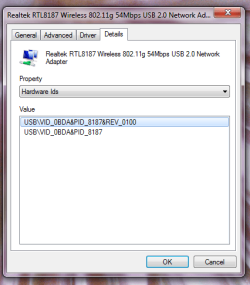
Hello there i've just installed my windows 7 ultimate x64 edition and everything is working fine but when i plugged my USB realtek wireless lan adapter it says it downloaded the driver automatically but still nothing happens and when i go to the netwoking and setup a new connection i still dont have the option to sep up a wireless connection.. anothing thing is it doesnt have the realtek utilty where in my windows xp i have.. i have tried so many drivers but still it wont work correctly. but my windows said it working fine.. also ive tried the windows compatibility to windows xp it installed the utility but it still does not work the way it should be. please someone help me..
 

My Computer

Computer Manufacturer/Model Number
ASUS p5kpl-am
OS
Windows 7 Ultimate x64
CPU
core 2 quad 2.33 mghz
Motherboard
p5kpl-am
Memory
4 Gig ram
Graphics Card(s)
palit geforce 9400 GX
Sound Card
realtek
Monitor(s) Displays
asus vw1710
Hard Drives
320 gig sata
Internet Speed
512kbps

My Computer

Computer Manufacturer/Model Number
Lenovo ThinkPad T60
OS
Windows 7 Ultimate 64Bit
CPU
GenuineIntel Intel(R) Core(TM) DuoCore T2400 @ 1.83GHz
Motherboard
Intel(R) 82801G (ICH7 Family)
Memory
2.00 GB
Graphics Card(s)
Mobile Intel(R) 945 Express Chipset
Sound Card
SoundMAX Integrated Digital HD Audio
Monitor(s) Displays
ThinkPad Display
Screen Resolution
1400x1050
Hard Drives
100Gb SATA
Keyboard
Standard Keyboard
Mouse
HID-compliant Mouse
Internet Speed
Cable Broadband - 54Mbps
Other Info
Intel(R) PRO/1000 PL Network Connection
11a/b/g Wireless LAN Mini PCI Express Adapter
i already tried that link using the windows 7 driver but still none =(
 

My Computer

Computer Manufacturer/Model Number
ASUS p5kpl-am
OS
Windows 7 Ultimate x64
CPU
core 2 quad 2.33 mghz
Motherboard
p5kpl-am
Memory
4 Gig ram
Graphics Card(s)
palit geforce 9400 GX
Sound Card
realtek
Monitor(s) Displays
asus vw1710
Hard Drives
320 gig sata
Internet Speed
512kbps
What brand-model of router are you using?
 

My Computer

Computer type
PC/Desktop
Computer Manufacturer/Model Number
Home built
OS
Windows 7 Ult, Windows 8.1 Pro,
CPU
Q9650-4.275GHz, E8600 4.5GHz, E6750-3.8GHz
Motherboard
Evga 780i FTW
Memory
G.Skill PC2 9600 1200Mhz 5 5 5 15 2T
Graphics Card(s)
GTX480
Sound Card
Asus Xonar D2
Monitor(s) Displays
HannsG
Screen Resolution
1680X1050
Hard Drives
GSkill Phoenix Pro 120GB SSD
PSU
ThermalTake Toughpower 1000Watt modular
Case
ThermalTake XaserV
Cooling
Xigmatek S1283
Keyboard
Logitech G15
Mouse
Logitech G9
Internet Speed
T1
Wireless eiii 802.11b/g lan usb 2.0 adapter
lp-8187e
 

My Computer

Computer Manufacturer/Model Number
ASUS p5kpl-am
OS
Windows 7 Ultimate x64
CPU
core 2 quad 2.33 mghz
Motherboard
p5kpl-am
Memory
4 Gig ram
Graphics Card(s)
palit geforce 9400 GX
Sound Card
realtek
Monitor(s) Displays
asus vw1710
Hard Drives
320 gig sata
Internet Speed
512kbps

My Computer

Computer Manufacturer/Model Number
Lenovo ThinkPad T60
OS
Windows 7 Ultimate 64Bit
CPU
GenuineIntel Intel(R) Core(TM) DuoCore T2400 @ 1.83GHz
Motherboard
Intel(R) 82801G (ICH7 Family)
Memory
2.00 GB
Graphics Card(s)
Mobile Intel(R) 945 Express Chipset
Sound Card
SoundMAX Integrated Digital HD Audio
Monitor(s) Displays
ThinkPad Display
Screen Resolution
1400x1050
Hard Drives
100Gb SATA
Keyboard
Standard Keyboard
Mouse
HID-compliant Mouse
Internet Speed
Cable Broadband - 54Mbps
Other Info
Intel(R) PRO/1000 PL Network Connection
11a/b/g Wireless LAN Mini PCI Express Adapter
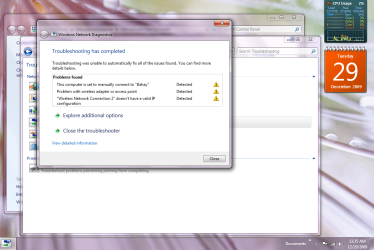
here is the pic..

can someone teach me how to make a connection like this..

my PC directly connects to the internet using the LAN

and i want to share the internet using my wireless lan to the other laptops in my house.. how can i make the network simultaneusly working at the same time.. when i use the wireless lan i got 169. something address and when u manually put it to 192.168.0.1 my windows 7 go to the blue screen of death
 

Attachments

  • Capture.PNG
    Capture.PNG
    172.4 KB · Views: 189
  • 1.PNG
    1.PNG
    25.9 KB · Views: 123

My Computer

Computer Manufacturer/Model Number
ASUS p5kpl-am
OS
Windows 7 Ultimate x64
CPU
core 2 quad 2.33 mghz
Motherboard
p5kpl-am
Memory
4 Gig ram
Graphics Card(s)
palit geforce 9400 GX
Sound Card
realtek
Monitor(s) Displays
asus vw1710
Hard Drives
320 gig sata
Internet Speed
512kbps
I didn't ask for the adaptor I asked for the router manufacture and the model and version number of the router you are currently using. There have been many router problems associated with Windows 7, your problem appears to be the same as the others with an incompatible router.
 

My Computer

Computer type
PC/Desktop
Computer Manufacturer/Model Number
Home built
OS
Windows 7 Ult, Windows 8.1 Pro,
CPU
Q9650-4.275GHz, E8600 4.5GHz, E6750-3.8GHz
Motherboard
Evga 780i FTW
Memory
G.Skill PC2 9600 1200Mhz 5 5 5 15 2T
Graphics Card(s)
GTX480
Sound Card
Asus Xonar D2
Monitor(s) Displays
HannsG
Screen Resolution
1680X1050
Hard Drives
GSkill Phoenix Pro 120GB SSD
PSU
ThermalTake Toughpower 1000Watt modular
Case
ThermalTake XaserV
Cooling
Xigmatek S1283
Keyboard
Logitech G15
Mouse
Logitech G9
Internet Speed
T1
here is the pic..

can someone teach me how to make a connection like this..

my PC directly connects to the internet using the LAN

and i want to share the internet using my wireless lan to the other laptops in my house.. how can i make the network simultaneusly working at the same time.. when i use the wireless lan i got 169. something address and when u manually put it to 192.168.0.1 my windows 7 go to the blue screen of death

Your pc is directly connected to the router/modem, so it is not relying on your wireless network. The other machines (laptops) which is using wireless, will connected to your wireless network. If you have set one up.

Have you setup a wireless network, on your router? If not you need to do this first and foremost!

Your original post, has it that you have a driver issue with your USB wireless adapter. Regardless of what you have done/setup, you MUST get this device a driver and get it working.

W7 has built-in utility that can get you connected to any network, without third party software, all you need is to get your devices working.

Now my other posts, have you tried ALL of this drivers on the site?
 

My Computer

Computer Manufacturer/Model Number
Lenovo ThinkPad T60
OS
Windows 7 Ultimate 64Bit
CPU
GenuineIntel Intel(R) Core(TM) DuoCore T2400 @ 1.83GHz
Motherboard
Intel(R) 82801G (ICH7 Family)
Memory
2.00 GB
Graphics Card(s)
Mobile Intel(R) 945 Express Chipset
Sound Card
SoundMAX Integrated Digital HD Audio
Monitor(s) Displays
ThinkPad Display
Screen Resolution
1400x1050
Hard Drives
100Gb SATA
Keyboard
Standard Keyboard
Mouse
HID-compliant Mouse
Internet Speed
Cable Broadband - 54Mbps
Other Info
Intel(R) PRO/1000 PL Network Connection
11a/b/g Wireless LAN Mini PCI Express Adapter
having the exact same problem.. works fine on my windows XP , same router..
 

My Computer

OS
windows 7
Back
Top