Repair CD - System Repair Disk

iseeuu

New member
Guru
VIP
Local time
4:48 PM
Messages
2,736
Recently questions were raised as to what functions are available on the System Repair CD - Create that Windows 7 will create and burn to a CD.
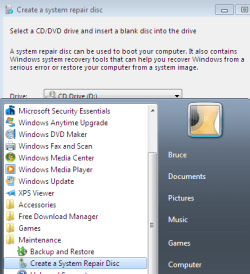
create_repair_cd.png

These clips are are from a 32 bit CD I made:
Insert the CD in the CD / DVD drive and reboot the computer.
When requested, "Hit any key to boot from CD."

Select the Language and click next.
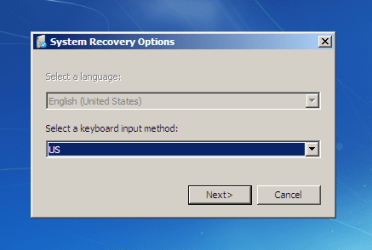
repair_CD_01.png

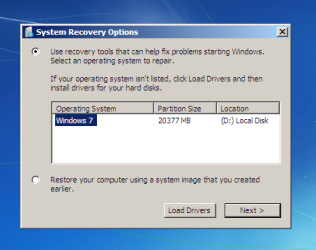
Windows will search for an Operating System to repair.
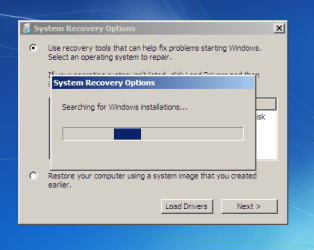
repair_CD_02.png

You can choose to restore a System Image you created,
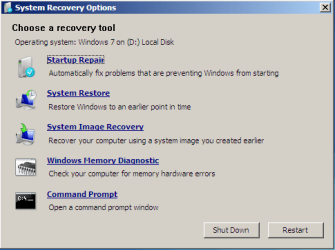
or go the Recovery Tools screen.
repair_CD_03.png

These are the same utilities available through the Install DVD,
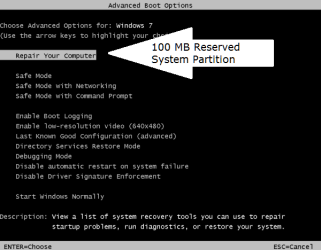
or via the function of the 100 MB System Partition (if installed).
repair_CD_04.png

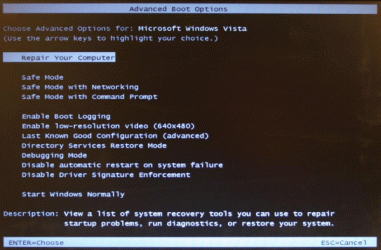
Tapping the F8 key before Windows loads (Safe Mode) opens this menu:
reserved_sys_01.png

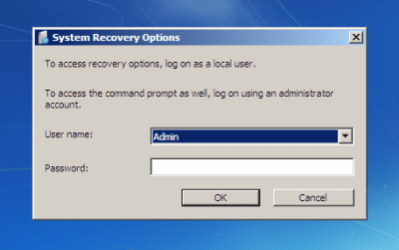
Selecting "Repair Your Computer" also opens the "System Recovery Options" menu,
but requires a password to proceed.
reserved_sys_02.png


Cheers!
Robert

Please find a complete list of related tutorials here:


http://www.sevenforums.com/tutorials/2083-system-repair-disc-create.html

http://www.sevenforums.com/tutorials/668-system-recovery-options.html

How to Boot to the System Recovery Options in Windows 7

How to Boot to the Advanced Boot Options in Windows 7

.
 
Last edited:

My Computer

OS
...
Thank you for putting this together, it is great to have a bit of insight before venturing into something
 

My Computer

Computer Manufacturer/Model Number
Hewlett Packard Compaq Presario CQ60-305au
OS
Windows Seven Home Premium 32bit SP1
CPU
AMD Athlon QI46 2.1Ghz
Motherboard
Wistron 303c
Memory
2048 Mb DDR2 SD RAM
Graphics Card(s)
NVidea GE GoForce 8200M G/256mb dedicated graphics memory
Sound Card
MCP78S NVidea high definition
Monitor(s) Displays
15.6" High definition Brightview Widescreen
Screen Resolution
1336x768
Hard Drives
Toshiba MK2555GSX ATA
Great work Robert.

I did Startup Repair on the beach the other day with my laptop, thanks to the 100mb System Reserved partition which put a "Repair Your Computer" link on the F8 Advanced Boot Options..

Was in the middle of removing a dual boot for a guy in Poland via Remote Desktop when laptop restarted to a black screen with cursor.

Since I didnt' have DVD with me, would have had to drive 100 miles to get home to finish the job before the guy could use his computer, plus missed some primo waves.
 

Attachments

  • AdvancedBootOptions.gif
    AdvancedBootOptions.gif
    132.6 KB · Views: 1,605
Last edited:
Great work Robert.

Is it the 100mb System Reserved partition which puts the Repair Console on the F8 Advanced Boot Options menu?

View attachment 44855

If so, it's a good reason to accept the 100mb during install.
That is my understanding. It is one of the features of the System partition. It also means you can repair your C: drive (for example) without bootable media! However, if the hard drive crashes, bootable media will be required.

Cheers!
Robert
 

My Computer

OS
...
These are the same utilities available through the Install DVD,
or via the function of the 100 MB System Partition (if installed).

So, for clarity; if you have an install disk, there is no added functionality in making a rescue disk?
 

My Computer

Computer type
PC/Desktop
Computer Manufacturer/Model Number
Custom
OS
7 x64 Ultimate
CPU
AMD Ryzen 5
Motherboard
Gigabyte GA-AB350-Gaming
Memory
16GB DDR4
Graphics Card(s)
Radeon R7 360
Monitor(s) Displays
2 x Dell U2518D
Screen Resolution
2560x1440 2560x1440
Hard Drives
WD 500GB x2
Samsung SSD 128MB (OS)
XPG SX8200 Pro M.2 2280 1TB
PSU
Antec 500
Cooling
Hyper 212 EVO
Keyboard
Logitech cordless K800
Mouse
Logitech M510
Antivirus
Avira
These are the same utilities available through the Install DVD,
or via the function of the 100 MB System Partition (if installed).

So, for clarity; if you have an install disk, there is no added functionality in making a rescue disk?
For clarity, if you have the Install DVD and a working DVD drive, correct; there is no added functionality to having a "System Repair" CD.

For clarity, if you did not receive the Install DVD or only have a working CD-ROM, then the "System Repair" CD can provide all the functionality of the DVD.

Cheers!
Robert
 

My Computer

OS
...
Nice job iseeuu really nice. Fabe
 

My Computer

Computer Manufacturer/Model Number
Self Built
OS
Windows 7 ultimate 64 bit / XP Home sp3
CPU
intel Core 2 Duo E8400 3.0ghz
Motherboard
Asus P5ND bios 1401
Memory
8 gigs 1066 OCZ Fata1ty
Graphics Card(s)
EVGA GTX 580 Call of Duty Black Ops Edition
Sound Card
Creative Soundblaster Audigy 2zs
Monitor(s) Displays
Asus 24in LCD's 2MS X2
Screen Resolution
1920x1080p @60Hz
Hard Drives
WD Caviar 500 Black/ WD Caviar 200 Blue
PSU
OCZ 700W GameXtreme
Case
NZXT Apollo
Cooling
Corsair H50 CPU/120mm x3 /60mm x2 /Corsair Dominator Ram
Keyboard
Logitech Bluetooth Wireless MX5000
Mouse
Logitech Bluetooth Wireless MX1000
Internet Speed
Download 19.83 Upload 0.97
Other Info
Logitech Z2300 Speakers/ Bose Noise Cancelling Headphones/Avermedia PCI-e Hybrid TV Bravo/Epson NX415 all in one/ 4 Port Powered USB Hub/ LG 10x Bluray Burner /TSST Corp DVDRW External
Lovely post/thread. Really does help clarify, and also with regards to the media (CD or DVD). Thanks iseeuu. :)
 

My Computer

OS
Windows XP - Now Windows 7 Home Premium (64-bit).
Can you post a download link for the Win7 System Repair CD here as it will help those hitting on Google, 7forums searches?

These are the only links I have right now, from recent SIW2 post: http://www.sevenforums.com/installa...oot-windows-xp-windows-7-a-16.html#post440486
Excellent suggestion, greg! Thanks for including a link to that thread with the download links. I added a link to this tutorial:

http://www.sevenforums.com/tutorials/2083-system-repair-disc-create.html

to the first post of this thread. Option Two includes the same NeoSmart Download link SIW2 refers to.

Microsoft has not seen fit to include either x86 or x64 files in their download library and I have no knowledge of the legal ethics of making a copy available to the public. I have not downloaded a copy of the "Repair Disk" and so cannot recommend any sites from personal experience. Perhaps someone else can?

Cheers!
Robert
 

My Computer

OS
...
  • Like
Reactions: ryo
Can you post a download link for the Win7 System Repair CD here as it will help those hitting on Google, 7forums searches?

These are the only links I have right now, from recent SIW2 post: http://www.sevenforums.com/installa...oot-windows-xp-windows-7-a-16.html#post440486
Excellent suggestion, greg! Thanks for including a link to that thread with the download links. I added a link to this tutorial:

http://www.sevenforums.com/tutorials/2083-system-repair-disc-create.html

to the first post of this thread. Option Two includes the same NeoSmart Download link SIW2 refers to.

Microsoft has not seen fit to include either x86 or x64 files in their download library and I have no knowledge of the legal ethics of making a copy available to the public. I have not downloaded a copy of the "Repair Disk" and so cannot recommend any sites from personal experience. Perhaps someone else can?

Cheers!
Robert

Got permission from SIW2 to link to his NeoSmart download links for Repair Console.

That original link to his post was from a thread where the OP used the same download to repair his Win7.
 
thank you, I finally got around to making one.
With installing XP and whatnot to different partitions I kept on borking my MBR, requiring me to use my mom's 7 Upgrade kit and a driver in a floppy to repair.
this does include driver for the drive, correct?
and if it was mad in Enterprise 32bit it will work for Home Premium 32bit?
 

My Computer

Computer type
PC/Desktop
Computer Manufacturer/Model Number
Apple 17" iMac MA199LL (Early 2006)
OS
Windows 8 Pro (32-bit)
CPU
1.83GHz Intel Core Duo
Memory
2GB 667MHz DDR2 SDRAM (PC2-5300) (upgrade)
Graphics Card(s)
ATI Radeon X1600 with 128MB GDDR3 memory
Monitor(s) Displays
17-inch TFT active-matrix LCD, millions of colors
Screen Resolution
1440 x 900
Hard Drives
Hitachi 320GB HDT721032SLA360 7200RPM SATA II (upgrade)
Keyboard
Microsoft Wired Keyboard 600
Mouse
Microsoft Basic Optical Mouse v2.0
Internet Speed
4 Mbps
Antivirus
Microsoft Security Essentials
Browser
Google Chrome
Other Info
WEI:
Base Score: 3.9 Processor: 4.4 Memory 4.7
Graphics: 3.9 Gaming Graphics: 4.1 Primary HD: 5.9
thank you, I finally got around to making one.
With installing XP and whatnot to different partitions I kept on borking my MBR, requiring me to use my mom's 7 Upgrade kit and a driver in a floppy to repair.
You are most welcome, I am glad this thread has been of help to someone.

this does include driver for the drive, correct?
No, if I understand your meaning correctly, there are no drivers. It is just a bootable CD with some Windows utilities to repair a borked system. However, the 32 bit CD I just checked is only 142 MB in size (on a 600 MB CD) leaving lots of room for you to add folders with drivers or other things to create a customized repair CD.

and if it was made in Enterprise 32bit it will work for Home Premium 32bit?
Correct, the only system compatibility issue is you must use a 32 bit CD for a 32 bit Operating System, or a 64 bit CD for a 64 bit Operating System.

Cheers!
Robert
 

My Computer

OS
...
Hi iseeuu.

Selecting "Repair Your Computer" also opens the "System Recovery Options" menu,
but requires a password to proceed.


How do you create a password for this?
just looking ahead if the worst happens?
 

My Computer

Computer type
Laptop
Computer Manufacturer/Model Number
Acer 7738G
OS
Acer Aspire 7738G Win 7 X64 bit Home Premium
Hi iseeuu.

Selecting "Repair Your Computer" also opens the "System Recovery Options" menu,
but requires a password to proceed.


How do you create a password for this?
just looking ahead if the worst happens?
You will be asked to select a Windows User and enter the password for that user.

Cheers!
Robert
 

My Computer

OS
...
Hello Everyone!
I'm new in this wonderful forum, I have aproblem which makes me crazy
I don't have the option "Repair your computer" when I press F8
and of course I have reserved the 100 Mb system partition during the instalation of win7
I Know that i can create a "System Repair disk" or return to the installation disk to reach that option, but I'm just asking why is that happeining?

It wil be useful if I reach the "Repair your computer" without any other disk, only by pressing F8 or F11 or F12 I don't know!!!

thanx alot!
 

My Computer

OS
windows seven
With certain BIOS' it will not place Repair My Computer on Advanced Boot Tools menu.

Make a System Repair CD to have on standby.
 
thank you for your reply
but I'm not agree with you, at least with my situation!
because I had this option on my laptop before I format it, that's why I think its about the new win7 disk that I got.

I've install it on 2 or 3 Pc's and they all miss this option!

thanx
 

My Computer

OS
windows seven
Back
Top