windows 7 and netgear dg83g v3 wireless router

ryanfitton

New member
Local time
5:49 PM
Messages
6
i have a problem with my computer and my wireless rputer, the problem is that when my computer is turned on tge ethernet port numer 1 light on my router is green and that is how it is supposed to be, however when i shut my computer down the light for ethernet port 1 goes orange, but when my computer get switched it changes back to green on windows 7's login screen.

this was working fine a couple of days ago howevr it has just started happening, i have tried the lead in different ethernet ports on my router and tried using a different ethernet cable. i have aso u ninstalled and reinstalled the driver for my computers ethernet port, my ethernet port is built in to my motherboard.

os: windows 7: home premium, 64-bit
router: netgear dg835g v3 with latest firmware
 

My Computer My Computer

At a glance

windows 7: home premium 64-bit$gb ram
Computer Manufacturer/Model Number
compaq
OS
windows 7: home premium 64-bit
Memory
$gb ram
Hard Drives
western digial 1tb
1. Try power cycling the modem: unplug the power from the modem for about 15 seconds and then plug it back in.
2. Download the latest version of your NIC drivers.
 

My Computer My Computer

At a glance

Windows 7 Ultimate x64 Service Pack 1 (Build ...Intel Core 2 Quad Q6600 (G0 Kentsfield) LGA77...Corsair TW3X4G1333C9A 4GB PC-10600 (2x XMS3 2GB)ASUS nVIDIA GeForce 560
OS
Windows 7 Ultimate x64 Service Pack 1 (Build 6.1.7601)
CPU
Intel Core 2 Quad Q6600 (G0 Kentsfield) LGA775 (FC-LGA6)
Motherboard
GIGABYTE GA-EP35C-DS3R (Rev. 2.1)
Memory
Corsair TW3X4G1333C9A 4GB PC-10600 (2x XMS3 2GB)
Graphics Card(s)
ASUS nVIDIA GeForce 560
Sound Card
RealTek ALC885/889A/890
Monitor(s) Displays
ChiMei CMV CT-730D 17inch (LCD Monitor)
Screen Resolution
1280-1024 60Hertz (Ture Colour 32bit)
Hard Drives
2x Barracuda 7200.10 SATA 3.0Gb/s 160-GB Hard Drive ST3160815AS (AHCI)
PSU
ANTEC 750w Earthwatts
Case
Thermaltake Shark (VA7000SWA ATX) Full Tower
Cooling
Front 120mm fan (1400 RPM) /Rear 120mm (1400 RPM) blue LED
Keyboard
Labtec Media Desktop Y-SAD65
Mouse
Razer DeathAdder 3G Infrared Sensor (1800DPI)
Internet Speed
Telstra BigPond Elite Liberty ADSL2+ 24Mbps/256kbps
Other Info
ASUS PCE-N13 802.11n Wireless LAN card
I find it strange how you are using wireless, yet the router sees the connection as a LAN port connection.
 

My Computer My Computer

At a glance

Windows 7 Ultimate 64BitGenuineIntel Intel(R) Core(TM) DuoCore T2400 ...2.00 GBMobile Intel(R) 945 Express Chipset
Computer Manufacturer/Model Number
Lenovo ThinkPad T60
OS
Windows 7 Ultimate 64Bit
CPU
GenuineIntel Intel(R) Core(TM) DuoCore T2400 @ 1.83GHz
Motherboard
Intel(R) 82801G (ICH7 Family)
Memory
2.00 GB
Graphics Card(s)
Mobile Intel(R) 945 Express Chipset
Sound Card
SoundMAX Integrated Digital HD Audio
Monitor(s) Displays
ThinkPad Display
Screen Resolution
1400x1050
Hard Drives
100Gb SATA
Keyboard
Standard Keyboard
Mouse
HID-compliant Mouse
Internet Speed
Cable Broadband - 54Mbps
Other Info
Intel(R) PRO/1000 PL Network Connection
11a/b/g Wireless LAN Mini PCI Express Adapter
I am not using wireless, my computer is plugged into the router using an ethernet cable
 

My Computer My Computer

At a glance

windows 7: home premium 64-bit$gb ram
Computer Manufacturer/Model Number
compaq
OS
windows 7: home premium 64-bit
Memory
$gb ram
Hard Drives
western digial 1tb
the netgear pdf manual for my router says that the orange light ion the Ethernet port goes orange (or amber) because the router has detected it as a 10Mps device instead of a 100Mps device, however when the computer is running the router sees it as a 100Mps device but when it is shut down it is seen as a 10Mps device. how can i make the router see my computer as a 100Mps device all the time even when switched off?
 

My Computer My Computer

At a glance

windows 7: home premium 64-bit$gb ram
Computer Manufacturer/Model Number
compaq
OS
windows 7: home premium 64-bit
Memory
$gb ram
Hard Drives
western digial 1tb
Oh ok, didnt realised you were using cables. The fluctuation of the link speeds could be a feature of the card or a driver issue. Just a background on what i have seen before with a laptop at my workplce, the link speed changes from 100Mps (using power mains) to 10Mps when we unplugged the main and use battery. The fix we had there was updating the driver. This could what you need to check. The driver is a Network type driver.
 

My Computer My Computer

At a glance

Windows 7 Ultimate 64BitGenuineIntel Intel(R) Core(TM) DuoCore T2400 ...2.00 GBMobile Intel(R) 945 Express Chipset
Computer Manufacturer/Model Number
Lenovo ThinkPad T60
OS
Windows 7 Ultimate 64Bit
CPU
GenuineIntel Intel(R) Core(TM) DuoCore T2400 @ 1.83GHz
Motherboard
Intel(R) 82801G (ICH7 Family)
Memory
2.00 GB
Graphics Card(s)
Mobile Intel(R) 945 Express Chipset
Sound Card
SoundMAX Integrated Digital HD Audio
Monitor(s) Displays
ThinkPad Display
Screen Resolution
1400x1050
Hard Drives
100Gb SATA
Keyboard
Standard Keyboard
Mouse
HID-compliant Mouse
Internet Speed
Cable Broadband - 54Mbps
Other Info
Intel(R) PRO/1000 PL Network Connection
11a/b/g Wireless LAN Mini PCI Express Adapter
well windows 7 has automatically updated the driver but i have rolled back to the previous in windows and still did not work. however i will try downloading an older one form the manufacturers website
 

My Computer My Computer

At a glance

windows 7: home premium 64-bit$gb ram
Computer Manufacturer/Model Number
compaq
OS
windows 7: home premium 64-bit
Memory
$gb ram
Hard Drives
western digial 1tb
well windows 7 has automatically updated the driver but i have rolled back to the previous in windows and still did not work. however i will try downloading an older one form the manufacturers website

What aren't you trying to use the latest from the vendor/manufacturers? What is the driver that w7 is using? is is a builtin driver?

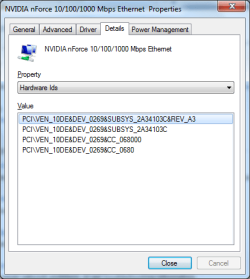
Can you screenshot the device's Properties > Details tab, and select from Property drop down to Hardware Id.
 

My Computer My Computer

At a glance

Windows 7 Ultimate 64BitGenuineIntel Intel(R) Core(TM) DuoCore T2400 ...2.00 GBMobile Intel(R) 945 Express Chipset
Computer Manufacturer/Model Number
Lenovo ThinkPad T60
OS
Windows 7 Ultimate 64Bit
CPU
GenuineIntel Intel(R) Core(TM) DuoCore T2400 @ 1.83GHz
Motherboard
Intel(R) 82801G (ICH7 Family)
Memory
2.00 GB
Graphics Card(s)
Mobile Intel(R) 945 Express Chipset
Sound Card
SoundMAX Integrated Digital HD Audio
Monitor(s) Displays
ThinkPad Display
Screen Resolution
1400x1050
Hard Drives
100Gb SATA
Keyboard
Standard Keyboard
Mouse
HID-compliant Mouse
Internet Speed
Cable Broadband - 54Mbps
Other Info
Intel(R) PRO/1000 PL Network Connection
11a/b/g Wireless LAN Mini PCI Express Adapter
im not sure if it is a built in driver or not :-/
i have attached the screenshot as an attachment
 

Attachments

  • screenshot.png
    screenshot.png
    13.8 KB · Views: 79

My Computer My Computer

At a glance

windows 7: home premium 64-bit$gb ram
Computer Manufacturer/Model Number
compaq
OS
windows 7: home premium 64-bit
Memory
$gb ram
Hard Drives
western digial 1tb
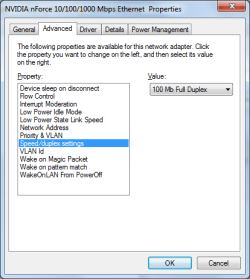
i have now got it working correctly by changing the "Speed/Duplex settings" from auto negotiation to 100 mb full duplex
 

Attachments

  • screenshot.png
    screenshot.png
    13.5 KB · Views: 751

My Computer My Computer

At a glance

windows 7: home premium 64-bit$gb ram
Computer Manufacturer/Model Number
compaq
OS
windows 7: home premium 64-bit
Memory
$gb ram
Hard Drives
western digial 1tb
Back
Top