Create dual boot with XP - need to go back to Vista fir

cspgsl

New member
Local time
12:59 PM
Messages
19
I have a VAIO that came with Vista 4bit - I upgraded to Win7 Home Prem 64bit but now wish to create a dual boot system with XP Pro 32bit and Win 7 64bit. I have legacy software that I need to run and it wont work on a 64bit platform.

I have tried to install XP but get an 0x7b error when the installation files are being loaded and I have not found a workaround so the eimpleest thing is for me to reformat, install XP, create another partition, reinstall Vista and then upgrade Vista again to Win7. I have no data to save so there is no issue there.

Problem is, I have not been able to format the hard drive so I can start clean. I tried to boot from a USB floppy but it just hung. Can anyone point me to a program that will let me format the HDD?

Thanks
 

My Computer My Computer

At a glance

Win 7 Home Premium2 gig
Computer Manufacturer/Model Number
Sony
OS
Win 7 Home Premium
Memory
2 gig
Are you booting the XP CD to install, as it will not run from a 64 bit OS? Did you preformat the XP partition; if so, delete formatting and use XP installer to format.

The installer may need an IDE storage driver to load. Here are the troubleshooting steps for this error: http://support.microsoft.com/kb/324103

Once you install XP, follow the further steps in Method Two here to add XP to dual boot menu:
http://www.sevenforums.com/tutorials/8057-dual-boot-installation-windows-7-xp.html

If none of this works, then you don't need to reinstall Vista. Just clean install Win7 after XP: http://www.sevenforums.com/tutorials/31402-clean-install-upgrade-windows-7-version.html

But you'll likely get the same error so best to troubleshoot it now and save the Win7 reinstall.
 

My Computer My Computer

At a glance

Windows 7 x64 finally!AMD Athlon II X2 240OCZ Platinum 4GB DDR2 1066 (will not work pas...MSI R4670-MD1G Radeon HD 4670 1GB 128-bit GDDR3
Computer Manufacturer/Model Number
Wally, Innc.
OS
Windows 7 x64 finally!
CPU
AMD Athlon II X2 240
Motherboard
Biostar TA790GX XE
Memory
OCZ Platinum 4GB DDR2 1066 (will not work past 800MHz)
Graphics Card(s)
MSI R4670-MD1G Radeon HD 4670 1GB 128-bit GDDR3
Sound Card
ATI High Definition Audio Device Realtek ALC888
Monitor(s) Displays
HP w19e
Screen Resolution
1440x900
Hard Drives
Western Digital Caviar Green WD5000AADS 500GB SATA
Western Digital Caviar Blue WD5000AAKS 500GB SATA
PSU
Athena Power Micro ATX 400W
Case
HEC 6T 6T10BB Black MicroATX Mini Tower
Cooling
stock
Keyboard
wired, many keys
Mouse
HP wireless, 2 buttons, 1 wheel
Internet Speed
DSL 2Mb (recently getting 1.65M!)
Great minds do think alike... :)
 

My Computer My Computer

At a glance

Windows 7 x64 finally!AMD Athlon II X2 240OCZ Platinum 4GB DDR2 1066 (will not work pas...MSI R4670-MD1G Radeon HD 4670 1GB 128-bit GDDR3
Computer Manufacturer/Model Number
Wally, Innc.
OS
Windows 7 x64 finally!
CPU
AMD Athlon II X2 240
Motherboard
Biostar TA790GX XE
Memory
OCZ Platinum 4GB DDR2 1066 (will not work past 800MHz)
Graphics Card(s)
MSI R4670-MD1G Radeon HD 4670 1GB 128-bit GDDR3
Sound Card
ATI High Definition Audio Device Realtek ALC888
Monitor(s) Displays
HP w19e
Screen Resolution
1440x900
Hard Drives
Western Digital Caviar Green WD5000AADS 500GB SATA
Western Digital Caviar Blue WD5000AAKS 500GB SATA
PSU
Athena Power Micro ATX 400W
Case
HEC 6T 6T10BB Black MicroATX Mini Tower
Cooling
stock
Keyboard
wired, many keys
Mouse
HP wireless, 2 buttons, 1 wheel
Internet Speed
DSL 2Mb (recently getting 1.65M!)
Are you booting the XP CD to install, as it will not run from a 64 bit OS? Did you preformat the XP partition; if so, delete formatting and use XP installer to format.
Tried that too

The installer may need an IDE storage driver to load. Here are the troubleshooting steps for this error: Advanced troubleshooting for "Stop 0x0000007B" errors in Windows XP
Been there without success

Once you install XP, follow the further steps in Method Two here to add XP to dual boot menu:
http://www.sevenforums.com/tutorials/8057-dual-boot-installation-windows-7-xp.html
here too

If none of this works, then you don't need to reinstall Vista. Just clean install Win7 after XP: http://www.sevenforums.com/tutorials/31402-clean-install-upgrade-windows-7-version.html
all I can do with 7 is another upgrade or a repair install
 

My Computer My Computer

At a glance

Win 7 Home Premium2 gig
Computer Manufacturer/Model Number
Sony
OS
Win 7 Home Premium
Memory
2 gig
Hi cspgsl
1) I can recommend GParted for formatting the partition
2) Your plan is good, except for one detail I will touch below. I recommend you check this tutorial too, it should help: http://www.sevenforums.com/tutorials/8057-dual-boot-installation-windows-7-xp.html?filter[3]=Installation%20and%20Setup
3) You don't need to install Vista and then install 7 on top of it. You can do a clean install of Windows 7 even with an upgrade disc: http://www.sevenforums.com/tutorials/31402-clean-install-upgrade-windows-7-version.html?filter[3]=Installation%20and%20Setup
Thanks Wally I'll give it a go with GParted
 

My Computer My Computer

At a glance

Win 7 Home Premium2 gig
Computer Manufacturer/Model Number
Sony
OS
Win 7 Home Premium
Memory
2 gig
I have now been able to install XP and now when I go to install the upgrade of Win7 64bit it tells me that the setup is not a valid 32bit application.

With Sony it appears that the only way to upgrade is either from the Vista installation or a 32bit upgrade from XP.

In any event, it won't autorun on boot from the DVD in spite of the setting in the BIOS

Is it possible to upgrade to the 32bit and then reinstall the 64bit version?

Thanks
 

My Computer My Computer

At a glance

Win 7 Home Premium2 gig
Computer Manufacturer/Model Number
Sony
OS
Win 7 Home Premium
Memory
2 gig
Is there a Win7 product key included in the Upgrade kit?

Try triggering the DVD to boot by tapping key given on first bootup screen for Boot Menu.

Make sure you have set it correctly in BIOS: Boot from CD - How to Boot your Computer from a Bootable CD or DVD - Boot to CD

Determine that the DVD is bootable: See if there is an ISO to extract using ImgBurn. View attachment 46648

Try writing the ISO to a flash stick instead: http://www.sevenforums.com/tutorials/2432-usb-windows-7-installation-key-drive-create.html

or this method: http://www.youtube.com/watch?v=srOoGhm-jcI

If Sony has indeed not provided you with a bootable DVD, then read here about how MS is helping license holders get a 64 bit version ISO: http://gizmodo.com/5391268/microsoft-fixes-windows-7-student-edition-upgrade-problems
 
Is there a Win7 product key included in the Upgrade kit?
Yes

Try triggering the DVD to boot by tapping key given on first bootup screen for Boot Menu.
No option is given on boot

did that first

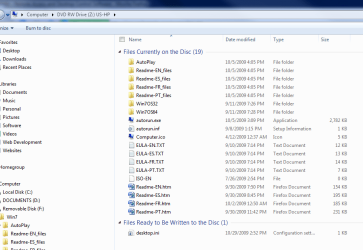
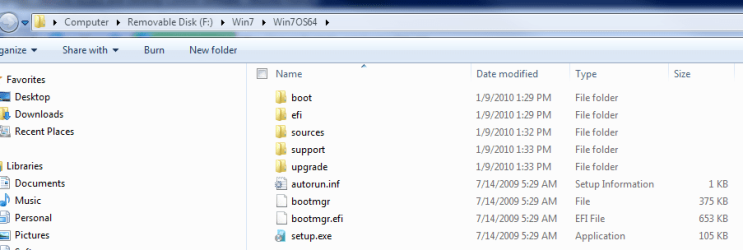
Determine that the DVD is bootable: See if there is an ISO to extract using ImgBurn.
attached are images of the DVD

tried to without success - couldnt make USB drive bootable - didn't try this method though and would do if I have the correct files on the DVD to do so

If Sony has indeed not provided you with a bootable DVD, then read here about how MS is helping license holders get a 64 bit version ISO: Microsoft Fixes Windows 7 Student Edition Upgrade Problems - Windows 7 student edition - Gizmodo
I shall look at this as well

I am running Win7 on my own machine and working on upgrading the laptop.

I see an ISO-EN file on the DVD but when I open it it's blank. Please tell me if I indeed have the correct files on the DVD

Thanks, much
 

Attachments

  • root of dvd.PNG
    root of dvd.PNG
    28.6 KB · Views: 6
  • 64bit folder on dvd.PNG
    64bit folder on dvd.PNG
    15.8 KB · Views: 5

My Computer My Computer

At a glance

Win 7 Home Premium2 gig
Computer Manufacturer/Model Number
Sony
OS
Win 7 Home Premium
Memory
2 gig
Thanks Greg - Completed successfully
Thanks Wally - Dual Booting now too

Love this place ;)
 

My Computer My Computer

At a glance

Win 7 Home Premium2 gig
Computer Manufacturer/Model Number
Sony
OS
Win 7 Home Premium
Memory
2 gig

My Computer My Computer

At a glance

Win 7 Home Premium2 gig
Computer Manufacturer/Model Number
Sony
OS
Win 7 Home Premium
Memory
2 gig
All versions are included in every Win7 installer, but hidden by the presence of an ei.cfg file.

So you can extract the ISO to your desktop, delete ei.cfg from Sources folder, recompile into ISO to burn an All-Versions DVD: http://www.sevenforums.com/tutorials/32055-bootable-iso-create-installation-files.html

Then just select your licensed version to install with Product key on your insert or machine.
Cheers Greg - I'll try it and let you know if I have a problem, thanks
 

My Computer My Computer

At a glance

Win 7 Home Premium2 gig
Computer Manufacturer/Model Number
Sony
OS
Win 7 Home Premium
Memory
2 gig
All versions are included in every Win7 installer, but hidden by the presence of an ei.cfg file.
So you can extract the ISO to your desktop, delete ei.cfg from Sources folder, recompile into ISO to burn an All-Versions DVD: http://www.sevenforums.com/tutorials/32055-bootable-iso-create-installation-files.html
Then just select your licensed version to install with Product key on your insert or machine.
Well, that was perfect, thanks.
Is there a similar download from MS to the Win7 one for Vista?
 

My Computer My Computer

At a glance

Win 7 Home Premium2 gig
Computer Manufacturer/Model Number
Sony
OS
Win 7 Home Premium
Memory
2 gig
All versions are included in every Win7 installer, but hidden by the presence of an ei.cfg file.
So you can extract the ISO to your desktop, delete ei.cfg from Sources folder, recompile into ISO to burn an All-Versions DVD: http://www.sevenforums.com/tutorials/32055-bootable-iso-create-installation-files.html
Then just select your licensed version to install with Product key on your insert or machine.
Well, that was perfect, thanks.
Is there a similar download from MS to the Win7 one for Vista?

A MS Vista DVD is already set to all versions.
 

My Computer My Computer

At a glance

ME/XP/Vista/Win7
OS
ME/XP/Vista/Win7
Back
Top