Question about non-latin-name web addresses

rlincolnh

New member
Local time
1:15 AM
Messages
24
Not sure where to ask this, so here goes:

Here is an ftp address that I want to access

ftp://mcu123:[email protected]/已整理目录/开发工具软件/ARM/

I can paste the address (including the chinese characters) into the Firefox address bar ok, and I get to mcu123 ok and enter the username and password, but then a message box says that it's not a valid file or folder. For all I know that may be entirely correct - one of the sub-folders after mcu123.com/ may no longer be valid.

I can get as far as ftp://mcu123:[email protected]/ but all I see there are file and folder names that are rendered in (guessing) the english codes-page of the chinese character codes.

Any suggestions on how I can make further progress?

Roger
 

My Computer My Computer

At a glance

Microsoft Windows 7 Professional 64-bitIntel(R) Core(TM) i7 CPU 920 @ 2.67GHz18.00 GBRadeon 4870
Computer type
PC/Desktop
Computer Manufacturer/Model Number
Custom
OS
Microsoft Windows 7 Professional 64-bit
CPU
Intel(R) Core(TM) i7 CPU 920 @ 2.67GHz
Motherboard
Gigabyte EX58-UD4P
Memory
18.00 GB
Graphics Card(s)
Radeon 4870
Sound Card
M/B
Monitor(s) Displays
Samsung 2443, Samsung 2243
Screen Resolution
1920 x 1200
Hard Drives
2 x WDC WD1001FALS-00J7B1
PSU
Antec E650
Case
Antec P183
Cooling
Intel
Keyboard
Logitech EX110 cordless
Mouse
Logitech cordless
Internet Speed
100MB/S d/load 37MB/S u/load
Antivirus
Windows Defender
Browser
FireFox
Hi rlincolnh (Roger),

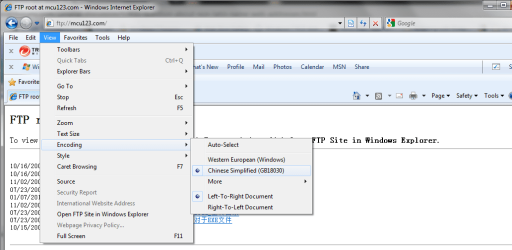
Just change the website encoding to Chinese Simplified.

I'm not sure if you need to install Chinese IME first, My PC has it installed as I use it regularly, so I can't check without.

Enjoy

Tim
 

Attachments

  • encoding.png
    encoding.png
    33.4 KB · Views: 17

My Computer My Computer

At a glance

Windows 7 Ultimate 64 bitIntel(R) Core(TM)2 Quad CPU Q8200 @ 2.33GHz8 GB KingstonNvidia GeForce 9600GT
Computer Manufacturer/Model Number
Custom Hack job
OS
Windows 7 Ultimate 64 bit
CPU
Intel(R) Core(TM)2 Quad CPU Q8200 @ 2.33GHz
Motherboard
GigaByte EP45-UD3
Memory
8 GB Kingston
Graphics Card(s)
Nvidia GeForce 9600GT
Sound Card
Soundblaster Audigy
Monitor(s) Displays
AOC x2 22"
Hard Drives
2 x Samsung 500GB (RAID)
2 x Samsung 2TB
1 x WD Green 2TB
1 x Seagate 1TB
1 x Samsung 500GB
PSU
Thermaltake QFan 750W
Case
CM Scout Gaming
Cooling
Coolermaster V10
Keyboard
Microsoft Wireless Keyboard 1000
Mouse
Microsoft Wireless Optical 2000
Internet Speed
320
Other Info
Winfast PVR2000CP
LG DVD-RAM DVD/RW/DL Super Multi
Linksys WMP300Nx2 Wireless Adapter
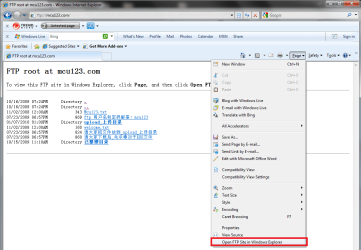
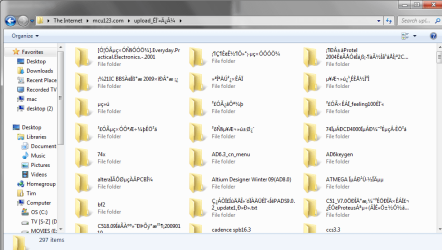
By the way, if you do try to connect in windows explorer via internet explorer, you may still get junky names. This happens sometimes (and does for me on your site).

FYI - you also posted your ftp password on the site. If this is by accident, you may want to:
a) edit your above posting
b) change your password

:D
 

Attachments

  • ftp in Chinese.png
    ftp in Chinese.png
    44.1 KB · Views: 13
  • junky names.png
    junky names.png
    41.4 KB · Views: 20

My Computer My Computer

At a glance

Windows 7 Ultimate 64 bitIntel(R) Core(TM)2 Quad CPU Q8200 @ 2.33GHz8 GB KingstonNvidia GeForce 9600GT
Computer Manufacturer/Model Number
Custom Hack job
OS
Windows 7 Ultimate 64 bit
CPU
Intel(R) Core(TM)2 Quad CPU Q8200 @ 2.33GHz
Motherboard
GigaByte EP45-UD3
Memory
8 GB Kingston
Graphics Card(s)
Nvidia GeForce 9600GT
Sound Card
Soundblaster Audigy
Monitor(s) Displays
AOC x2 22"
Hard Drives
2 x Samsung 500GB (RAID)
2 x Samsung 2TB
1 x WD Green 2TB
1 x Seagate 1TB
1 x Samsung 500GB
PSU
Thermaltake QFan 750W
Case
CM Scout Gaming
Cooling
Coolermaster V10
Keyboard
Microsoft Wireless Keyboard 1000
Mouse
Microsoft Wireless Optical 2000
Internet Speed
320
Other Info
Winfast PVR2000CP
LG DVD-RAM DVD/RW/DL Super Multi
Linksys WMP300Nx2 Wireless Adapter
Thanks Tim, I've *never* had occasion to use that option, and had forgotten completely about it. Absolutely magic! I can now manually follow through those sub-directories without any problem.

Fantastic!

Roger
 

My Computer My Computer

At a glance

Microsoft Windows 7 Professional 64-bitIntel(R) Core(TM) i7 CPU 920 @ 2.67GHz18.00 GBRadeon 4870
Computer type
PC/Desktop
Computer Manufacturer/Model Number
Custom
OS
Microsoft Windows 7 Professional 64-bit
CPU
Intel(R) Core(TM) i7 CPU 920 @ 2.67GHz
Motherboard
Gigabyte EX58-UD4P
Memory
18.00 GB
Graphics Card(s)
Radeon 4870
Sound Card
M/B
Monitor(s) Displays
Samsung 2443, Samsung 2243
Screen Resolution
1920 x 1200
Hard Drives
2 x WDC WD1001FALS-00J7B1
PSU
Antec E650
Case
Antec P183
Cooling
Intel
Keyboard
Logitech EX110 cordless
Mouse
Logitech cordless
Internet Speed
100MB/S d/load 37MB/S u/load
Antivirus
Windows Defender
Browser
FireFox
Thanks Tim, I've *never* had occasion to use that option, and had forgotten completely about it. Absolutely magic! I can now manually follow through those sub-directories without any problem.

Fantastic!

Roger

You're very welcome Roger. :D
 

My Computer My Computer

At a glance

Windows 7 Ultimate 64 bitIntel(R) Core(TM)2 Quad CPU Q8200 @ 2.33GHz8 GB KingstonNvidia GeForce 9600GT
Computer Manufacturer/Model Number
Custom Hack job
OS
Windows 7 Ultimate 64 bit
CPU
Intel(R) Core(TM)2 Quad CPU Q8200 @ 2.33GHz
Motherboard
GigaByte EP45-UD3
Memory
8 GB Kingston
Graphics Card(s)
Nvidia GeForce 9600GT
Sound Card
Soundblaster Audigy
Monitor(s) Displays
AOC x2 22"
Hard Drives
2 x Samsung 500GB (RAID)
2 x Samsung 2TB
1 x WD Green 2TB
1 x Seagate 1TB
1 x Samsung 500GB
PSU
Thermaltake QFan 750W
Case
CM Scout Gaming
Cooling
Coolermaster V10
Keyboard
Microsoft Wireless Keyboard 1000
Mouse
Microsoft Wireless Optical 2000
Internet Speed
320
Other Info
Winfast PVR2000CP
LG DVD-RAM DVD/RW/DL Super Multi
Linksys WMP300Nx2 Wireless Adapter
Back
Top