Dual boot Vista X64/7x64

killerhz

New member
Local time
8:13 AM
Messages
7
I have been lurking around this forum for the last several months. I wanted to know how to dual boot on 2 separate hard drive. Last night I installed Windows 7 and all looked good. Upon my first boot after install into Vista all the drives were noticed. Then I booted into Windows 7 to make sure that everything was fine and install drivers. All I can say is wow, what an amazing OS so far.
Here is where it get's bad;

After installing a few games I decided it was time to shut my rig down but check my e-mail over on the Vista drive. When I hit the option to boot into Vista there was an error message "bootloader.exe can't be found" (I think, at work right now)

I put in the Vista DVD and tried a repair but was told that a repair couldn't be done. :( I unhooked the 7 drive to see if that would make a difference but it didn't. I got a different message this time "DISK BOOT FAILURE, INSERT SYSTEM DISK AND PRESS ENTER" (or something like this).

I guess my question is; am i screwed or is there a way to fix this?

Sorry for the long post and to bother you all with such a newbie question.

thanks in advance

khz
 

My Computer My Computer

At a glance

Vista/Windows7i79203X2GB OCZ FlexEX 7-7-7-213x 260's Tri Sli
OS
Vista/Windows7
CPU
i7920
Motherboard
evga X58 SLI
Memory
3X2GB OCZ FlexEX 7-7-7-21
Graphics Card(s)
3x 260's Tri Sli
Monitor(s) Displays
Acer 22"
Screen Resolution
1680x1050
PSU
Antec TPQ 850
Cooling
Copper TRUE
Hi Killerhz and welcome to the forum,

You can give Easy BCD a try, it has options to restore boot loaders.
 

My Computer My Computer

At a glance

Windows 7 Ultimate Vista Ultimate x64Core 2 Duo E8500 3.16Ghz @ 3.8Ghz2x2Gigs Patriot PC2-6400 LLInno3D GeForce GTX260 216 SP
Computer Manufacturer/Model Number
Home Brew
OS
Windows 7 Ultimate Vista Ultimate x64
CPU
Core 2 Duo E8500 3.16Ghz @ 3.8Ghz
Motherboard
eVGA 750i FTW
Memory
2x2Gigs Patriot PC2-6400 LL
Graphics Card(s)
Inno3D GeForce GTX260 216 SP
Monitor(s) Displays
ASUS VW222U 22" 2ms Response time
Screen Resolution
1680x1050
Hard Drives
SATA 150GB
SATA II 250GB
USB IDE 750GB Ext.
PSU
HYTEC 600W & Thermaltake 650W Toughpower Power Exp
Case
Thermaltake Armor LCS (Liquid Cooling System)
Cooling
Liquid Cooling System
Keyboard
Logitech G15 Gaming Keyboard
Mouse
Logitech G9 Gaming Mouse
Hi Killerhz and welcome to the forum,

You can give Easy BCD a try, it has options to restore boot loaders.

I did a quick research about this. It's an .exe file right? How to I use that, do you have a link to the file and or how to use.

Thanks GRiM.
 

My Computer My Computer

At a glance

Vista/Windows7i79203X2GB OCZ FlexEX 7-7-7-213x 260's Tri Sli
OS
Vista/Windows7
CPU
i7920
Motherboard
evga X58 SLI
Memory
3X2GB OCZ FlexEX 7-7-7-21
Graphics Card(s)
3x 260's Tri Sli
Monitor(s) Displays
Acer 22"
Screen Resolution
1680x1050
PSU
Antec TPQ 850
Cooling
Copper TRUE
Hi killer,

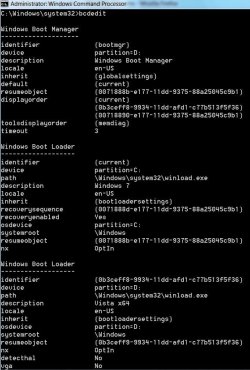
Could you post a screenshot of the bcd entries?

Type cmd in start search >when it pops up, rt click and run as admin >at the prompt, type bcdedit, then press enter.

Like this:

BCDEDIT2009-03-07_235226.jpg

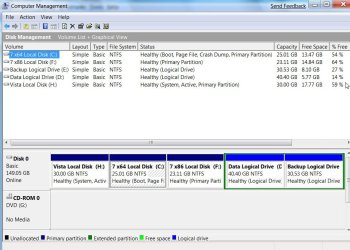
You might also post a screenshot of Disk Management - ( to save asking later if necessary). Like this:

DISKMANAGEMENT2009-02-04_031947.jpg

Thanks

To post a screenshot (jpeg ), click the Quick button at the bottom of this post, then Go Advanced, then follow step 8 onward of this tutorial

http://www.vistax64.com/tutorials/148532-how-use-snipping-tool-vista.html
 

My Computers My Computers

  • At a glance

    7 X64i5 84002x8gb 3200mhz
    Computer type
    PC/Desktop
    OS
    7 X64
    CPU
    i5 8400
    Motherboard
    gigabyte b365m ds3h
    Memory
    2x8gb 3200mhz
    Hard Drives
    various
    PSU
    pure power 11 400w cm
    Case
    Coolermaster
    Cooling
    cryorig m9i
  • At a glance

    7x64g54008gb ddr4 2400
    Computer type
    PC/Desktop
    OS
    7x64
    CPU
    g5400
    Motherboard
    ga b365m ds3h
    Memory
    8gb ddr4 2400
    PSU
    xfx pro 450w
Hey SIW2, I am at work but can post this for you once at home. TO do what you are asking I should be in teh Windows 7 drive correct?

Thanks for the quick response.
 

My Computer My Computer

At a glance

Vista/Windows7i79203X2GB OCZ FlexEX 7-7-7-213x 260's Tri Sli
OS
Vista/Windows7
CPU
i7920
Motherboard
evga X58 SLI
Memory
3X2GB OCZ FlexEX 7-7-7-21
Graphics Card(s)
3x 260's Tri Sli
Monitor(s) Displays
Acer 22"
Screen Resolution
1680x1050
PSU
Antec TPQ 850
Cooling
Copper TRUE
Yes the 7 drive will be fine - we need to see both drives - so make sure the other one is attached.:)
 

My Computers My Computers

  • At a glance

    7 X64i5 84002x8gb 3200mhz
    Computer type
    PC/Desktop
    OS
    7 X64
    CPU
    i5 8400
    Motherboard
    gigabyte b365m ds3h
    Memory
    2x8gb 3200mhz
    Hard Drives
    various
    PSU
    pure power 11 400w cm
    Case
    Coolermaster
    Cooling
    cryorig m9i
  • At a glance

    7x64g54008gb ddr4 2400
    Computer type
    PC/Desktop
    OS
    7x64
    CPU
    g5400
    Motherboard
    ga b365m ds3h
    Memory
    8gb ddr4 2400
    PSU
    xfx pro 450w
Yes the 7 drive will be fine - we need to see both drives - so make sure the other one is attached.:)

Will do. 3 more hours before I get home and will be sure to post this ASAP.
 

My Computer My Computer

At a glance

Vista/Windows7i79203X2GB OCZ FlexEX 7-7-7-213x 260's Tri Sli
OS
Vista/Windows7
CPU
i7920
Motherboard
evga X58 SLI
Memory
3X2GB OCZ FlexEX 7-7-7-21
Graphics Card(s)
3x 260's Tri Sli
Monitor(s) Displays
Acer 22"
Screen Resolution
1680x1050
PSU
Antec TPQ 850
Cooling
Copper TRUE
Hey SIW2

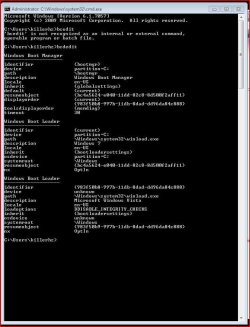
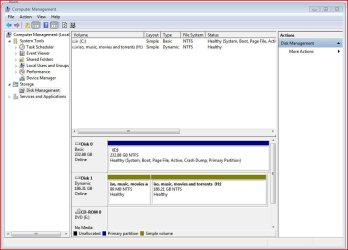
Here are those screenies sir...
 

Attachments

  • bcdedit.JPG
    bcdedit.JPG
    79.1 KB · Views: 41
  • drive mgmt.JPG
    drive mgmt.JPG
    77.9 KB · Views: 43

My Computer My Computer

At a glance

Vista/Windows7i79203X2GB OCZ FlexEX 7-7-7-213x 260's Tri Sli
OS
Vista/Windows7
CPU
i7920
Motherboard
evga X58 SLI
Memory
3X2GB OCZ FlexEX 7-7-7-21
Graphics Card(s)
3x 260's Tri Sli
Monitor(s) Displays
Acer 22"
Screen Resolution
1680x1050
PSU
Antec TPQ 850
Cooling
Copper TRUE
Ok, the second HD is a Dynamic disk.

It should work with 7 as it is the Ultimate version.

The problem you may have is that only Vista Enterprise and Ultimate support Dynamic disks. Even then, you may have some difficulties.

I suggest converting it to a Basic Disk. Unfortunately, Windows Disk Management can only do this destructively, i.e you will lose all the data on it and have to reinstall Vista. This will give it a drive letter and correct the bcd entry as well.

Otherwise, you will need a third party partition manager to convert the Dynamic disk to a Basic disk , without data loss.
 

My Computers My Computers

  • At a glance

    7 X64i5 84002x8gb 3200mhz
    Computer type
    PC/Desktop
    OS
    7 X64
    CPU
    i5 8400
    Motherboard
    gigabyte b365m ds3h
    Memory
    2x8gb 3200mhz
    Hard Drives
    various
    PSU
    pure power 11 400w cm
    Case
    Coolermaster
    Cooling
    cryorig m9i
  • At a glance

    7x64g54008gb ddr4 2400
    Computer type
    PC/Desktop
    OS
    7x64
    CPU
    g5400
    Motherboard
    ga b365m ds3h
    Memory
    8gb ddr4 2400
    PSU
    xfx pro 450w
Ok, the second HD is a Dynamic disk.

It should work with 7 as it is the Ultimate version.

The problem you may have is that only Vista Enterprise and Ultimate support Dynamic disks.

I suggest converting it to a Basic Disk. Unfortunately, Windows Disk Management can only do this destructively, i.e you will lose all the data on it and have to reinstall Vista.

Otherwise, you will need a third party partition manager to convert the Dynamic disk to a Basic disk , without data loss.

I guess I would like to not lose any data right now so a third party software would be needed. I do not understand what I need to do so please link me to an explanation? Once I do what you suggest Vista & 7 will work?
 

My Computer My Computer

At a glance

Vista/Windows7i79203X2GB OCZ FlexEX 7-7-7-213x 260's Tri Sli
OS
Vista/Windows7
CPU
i7920
Motherboard
evga X58 SLI
Memory
3X2GB OCZ FlexEX 7-7-7-21
Graphics Card(s)
3x 260's Tri Sli
Monitor(s) Displays
Acer 22"
Screen Resolution
1680x1050
PSU
Antec TPQ 850
Cooling
Copper TRUE
Ok, the second HD is a Dynamic disk.

Otherwise, you will need a third party partition manager to convert the Dynamic disk to a Basic disk , without data loss.

can that be done ?

I have had two bad experiences with dynamic disks and both times recovered only by copying data to another drive then starting again :mad:

the only third party partition manager I find works well with all OS from XP thru to win 7 is Eausus :geek:
 

My Computer My Computer

At a glance

win7 ultimate / virtual boxIntel Core i7 3770K,1155, Ivy BridgeGSkill Ripjaws Z Series 1600 CL 9.0 16GBKFA2 GeForce GTX 670 EX OC 2048MB GDDR5 PCI-E...
Computer Manufacturer/Model Number
built my own
OS
win7 ultimate / virtual box
CPU
Intel Core i7 3770K,1155, Ivy Bridge
Motherboard
MSI Z77A-G43
Memory
GSkill Ripjaws Z Series 1600 CL 9.0 16GB
Graphics Card(s)
KFA2 GeForce GTX 670 EX OC 2048MB GDDR5 PCI-E gfx card
Sound Card
onboard Nvidia HDMI audio
Monitor(s) Displays
ASUS VK222H 22" widescreen LCD monitor
Screen Resolution
1680x1050
Hard Drives
Kingston 128gb SSD
OCZ Vertex 90gb SSD
500GB WDCaviar 16mb 5000KS
320GB WDCaviar 16mb 3200AAKS sata 2
1TB Samsung 16mb HD103SJ sata 2
PSU
Corsair HX 750W ATX2.2 Modular
Cooling
Antec 25 Kuhler H2O 620
Keyboard
logitech
Mouse
logitech MX518
Internet Speed
7mb adsl
Hi,

The only free software that I know of for that is Testdisk - instructions here:

How to non-destructively convert dynamic disks to basic disks « My PKB

Copy any really essential data off beforehand.

You should then be able to sort out the boot problems using Startup Repair on the dvd.

I say should , because nothing is ever certain. What have you got to lose except a little time - and you may have fun doing it.
 

My Computers My Computers

  • At a glance

    7 X64i5 84002x8gb 3200mhz
    Computer type
    PC/Desktop
    OS
    7 X64
    CPU
    i5 8400
    Motherboard
    gigabyte b365m ds3h
    Memory
    2x8gb 3200mhz
    Hard Drives
    various
    PSU
    pure power 11 400w cm
    Case
    Coolermaster
    Cooling
    cryorig m9i
  • At a glance

    7x64g54008gb ddr4 2400
    Computer type
    PC/Desktop
    OS
    7x64
    CPU
    g5400
    Motherboard
    ga b365m ds3h
    Memory
    8gb ddr4 2400
    PSU
    xfx pro 450w
Hi,

The only free software that I know of for that is Testdisk - instructions here:

How to non-destructively convert dynamic disks to basic disks « My PKB

Copy any really essential data off beforehand.

You should then be able to sort out the boot problems using Startup Repair on the dvd.

I say should , because nothing is ever certain. What have you got to lose except a little time - and you may have fun doing it.

Thanks man it looks like my seagate barracuda s dead. I tried to even format but can't find the drive that is connected. looks like it's RMA time.
Man this really bums me out. Not even 2 months old and craps out on me. I have had my WD for 2+ years and not one issue that wasn't cause by me.
 

My Computer My Computer

At a glance

Vista/Windows7i79203X2GB OCZ FlexEX 7-7-7-213x 260's Tri Sli
OS
Vista/Windows7
CPU
i7920
Motherboard
evga X58 SLI
Memory
3X2GB OCZ FlexEX 7-7-7-21
Graphics Card(s)
3x 260's Tri Sli
Monitor(s) Displays
Acer 22"
Screen Resolution
1680x1050
PSU
Antec TPQ 850
Cooling
Copper TRUE
That's bad news .:(
 

My Computers My Computers

  • At a glance

    7 X64i5 84002x8gb 3200mhz
    Computer type
    PC/Desktop
    OS
    7 X64
    CPU
    i5 8400
    Motherboard
    gigabyte b365m ds3h
    Memory
    2x8gb 3200mhz
    Hard Drives
    various
    PSU
    pure power 11 400w cm
    Case
    Coolermaster
    Cooling
    cryorig m9i
  • At a glance

    7x64g54008gb ddr4 2400
    Computer type
    PC/Desktop
    OS
    7x64
    CPU
    g5400
    Motherboard
    ga b365m ds3h
    Memory
    8gb ddr4 2400
    PSU
    xfx pro 450w
Back
Top