remove xp from dual-boot with win7

zaiko2000

New member
Local time
3:29 PM
Messages
12
I succesfully installed win 7 with xp. Later i want to remove win XP and that doesn't seem to be that easy!
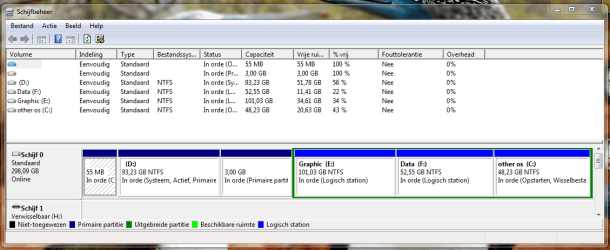
Here is the harddisk partition : (on a DELL PC)

- FAT 55 MB Hidden Primary
D: NTFS 93 GB Active &Boot Primary
- FAT 32 3 GB Hidden Primary
E:Graphic NTFS 101 GB None Logical
F: data NTFS 53 GB None Logical
C:Other OS NTFS 48 GB System Logical

So the C is windows 7 and D win XP
E and F are data

I know there are a lot of bright experts who can help me with this !
I'm using partition wizzard home edition.
I have also easyBCD but never used it.

thnx a lot
 

My Computer My Computer

At a glance

xp home sp3
OS
xp home sp3
I succesfully installed win 7 with xp. Later i want to remove win XP and that doesn't seem to be that easy!
Here is the harddisk partition : (on a DELL PC)

- FAT 55 MB Hidden Primary
D: NTFS 93 GB Active &Boot Primary
- FAT 32 3 GB Hidden Primary
E:Graphic NTFS 101 GB None Logical
F: data NTFS 53 GB None Logical
C:Other OS NTFS 48 GB System Logical

So the C is windows 7 and D win XP
E and F are data

I know there are a lot of bright experts who can help me with this !
I'm using partition wizzard home edition.
I have also easyBCD but never used it.

thnx a lot


Two things to be aware of.
1-if xp was installed first then win7 there is a boot folder in xp that win 7 needs to boot
2-easybcd is needed to fix the boot

there are tutorials for both. Just search

Ken J+
 

My Computer My Computer

At a glance

Win 8 Release candidate 8400[email protected]4 gigsNvidia 9600M
Computer Manufacturer/Model Number
HP Pavillion dv-7 1005 Tx
OS
Win 8 Release candidate 8400
CPU
[email protected]
Memory
4 gigs
Graphics Card(s)
Nvidia 9600M
Sound Card
HD built-in
Monitor(s) Displays
17" Wxga
Screen Resolution
1440x900
Cooling
none
Internet Speed
45Mb down 5Mb up
Can you please post back a screenshot of your full Disk management drive map, using the Snipping Tool in Start Menu and attaching file using paper clip in reply box?

Then we can give you the exact steps needed to remove XP from your dual boot.
 
In the mean time I already got rid of the dual-boot menu and i'm back in win7
I show you diskmanagement but it is in flemish so I added one with partition wizard as well.

thnx a lot
 

Attachments

  • Knipsel.PNG
    Knipsel.PNG
    40.9 KB · Views: 72
  • Knipsel2.PNG
    Knipsel2.PNG
    43.6 KB · Views: 46

My Computer My Computer

At a glance

xp home sp3
OS
xp home sp3
This is a real mess.

Somehow between the Disk Mgmt and Partition Wizard screenshot, system was transferred to D: which is on an extended logical partition that cannot be marked active.

If you want to delete D:XP, then I would try to copy C: Win7 off of that extended logical partition into the deleted D: space and convert it to primary so it can be properly marked active.

In doing this, consider deleting also the two FAT partitions (after moving data) to include them in the deleted D: space where you can attempt to copy C: using Partition Wizard bootable CD. Here's how:

Back up your files and a Win7 system image externally.

Boot PW CD, choose 1 for screen resolution, then right click D: delete, click OK

Now right click on FAT and FAT32 partition to delete if desired, click OK

Now rightclick C: Windows 7 partition and Copy. Use Copy Wizard to copy C: into deleted D: space. If PW will not copy from an extended logical partition, undo all steps and report back.

Once copied into first partition, right click C: to Modify: convert to Primary, then Set to Active, OK. Now rightclick old C: partition to delete, OK. Apply all steps.

Now boot into Win7 DVD REpair console, click through to Recovery tools, run Startup Repair up to 3 separate times to repair the moved MBR.
 
Last edited:
I tried to do what you wrote down with the PW CD and everything seems to work !
I only didn't excecute yet .
Once copied into first partition is that after reboot and than again with PW CD to set partition active and then delete old C !

It looks very OK to me ! Untill now one of the best solutions I found!
Better than install win7 in the XP partition ?

I'm still a little worried about the win 7 repair console ! run startup repair 3x just by rebooting?
I see on the PW CD for disk : rebuild MBR isn't that the same ?
 
Last edited:

My Computer My Computer

At a glance

xp home sp3
OS
xp home sp3
Then I would Apply the steps to see if it will complete them.

Have not tried using PW Rebuild MBR; not sure it is for Win7.

Win7 Startup Repair is automated with all former commands to repair or rewrite the MBR. You only need to run it up to 3 separate times since it assumes the given repair will work until you return for another.

Just make sure Win7 partition is marked active.

If not then you can reinstall Win7 into the old XP space.

Be sure to back up your files and a Win7 Backup Image externally so you can start over if necessary.
 
Ok I managed to put everything on it's place. Now I have a windows.00.old file , I presume I can delete it without any problems ?
 

My Computer My Computer

At a glance

xp home sp3
OS
xp home sp3
That is such a mess.

I would just backup and delete everything and start from scratch.
 

My Computer My Computer

At a glance

Windows 8.1 PRO3rd Generation Intel Core i7‐3612QM CPU @ 2.1...8GB DDR3NVIDIA GeForce GT 525M (128 bit), 1GB Grpahics
Computer type
PC/Desktop
Computer Manufacturer/Model Number
DELL VOSTRO 3650
OS
Windows 8.1 PRO
CPU
3rd Generation Intel Core i7‐3612QM CPU @ 2.10GHZ
Memory
8GB DDR3
Graphics Card(s)
NVIDIA GeForce GT 525M (128 bit), 1GB Grpahics
Screen Resolution
1920X1080
Hard Drives
750GB 5400RPM
You probably don't need the windows .old folder - unless you need to get some of your data out of it.


Please post a screenshot of Disk Management window so we can see where you are up to now.


Ok I managed to put everything on it's place. Now I have a windows.00.old file , I presume I can delete it without any problems ?
 

My Computers My Computers

  • At a glance

    7 X64i5 84002x8gb 3200mhz
    Computer type
    PC/Desktop
    OS
    7 X64
    CPU
    i5 8400
    Motherboard
    gigabyte b365m ds3h
    Memory
    2x8gb 3200mhz
    Hard Drives
    various
    PSU
    pure power 11 400w cm
    Case
    Coolermaster
    Cooling
    cryorig m9i
  • At a glance

    7x64g54008gb ddr4 2400
    Computer type
    PC/Desktop
    OS
    7x64
    CPU
    g5400
    Motherboard
    ga b365m ds3h
    Memory
    8gb ddr4 2400
    PSU
    xfx pro 450w
I'm with you guy's, that's a total clean install, the way it is now the registery has to look like mud.

Smitty
 

My Computer My Computer

At a glance

Windows 7 Home Premium 64 bitIntel Core 2 quad Extreme Q9770 @ 3.2 GHz4x2 GB Muskin 1600 MHz ramNVidia GTX 250
Computer Manufacturer/Model Number
Dell XPS 730
OS
Windows 7 Home Premium 64 bit
CPU
Intel Core 2 quad Extreme Q9770 @ 3.2 GHz
Memory
4x2 GB Muskin 1600 MHz ram
Graphics Card(s)
NVidia GTX 250
Sound Card
Soundblaster X-Fi Fatality Champion
Monitor(s) Displays
2 Dell 2007WFP Ultrascans
Screen Resolution
3360 x 1050
Hard Drives
WD Black 1TB sata, 2-WD Black 500 sata, 2-Seagate 500 Go external
PSU
1000 Watt
Cooling
air
Keyboard
MS Natrual Keyboard Pro
Mouse
Logitech Wireless Trackball
Internet Speed
DSL Elite
I deleted the old windowsfile and for me everything looks now picobello!

Thanks to this forum, big thanks to all you guys!
Couldn't have done it without your support.
 

Attachments

  • Knipsel.JPG
    Knipsel.JPG
    92.5 KB · Views: 13

My Computer My Computer

At a glance

xp home sp3
OS
xp home sp3
Looks okay. I notice you didn't delete the FAT partitions.

You might want to unhide Hidden Files and Protected OS files in Control Panel>Folder Options>View tab to look at what is on those FAT partitions. I would want to know.
 
I think it's the recoverysystem from Dell. It doesn't bother me it's always been there and I don't want to do something that gives me problems.
I had enough these last days!:shock:
 

My Computer My Computer

At a glance

xp home sp3
OS
xp home sp3
They are almost certainly the oem utility and recovery partitions.
 

My Computers My Computers

  • At a glance

    7 X64i5 84002x8gb 3200mhz
    Computer type
    PC/Desktop
    OS
    7 X64
    CPU
    i5 8400
    Motherboard
    gigabyte b365m ds3h
    Memory
    2x8gb 3200mhz
    Hard Drives
    various
    PSU
    pure power 11 400w cm
    Case
    Coolermaster
    Cooling
    cryorig m9i
  • At a glance

    7x64g54008gb ddr4 2400
    Computer type
    PC/Desktop
    OS
    7x64
    CPU
    g5400
    Motherboard
    ga b365m ds3h
    Memory
    8gb ddr4 2400
    PSU
    xfx pro 450w
If you are pleased with performance, then it appears you have successfully deleted XP and moved Win7 into its space. Good job!

Be sure to make a Win7 Backup Image to save externally so you never again have to reinstall Win7.
 
It's already been done!

Thnx again :D
 

My Computer My Computer

At a glance

xp home sp3
OS
xp home sp3
Back
Top