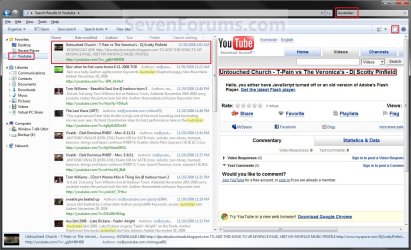
Windows 7 Federated Search Providers

Windows 7 Search Federation Providers

   Information
With the demonstration of Windows 7`s OpenSearch Providers by Long Zheng (Flickr Search Connector for Windows 7 Search Federation)

I have created these providers for Searching Youtube, Google, Google News, GoogleBlogs, MSN and Yahoo.


OPTION ONE

Installation and Usage


1st Step: Click on a icon below to install the Search Provider.
Advanced Search Connectors:
These Search Connectors export Additional properties like Thumbnails, Videos, Documents, Images and other files for use directly from explorer!
Youtube:


Flickr Search: (by Zong Zheng) Flickr Search Connector for Windows 7


ISOHunt.com Search


Deviant Art


Yahoo Image Search


Yahoo Video


TechNet-Edge


Msdn Channel 9

Basic Search Connectors:
These Search connectors only show web page results without additional properties like Thumbnails, Videos, Documents, Images and other files...
Bing:


Yahoo:


MSNSearch:


Google:
Google claim support for RSS based OpenSearch will be Implemented late 2010-2011, I have asked Google for more specific Information but their response was no comment (Recent conversations suggests they never will allow rss based searches)

An Alternate solution has been created by Dan Bugglin, You can read the full story here: OpenSearch Google in Windows 7 (Nicely done, Thanks Dan!)


Google News:


Google Blogs:


SevenForum`s Search:


ebay Search:


Amazon Search:


Digg


Technet


Techrepublic


Wired

2nd Step: Open Windows Explorer. You will see you new Search Provider listed under Favorites or under C:\Users\<username>\Searches


OPTION TWO

Create Your Own Standard Basic Search Provider


   Note
Most websites do not support OpenSearch however a little feature of Microsoft`s Live Search allows you to create your own basic Search Provider for any Website and make it able to search that site directly from Windows 7 :geek:

1st Step: Open Notepad and paste this code:
Code:
<?xml version="1.0" encoding="UTF-8"?>
<OpenSearchDescription xmlns="http://a9.com/-/spec/opensearch/1.1/" xmlns:ms-ose="http://schemas.microsoft.com/opensearchext/2009/">
<ShortName>[B][COLOR=red]Sevenforums[/COLOR][/B]</ShortName>
<Description>[COLOR=red][B]OpenSearch SevenForums via Live Search using Windows 7 Federated Search[/B][/COLOR]</Description>
<Url type="application/rss+xml" template="http://api.bing.com/rss.aspx?source=web&query={searchTerms} site:[COLOR=red][B]sevenforums.com[/B][/COLOR]&web.count=50"/>
<Url type="text/html" template="http://www.bing.com/search?q={searchTerms}+site:[B][COLOR=red]sevenforums.com[/COLOR][/B]"/>
</OpenSearchDescription>

2nd Step: Replace the red text with a Shortname you want to call the Search Provider, A description and then replace sevenforums.com URL with the website URL you would like to use for Searching using Windows 7

3rd Step: Click File> Save As and change the "Save as Type" to all files (important!), then under filename use (filename.osdx) to allow Windows 7 to recognize the Search Provider osdx extension ;)

4th Step: Open your newly created Search provider to begin searching the website you specified using LiveSearch`s webite RSS Search Feature :geek:


Attachments

Last edited by a moderator:
:cool: Thanks Steven. :D

Gary
 

My Computer

Computer Manufacturer/Model Number
Dell XPS420
OS
Vista Ult 64 bit Seven Ult RTM x64
CPU
Intel Core2 Quad Q6600 2.40 gigahertz
Memory
Crucial Ballistix 4x2GB PC2 6400
Graphics Card(s)
NVIDIA GeForce 8600 GTS 256 MB
Sound Card
Creative SB X-Fi audio
Monitor(s) Displays
HP w2207 + HPvs15
Screen Resolution
1680x1050 + 1024x768
Hard Drives
2-WD5000AAKS-500 GB
WD5000AAV-500 GB external
Keyboard
Microsoft Comfort Curve
Mouse
MX Revolution
Other Info
Wacom Intuos 2 Graphics Tablet
Experience Index=5.5
I finally got around to installing W7 x64 on my older WD 250 GB HD - I am impressed thus far. More about that in a different post.

I've got these downloaded - now to try them out .... So, it is my understanding that the one for W7 forums is still not 100% active?
 

My Computers

System One System Two

  • Computer type
    PC/Desktop
    Computer Manufacturer/Model Number
    The Beast Model A (homebrew)
    OS
    Windows 11 21H2 Current build
    CPU
    AMD Ryzen 9 3950X
    Motherboard
    MSI MEG X570 GODLIKE
    Memory
    4 * 32 GB - Corsair Vengeance 3600 MHz
    Graphics Card(s)
    EVGA GeForce RTX 3080 Ti XC3 ULTRA GAMING (12G-P5-3955-KR)
    Sound Card
    Realtek® ALC1220 Codec
    Monitor(s) Displays
    2x Eve Spectrum ES07D03 4K Gaming Monitor (Matte) | Eve Spec
    Screen Resolution
    3x 3840 x 2160
    Hard Drives
    3x Samsung 980 Pro NVMe PCIe 4 M.2 2 TB SSD (MZ-V8P2T0B/AM) } 3x Sabrent Rocket NVMe 4.0 1 TB SSD
    PSU
    PC Power & Cooling’s Silencer Series 1050 Watt, 80 Plus Plat
    Case
    Fractal Design Define 7 XL Dark ATX Full Tower Case
    Cooling
    SteelSeries Apex Pro Wired Gaming Keyboard
    Keyboard
    SteelSeries Apex Pro
    Mouse
    Logitech MX Master 3S | MX Master 3 for business
    Internet Speed
    AT&T LightSpeed Gigabit Duplex Ftth
    Antivirus
    Windows Defender + MB 3
    Browser
    Nightly (default) + Firefox (stable),Chrome, Edge
  • Computer type
    PC/Desktop
    System Manufacturer/Model Number
    Dell Latitude E5470
    OS
    ChromeOS Flex Dev Channel (current)
    CPU
    Intel(R) Core(TM) i5-6300U CPU @ 2.40GHz, 2501 Mhz, 2 Core(s), 4 Logical Processor(s)
    Motherboard
    Dell
    Memory
    16 GB
    Graphics Card(s)
    Intel(R) HD Graphics 520
    Sound Card
    Intel(R) HD Graphics 520 + RealTek Audio
    Monitor(s) Displays
    Dell laptop display 15"
    Screen Resolution
    1920 * 1080
    Hard Drives
    Toshiba 128GB M.2 22300 drive
    INTEL Cherryville 520 Series SSDSC2CW180A 180 GB SATA III SSD
    PSU
    Dell
    Case
    Dell
    Cooling
    Dell
    Keyboard
    Dell
    Mouse
    Logitech MX Master 3S (shared w. Sys 1) | Dell TouchPad
    Internet Speed
    AT&T LightSpeed Gigabit Duplex Ftth
So, it is my understanding that the one for W7 forums is still not 100% active?


Hey JohnG,

Yeah we have one, just copy and save the text from Step1 under "Create your own Personalized Search Provider"

Code:
<?xml version="1.0" encoding="UTF-8"?><OpenSearchDescription xmlns="http://a9.com/-/spec/opensearch/1.1/" xmlns:ms-ose="http://schemas.microsoft.com/opensearchext/2009/"> 
<ShortName>Sevenforums</ShortName> 
<Description>OpenSearch SevenForums via MSN using Windows 7 Search.</Description> 
<Url type="application/rss+xml" template="http://search.msn.com/results.aspx?q={searchTerms}+site%3asevenforums.com&num=10&format=rss"/> 
<Url type="text/html" template="http://search.live.com/results.aspx?q={searchTerms}+site%3asevenforums.com&format=rss"/> 
</OpenSearchDescription>

It uses a trick with Microsoft`s Live Search to display results in OpenSearch RSS format for any website you specify ;)

We are working on our own SevenForums Search Provider without using LiveSearch and it works but has some search result issues at the moment so the LiveSearch trick will have todo until we have a more reliable one for public release ;)
 
We previously touched upon how you could add Flickr Search to the Windows 7 Search Federation. dmex over at SevenForums went on to create even additional providers that you can experiment with. A few of the search providers available for download drew their sources from Youtube, Google News, and Yahoo. Of course, the one everyone wants is a Google Search implementation, but apparently, OpenSearch cannot be used with Google Search just yet.

Windows 7 Center
 

My Computer

Computer Manufacturer/Model Number
Self Built
OS
Vista X32. Windows 7 32bit
CPU
Intel Quad Core 6600
Motherboard
Asus P5B
Memory
4096 MB Xtreme-Dark 800mhz
Graphics Card(s)
Zotac Amp Edition 8800GT - 512MB DDR3, O/C 700mhz
Monitor(s) Displays
Samsung 206BW
Screen Resolution
1680 X 1024
Hard Drives
4 X Samsung 500GB 7200rpm Serial ATA-II HDD w. 16MB Cache .
PSU
550 w
Case
Thermaltake
Cooling
3 x octua NF-S12-1200 - 120mm 1200RPM Sound Optimised Fans
Keyboard
Microsoft
Mouse
Targus
Internet Speed
1500kbs
Been playing around with this a bit. Very:cool:

Gary
 

My Computer

Computer Manufacturer/Model Number
Dell XPS420
OS
Vista Ult 64 bit Seven Ult RTM x64
CPU
Intel Core2 Quad Q6600 2.40 gigahertz
Memory
Crucial Ballistix 4x2GB PC2 6400
Graphics Card(s)
NVIDIA GeForce 8600 GTS 256 MB
Sound Card
Creative SB X-Fi audio
Monitor(s) Displays
HP w2207 + HPvs15
Screen Resolution
1680x1050 + 1024x768
Hard Drives
2-WD5000AAKS-500 GB
WD5000AAV-500 GB external
Keyboard
Microsoft Comfort Curve
Mouse
MX Revolution
Other Info
Wacom Intuos 2 Graphics Tablet
Experience Index=5.5
Hey guys! Great to see all this excitement around my feature :)

Just wanted to let you guys know that instead of hosting the OSDX file in a .zip file, you can link to it directly. If the server it's on is configured to return .OSDX files with the appropriate "application/opensearchdescription+xml" MIME type, the install will happen automatically when you click on the link!

Most hosting providers provide a configuration UI to add file extensions and MIME type associations. If you can't find it, check the help documentation (probably just search for "MIME").

Happy searching!
 

My Computer

OS
Windows 7
Thanks Brandon, I have now added the MIME type to the server....now to make an install button.

Great feature BTW
 

My Computer

Computer type
PC/Desktop
OS
Windows 11
Anybody have the programming skills to make a plugin for seeqpod?

They have open search implemented, and an API for retrieving results, however, instead of getting back a rss feed, it returns a xspf file (open source xml playlist format.) Windows 7 doesn't seem to recognize anything besides an rss feed, so I guess you would need to use an xsl transformation to convert the xspf to rss, but I think that should work.
 

My Computer

OS
Windows 7 Ultimate Build 7000 x64
Fixed it!

Got Windows 7 beta and fixed my Twitter Search provider.

Here's a screenshot:
twittersearch_screenshot.gif


Here's the more info link:
Twitter Search at Aalaap.com

Here's the download link:
http://aalaap.com/downloads/TwitterSearch.osdx

Let me know if this works for you!

- Aalaap
 

My Computer

OS
Windows Vista SP1
I created a simple search connector using the base provided. It's used to search the MSDN documentation.

Hopefully someone else will find this useful.

Download Link
 
Last edited by a moderator:

My Computer

OS
Windows 7
Has anyone created a search connector for GMail? Is this possible, with the sample script in this thread?

Having search access to Gmail via Windows Desktop Search would be excellent!!!
 

My Computer

OS
Windows 7 SP1
Wow! Never knew this feature existed! Wonder what we'l learn next.
 

My Computer

Computer Manufacturer/Model Number
self built
OS
Windows 7 Professional 64-bit
CPU
Intel E8400 3GHz
Motherboard
Intel DX48BT2
Memory
Kingston PC3-10700H 4Gb
Graphics Card(s)
XFX Radeon HD 5850 BlackEd.
Sound Card
Asus Xonar DG
Monitor(s) Displays
2x Samsung SM-T220HD 22"
Screen Resolution
1680x1050 on two monitors
Hard Drives
OCZ Vertex 2 120gb 3.5" (OS)
Seagate Momentus XT 500gb
Samsung F3 1Tb (games)
2x Samsung F1 1Tb
PSU
Thermaltake ToughPower 850w
Case
Thermaltake Armor
Cooling
Scythe Mugen II
Keyboard
Microsoft Comfort Curve USB
Mouse
Razer Diamondback 3G
Internet Speed
8128/443
Has anyone created a search connector for GMail? Is this possible, with the sample script in this thread?

Having search access to Gmail via Windows Desktop Search would be excellent!!!

Yes, I have two different methods for allowing Gmail access via Federated Search however Im waiting for Brandon to implement changes with their PreviewHandler instance so I can replace the default locked-down previewer with a less-restricted, more functional Previewer that allows the required page scripting for gmail so users can see/preview the selected e-mail, My component also allows Flash for previewing YouTube searches and also allows Flash to be used by 64bit process's ;)

This is a quote from Brandon in an e-mail exchange we had two months ago:
it's been a busy week and I've actually been working with my PMs and our architect to work out the details of how to handle the OpenSearch previewer registration. We found a couple issues with the mechanism in the current post-beta builds. To solve them we have two options on the table right now, so I can't give specifics until that decision is made, but rest assured this will be easier in the final release build than in the beta.

Brandon said he would contact me when he had some information available but it seems there's nothing new just yet...I have to wait until I have some more information to continue working on the project so your just going to have to wait too ;) If anyone's interested in investigating/branching the Flash x64 project or has experience with C# or COM then drop me a line ;)


Steven
 
dmex,

Thanks for the reply and the explanation. As I'm thinking more about this federated search concept, one thing I'm not clear on is how the search actually works.

Does the federated search lead to GMail (or other external sources) being included in the real-time index of content. It seems like it would need to in order to be really useful. If I'm searching for a client name, I really want to receive all the content relevant to that search, whether it's from a Word or Excel document on my hard drive or a series of Gmails sent to that client over the past 5 years.

Hope that's not a dumb question. Otherwise, I'm happy to wait until you've got something worked out with the new, desired method. Thanks again.
 

My Computer

OS
Windows 7 SP1
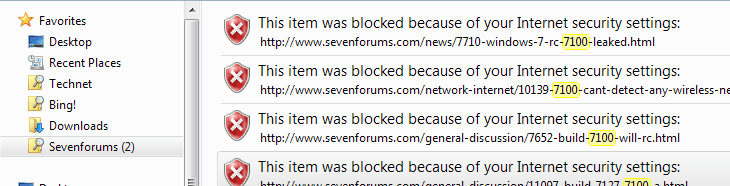
Lately my Seven forums search hasn't been working. No results found even for very common keywords. Technet still works so don't think it has anything to do with the function here. I've tried cutting and pasting the code into notepad, reinstalling and I then get results, but they all have this content blocked. Have played with security settings to try to get it working, but no joy.

fed.PNG

Same thing happens when I create a Vistax64 search.

Any idea what I'm doing wrong or what setting I need to change. Using Firefox if that matters.

Gary
 

My Computer

Computer Manufacturer/Model Number
Dell XPS420
OS
Vista Ult 64 bit Seven Ult RTM x64
CPU
Intel Core2 Quad Q6600 2.40 gigahertz
Memory
Crucial Ballistix 4x2GB PC2 6400
Graphics Card(s)
NVIDIA GeForce 8600 GTS 256 MB
Sound Card
Creative SB X-Fi audio
Monitor(s) Displays
HP w2207 + HPvs15
Screen Resolution
1680x1050 + 1024x768
Hard Drives
2-WD5000AAKS-500 GB
WD5000AAV-500 GB external
Keyboard
Microsoft Comfort Curve
Mouse
MX Revolution
Other Info
Wacom Intuos 2 Graphics Tablet
Experience Index=5.5
Lately my Seven forums search hasn't been working. No results found even for very common keywords. Technet still works so don't think it has anything to do with the function here. I've tried cutting and pasting the code into notepad, reinstalling and I then get results, but they all have this content blocked. Have played with security settings to try to get it working, but no joy.

View attachment 13413

Same thing happens when I create a Vistax64 search.

Any idea what I'm doing wrong or what setting I need to change. Using Firefox if that matters.

Gary


Wow, Ive never seen that happen :shock:

Federated Search inherits and uses IE's Restricted Zone security settings, Either something has corrupted IE or the Restricted Zone settings are too high, Try resetting the Restricted Security Zone settings in IE and adding http://www.sevenforums.com/* into the Trusted Site list and see if anything changes ;)

If your still getting the "blocked" results after trying the above, try lowering every setting you can find in the Restricted Zone to see if it makes any difference, You can reset the zone settings to defaults after ;)

Let me know if you have any success.

Steven
 
Hi Steven,

I have set everything to enabled in the restricted zone, seven and vistax64 were already in the trusted zone even did a complete reset of IE and then enabled everything in the restricted zone with a reboot. No joy. This is very odd as it was working, at least for sevenforums, before installing the RC. This is the first time I've tried it at sevenforums since installing the RC. The other oddity is that it works fine for technet and bing. Bing is not in the trusted zone and technet is. Since you haven't seen it then it must still be working for you, which makes it even more perplexing.

Gary

Update:I have 7201 installed on another partition with only Avast installed. Added the sevenforums search that you have all done up and it didn't work at all, as in 7100. Added sevenforums with my cut and paste version in 7201 and it works fine.

I wasn't going to set 7201 all up, but I guess I will start doing tweaks and installing programs trying the federated search after each change to see if I can break it there unless you have some other idea.

Gary
 

My Computer

Computer Manufacturer/Model Number
Dell XPS420
OS
Vista Ult 64 bit Seven Ult RTM x64
CPU
Intel Core2 Quad Q6600 2.40 gigahertz
Memory
Crucial Ballistix 4x2GB PC2 6400
Graphics Card(s)
NVIDIA GeForce 8600 GTS 256 MB
Sound Card
Creative SB X-Fi audio
Monitor(s) Displays
HP w2207 + HPvs15
Screen Resolution
1680x1050 + 1024x768
Hard Drives
2-WD5000AAKS-500 GB
WD5000AAV-500 GB external
Keyboard
Microsoft Comfort Curve
Mouse
MX Revolution
Other Info
Wacom Intuos 2 Graphics Tablet
Experience Index=5.5
Back
Top