Boot partition only installs on 2nd drive

TacticalTimbo

New member
Member
Local time
11:50 PM
Messages
82
Hi,

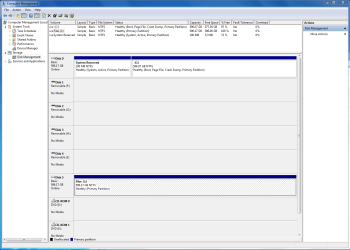
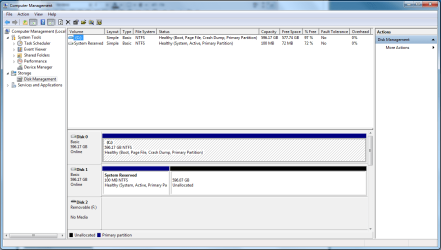
I've read all about, and understand what the 100mb boot partition is, why windows 7 creates it etc. However my issue is that Windows only wants to create it on Disk1 i.e. the second drive, and not on Disk0 along with the OS. I don't want Windows on Disk1 because my motherboard see it as the second drive and won't direct the bios to look for the OS unless you change it to the boot drive, under the bios settings. the attached screen shot below illustrates the issue.


Someone please explain
 

Attachments
  • Capture.PNG
    Capture.PNG
    35.1 KB · Views: 61

My Computer My Computer

Computer Manufacturer/Model Number
Custom build
OS
Windows 7 64-bit
CPU
Core i7 3930K @Stock
Motherboard
Asus Rampage IV Extreme
Memory
G.SKILL Z 1600Mhz 16GB
Graphics Card(s)
Nvidia GTX 580
Sound Card
Asus Xonar DX
Monitor(s) Displays
Dell S2409W
Screen Resolution
1920x1080p
Hard Drives
Crucial M4 128GB, Western Digital WD6400AAKS (X2)
PSU
Corsair Professional Series Gold AX850
Case
CM Storm Trooper
Cooling
Corsair H100
Keyboard
Microsoft Sidewinder X6
Mouse
Logitech G9x
Other Info
HITACHI/LG BH20N Blu-ray Rewriter
Welcome to SF!

Try unplugging the second drive during installation.
 

My Computer My Computer

Computer Manufacturer/Model Number
Custom
OS
Windows 7 Professional x64
CPU
Intel i7 2600K OC'd @ 4620 MHz
Motherboard
Asus P8Z68-V Pro
Memory
16GB GSkill Sniper 2133 Mhz (4x4GB)
Graphics Card(s)
EVGA GeForce GTX 480 SuperClocked+
Sound Card
Realtek High Definition Audio
Monitor(s) Displays
2x Acer S273HLbmii 27"
Screen Resolution
2 x 1920x1080
Hard Drives
64GB Crucial M4 SSD

Storage: Hitachi 1TB 5400RPM, Samsung 1.5TB 5400RPM
PSU
Corsair HW Series 750w (modular)
Case
Cooler Master HAF 932 Advanced Blue Edition
Cooling
CM Hyper 212+ CPU cooler, 3x 230mm + 1x 140mm case fans
Keyboard
Logitech MK320 (wireless)
Mouse
Logitech MK320 (wireless)
Internet Speed
30 Mb/s : 2 Mb/s
If you don't want to reinstall, you can mark Win7 active in Disk Management, unplug the second drive, set Win7 as first HD (after DVD) to boot in BIOS setup, boot into Win7 DVD Repair console, click through to Recovery Tools list to run Startup Repair up to three separate times to rewrite the MBR to Win7 partition.

Next plug the second drive back in, boot into Win7 DVD Repair console tools list, open a command line and type:

DISKPART
LIST DISK
SELECT DISK 1 (make sure it is 100mb SYstem Reserved HD)
CLEAN
EXIT

Now you can partition and format new data drive logical in Disk Mgmt.
 
Welcome to SF!

Try unplugging the second drive during installation.

I thought about that, but why is it so stubborn as to refuse to create it for Disk0? I mean it doesn't make any sense to have it on the other disk does it?
 

My Computer My Computer

Computer Manufacturer/Model Number
Custom build
OS
Windows 7 64-bit
CPU
Core i7 3930K @Stock
Motherboard
Asus Rampage IV Extreme
Memory
G.SKILL Z 1600Mhz 16GB
Graphics Card(s)
Nvidia GTX 580
Sound Card
Asus Xonar DX
Monitor(s) Displays
Dell S2409W
Screen Resolution
1920x1080p
Hard Drives
Crucial M4 128GB, Western Digital WD6400AAKS (X2)
PSU
Corsair Professional Series Gold AX850
Case
CM Storm Trooper
Cooling
Corsair H100
Keyboard
Microsoft Sidewinder X6
Mouse
Logitech G9x
Other Info
HITACHI/LG BH20N Blu-ray Rewriter
If you don't want to reinstall, you can mark Win7 active in Disk Management, unplug the second drive, set Win7 as first HD (after DVD) to boot in BIOS setup, boot into Win7 DVD Repair console, click through to Recovery Tools list to run Startup Repair up to three separate times to rewrite the MBR to Win7 partition.

Next plug the second drive back into DISK1 cable, boot into Win7 DVD Repair console tools list, open a command line and type:

DISKPART
LIST DISK
SELECT DISK 1 (make sure it is 100mb SYstem Reserved HD)
CLEAN
EXIT

Now you can partition and format new data drive logical in Disk Mgmt.

Mmm my brains a bit tired, not sure I'm getting you. I don't mind starting from scratch but it does this everytime, tried twice already! also only just clocked that its made disk1 active, wtf is it doing that?
 

My Computer My Computer

Computer Manufacturer/Model Number
Custom build
OS
Windows 7 64-bit
CPU
Core i7 3930K @Stock
Motherboard
Asus Rampage IV Extreme
Memory
G.SKILL Z 1600Mhz 16GB
Graphics Card(s)
Nvidia GTX 580
Sound Card
Asus Xonar DX
Monitor(s) Displays
Dell S2409W
Screen Resolution
1920x1080p
Hard Drives
Crucial M4 128GB, Western Digital WD6400AAKS (X2)
PSU
Corsair Professional Series Gold AX850
Case
CM Storm Trooper
Cooling
Corsair H100
Keyboard
Microsoft Sidewinder X6
Mouse
Logitech G9x
Other Info
HITACHI/LG BH20N Blu-ray Rewriter
You don't have to have the 100mb System Reserved partition. I showed you how to remove it above and recover the MBR boot-critical files into Win7.

Or you can pre-partition before install and you will not be offered the 100mb using these commands.

Boot DVD>Repair console>Recovery tools, open Command Line, type:

DISKPART
LIST DISK
SELECT DISK 1 (for 100mb System Reserved HD)
clean
select disk 0 (for Win7 HD)
clean
create partition primary
select partition 1
assign letter=c:
active
format
exit

Now reboot DVD, select Custom install, highlight DISK0 for install.
 
Ok sorry, I'm happy to start again with disk1 unplugged and I'm sure it'll go fine but is this the normal procedure, I notice you've got 2 drives Jonathan, did you have to do this as well, or is something with my system just screwed?
 

My Computer My Computer

Computer Manufacturer/Model Number
Custom build
OS
Windows 7 64-bit
CPU
Core i7 3930K @Stock
Motherboard
Asus Rampage IV Extreme
Memory
G.SKILL Z 1600Mhz 16GB
Graphics Card(s)
Nvidia GTX 580
Sound Card
Asus Xonar DX
Monitor(s) Displays
Dell S2409W
Screen Resolution
1920x1080p
Hard Drives
Crucial M4 128GB, Western Digital WD6400AAKS (X2)
PSU
Corsair Professional Series Gold AX850
Case
CM Storm Trooper
Cooling
Corsair H100
Keyboard
Microsoft Sidewinder X6
Mouse
Logitech G9x
Other Info
HITACHI/LG BH20N Blu-ray Rewriter
If you unplug the drive with System reserved 100mb still on it, it will mess up your boot and not want to delete when you replug it. Better to delete it now using DISKPART commands given above, also pre-formatting DISK0 so no 100mb System Reserved partition will be offered - unless you want one. In that case, unplug DISK1.
 
You don't have to have the 100mb System Reserved partition. I showed you how to remove it above and recover the MBR boot-critical files into Win7.

Or you can pre-partition before install and you will not be offered the 100mb using these commands.

Boot DVD>Repair console>Recovery tools, open Command Line, type:

DISKPART
LIST DISK
SELECT DISK 1 (for 100mb System Reserved HD)
clean
select disk 0 (for Win7 HD)
clean
create partition primary
select partition 1
assign letter=c:
active
format
exit

Now reboot DVD, select Custom install, highlight DISK0 for install.

I don't mind having the 100mb partition but why is it putting in on my second hd and also making my second drive the active one?
 

My Computer My Computer

Computer Manufacturer/Model Number
Custom build
OS
Windows 7 64-bit
CPU
Core i7 3930K @Stock
Motherboard
Asus Rampage IV Extreme
Memory
G.SKILL Z 1600Mhz 16GB
Graphics Card(s)
Nvidia GTX 580
Sound Card
Asus Xonar DX
Monitor(s) Displays
Dell S2409W
Screen Resolution
1920x1080p
Hard Drives
Crucial M4 128GB, Western Digital WD6400AAKS (X2)
PSU
Corsair Professional Series Gold AX850
Case
CM Storm Trooper
Cooling
Corsair H100
Keyboard
Microsoft Sidewinder X6
Mouse
Logitech G9x
Other Info
HITACHI/LG BH20N Blu-ray Rewriter
Cannot say why it is doing this, unless you are highlighting second drive when you first attempt to format, then changing to first drive to install.

I would delete the 100mb Sys Reserved before plugging it back in. Use the Diskpart commands given from DVD.
 
If you unplug the drive with System reserved 100mb still on it, it will mess up your boot and not want to delete when you replug it. Better to delete it now using DISKPART commands given above, also pre-formatting DISK0 so no 100mb System Reserved partition will be offered - unless you want one. In that case, unplug DISK1.


Surley it dosen't matter if I'm gonna do a re-build from the DVD?
 

My Computer My Computer

Computer Manufacturer/Model Number
Custom build
OS
Windows 7 64-bit
CPU
Core i7 3930K @Stock
Motherboard
Asus Rampage IV Extreme
Memory
G.SKILL Z 1600Mhz 16GB
Graphics Card(s)
Nvidia GTX 580
Sound Card
Asus Xonar DX
Monitor(s) Displays
Dell S2409W
Screen Resolution
1920x1080p
Hard Drives
Crucial M4 128GB, Western Digital WD6400AAKS (X2)
PSU
Corsair Professional Series Gold AX850
Case
CM Storm Trooper
Cooling
Corsair H100
Keyboard
Microsoft Sidewinder X6
Mouse
Logitech G9x
Other Info
HITACHI/LG BH20N Blu-ray Rewriter
You said you plan to reinstall with DISK1 unplugged. Until it is deleted, it will have the 100mb System Reserved partition on it which has the MBR. Best to delete it using the DISKPART clean command since you will be booting the DVD anyway.
 
Cannot say why it is doing this, unless you are highlighting second drive when you first attempt to format, then changing to first drive to install.

I would delete the 100mb Sys Reserved before plugging it back in. Use the Diskpart commands given from DVD.


I had two unformatted disks, formatted disk0 only and choose it for installation of the OS, it happened. Went back ran installation for the second time tried to format both disks (in both orders) and noticed that it only warns me and creates it when I format Disk1?

That's the best I can explain what I'm doing.
 

My Computer My Computer

Computer Manufacturer/Model Number
Custom build
OS
Windows 7 64-bit
CPU
Core i7 3930K @Stock
Motherboard
Asus Rampage IV Extreme
Memory
G.SKILL Z 1600Mhz 16GB
Graphics Card(s)
Nvidia GTX 580
Sound Card
Asus Xonar DX
Monitor(s) Displays
Dell S2409W
Screen Resolution
1920x1080p
Hard Drives
Crucial M4 128GB, Western Digital WD6400AAKS (X2)
PSU
Corsair Professional Series Gold AX850
Case
CM Storm Trooper
Cooling
Corsair H100
Keyboard
Microsoft Sidewinder X6
Mouse
Logitech G9x
Other Info
HITACHI/LG BH20N Blu-ray Rewriter
You can use a partition manager to delete the 100mb partition on DISK1 before unplugging it for reinstall.

Win7 will not start, so do it as last step before booting DVD to reinstall 7.

Or use the DISKPART commands to clean DISK1 given earlier from the booted Win7 DVD, then shutdown, unplug it, reboot to Install to DISK0.
 
You said you plan to reinstall with DISK1 unplugged. Until it is deleted, it will have the 100mb System Reserved partition on it which has the MBR. Best to delete it using the DISKPART clean command since you will be booting the DVD anyway.

You can use a partition manager to delete the 100mb partition on DISK1 before unplugging it for reinstall.

Win7 will not start, so do it as last step before booting DVD to reinstall 7.

Or use the DISKPART commands to clean DISK1 given earlier from the booted Win7 DVD, then shutdown, unplug it, reboot to Install to DISK0.

Got you, though could I use this http://www.killdisk.com/ from within windows. It was quicker last time, when I had bad sectors and couldn't change the second disk from being active under the RC and should be ok again you reckon?

In fact if I remember (was a while ago), I think because I made disk0 active also, I could boot back into Windows, might be wrong though.
 

My Computer My Computer

Computer Manufacturer/Model Number
Custom build
OS
Windows 7 64-bit
CPU
Core i7 3930K @Stock
Motherboard
Asus Rampage IV Extreme
Memory
G.SKILL Z 1600Mhz 16GB
Graphics Card(s)
Nvidia GTX 580
Sound Card
Asus Xonar DX
Monitor(s) Displays
Dell S2409W
Screen Resolution
1920x1080p
Hard Drives
Crucial M4 128GB, Western Digital WD6400AAKS (X2)
PSU
Corsair Professional Series Gold AX850
Case
CM Storm Trooper
Cooling
Corsair H100
Keyboard
Microsoft Sidewinder X6
Mouse
Logitech G9x
Other Info
HITACHI/LG BH20N Blu-ray Rewriter
No, your MBR is placed on 100mb System Reserved partition so Win7 cannot start on its own until MBR is recovered using method I gave in my first post.

What's important is to delete the 100mb off of DISK1 before plugging it back in after reinstall to DISK0. Use 3rd party disk manager/cleaner in 7 or DISKPART commands given from booted Win7 DVD.
 
No, your MBR is placed on 100mb System Reserved partition so Win7 cannot start on its own until MBR is recovered using method I gave in my first post.

What's important is to delete the 100mb off of DISK1 before plugging it back in after reinstall to DISK0. Use 3rd party disk manager/cleaner in 7 or DISKPART commands given from booted Win7 DVD.

If I wipe the disk before I shut down then unplug the drive, I won't need to get back into windows right?

Thats right I remember now last time when I wiped disk1 it wouldn't boot and somthing prompted me to repair the MBR from the disk.
 
Last edited:

My Computer My Computer

Computer Manufacturer/Model Number
Custom build
OS
Windows 7 64-bit
CPU
Core i7 3930K @Stock
Motherboard
Asus Rampage IV Extreme
Memory
G.SKILL Z 1600Mhz 16GB
Graphics Card(s)
Nvidia GTX 580
Sound Card
Asus Xonar DX
Monitor(s) Displays
Dell S2409W
Screen Resolution
1920x1080p
Hard Drives
Crucial M4 128GB, Western Digital WD6400AAKS (X2)
PSU
Corsair Professional Series Gold AX850
Case
CM Storm Trooper
Cooling
Corsair H100
Keyboard
Microsoft Sidewinder X6
Mouse
Logitech G9x
Other Info
HITACHI/LG BH20N Blu-ray Rewriter
Yes, make it the last step in Windows since it won't restart. Or use the DVD to run Diskpart commands given.


Thanks greatly for you're help and tolerance of my slow, tired brain, though I'm still very much in search of an answer as to why I'm suffering the route cause.
 

My Computer My Computer

Computer Manufacturer/Model Number
Custom build
OS
Windows 7 64-bit
CPU
Core i7 3930K @Stock
Motherboard
Asus Rampage IV Extreme
Memory
G.SKILL Z 1600Mhz 16GB
Graphics Card(s)
Nvidia GTX 580
Sound Card
Asus Xonar DX
Monitor(s) Displays
Dell S2409W
Screen Resolution
1920x1080p
Hard Drives
Crucial M4 128GB, Western Digital WD6400AAKS (X2)
PSU
Corsair Professional Series Gold AX850
Case
CM Storm Trooper
Cooling
Corsair H100
Keyboard
Microsoft Sidewinder X6
Mouse
Logitech G9x
Other Info
HITACHI/LG BH20N Blu-ray Rewriter
@gregrocker

Does this look right to you now?

(Disk1 is now Disk5)
 

Attachments

  • Capture.PNG
    Capture.PNG
    41.5 KB · Views: 28

My Computer My Computer

Computer Manufacturer/Model Number
Custom build
OS
Windows 7 64-bit
CPU
Core i7 3930K @Stock
Motherboard
Asus Rampage IV Extreme
Memory
G.SKILL Z 1600Mhz 16GB
Graphics Card(s)
Nvidia GTX 580
Sound Card
Asus Xonar DX
Monitor(s) Displays
Dell S2409W
Screen Resolution
1920x1080p
Hard Drives
Crucial M4 128GB, Western Digital WD6400AAKS (X2)
PSU
Corsair Professional Series Gold AX850
Case
CM Storm Trooper
Cooling
Corsair H100
Keyboard
Microsoft Sidewinder X6
Mouse
Logitech G9x
Other Info
HITACHI/LG BH20N Blu-ray Rewriter
Back
Top