Replacement for DvD Shrink on 7

Fantail

New member
Power User
Local time
5:40 PM
Messages
852
Location
Syracuse NY, USA
Former Shrink aholic from XP here.

Prior build with XP I frequently used Shrink 3.2 with Nero 7.
You probably know where this is going, Shrink runs on 7 x64 but both those apps are dated with 7. Shrink was great, clean, you could reauthor to dump all the menues, previews and extra tracks. And then burn with Nero automaticaly.
Moving along; to my knowledge Shrink worked with nero, and that's it unless you wanted folders with 3.5 gigs of vob files and use a secondary burn app. I may need a new way of thinking this as a friend of mine recomended an app called handbrake if I shoot for a library instead of burns. Down the road I could make use of a terabyte media drive untill the 750 fills up. I don't want to loose the ability to reauthor, or sacrifice too much video quality. But it occurs to me I can keep buying dvd blanks for back-ups, or get a decent app and start building a catagorized media folder.
Looking for software suggestions.
What I don't want is 3 seprate apps for one goal. I'd like to be able to reauthor, and try not to consume 3-4 gigs for each folder. While Nero is a great app, I don't have ver 9 and have not reinstalled ver 7 (on 7)at this point.
 

My Computer

Computer type
PC/Desktop
Computer Manufacturer/Model Number
Self - Build | Asus K53e Laptop
OS
10 x64 | 7 x64
CPU
AMD FX-9590 Vishera 4.7 | i5 Sandy Bridge
Motherboard
MSI 990 FXA | K53e
Memory
16 gigs Crucial Ballistix | 8 gigs Adata ddr3 1600
Graphics Card(s)
RX-570 4gd5 | Intel HD 3000
Sound Card
Realtek HD OnBoard Audio
Monitor(s) Displays
Samsung 22" & 37" Toshiba | 15.6
Hard Drives
ADATA 240 ssd & 750 Caviar Black 7200 sata | 250 840 EVO ssd & samsung ssd
PSU
Thermaltake 700 | 65w
Case
CoolMaster Centurion 534+
Cooling
Corsair H60
Keyboard
Rosewill RK-800G PS/2 Gaming Keyboard | Asus Chiclet
Mouse
Ventus | MS w/side buttons
Internet Speed
RoadRunner
Other Info
I hate the smell of friggin corn chip butt breath snacks.
Former Shrink aholic from XP here.

Prior build with XP I frequently used Shrink 3.2 with Nero 7.....


I use to use Shrink a long while ago, but gave up when I got fed up with the loss in quality when burning a big film I wanted to keep.
I moved over to Slyfox CloneDVD, and can recommend it over shrink. I haven't install it on windows7 as yet so can't confirm if it works ok, prob. info. about that on this site somewhere.

I know of one other who says Nero 7 works with windows 7 64 bit, but I couldn't get it working properly, and haven't got round to the Nero 9 bloatware yet.


Try CloneDVD as a trial here:

SlySoft Download | AnyDVD, CloneDVD, CloneCD, GameJackal, Any DVD, Clone DVD, Clone CD, Game Jackal

well worth checking out, methinks!

Inform us what you settle on.

Good luck
 

My Computer

Computer Manufacturer/Model Number
Self Built
OS
Windows 7 Professional 64 Bit
CPU
Intel i7 920 DO SLBEJ 2.66 Ghz
Motherboard
Asus P6T SE
Memory
6Gb (3x2GB) CorsairXMS3 DDR3 PC3-12800
Graphics Card(s)
Ati 1GB XFX HD4890
Sound Card
Onboard HD Audio
Monitor(s) Displays
Samsung SyncMaster T240
Screen Resolution
1920 x 1200
Hard Drives
1TB Samsung HD 103UJ Spinpoint F1
250Gb Seagate
PSU
850W Corsair 850HX
Case
Antec Twelve Hundred Full Tower
Cooling
Akasa Nero AK-967
Internet Speed
20Mb
I used AnyDvD before. I'm sure CloneDvD's quality would do the job but I don't like SlySoft's pricing structure.
I would need both those programs in most cases, that would cost me just over 100$usd for a two year subscription - licence? :shock::rolleyes:
The search continues.
 

My Computer

Computer type
PC/Desktop
Computer Manufacturer/Model Number
Self - Build | Asus K53e Laptop
OS
10 x64 | 7 x64
CPU
AMD FX-9590 Vishera 4.7 | i5 Sandy Bridge
Motherboard
MSI 990 FXA | K53e
Memory
16 gigs Crucial Ballistix | 8 gigs Adata ddr3 1600
Graphics Card(s)
RX-570 4gd5 | Intel HD 3000
Sound Card
Realtek HD OnBoard Audio
Monitor(s) Displays
Samsung 22" & 37" Toshiba | 15.6
Hard Drives
ADATA 240 ssd & 750 Caviar Black 7200 sata | 250 840 EVO ssd & samsung ssd
PSU
Thermaltake 700 | 65w
Case
CoolMaster Centurion 534+
Cooling
Corsair H60
Keyboard
Rosewill RK-800G PS/2 Gaming Keyboard | Asus Chiclet
Mouse
Ventus | MS w/side buttons
Internet Speed
RoadRunner
Other Info
I hate the smell of friggin corn chip butt breath snacks.
I notice DvDFab's license is similar :sarc:
But would it work without something like AnyDvD in front I wonder.
 

My Computer

Computer type
PC/Desktop
Computer Manufacturer/Model Number
Self - Build | Asus K53e Laptop
OS
10 x64 | 7 x64
CPU
AMD FX-9590 Vishera 4.7 | i5 Sandy Bridge
Motherboard
MSI 990 FXA | K53e
Memory
16 gigs Crucial Ballistix | 8 gigs Adata ddr3 1600
Graphics Card(s)
RX-570 4gd5 | Intel HD 3000
Sound Card
Realtek HD OnBoard Audio
Monitor(s) Displays
Samsung 22" & 37" Toshiba | 15.6
Hard Drives
ADATA 240 ssd & 750 Caviar Black 7200 sata | 250 840 EVO ssd & samsung ssd
PSU
Thermaltake 700 | 65w
Case
CoolMaster Centurion 534+
Cooling
Corsair H60
Keyboard
Rosewill RK-800G PS/2 Gaming Keyboard | Asus Chiclet
Mouse
Ventus | MS w/side buttons
Internet Speed
RoadRunner
Other Info
I hate the smell of friggin corn chip butt breath snacks.
You could just pick up AnyDVD from Slysoft and save some money.

Let AnyDVD run in the background; Transcode with DVDShrink and set it to burn automatically with ImgBurn.

Works great on Win7 32 and 64bit
 

My Computer

Computer Manufacturer/Model Number
My Build
OS
win7 Ult 64
CPU
i7 3930K & 3960X
Motherboard
ASUS P9X79 Deluxe
Memory
16GB G-Skill 2133MHz
Graphics Card(s)
Sapphire HD 7970
Sound Card
On-board
Monitor(s) Displays
ASUS 27 inch
Screen Resolution
1920X1080
Hard Drives
Crucial M4 256GB, 1.5TB WD Black for Data/Images
PSU
Corsair AX1200
Case
NZXT 810
Cooling
Custom Loop, Swiftech HDBlock
Keyboard
Mionix
Mouse
Mionix
Internet Speed
Cable
That's not a bad idea.
I tried Handbrake (and what's with the icon) to convert the file. That took a 3.5 vob down to about 1.4 mp4 and the quality looks good. Going to see what movie maker can do with a wma. But seeing how that's an older format I'm still looking into an alternate.
 

My Computer

Computer type
PC/Desktop
Computer Manufacturer/Model Number
Self - Build | Asus K53e Laptop
OS
10 x64 | 7 x64
CPU
AMD FX-9590 Vishera 4.7 | i5 Sandy Bridge
Motherboard
MSI 990 FXA | K53e
Memory
16 gigs Crucial Ballistix | 8 gigs Adata ddr3 1600
Graphics Card(s)
RX-570 4gd5 | Intel HD 3000
Sound Card
Realtek HD OnBoard Audio
Monitor(s) Displays
Samsung 22" & 37" Toshiba | 15.6
Hard Drives
ADATA 240 ssd & 750 Caviar Black 7200 sata | 250 840 EVO ssd & samsung ssd
PSU
Thermaltake 700 | 65w
Case
CoolMaster Centurion 534+
Cooling
Corsair H60
Keyboard
Rosewill RK-800G PS/2 Gaming Keyboard | Asus Chiclet
Mouse
Ventus | MS w/side buttons
Internet Speed
RoadRunner
Other Info
I hate the smell of friggin corn chip butt breath snacks.
View attachment 47783Hi Fantail!
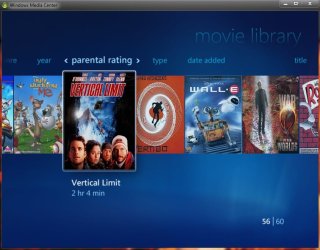
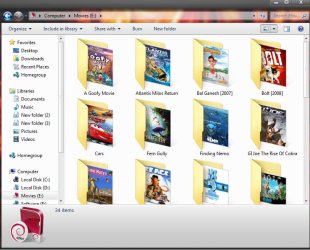
If you want dvd menus, extra tracks etc., you have to use any one of the dvd copying softwares like dvd shrink (though it hampers mpeg2 quality), dvdfab, clonedvd, slysoft anydvd, etc. But if you think it is not too important to have the stylish menus or other dvd fratures, h264 is the best idea I think. It doesnt reduce quality a lot, but reduce the space used. The alternative GUIs in this field (as much as I know) are handbrake (the best in my openion), autoGK, Gordian knot, Virtual DubMod, Nandub, etc.

I use HandBrake because space matters for me. I keep the ripped dvd movies in a folder, then make a movie library in media center. It looks Just cool. Here are the screenshots:
 

Attachments

  • Untitled.jpg
    Untitled.jpg
    75.5 KB · Views: 208
  • Untitled1.jpg
    Untitled1.jpg
    71.5 KB · Views: 181

My Computer

Computer type
PC/Desktop
Computer Manufacturer/Model Number
Self Assembled
OS
Microsoft Windows 10 Pro Insider Preview 64-bit
CPU
Intel(R) Core(TM) i3-4130 CPU @ 3.40GHz
Motherboard
Gigabyte Technology Co., Ltd. B85M-D3H
Memory
Corsair Vengence 4GB x2 (8.00GB Dual-Channel DDR3 @ 798MHz)
Graphics Card(s)
2047MB GeForce GTS 450 (ZOTAC International)
Sound Card
Onboard (Realtek High Definition Audio)
Monitor(s) Displays
LG Flatron E2040T
Screen Resolution
1600x900
Hard Drives
Western Digital 1 TB
Seagate 500 GB
PSU
Corsair VS550
Case
Cooler Master K380
Cooling
Cooler Master Seidon 120V Plus
Keyboard
Logitech MK260r
Mouse
Logitech MK260r
Internet Speed
PMPL Broadband
Antivirus
Windows Defender + MBAM
Browser
Firefox
Other Info
Dell Studio 15" Laptop
Back
Top