Install All messed up - with Ubuntu - HELP

Nokoyashi

New member
Local time
4:34 AM
Messages
58
Location
New Hampshire, USA
I had dual-boot Vista and Ubuntu on my laptop.

I tried to upgrade to Windows 7 without touching Ubuntu. I am not sure if Ubuntu was the culprit but my upgrade failed and I could not boot back up with a Vista CD. I could not do a Restore because it says there is no restore saved. I booted it up with Windows 7 DVD and came to the failure screen. It offers a 'Repair' option, I tried and I got a 'blue screen'.

Now, I have no way out. It seemed that the only option now for me is to RE-INSTALL Vista anew. However, my Ubuntu is still there and I am supposed to install Windows first before Ubuntu.

Good recipe for a worse mess. What should I do? Do I need to erase my whole hard disk to start over?

Please HELP! I'm quite desperate.

Thanks
 

My Computer My Computer

Computer Manufacturer/Model Number
Dell Inspiron 1521
OS
Windows Vista Home Premium
CPU
AMD Turion(tm)64 X2 Mobile Technology TL-58 1.90GHz
Memory
1.00 GB
I had dual-boot Vista and Ubuntu on my laptop.

I tried to upgrade to Windows 7 without touching Ubuntu. I am not sure if Ubuntu was the culprit but my upgrade failed and I could not boot back up with a Vista CD. I could not do a Restore because it says there is no restore saved. I booted it up with Windows 7 DVD and came to the failure screen. It offers a 'Repair' option, I tried and I got a 'blue screen'.

Now, I have no way out. It seemed that the only option now for me is to RE-INSTALL Vista anew. However, my Ubuntu is still there and I am supposed to install Windows first before Ubuntu.

Good recipe for a worse mess. What should I do? Do I need to erase my whole hard disk to start over?

Please HELP! I'm quite desperate.

Thanks
Hello Nokoyashi, and welocme to Windows Seven Forums!

It doesn't sound that bad ... sorry Windows 7 would not install on your machine. Did you check it with the Windows compatibility site before you tried 7? Did you create an "Image" and backups with Vista before you tried 7?

You can go ahead and reinstall Vista if you need to. Then if you want to use Grub as your boot menu (is that the way you had Vista and Ubuntu setup before?) all you have to do is use the Ubuntu install CD to reinstall Grub and you are back in business!

Cheers!
Robert
 
Last edited:

My Computer My Computer

OS
...
Ran Compatibility check / no Restore disk created

Thank you so much for your quick response.

Yes, I ran compatibility check prior to install. No problem was reported.

I don't remember being prompted to create a restore disk at time of install.

I could have been astral traveling and missed both :-(.

I guess I do need to reinstall Vista and leave Ubuntu alone. After Vista is back, then reinstall Grub.

So starting back from the beginning, what should I do this time to get a successful Windows 7 installed?

Your help is greatly appreciated.

Thanks...Mimi
 

My Computer My Computer

Computer Manufacturer/Model Number
Dell Inspiron 1521
OS
Windows Vista Home Premium
CPU
AMD Turion(tm)64 X2 Mobile Technology TL-58 1.90GHz
Memory
1.00 GB
New Windows 7 install instead of Vista?

Hi Robert,

It seemed that I do need to do a new install of Vista. If I need to do a new OS install, I might as well install the new Windows 7 instead of Vista.

What do you think?

Many Thanks
 

My Computer My Computer

Computer Manufacturer/Model Number
Dell Inspiron 1521
OS
Windows Vista Home Premium
CPU
AMD Turion(tm)64 X2 Mobile Technology TL-58 1.90GHz
Memory
1.00 GB
Thank you so much for your quick response.

Yes, I ran compatibility check prior to install. No problem was reported.

I don't remember being prompted to create a restore disk at time of install.

I could have been astral traveling and missed both :-(.

I guess I do need to reinstall Vista and leave Ubuntu alone. After Vista is back, then reinstall Grub.

So starting back from the beginning, what should I do this time to get a successful Windows 7 installed?

Your help is greatly appreciated.

Thanks...Mimi
Mimi;

Yes, you posted again before I could reply. Sorry, I am just too slow!!

It is difficult for me to say what to do as I don't know why 7 wouldn't install. If you want 7 I wouldn't go back to Vista. I would try 7 again.

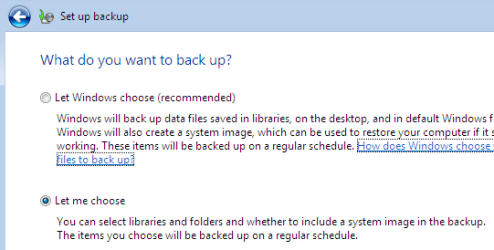
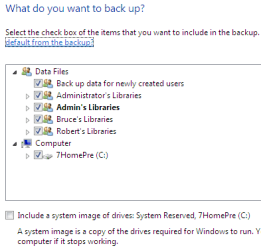
Backup, backup backup! I don't use Vista but 7 offers a backup utility that will save your files as well as an "Image" of your hard drive that can be restored if things go wrong. I assume Vista has something similar?

backup_01.png

backup_02.png

Did you use the "Easy Transfer Wizard" to move your settings from Vista to 7? What kind of backup did you make before installing 7?

And yes, if you need to reinstall Vista, you can reinstall Grub afterward to resume dual booting.

Please let us know what you want to do?

Cheers!
Robert
 

My Computer My Computer

OS
...
Could not install new Vista....error

Hi Robert,

Thanks again so much for the quick reply and advice.

Whether I do a new Vista or a new Windows 7 install at this point, there is nothing that I can backup, right? Currently, I cannot boot up successfully with or without Vista or Windows 7 DVD.

I am in limbo and getting 'blue screen'.

I decided to install Vista anew using the original Vista install DVD that the manufacturer provided. Before I get to the "Where do you want to install Windows" screen, I got this error:

"Windows installation encountered an unexpected error. Verify that the installation sources are accessible, and restart the installation.
Error code: 0xE0000100"

I repeated and got the same error. I must be in it real deep :-(. I cannot even using the original Vista install DVD to reinstall Vista anew.

What should I do now? Please help!

Many Thanks.
 

My Computer My Computer

Computer Manufacturer/Model Number
Dell Inspiron 1521
OS
Windows Vista Home Premium
CPU
AMD Turion(tm)64 X2 Mobile Technology TL-58 1.90GHz
Memory
1.00 GB
I Googled your error code: Error code: 0xE0000100 and found lots of info like this:

Error message when you use Windows Vista Setup to try to create a partition: "Error code: 0xE0000100"

You can try to correct your issue with some of this information.

If you are going to just install Windows 7 and have no data left to loose, there are several tutorials here that may help you with that. For example, you can delete the current Vista partition before reinstalling either Vista or 7 using the 7 Install DVD. Take a look and let us know what you think you can try?

http://www.sevenforums.com/tutorials/52291-partition-hard-drive-windows-7-install.html

http://www.sevenforums.com/general-discussion/22462-quick-link-tutorial-index.html

Cheers!
Robert
 

My Computer My Computer

OS
...
Windows 7 Compatibility Report - please review

Please review my herein inserted Windows 7 Compatibility Report and kindly tell me if I can go ahead and upgrade my Vista to Windows 7 Ultimate.

My laptop has 1GB RAM but the report shows only 896 MB. Is this a show stopper to upgrade to Windows 7 Ultimate?

Your help is greatly appreciated.

Many Thanks...Mimi
 

My Computer My Computer

Computer Manufacturer/Model Number
Dell Inspiron 1521
OS
Windows Vista Home Premium
CPU
AMD Turion(tm)64 X2 Mobile Technology TL-58 1.90GHz
Memory
1.00 GB
Forgot the attachment .... here it goes

My Windows 7 compatibility Report ran on Vista.
 

Attachments

My Computer My Computer

Computer Manufacturer/Model Number
Dell Inspiron 1521
OS
Windows Vista Home Premium
CPU
AMD Turion(tm)64 X2 Mobile Technology TL-58 1.90GHz
Memory
1.00 GB
Please review my herein inserted Windows 7 Compatibility Report and kindly tell me if I can go ahead and upgrade my Vista to Windows 7 Ultimate.

My laptop has 1GB RAM but the report shows only 896 MB. Is this a show stopper to upgrade to Windows 7 Ultimate?

Your help is greatly appreciated.

Many Thanks...Mimi
Mimi;

My old Dell Latitude D505 does just fine on 1GB, but without Areo. So I have low expectations here.

Sorry I didn't see a link to your compatibility report. Some information here would help you get more specific replies: the make and model of your laptop for example, and your correct time zone. This is a global forum and it helps to know where, in general, you are. Also, if you click the "UserCP" link and go the the second link at the top left of your "User Control Panel", the "User Specs", if you put your laptop info there you only need do it once. Then who ever is helping at the moment can see what hardware you are using.

Try again with the link ... use the paper clip next to the white smilie face at the top to attach it?

Cheers!
Robert
 

My Computer My Computer

OS
...
(Attached) Windows 7 Compatibility Rpt - please review

Please review my herein inserted Windows 7 Compatibility Report and kindly tell me if I can go ahead and upgrade my Vista to Windows 7 Ultimate.

Your help is greatly appreciated.

Many Thanks...Mimi
 

Attachments

My Computer My Computer

Computer Manufacturer/Model Number
Dell Inspiron 1521
OS
Windows Vista Home Premium
CPU
AMD Turion(tm)64 X2 Mobile Technology TL-58 1.90GHz
Memory
1.00 GB
Please review my herein inserted Windows 7 Compatibility Report and kindly tell me if I can go ahead and upgrade my Vista to Windows 7 Ultimate.

Your help is greatly appreciated.

Many Thanks...Mimi
Mimi;

Been looking over your laptop specs ... it is close. This laptop looks to be about 3 years old or so. However, it is compatible with and supported by Dell for 32 Bit Vista, so you should be good to go for 32 bit 7!!

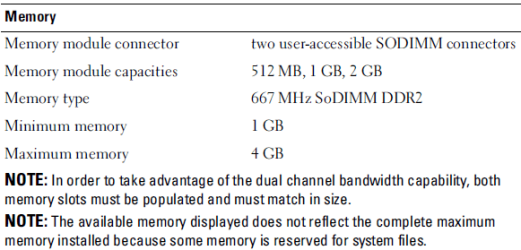
If I was to just make a wild guess, I would say your blue screen is due to the combination of the ATI Radeon X1270 and only 1GB of memory. Look here:

Mimi_dell_1521_ddr2.png

This suggests the ATI video is using some of your memory, the reason your report only counted 896MB instead of 1GB. The trick is going to be to get 7 to install so we can get the driver updates in place so the laptop will run stable. I would suggest 2GB of memory would help do that, as well as allow 7 to run better all around.

Please look at the bottom of the laptop. You have a cover over one memory slot. Please just look and see if there is a stick of memory there and what size if possible. The second memory slot is underneath the keyboard and is more difficult to access ... later.
 

My Computer My Computer

OS
...
Mimi;

It is very likely this BIOS update may make installing 7 possible:

Drivers and Downloads

The easy way to install it is while in windows, but since you can't get there, we can also install it by creating a bootable flash drive (USB or a memory card). Please let me know how I can help.

Cheers!
Robert
 

My Computer My Computer

OS
...
Updated Bios for Windows 7?

Hi Robert,

Thank you so much for all the info that you provided.

First of all, despite of the potential problems you pointed out, can I go ahead and install Windows 7 now with less than 1 GB RAM (some used by ATI)?

I can boot back up to Vista now. How can I get an updated Bios in Vista and use it afterwards for the install?

Many Thanks...Mimi
 

My Computer My Computer

Computer Manufacturer/Model Number
Dell Inspiron 1521
OS
Windows Vista Home Premium
CPU
AMD Turion(tm)64 X2 Mobile Technology TL-58 1.90GHz
Memory
1.00 GB
Hi Gregrocker,

I followed the instructions from the link that you provided. I booted up Ubuntu with a Ubuntu boot DVD. I am inside the GParted UI. What I saw was only one device:

/dev/sda (149.05 GiB)

Underneath, it says this Partition is "unallocated", File System is "unallocated". For Disk Info, the "DiskLabelType" is "unrecognized".

This laptop dual-boots Vista and Ubuntu. I encountered problem upgrading to Windows 7 Ultimate so I restored to my old Vista. This is my current state. What should I do to my partitions (none allocated now, it seems)?

Please help.

Many Thanks...Mimi
 

My Computer My Computer

Computer Manufacturer/Model Number
Dell Inspiron 1521
OS
Windows Vista Home Premium
CPU
AMD Turion(tm)64 X2 Mobile Technology TL-58 1.90GHz
Memory
1.00 GB
Mimi;

It is very likely this BIOS update may make installing 7 possible:

Drivers and Downloads

The easy way to install it is while in windows, but since you can't get there, we can also install it by creating a bootable flash drive (USB or a memory card). Please let me know how I can help.

Cheers!
Robert

Hi Robert,

Thank you so much for all the info that you provided.

First of all, despite of the potential problems you pointed out, can I go ahead and install Windows 7 now with less than 1 GB RAM (some used by ATI)?

I can boot back up to Vista now. How can I get an updated Bios in Vista and use it afterwards for the install?

Many Thanks...Mimi
Good morning, Mimi;

From Vista, go to the Dell website link I posted and download the Bios update. Open it and follow the instructions. You can update the Bios from Vista. The Dell owner who posted this said it solved many of his Windows 7 problems.

There is no risk now, so I would recommend trying to install 7 after the Bios update, even with only 1GB of memory.

DDR2 memory is very inexpensive at the moment, if I knew how many sticks were actually installed in your laptop I could determine the cost of adding more memory?

Cheers!
Robert
 

My Computer My Computer

OS
...
My Vista Partition map

While I saw only /dev/sda in Ubuntu and is all "unallocated", I captured a partition map from Vista (inserted herein).

Something is not right. I have more than 1 drive active??

What is the course of action for me now?

Many Thanks...Mimi
 

Attachments

My Computer My Computer

Computer Manufacturer/Model Number
Dell Inspiron 1521
OS
Windows Vista Home Premium
CPU
AMD Turion(tm)64 X2 Mobile Technology TL-58 1.90GHz
Memory
1.00 GB
While I saw only /dev/sda in Ubuntu and is all "unallocated", I captured a partition map from Vista (inserted herein). Something is not right. I have more than 1 drive active?? What is the course of action for me now?

Many Thanks...Mimi
Mimi;

I am not sure you even need to worry about the "Active" status of partitions here, some suggest to mark all partitions "Not Active" except for the Windows partition the new OS is being installed to. It is my understanding that all partitions with an OS need to be "Active". This is a link to Ubuntu, how to add Window 7 where Ubuntu is installed first, and there is no mention of marking a partition active or not.

“How to” Dual boot Ubuntu and Windows 7 (Ubuntu installed first) - Ubuntu Forums

I do have some questions, though:

Mimi_dell_1521_02.png

It would help me to understand what each of these partitions is being used for, if you know?

(BTW, these tutorials show how to grab a screen shot like this and add it to a post. A real time saver for you!
http://www.sevenforums.com/tutorials/51160-screenshot-upload-using-mwsnap.html
http://www.sevenforums.com/tutorials/9733-how-post-screenshot-seven-forums.html
http://www.sevenforums.com/tutorials/9717-screenshot-paint.html )

If you have important data, or if one is being used by Ubuntu, like a "Swap" file, then by all means we need to keep them. The rest we can clean up.

Cheers!
Robert
 

My Computer My Computer

OS
...
Back
Top