A Tip on increasing Graphics VRAM in a VMWare WM

jimbo45

New member
Hi everyone.

Just a little hard to find bit of info on increasing the graphics size memory for the virtual SVGA graphics adapter on a Virtual Machine running under vmware products.

The default is only 16 MB (VRAM) which probably isn't enough to get Aero going on a Windows 7 Virtual machine. You need WKS 7 / vmware workstation 3.0 for 3D support in any case.

Solution

Edit the .vmx file with notepad (Open with notepad) and insert this line

svga.vramSize = "sizeInBytes"

I think 64MB is needed for AERO -- mine works with 64MB - but you could try 32.

Vm runs with FULL AERO -- no prob at all.

here's what I added to my .vmx file for a W7 Professional X-64 Virtual machine - look at the last line.


pciBridge7.pciSlotNumber = "24"
scsi0.pciSlotNumber = "160"
usb.pciSlotNumber = "32"
ethernet0.pciSlotNumber = "33"
sound.pciSlotNumber = "34"
ehci.pciSlotNumber = "35"
vmci0.pciSlotNumber = "36"
scsi0.sasWWID = "50 05 05 66 67 3e f6 b0"
vmotion.checkpointFBSize = "134217728"
usb:0.present = "TRUE"
usb:1.present = "TRUE"
ethernet0.generatedAddressOffset = "0"
vmci0.id = "780936453"
usb:1.deviceType = "hub"
usb:0.deviceType = "mouse"
ide1:0.autodetect = "FALSE"
ide1:0.allowGuestConnectionControl = "FALSE"
tools.upgrade.policy = "manual"
scsi0:1.present = "TRUE"
scsi0:1.fileName = "Windows 7_pro x64-0.vmdk"
scsi0:1.redo = ""
floppy0.present = "FALSE"
ide1:0.startConnected = "TRUE"
svga.vramSize = "64000000"


Give it say 64 MB. Don't forget its size in BYTES you have to set -- if you do it wrong then the VM won't power on so backup the .vmx file before messing around with it.

Cheers
jimbo
 

My Computer

Computer type
PC/Desktop
Computer Manufacturer/Model Number
Custom built, several laptops HP/ASUS
OS
Linux CENTOS 7 / various Windows OS'es and servers
CPU
Intel i7 Intel i5
Memory
8GB, 16GB
Graphics Card(s)
On Motherboard
Sound Card
Realtek HD audio
Monitor(s) Displays
Apple Cinema display, Samsung LCD
Screen Resolution
1920 X 1080
Hard Drives
4 X 1TB SATA
Mouse
Toshiba wireless laser
Internet Speed
> 20MB up
So this is probably only applicable to Vista mode, huh? I added the line anyways! :D
 

My Computer

Computer Manufacturer/Model Number
Cyberpower, Inc.
OS
Windows 7 Professional (x64)
CPU
AMD Phenom II X4 955 Black Edition
Motherboard
Gigabyte AMD MA770T-UD3P AM3 DDR3 1666+/1333/1066
Memory
6GB (3 x 2GB) Kingston DDR3 1333 SDRAM
Graphics Card(s)
NVIDIA GeForce GTX 260
Sound Card
Onboard 7.1 Sound
Monitor(s) Displays
Samsung 24" SyncMaster 2422
Screen Resolution
1920 x 1200
Hard Drives
500GB Sata II 3.0GB 16MB 7200RPM,
Western Digital 1TB USB 2.0 External Hard Drive
PSU
Kingwin 700 Watt Power Supply
Case
Silver X-Cruiser 2 Mid No Power
Cooling
Asetek 120MM Watercooler
Keyboard
HTK-1001
Mouse
Razer Viper
Internet Speed
Incoming: 2496 kbps, Outgoing: 512 kbps
Hi there
not sure what you mean by "Vista mode"

I'm running a full W7 X-64 pro Virtual machine and have installed some proper W7 Aero themes from the MS download site -- all work perfectly.

Increasing the Virtual Video Ram does also tend to speed up the graphics in general on Virtual machines running under vmware -- there's a very slight price to pay on the HOST system but as I've got a QUAD processor this is easily absorbed.

I've also increased the graphics memory size on W2K3 server VM's - these also seem to draw the graphics much snappier.

To check AERO on W7 virtual machine is working just have 2 open windows and press the start + tab key (or the Windows + tab key) - the windows should rotate in "3D" mode as per the Host system.

Note that the eventual screen output will depend on you REAL graphics adapter on the host - but you can eliminate some of the bottleneck on the Virtual SVGA adapter.

Cheers
jimbo.
 

My Computer

Computer type
PC/Desktop
Computer Manufacturer/Model Number
Custom built, several laptops HP/ASUS
OS
Linux CENTOS 7 / various Windows OS'es and servers
CPU
Intel i7 Intel i5
Memory
8GB, 16GB
Graphics Card(s)
On Motherboard
Sound Card
Realtek HD audio
Monitor(s) Displays
Apple Cinema display, Samsung LCD
Screen Resolution
1920 X 1080
Hard Drives
4 X 1TB SATA
Mouse
Toshiba wireless laser
Internet Speed
> 20MB up
Stickified and edited title to show it is for VMWare
 

My Computers

System One System Two

  • Computer type
    PC/Desktop
    Computer Manufacturer/Model Number
    The Beast Model A (homebrew)
    OS
    Windows 11 21H2 Current build
    CPU
    AMD Ryzen 9 3950X
    Motherboard
    MSI MEG X570 GODLIKE
    Memory
    4 * 32 GB - Corsair Vengeance 3600 MHz
    Graphics Card(s)
    EVGA GeForce RTX 3080 Ti XC3 ULTRA GAMING (12G-P5-3955-KR)
    Sound Card
    Realtek® ALC1220 Codec
    Monitor(s) Displays
    2x Eve Spectrum ES07D03 4K Gaming Monitor (Matte) | Eve Spec
    Screen Resolution
    3x 3840 x 2160
    Hard Drives
    3x Samsung 980 Pro NVMe PCIe 4 M.2 2 TB SSD (MZ-V8P2T0B/AM) } 3x Sabrent Rocket NVMe 4.0 1 TB SSD
    PSU
    PC Power & Cooling’s Silencer Series 1050 Watt, 80 Plus Plat
    Case
    Fractal Design Define 7 XL Dark ATX Full Tower Case
    Cooling
    SteelSeries Apex Pro Wired Gaming Keyboard
    Keyboard
    SteelSeries Apex Pro
    Mouse
    Logitech MX Master 3S | MX Master 3 for business
    Internet Speed
    AT&T LightSpeed Gigabit Duplex Ftth
    Antivirus
    Windows Defender + MB 3
    Browser
    Nightly (default) + Firefox (stable),Chrome, Edge
  • Computer type
    PC/Desktop
    System Manufacturer/Model Number
    Dell Latitude E5470
    OS
    ChromeOS Flex Dev Channel (current)
    CPU
    Intel(R) Core(TM) i5-6300U CPU @ 2.40GHz, 2501 Mhz, 2 Core(s), 4 Logical Processor(s)
    Motherboard
    Dell
    Memory
    16 GB
    Graphics Card(s)
    Intel(R) HD Graphics 520
    Sound Card
    Intel(R) HD Graphics 520 + RealTek Audio
    Monitor(s) Displays
    Dell laptop display 15"
    Screen Resolution
    1920 * 1080
    Hard Drives
    Toshiba 128GB M.2 22300 drive
    INTEL Cherryville 520 Series SSDSC2CW180A 180 GB SATA III SSD
    PSU
    Dell
    Case
    Dell
    Cooling
    Dell
    Keyboard
    Dell
    Mouse
    Logitech MX Master 3S (shared w. Sys 1) | Dell TouchPad
    Internet Speed
    AT&T LightSpeed Gigabit Duplex Ftth
Hi there
not sure what you mean by "Vista mode"
Oh sorry, I thought you were using a virtual Vista. I didn't know they had proper W7 aero themes for XP. Can you share the link to the download site?
 

My Computer

Computer Manufacturer/Model Number
Cyberpower, Inc.
OS
Windows 7 Professional (x64)
CPU
AMD Phenom II X4 955 Black Edition
Motherboard
Gigabyte AMD MA770T-UD3P AM3 DDR3 1666+/1333/1066
Memory
6GB (3 x 2GB) Kingston DDR3 1333 SDRAM
Graphics Card(s)
NVIDIA GeForce GTX 260
Sound Card
Onboard 7.1 Sound
Monitor(s) Displays
Samsung 24" SyncMaster 2422
Screen Resolution
1920 x 1200
Hard Drives
500GB Sata II 3.0GB 16MB 7200RPM,
Western Digital 1TB USB 2.0 External Hard Drive
PSU
Kingwin 700 Watt Power Supply
Case
Silver X-Cruiser 2 Mid No Power
Cooling
Asetek 120MM Watercooler
Keyboard
HTK-1001
Mouse
Razer Viper
Internet Speed
Incoming: 2496 kbps, Outgoing: 512 kbps
Hi there
I never actually mentioned XP in the post - for full AERO you need to be running VISTA or W7 in a VM (vmware version).

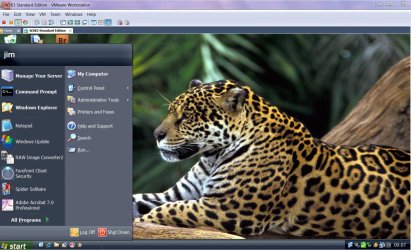
However you can get an "almost" W7 like them (no AERO but still a nice theme) for XP -- I'm using a Virtual W2K3 server as a VM = I've enabled themes on the server where you can use XP themes on it.

Here's a screenshot.

XP ROYALE NOIR theme with the Jaguar wallpaper extracted from the Brazilian Regional W7 Themepack downloaded from MS site.

Enc screenshot of the desktop and the jaguar wallpaper. You'll have to google for ROYAL NOIR XP theme as it was a while since I downloaded it.

Cheers
jimbo
 

Attachments

  • BR-olwp4.jpg
    BR-olwp4.jpg
    534.9 KB · Views: 1,788
  • w2k3vm.jpg
    w2k3vm.jpg
    185.3 KB · Views: 671

My Computer

Computer type
PC/Desktop
Computer Manufacturer/Model Number
Custom built, several laptops HP/ASUS
OS
Linux CENTOS 7 / various Windows OS'es and servers
CPU
Intel i7 Intel i5
Memory
8GB, 16GB
Graphics Card(s)
On Motherboard
Sound Card
Realtek HD audio
Monitor(s) Displays
Apple Cinema display, Samsung LCD
Screen Resolution
1920 X 1080
Hard Drives
4 X 1TB SATA
Mouse
Toshiba wireless laser
Internet Speed
> 20MB up
windows 7 runs almost as fast in virtualbox (ubuntu 9.10 x64 host) as it does when you boot the actual windows 7. Aero effects can be enabled if you have a graphics card with more than 128MB memory. Most games that will run in windows 7 will work just fine in a windows 7 guest system in Vbox if you have a high end video card. Virtualbox is free and so is ubuntu. So why can't we even get 32 bit color in xp mode, let alone 3D hardware acceleration?
 
Hi there
XP mode as I've posted elsewhere is really only meant for small apps -- and IMO isn't really of much use anyway since you need at least W7 Professional and a 64 bit enabled machine to run it on.

It was designed for small workplaces but IMO is nopt even suitable for that.

For legacy apps I'd recommend a small workplace uses an OLD computer (probably can be got for almost ZERO cost) and run XP server 2003 on it - and then allow uses to RDP / connect to it to run the old apps.

XP mode -- great idea - silly implementation.

This thread however is for increasing the graphics size in a VM.

If you don't SET THE VRAM parameter in your VM it won't matter how much your Real graphics card has -- your vm will only use the default which I think is very small.

Cheers
jimbo
 

My Computer

Computer type
PC/Desktop
Computer Manufacturer/Model Number
Custom built, several laptops HP/ASUS
OS
Linux CENTOS 7 / various Windows OS'es and servers
CPU
Intel i7 Intel i5
Memory
8GB, 16GB
Graphics Card(s)
On Motherboard
Sound Card
Realtek HD audio
Monitor(s) Displays
Apple Cinema display, Samsung LCD
Screen Resolution
1920 X 1080
Hard Drives
4 X 1TB SATA
Mouse
Toshiba wireless laser
Internet Speed
> 20MB up
Dont see that line in my file.

Want to emulate aero in 7 Ultimate x32.

VMWare Workstation 7.0
256MB Host Video Memory
 

My Computer

Computer Manufacturer/Model Number
Toshiba Satellite L505D-S9565
OS
Windows 7 Home Premium x64, Mac OS X 10.6.2 x64
CPU
AMD Athlon X2 Dual-Core 2.1 GHz
Motherboard
Toshiba Built-In with Insyde H20 BIOS 1.40
Memory
4 GB DDR2 800 MHz
Graphics Card(s)
ATI Radeon HD Mobility 3100 Graphics 256MB to 1468 MB Shared
Sound Card
Realtek Mobile ALC272 HD Audio
Monitor(s) Displays
15.6" TFT LCD with TruBrite, Samsung 1080p HDTV
Screen Resolution
1366x768, 1920x1080
Hard Drives
❶:Main: Toshiba 250 GB SATA 5400 RPM
PSU
N/A
Case
N/A
Cooling
Built-in/Open window in winter :P
Keyboard
Built-in
Mouse
Build-in Symantics SmartTouch Pad
Internet Speed
55 MB/sec Down, 9 MB/sec Up
Other Info
❷:Backup: Seagate FreeAgent Desk USB 2.0 5400 RPM
❸:Media: Toshiba 640 GB USB 2.0 5400 RPM Portable Edition
Should you put in this line instead?

svga.vramSize = "67108864"

1 MB isn't 1,000,000 bytes, but it's really 1,048,576 bytes. That value times 64 MB gives you 67,108,864 bytes.
 

My Computer

Computer Manufacturer/Model Number
Dell Inspiron 14R N4110
OS
Windows 7 Home Premium x64
CPU
Intel Core i5-2410M Quad Core CPU @ 2.30 GHz
Memory
8 GB Shared Channel DDR3 Memory
Graphics Card(s)
Intel HD Graphics 3000, AMD Radeon HD 6470M
Sound Card
Intel Display Audio, Realtek High Definition Audio
Monitor(s) Displays
14" HD 720p LED Display
Screen Resolution
1366x768
Hard Drives
500 GB 5400 RPM SATA Hard Drive
Mouse
Microsoft USB IntelliMouse Explorer 3.0
windows 7 runs almost as fast in virtualbox (ubuntu 9.10 x64 host) as it does when you boot the actual windows 7. Aero effects can be enabled if you have a graphics card with more than 128MB memory. Most games that will run in windows 7 will work just fine in a windows 7 guest system in Vbox if you have a high end video card. Virtualbox is free and so is ubuntu. So why can't we even get 32 bit color in xp mode, let alone 3D hardware acceleration?

If you understood XP Mode you would know why. It is a VM running through Virtual PC but the XP Mode interface that shows the published application on the host is going through an RDP interface. You will never get 3D hardware acceleration through RDP. Good luck trying.
 

My Computer

OS
Windows 7 Home Premium x64
CPU
Intel Core 2 Quad Q9450 @ 3.2GHz
Motherboard
Asus P5Q PRO Turbo
Memory
4GB DDR2-800
Graphics Card(s)
MSI Radeon HD 5850
Sound Card
Creative Labs Audigy2 ZS
Monitor(s) Displays
Samsung 225BW
Hard Drives
(2) 1TB Samsung F1, (2) 1.5TB Samsung F2, 1TB Samsung F2, 2TB Samsung F3
PSU
Corsair HX650
Case
Antec Nine Hundred
thanks for the advices here mates
 

My Computer

OS
Windows 7 Ultimate 64bit
CPU
Intel Core 2 Quad Q6600
Motherboard
Asus P5KPL-AM EPU
Memory
Kingston 2 GB x 2
Graphics Card(s)
NVIDIA 9500gt
Sound Card
VIA HD
Monitor(s) Displays
Acer 17" LCD
Hard Drives
Seagate SATA HD 500gb x 3
PSU
Intex
Case
eBOX
Cooling
None
Running PTC ProDesktop in VM

Hi there
not sure what you mean by "Vista mode"

I'm running a full W7 X-64 pro Virtual machine and have installed some proper W7 Aero themes from the MS download site -- all work perfectly.

Increasing the Virtual Video Ram does also tend to speed up the graphics in general on Virtual machines running under vmware -- there's a very slight price to pay on the HOST system but as I've got a QUAD processor this is easily absorbed.

I've also increased the graphics memory size on W2K3 server VM's - these also seem to draw the graphics much snappier.

To check AERO on W7 virtual machine is working just have 2 open windows and press the start + tab key (or the Windows + tab key) - the windows should rotate in "3D" mode as per the Host system.

Note that the eventual screen output will depend on you REAL graphics adapter on the host - but you can eliminate some of the bottleneck on the Virtual SVGA adapter.

Cheers
jimbo.

Hello Jimbo

I have read a number of your posts, some going back quite a ways on running XP Mode etc. From what I am able to gather, the Windows offering is not impressive, which I have experienced myself. I would really appreciate your assistance with the following as you appear to have all the knowledge which I need.

I am trying to instal PTC's Prodesktop 2000i, which is a parametric 3D modelling program which is a memory hog, much like Photoshop etc. I did install it and attempted to use it in XP mode but it is horrendously slow and it would be impossible to work under those circumstances. I increased the memory to XP mode to the maximum I understand it can run with 3.2Gig. This made zero difference.

I then acted on your advice and started to download the massive VMware Server file. However while downloading I started reading through the requirements etc. I am not sure I will be able to run it as I do not see my processor as listed compliant. Could you confirm this for me please? I believe you can see my system specs on the bottom of this post.

Second, assuming I can install and run VM Server, do you believe the software I have mentioned should run a little better than in XP Mode? Of course I do not expect you to guarantee this but I do not wish to go to all the trouble of downloading the *.exe using my SLOW internet connection only to find that it was of little use.

Also, I have a license for XP Professional which I had on an old laptop. Should I use this instead of the version of XP which you get for XP Mode?

I am not a whizz with computers so please keep your response in as plain English as possible :).

I look forward to your reply, with thanks.
 

My Computer

Computer Manufacturer/Model Number
Dell Inspiron 620 x64 based PC
OS
Windows 7 Ultimate Service pack 1
CPU
Intel Core i5 -2300 CPU @ 2.80GHz
Memory
6 Gig
Graphics Card(s)
NVIDIA Geforce GT420 1Gig
Monitor(s) Displays
Samsung Syncmaster S23A350H (digital)
Hard Drives
1.5 TB
PSU
None
Case
Dell
Keyboard
Dell
Internet Speed
386
Back
Top